
Static IPs for Koyeb Serverless Apps
Give your Koyeb services a fixed outbound identity.
Route traffic through static IPs to connect to firewalled databases and APIs that reject dynamic cloud ranges.
Works with Python, Node.js, Go, and Ruby via standard HTTP proxy configuration.
Koyeb's Dynamic IP Limitation
Koyeb runs your containers on shared infrastructure with constantly rotating IP addresses. Their documentation explicitly states they don't provide static outbound IPs.
When your app needs to connect to MongoDB Atlas, a corporate API, or any service requiring IP whitelisting, you're stuck managing broad CIDR ranges that change without notice.
Note: QuotaGuard is designed for connecting to IP-restricted B2B resources like SQL databases, internal APIs, and secure gateways. This solution is not intended for web scraping consumer sites that block cloud infrastructure.

Proxy Integration Without Complexity
QuotaGuard works with any language or framework running on Koyeb. Set one environment variable, configure your HTTP client, and your requests route through static IPs.
No sidecars, no custom networking, no infrastructure changes.
Environment Variable Configuration
Store your QuotaGuard proxy URL in Koyeb Secrets and inject it into your service.
Works natively with Python requests, Node.js axios, Go net/http, Ruby, and any language supporting standard HTTP proxies.
SOCKS5 for Database Connections
HTTP proxies handle API calls, but database protocols need SOCKS5.
Connect to PostgreSQL, MySQL, or MongoDB instances behind IP allowlists using our SOCKS5 proxy on port 1080.
Match Your Koyeb Region
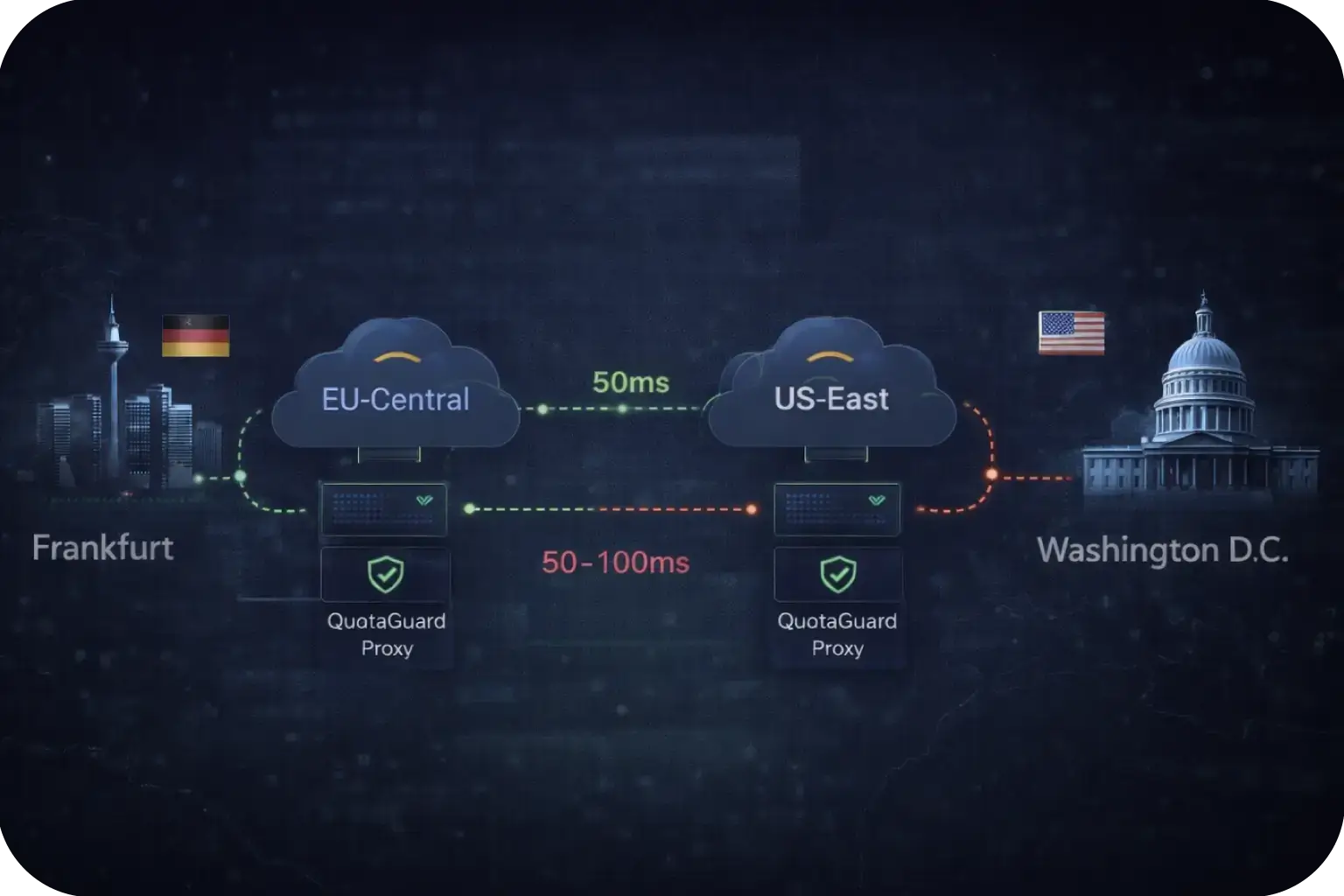
Koyeb offers deployment regions in Frankfurt and Washington D.C.
Select a QuotaGuard proxy in the matching AWS region (EU-Central or US-East) to minimize latency.
Cross-region routing adds 50-100ms and should be avoided for latency-sensitive workloads.
Built for Production Workloads
Koyeb is designed for production serverless apps.
Your static IP solution needs to match that reliability.
QuotaGuard provides high availability, logging, and compliance features that scale with your infrastructure.

FAQs
Technical Configuration and Setup for Koyeb Serverless Apps
No.
Koyeb's official documentation explicitly states: "We do not currently provide a list of static outbound IP addresses that your Services may be deployed to."
Their suggested workaround is querying DNS records like outbound-ips-region-fra.infra.prod.koyeb.com to get current IP ranges, but these ranges contain dozens of addresses shared across all Koyeb customers.
The IPs can also change without notice, which makes maintaining firewall allowlists a recurring operational burden. QuotaGuard solves this by giving your Koyeb services two static IPs that never change.
Store your QuotaGuard proxy URL as a Koyeb Secret using the CLI: koyeb secret create QUOTAGUARDSTATIC_URL --value "http://user:pass@proxy.quotaguard.com:9293".
Then reference it in your service deployment with --env "QUOTAGUARDSTATIC_URL=@QUOTAGUARDSTATIC_URL".
Most languages (Python, Node.js, Go, Ruby) respect standard HTTP proxy environment variables, so your HTTP client will automatically route traffic through QuotaGuard.
For apps that don't auto-detect proxy settings, you'll configure the proxy URL directly in your HTTP client initialization.
Yes.
For database connections, use QuotaGuard's SOCKS5 proxy on port 1080 instead of the HTTP proxy.
SOCKS5 supports any TCP protocol, including PostgreSQL (5432), MySQL (3306), and MongoDB (27017). In Python, use the PySocks library to configure a global SOCKS proxy before initializing your database client.
In Node.js, libraries like socksjs or socks-proxy-agent provide similar functionality.
Once configured, your database queries originate from your QuotaGuard static IP, which you can permanently add to MongoDB Atlas IP Access Lists or your RDS security groups.
Make a request to ip.quotaguard.com through your configured proxy. This endpoint returns your outbound IP address as JSON (e.g., {"ip":"52.34.188.175"}).
The returned IP should match one of the two static IPs shown in your QuotaGuard dashboard.
Test this locally first using curl (curl -x $QUOTAGUARDSTATIC_URL https://ip.quotaguard.com), then deploy to Koyeb and verify your service logs show the same static IP.
If you see a different IP, your proxy configuration isn't being applied correctly. Check that your Koyeb Secret is properly referenced and your HTTP client is configured to use the proxy.
Match your QuotaGuard proxy region to your Koyeb deployment region for lowest latency.
For Koyeb's Frankfurt (fra) region, select QuotaGuard's EU proxy.
For Koyeb's Washington D.C. (was) region, select QuotaGuard's US-East proxy.
Matching regions typically adds only 10-20ms to request times.
Cross-region routing (e.g., Koyeb EU through QuotaGuard US) adds 50-100ms and should be avoided for latency-sensitive workloads.
If you need EU data residency for GDPR compliance, our EU data location proxy ensures your traffic never leaves European infrastructure.
Yes, and we recommend it.
Create separate QuotaGuard subscriptions for staging and production, then store each proxy URL in environment-specific Koyeb Secrets.
This separation ensures your staging traffic never shares IP reputation with production. If a developer accidentally triggers rate limiting during testing, it won't affect your live services.
Separate subscriptions also give you distinct usage logs, making it easier to track costs and debug issues per environment.
You can manage multiple subscriptions from a single QuotaGuard account dashboard.
QuotaGuard has a "No Hard Stops" policy. If your Koyeb service experiences a traffic spike and exceeds your plan's request limit, we continue processing your requests rather than dropping connections.
You won't see "Service Unavailable" errors or broken API integrations during peak load.
We'll notify you about the overage so you can upgrade your plan, but your application stays online throughout.
This is especially important for Koyeb's auto-scaling architecture, where sudden traffic increases can happen faster than manual intervention allows.
Still have questions?
We don’t outsource Support to non-Engineers.
Reach out directly to the Engineers who built Shield to discuss your specific architecture, integration challenges, or compliance constraints here 👇
🚀 Ready to Get Started? Choose Your QuotaGuard Path
QuotaGuard STATIC
QuotaGuard SHIELD
Trusted by Engineering Teams Everywhere
Reliability Engineered for the Modern Cloud
For over a decade, QuotaGuard has provided reliable, high-performance static IP and proxy solutions for cloud environments like Heroku, Kubernetes, and AWS.
Get the fixed identity and security your application needs today.