
QuotaGuard gives customer-controlled Bugcrowd API requests two fixed public IPv4 sources for an API token's optional Allowlist.
Add both subscription addresses to the token through Edit IP Allowlist. Bugcrowd rejects API calls made with that token when their source is not approved.
The Bugcrowd token still authenticates the request and preserves the owner's role, permissions, and pinned API version. See Bugcrowd's API credential documentation.
QuotaGuard's two fixed IPv4 addresses fit Bugcrowd's credential-level Allowlist. Register both on the specific API token so either load-balanced source can satisfy its network rule.
The control lives on the token under Current credentials, not on every API request or every user in the organization.
Open API Credentials, find the token under Current credentials, and select Edit IP Allowlist. This attaches the stable source rule to the credential used by that automation.
Bugcrowd supports IPv4 addresses or ranges and permits multiple entries. Add both individual addresses shown for the relevant QuotaGuard subscription so either healthy route is accepted.
Bugcrowd says an API endpoint call from an address outside the token's Allowlist is rejected. Requests that leave directly through changing cloud egress therefore fail the network rule instead of silently bypassing it.
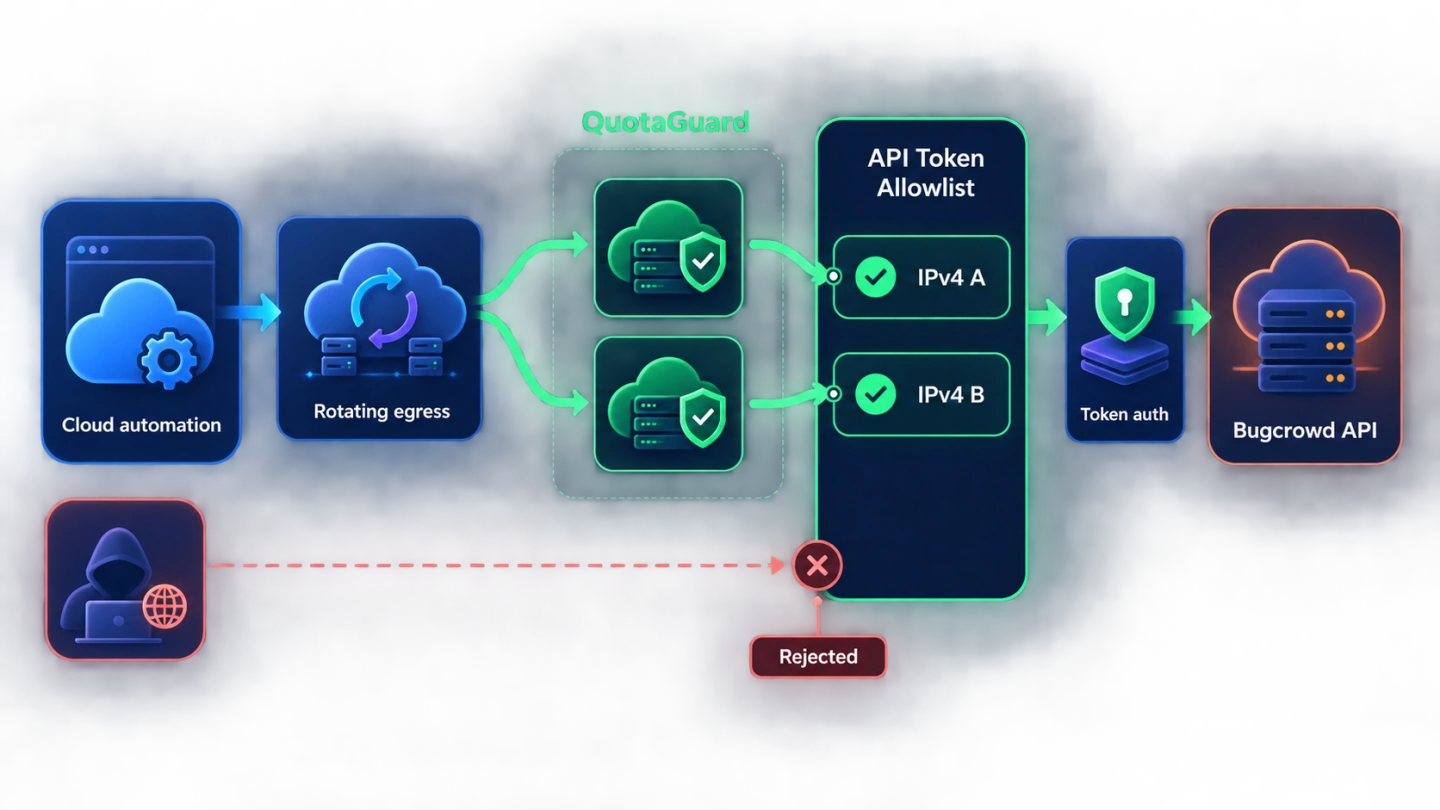
QuotaGuard supplies stable network identity while Bugcrowd continues to authenticate and authorize the API token. The source rule supplements the controls Bugcrowd already applies to the credential.
That separation lets teams standardize egress without flattening user roles, token ownership, or version boundaries across different automations.
Bugcrowd provisions access tokens per user and authorizes resources according to that user's role. Routing through QuotaGuard does not expand the token's permissions or turn the source address into an authorization credential.
Bugcrowd permits multiple access tokens per user and recommends descriptive credential names. A SIEM export, ticket synchronization job, and internal dashboard can therefore keep separate tokens while sharing the same approved QuotaGuard pair.
Each token is pinned to a major API version, while minor releases and bug fixes update automatically. Bugcrowd recommends testing the service before moving a token to a newer major version, so network stability does not remove the need for version testing.
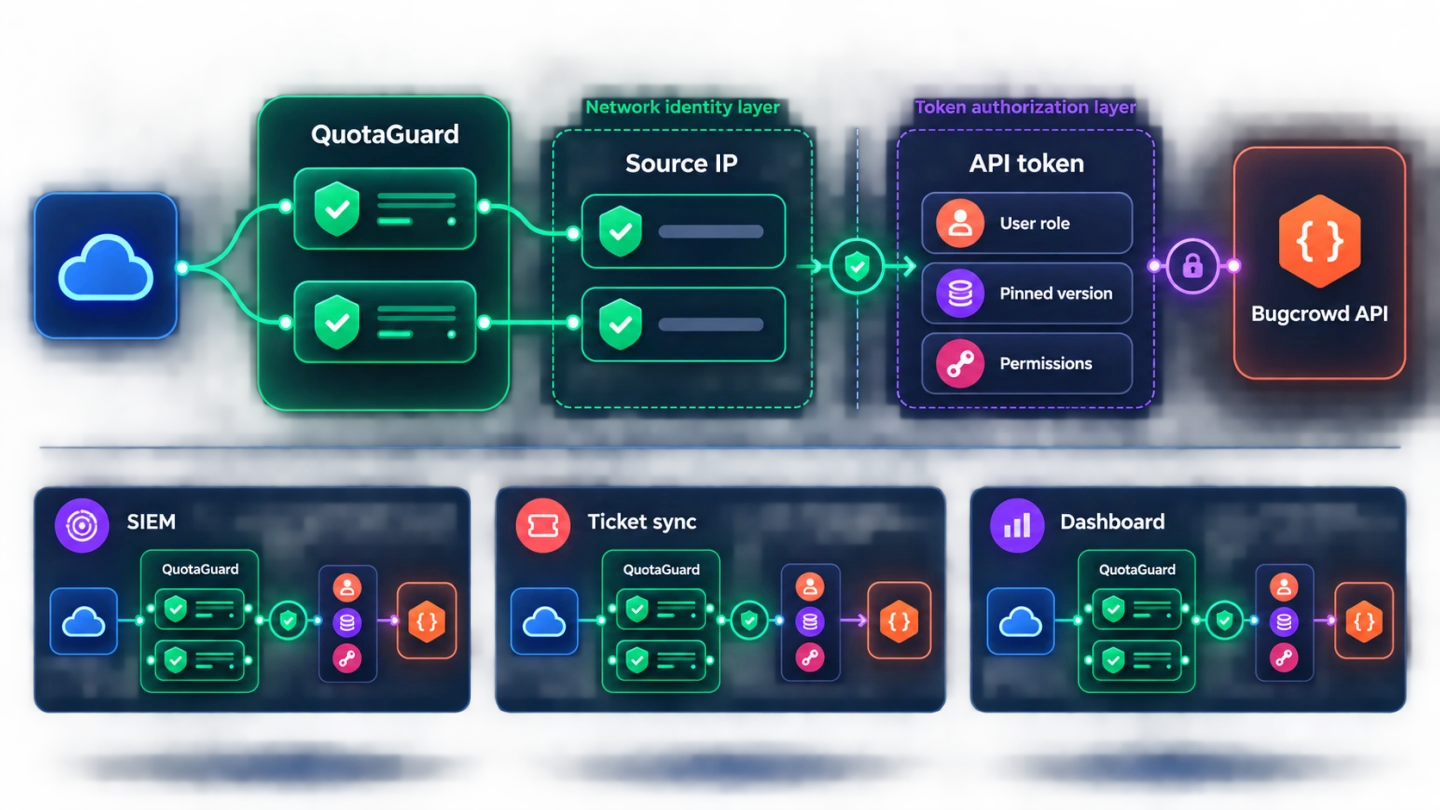
A stable QuotaGuard pair gives cloud-hosted security automation a network identity that survives deploys, restarts, and token maintenance. Both addresses remain available to the allowlisted credential.
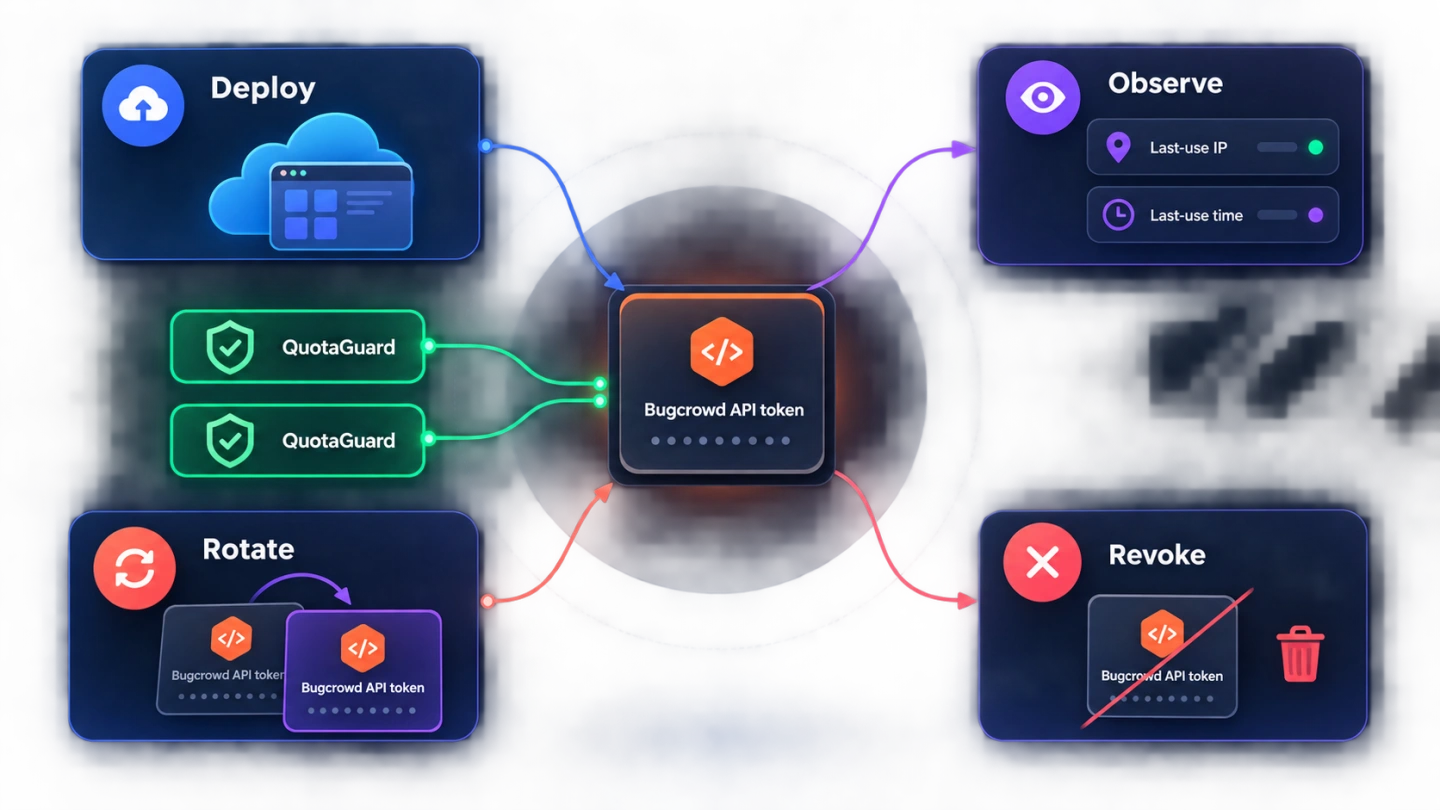
Bugcrowd's credential visibility and revocation controls then help the Organization Owner verify use and retire access without depending on a rotating cloud address.
Bugcrowd lets Organization Owners see the IP address and timestamp of a key's last use, along with whether the key is active, inactive, or expired. Compare that observed address with the two subscription IPs when investigating an unexpected route.
Bugcrowd documents a limit of 60 API requests per minute per IP address. QuotaGuard may use either address in the load-balanced pair, so clients should handle Bugcrowd's rate responses instead of assuming every request will leave through one source.
Create and test a replacement credential with the same approved pair before deleting the old token. Bugcrowd makes deletion irreversible, so an overlap keeps the network path available while the client and token version are verified.
Common questions about Bugcrowd API static IPs and QuotaGuard.
Does the Bugcrowd API require a static IP?
Only when an API token has an Allowlist configured. Bugcrowd describes the token allowlist as an optional additional security control and rejects API calls made with that token from an unlisted source. If the token has no source restriction, a static IP is not required for this specific gate.
Where do I configure the Bugcrowd API token Allowlist?
Open your profile's API Credentials page, find the token under Current credentials, and select Edit IP Allowlist. Bugcrowd accepts an IPv4 address or range and lets you add multiple entries. Its current API documentation says only IPv4 is supported.
Which QuotaGuard addresses should I add to Bugcrowd?
Add both individual IPv4 addresses shown for the relevant QuotaGuard subscription. Do not add the proxy hostname or assume that only one address will answer, because QuotaGuard load balances and fails over across the pair. Both entries must remain approved for the token to work through either healthy route.
Is the API token Allowlist the same as Bugcrowd organization IP Restrictions?
No. The API token Allowlist is attached to one credential and controls calls made with that token. Bugcrowd's organization-level IP Restrictions setting applies to admin users accessing organization data and has different partial-access behavior for unlisted users. Configure the control that matches the traffic you actually need to restrict.
Does QuotaGuard replace Bugcrowd token authentication?
No. Bugcrowd still authenticates the API token and authorizes resources according to the token owner's role. QuotaGuard supplies the stable network source only, so the token, its permissions, and its pinned API version remain part of every accepted request.
How long does the QuotaGuard side of setup take?
The network work is limited to routing the customer-controlled HTTPS client through QuotaGuard and adding both dashboard addresses to the token's Allowlist. The actual time depends on whether the client already supports an authenticated HTTP proxy and whether the operator can edit that Bugcrowd credential. Confirm the observed egress address before relying on the rule.
Should I use QuotaGuard Static or Shield for the Bugcrowd API?
Use Static for ordinary non-regulated HTTPS automation when a standard authenticated proxy meets the customer's policy. Use Shield when the customer-to-proxy hop must also be TLS-encrypted or the workflow carries regulated data. With either product, the HTTPS session to Bugcrowd remains encrypted and QuotaGuard does not decrypt its payload.
Can I get dedicated IPs for the Bugcrowd API?
Yes. Dedicated IPs and proxy resources are included on direct Enterprise plans, currently $219 per month for QuotaGuard Static and $269 per month for QuotaGuard Shield. Starter, Production, and Business use shared static IP pairs, but each subscription still receives its own two-address pair to place on the token Allowlist.
How should I update the Bugcrowd token Allowlist later?
Add the replacement source before removing the old one, verify a harmless API request through the new path, and retain both active QuotaGuard addresses. Bugcrowd supports multiple entries, which allows an overlap during a controlled network or token migration. Do not delete the old credential until the replacement path and intended API version are working.
Does this integration make Bugcrowd outgoing webhooks use QuotaGuard IPs?
No. This page covers outbound API requests traveling from the customer's application through QuotaGuard to Bugcrowd. Bugcrowd outgoing webhooks travel from Bugcrowd to the customer's receiver in the opposite direction and need their own endpoint authentication and access-control design.
For over a decade, QuotaGuard has provided reliable, high-performance static IP and proxy solutions for cloud environments like Heroku, Kubernetes, and AWS.
Get the fixed identity and security your application needs today.