
QuotaGuard gives customer-controlled Dengage REST API requests two fixed public IPv4 sources for Dengage's default-blocked API IP Restriction.
Add both subscription addresses under Settings, Identity & Access Management, API IP Restriction. Dengage accepts individual addresses or ranges and grants REST API access only to trusted entries.
The network rule works alongside Dengage's generated API credentials, authenticated session, token expiration, and API User permissions. See Dengage's API IP Restriction documentation.

Dengage says API Users are blocked by default from reaching its REST APIs from internet addresses. The API IP Restriction list defines the specific sources or ranges that are trusted to use API functions.
QuotaGuard turns a changing cloud source into two stable entries without changing the Dengage endpoint or weakening its separate authentication controls.
Open Settings, Identity & Access Management, then API IP Restriction. Dengage lets the operator name each definition so the two QuotaGuard sources can be identified as part of the same application route.
Select the single-IP option for each public IPv4 address shown on the relevant QuotaGuard subscription. Dengage says the number of definitions is limited but does not publish a numerical limit on the current page, so remove obsolete entries deliberately.
Dengage grants API access only to trusted source definitions. A request that leaves directly through an unregistered cloud address therefore fails the network gate before valid API credentials can make it eligible to use an API function.
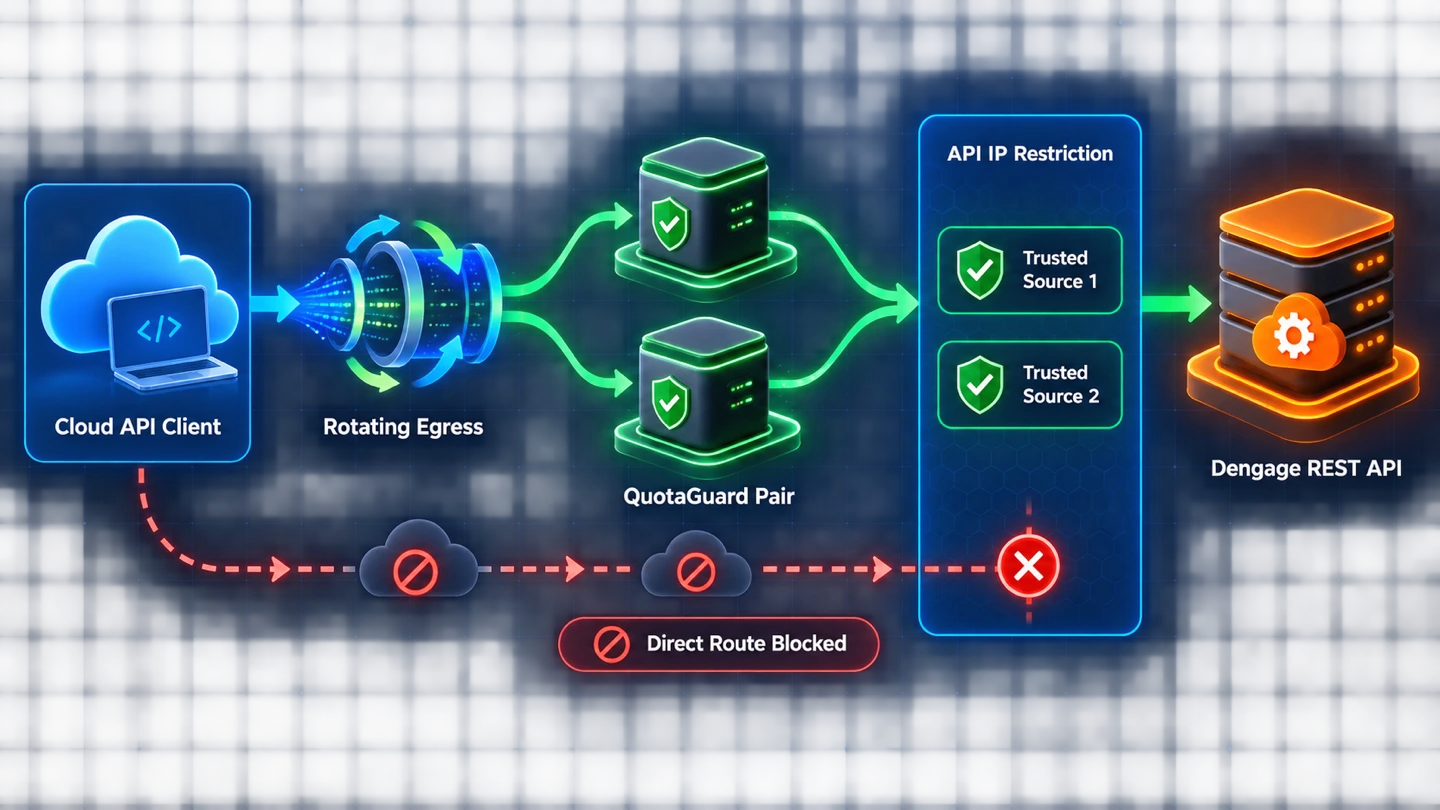
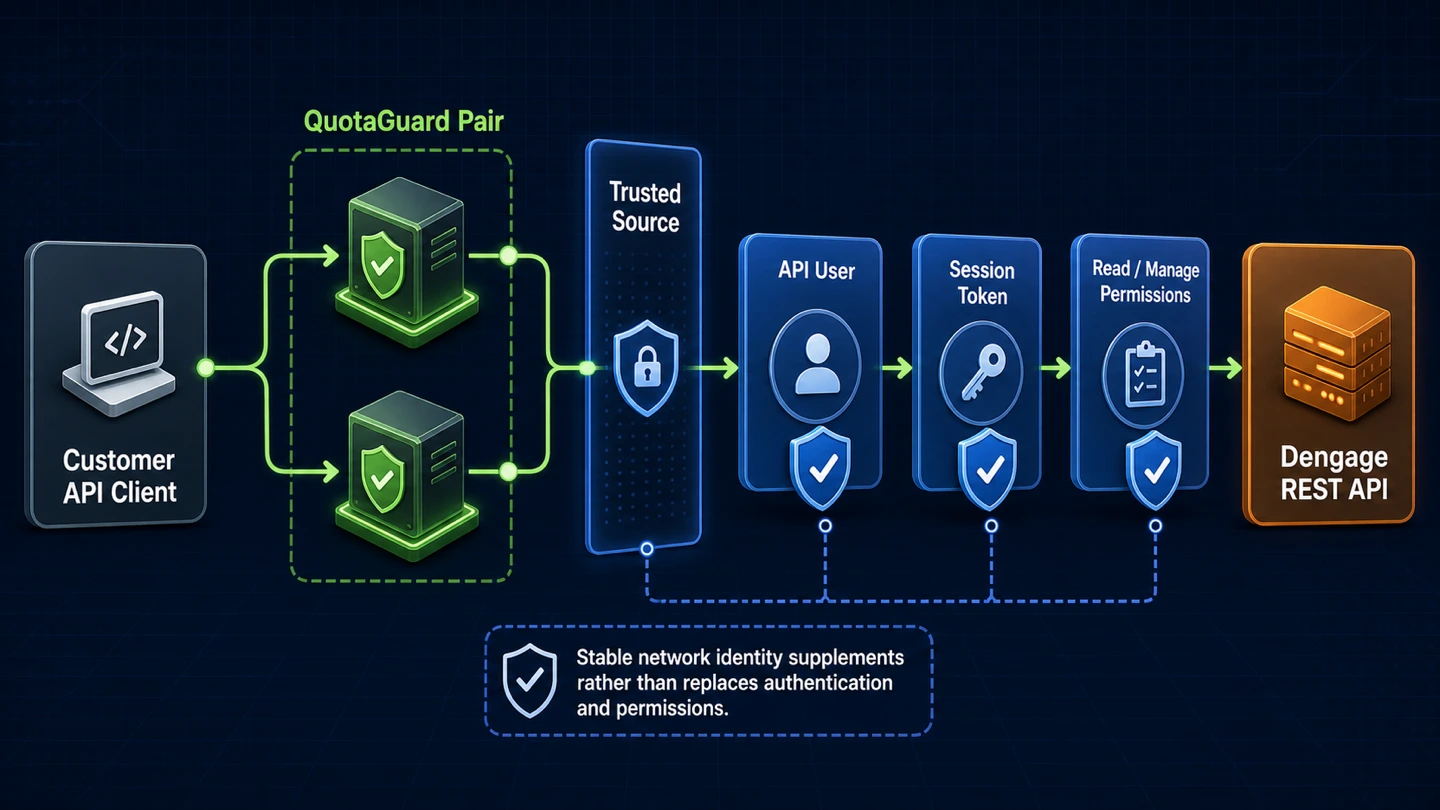
QuotaGuard supplies stable source identity. Dengage continues to authenticate the API User, establish the client session, apply permissions, and expire the access token.
This layered design lets teams stabilize network access without turning an IP address into a password or expanding what an automation can do.
Dengage generates the API User name and password when an administrator creates the user. The password is displayed once and sent to the registered email address, so the client still needs appropriate credential storage after its source is trusted.
API User permissions remain specific to documented areas such as transactional messaging, Data Space, content, sends, and reports. Dengage distinguishes Read from Manage and includes Read when Manage is granted.
The client authenticates before calling other REST API operations. Dengage documents a standard access-token lifetime of 3,600 seconds and notes that an account may use a custom expiration, so a stable source does not remove token-renewal handling.
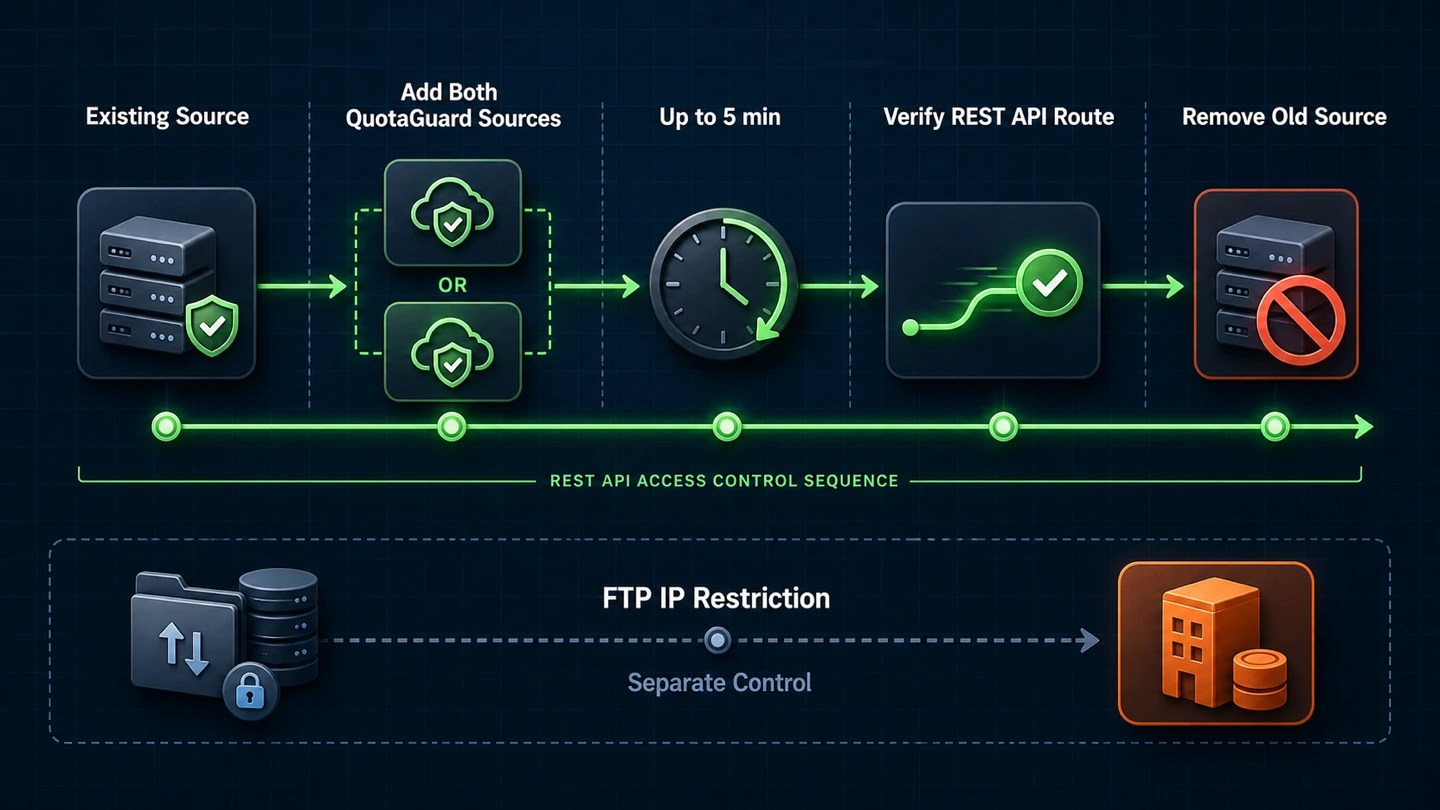
Dengage says saved IP-restriction changes become effective automatically within five minutes. A controlled overlap keeps the existing route available while both QuotaGuard sources are added and verified.
The restriction discussed here governs REST API traffic only. Keep separate Dengage access paths and opposite-direction traffic out of this network rule.
Route the same customer-controlled HTTP or HTTPS client through QuotaGuard and confirm that the observed egress address matches one of the subscription's two dashboard IPs. Keep both addresses registered because load balancing and failover may select either source.
Add both QuotaGuard definitions before removing an existing trusted source. Wait for Dengage's documented activation window, verify a harmless REST API operation through the new route, and remove the old definition only after the intended path works.
Dengage documents FTP IP restrictions as a separate setting, so this REST API rule should not be presented as governing FTP connections. Dengage messages, callbacks, or other traffic leaving its platform also travel in the opposite direction and need their own controls.
Common questions about Dengage API static IPs and QuotaGuard.
Does the Dengage REST API require a static IP?
Dengage's current documentation says REST API access is blocked by default for API Users from any internet IP address. The operator must define trusted source IP addresses or ranges before those API Users can access API functions. A stable source is therefore required when the client runs on infrastructure whose native outbound address changes.
Where do I configure Dengage API IP Restriction?
Open Settings, Identity & Access Management, then API IP Restriction. The page lists existing definitions and lets you add, edit, or delete trusted sources. Give each definition a recognizable name so the two entries can be traced to the correct QuotaGuard subscription.
Which QuotaGuard addresses should I add to Dengage?
Add both individual public IPv4 addresses shown for the relevant QuotaGuard subscription. Choose Dengage's single-IP option for each address rather than entering the proxy hostname or assuming one source will always be used. Both entries must remain trusted because QuotaGuard load balances and fails over across the pair.
Does Dengage accept CIDR entries?
The current Dengage page documents a single IP option and an explicit IP-range option. It does not describe CIDR notation on that page, so enter each QuotaGuard IPv4 address as its own single-IP definition. Dengage also says the number of definitions is limited without publishing a numerical limit there.
How quickly does a Dengage IP change take effect?
Dengage says saved IP restrictions become effective automatically within five minutes. During a migration, retain the existing trusted source while adding both QuotaGuard addresses, wait for that window, and verify the REST API route before deleting the old entry. That overlap avoids making the cutover depend on an instantaneous settings update.
Does QuotaGuard replace Dengage API authentication?
No. Dengage still authenticates the generated API User name and password, establishes the client session, applies its Read or Manage permissions, and enforces token expiration. Dengage documents a standard access-token lifetime of 3,600 seconds, although an account may have a custom expiration.
How long does the QuotaGuard side of setup take?
The network work consists of routing the customer-controlled HTTP or HTTPS client through QuotaGuard and adding both observed dashboard addresses to Dengage. Actual setup time depends on whether that client supports an authenticated proxy and whether the operator can edit Identity & Access Management settings. Dengage's separate settings activation may then take up to five minutes.
Should I use QuotaGuard Static or Shield for the Dengage API?
Use Static for ordinary non-regulated HTTPS API traffic when a standard authenticated proxy meets the customer's policy. Use Shield when the customer-to-proxy hop must also be TLS-encrypted or the workflow carries regulated data. With either product, the application-to-Dengage HTTPS session remains encrypted and QuotaGuard does not decrypt its payload.
Can I get dedicated IPs for the Dengage API?
Yes. Dedicated IPs and proxy resources are included on direct Enterprise plans, currently $219 per month for QuotaGuard Static and $269 per month for QuotaGuard Shield. Starter, Production, and Business use shared static IP pairs, but each subscription still receives its own two-address pair to enter in Dengage.
Does this integration cover Dengage FTP or outbound messages?
No. This page covers REST API requests traveling from the customer's application through QuotaGuard to Dengage. Dengage documents FTP IP restriction separately, while messages, callbacks, or other traffic leaving Dengage travel in the opposite direction and require their own access-control design.
For over a decade, QuotaGuard has provided reliable, high-performance static IP and proxy solutions for cloud environments like Heroku, Kubernetes, and AWS.
Get the fixed identity and security your application needs today.