
QuotaGuard gives customer-controlled Fortanix Data Security Manager requests two fixed public IPv4 sources for trusted CIDR restrictions.
Add both subscription addresses as individual /32 CIDRs on the Fortanix application. Requests can keep an approved network origin even when the application's native cloud egress changes.
Fortanix treats application IP whitelisting as an additional authentication restriction, not a replacement for the app's credentials. See Fortanix DSM's application authentication documentation.

QuotaGuard's two fixed IPv4 addresses fit Fortanix DSM's application-level CIDR control. Register both addresses so either load-balanced route can satisfy the application's source restriction.
The setting belongs to the individual application's Allowed IP-addresses field. This keeps the network rule attached to the Fortanix application identity that uses it.
Each QuotaGuard subscription receives two static public IPv4 addresses. Enter each address with a /32 prefix, then use Fortanix's ADD ANOTHER CIDR control for the second entry.
Fortanix documents this control for machine applications. Open the application's detailed view, edit Allowed IP-addresses, and select the option that restricts authentication to trusted IPv4 or IPv6 CIDRs.
Once the restriction is active, Fortanix allows the application to authenticate only when it comes from a listed source range. A request that bypasses QuotaGuard can therefore fail the source check even when it presents otherwise valid application credentials.
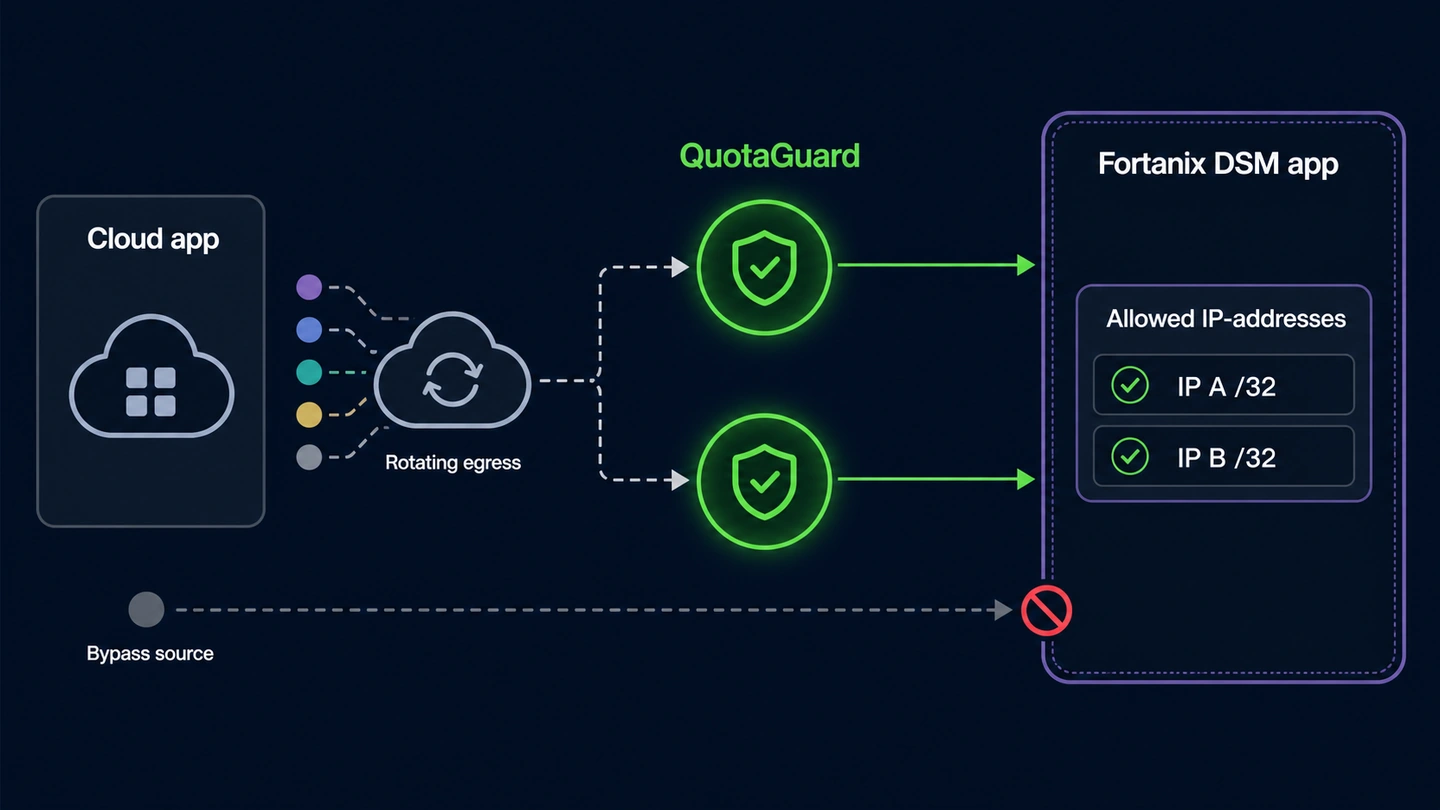
QuotaGuard supplies the stable source while Fortanix continues to authenticate and authorize the application. The two controls solve different parts of the request path.
Fortanix explicitly describes application IP whitelisting as an additional restriction and cautions against relying on an IP address as sufficient security by itself.
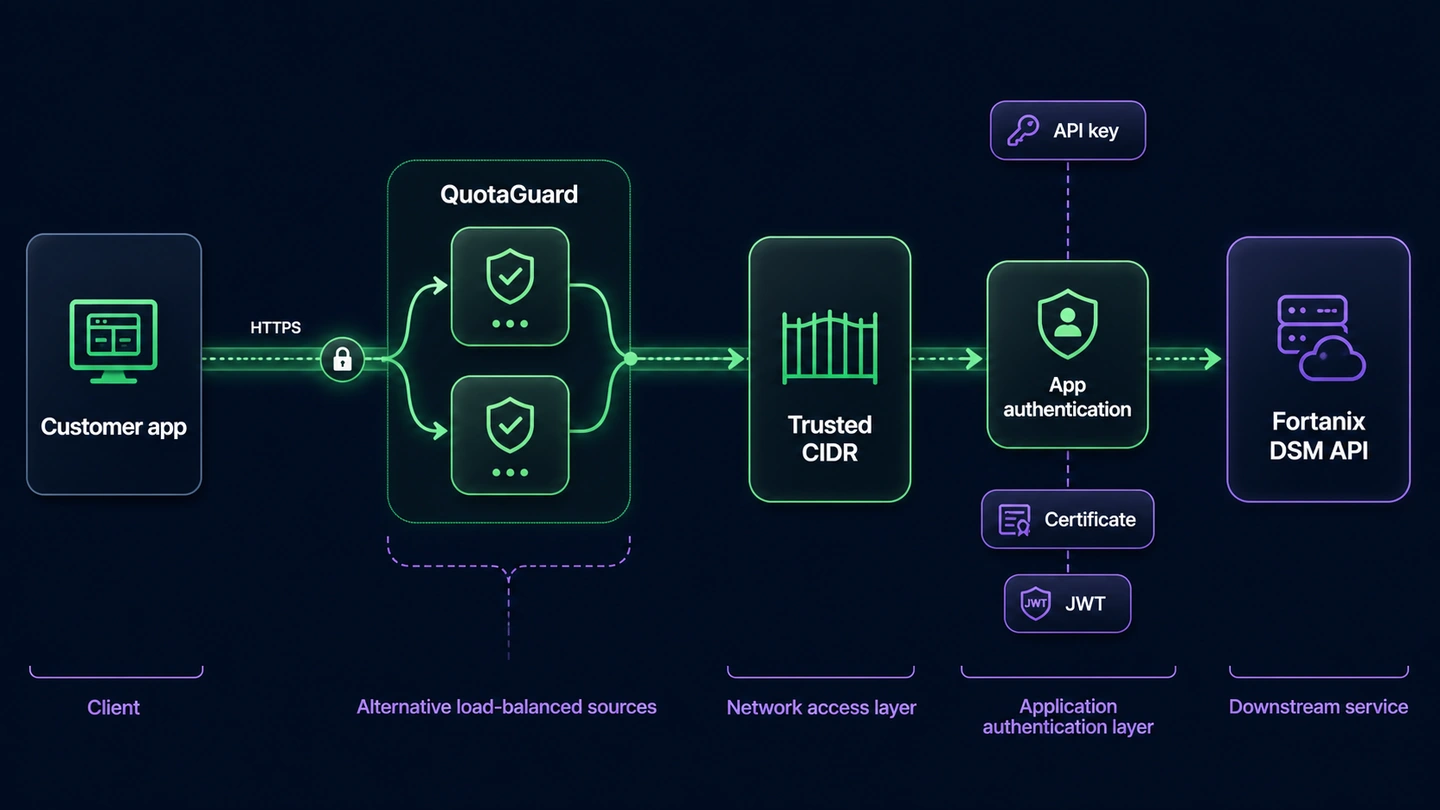
Fortanix applications can use methods including an API key, certificate, trusted CA, Google service account, JSON Web Token, or AWS IAM. Routing through QuotaGuard does not replace the selected method or the Fortanix permissions attached to the application.
For HTTPS requests, QuotaGuard opens a tunnel and does not decrypt the application's TLS payload. Client certificates and private keys used for mutual TLS remain between the customer application and Fortanix DSM on both Static and Shield.
QuotaGuard Static is appropriate for non-regulated HTTPS traffic. Use Shield when the customer's policy requires the customer-to-proxy hop to be TLS-encrypted or when the workload carries regulated data. Neither product makes the complete Fortanix deployment compliant by itself.
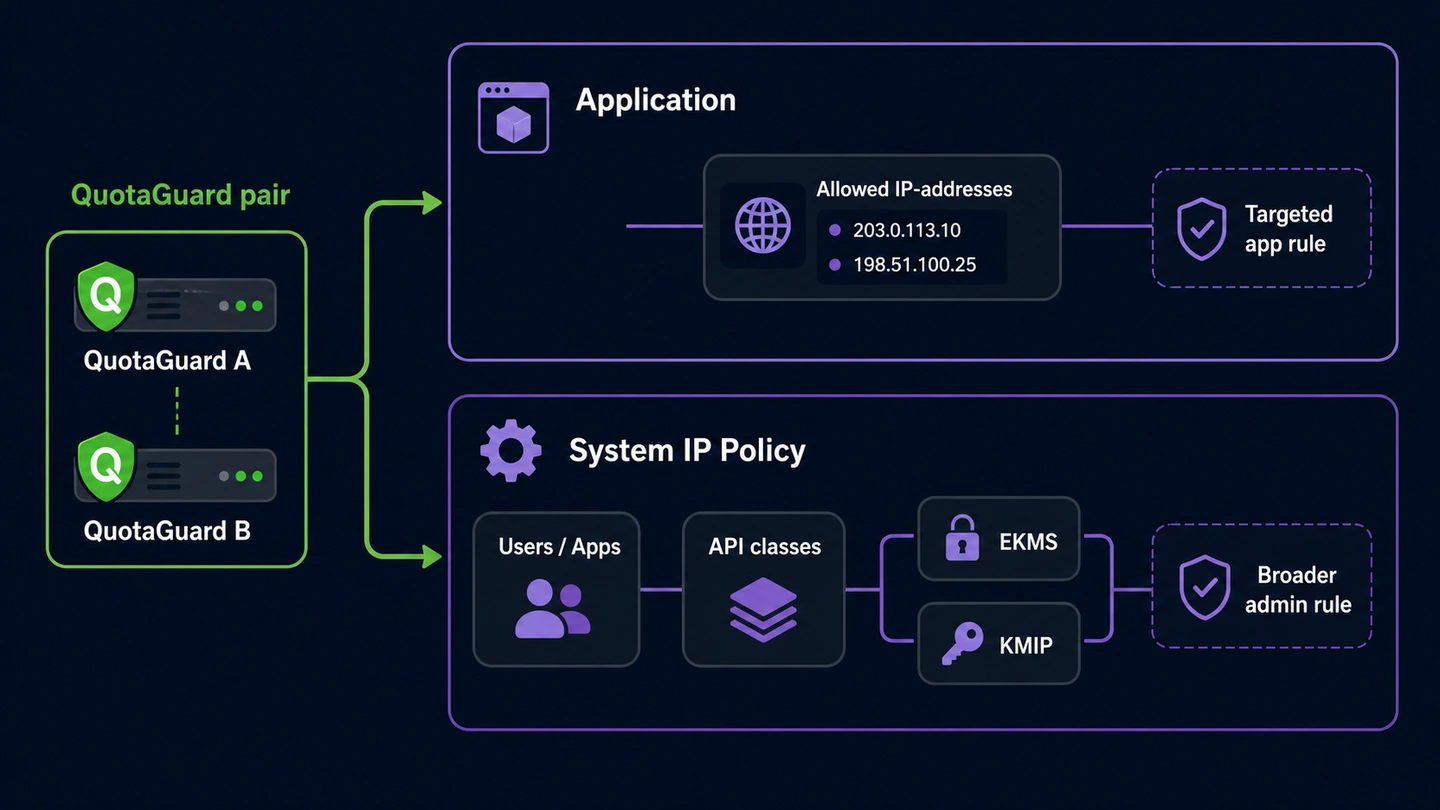
A stable QuotaGuard pair can support either a targeted application rule or a broader Fortanix DSM system IP Policy. The Fortanix administrator still decides which control and scope fit the deployment.
Keeping those controls distinct avoids treating an application allowlist as an account-wide rule or assuming a system policy changes every application's authentication method.
The application setting narrows where that Fortanix application may authenticate from. It is the focused choice when one service, automation, or workload needs the QuotaGuard pair without changing network access for other principals.
Fortanix's system-level IP Policy can distinguish users from applications and can apply different API classes, including EKMS, KMIP, health, unauthenticated-user, and other APIs. That policy is configured under System Administration and is separate from the application's Allowed IP-addresses field.
QuotaGuard balances traffic across two static addresses and uses health checks with automated failover. Keep both addresses in the applicable Fortanix CIDR rule, including during client migrations, so either healthy route remains approved.
Common questions about Fortanix DSM static IPs and QuotaGuard.
Does Fortanix DSM require a static IP?
Only when the relevant Fortanix application or system IP Policy restricts requests by source CIDR. Fortanix says an application with IP whitelisting can authenticate only when it comes from an approved source, so changing cloud egress can be rejected even when the application presents valid credentials. QuotaGuard gives that customer-controlled request path two stable IPv4 sources to register.
Where do I configure IP whitelisting for a Fortanix application?
Open the application's detailed view and edit the Allowed IP-addresses field. Select the option to restrict authentication to trusted IPv4 or IPv6 CIDRs, enter the first CIDR, and use ADD ANOTHER CIDR for the second QuotaGuard address. If the IP Whitelisting setting is not visible, Fortanix instructs the user to contact the System Administrator.
Which QuotaGuard addresses should I add to Fortanix DSM?
Add both individual IPv4 addresses shown for the relevant QuotaGuard subscription. Represent each single address as a /32 CIDR because Fortanix accepts CIDR entries, and do not substitute the QuotaGuard proxy hostname. Both addresses must remain approved because QuotaGuard load balances and fails over across the pair.
Does the Fortanix source restriction replace an API key or certificate?
No. Fortanix describes application IP whitelisting as an additional restriction alongside application authentication methods. The application must still use its configured API key, certificate, trusted CA, Google service account, JSON Web Token, or AWS IAM method, and Fortanix authorization still determines what it may do.
What is the difference between application IP whitelisting and Fortanix system IP Policy?
Application IP whitelisting is configured on one application's Allowed IP-addresses field and limits where that application may authenticate from. System IP Policy is a broader DSM administration control that can distinguish user and application principals and can govern separate API classes. A Fortanix administrator should choose the intended scope rather than treating the two settings as interchangeable.
How long does the QuotaGuard side of setup take?
The network setup is limited to routing the customer-controlled HTTPS client through the subscription and adding both dashboard addresses to the Fortanix CIDR restriction. The actual time depends on whether that client already supports an authenticated HTTP proxy and whether the operator has permission to edit the Fortanix application. Confirm the egress address before enforcing the rule so an unapproved route does not lock out the application.
Should I use QuotaGuard Static or Shield for Fortanix DSM?
Use Static for non-regulated HTTPS traffic when a standard authenticated proxy meets the customer's network policy. Use Shield when the customer-to-proxy hop must also be TLS-encrypted or when the workload carries regulated data. In both products, the application's HTTPS session to Fortanix remains encrypted and QuotaGuard does not decrypt the payload.
Can I get dedicated IPs for Fortanix DSM?
Yes. Dedicated IPs and proxy resources are included on direct Enterprise plans, currently $219 per month for QuotaGuard Static and $269 per month for QuotaGuard Shield. Starter, Production, and Business use shared static IP pairs, but each subscription still receives its own two-address pair to place in the Fortanix CIDR rule.
How should I change the Fortanix allowlist later?
Add the replacement source before removing the old one, verify a harmless request through the new path, and retain both active QuotaGuard addresses. Fortanix supports multiple CIDRs through ADD ANOTHER CIDR, which permits an overlap during a controlled migration. Do not remove the prior source until the replacement route has been confirmed.
Does this integration control connections sent from Fortanix to my application?
No. This page covers outbound requests traveling from the customer's application through QuotaGuard to Fortanix DSM. Fortanix-originated callbacks or service connections travel in the opposite direction and require their own receiver and access-control design. Published Fortanix SaaS service IP ranges do not replace the application source CIDRs described here.
For over a decade, QuotaGuard has provided reliable, high-performance static IP and proxy solutions for cloud environments like Heroku, Kubernetes, and AWS.
Get the fixed identity and security your application needs today.