
Fireblocks Static IPs
QuotaGuard gives your Fireblocks API client two fixed /32 outbound IP addresses that drop straight onto each API key's allowlist.
It is built for institutional custody and treasury teams running the Fireblocks API from cloud infrastructure, where the egress IP changes on every deploy and a locked-down key starts refusing requests that worked yesterday.
Two Fixed /32 IPs That Drop Straight Onto the Allowlist
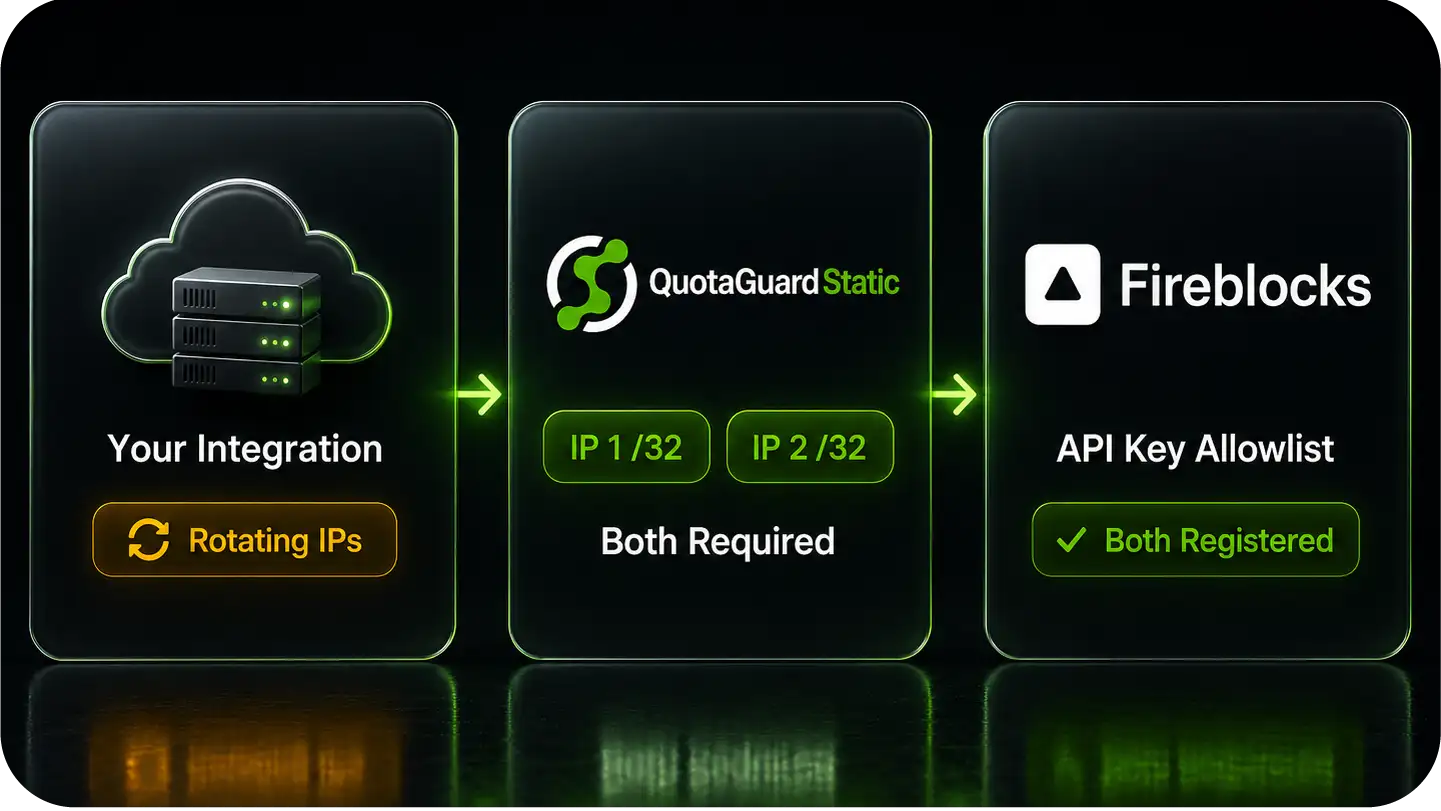
QuotaGuard assigns your account two static /32 IP addresses that belong to you and never change.
Both are exactly the format Fireblocks wants, so you register the pair on a key's allowlist once and the client is recognized on every request, including under failover.
One Environment Variable, and Your Signing Path Stays Untouched
QuotaGuard works at the API-connectivity layer.
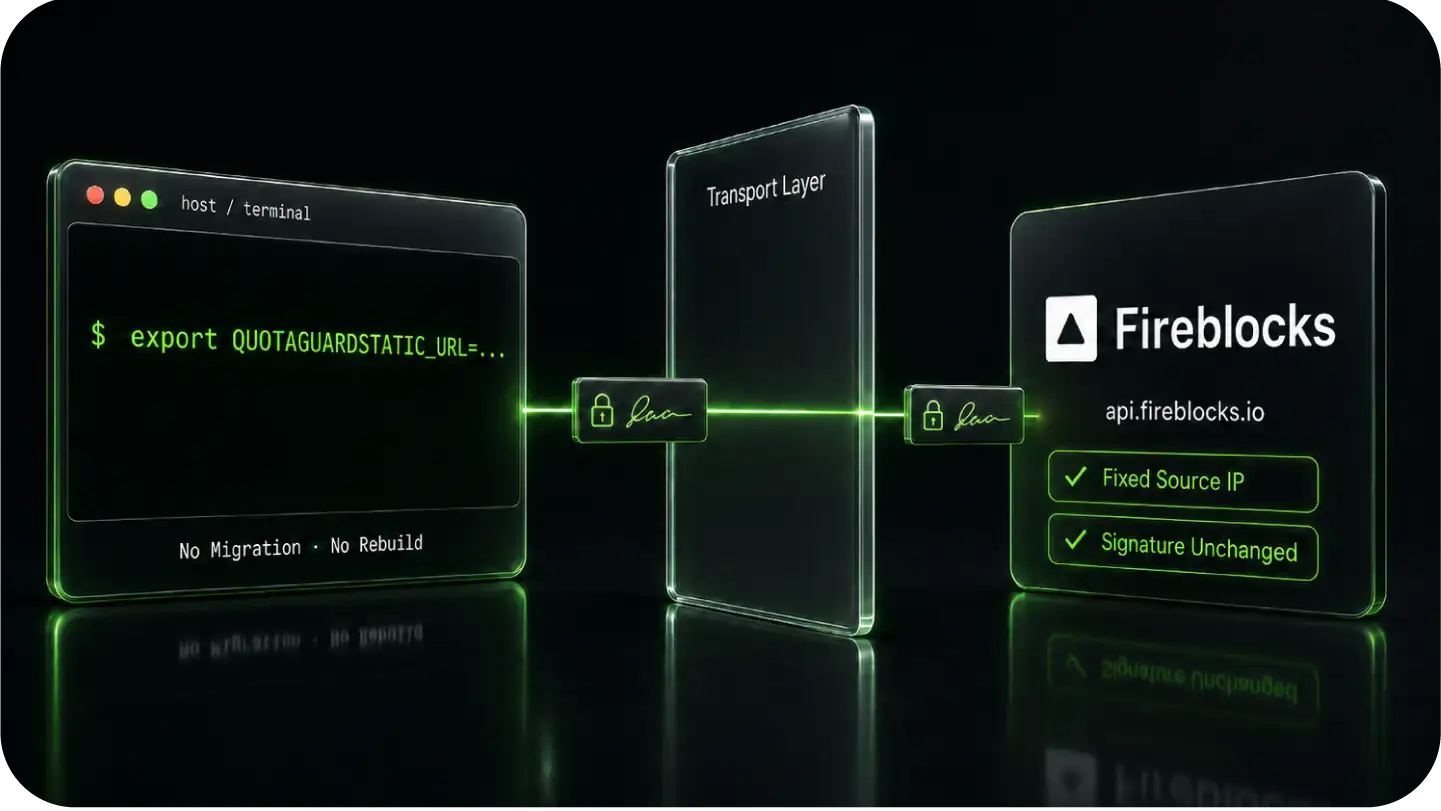
You route your Fireblocks API calls through it with a single environment variable, and nothing about how transactions are signed or approved changes.
Set the Proxy, Route the Outbound API Calls
Store your QuotaGuard connection string as an environment variable on the host running your Fireblocks client, then send the client's outbound calls to api.fireblocks.io through it.
There is no platform migration and no rebuild, just a fixed source address on every request the client makes.
The proxy operates at the transport layer, so the request body and its signature are carried through unchanged.
QuotaGuard Carries Outbound REST, Not the Co-Signer Callback
The IP allowlist governs your outbound REST calls to the Fireblocks API, and that is the only flow QuotaGuard sits in.
The Co-Signer is a separate component that holds your key shares inside an Intel SGX enclave and signs transactions there, and it talks to its own callback handler, an inbound HTTPS server in your environment that returns approve or reject.
It is provisioned in your own production environment, in your cloud or on-premise, physically separate from the outbound API path QuotaGuard handles. QuotaGuard never touches that signing path or that callback.
Your Transaction-Security Model Is Unchanged
Because QuotaGuard handles only the network path of your API calls, your Co-Signer setup, approval quorums, and key shares stay exactly as they are.
You are adding a fixed network identity for outbound requests, not altering how funds move, how approvals are reached, or where signing happens.
Shield for Custody-Grade Compliance
Static satisfies the Fireblocks allowlist.
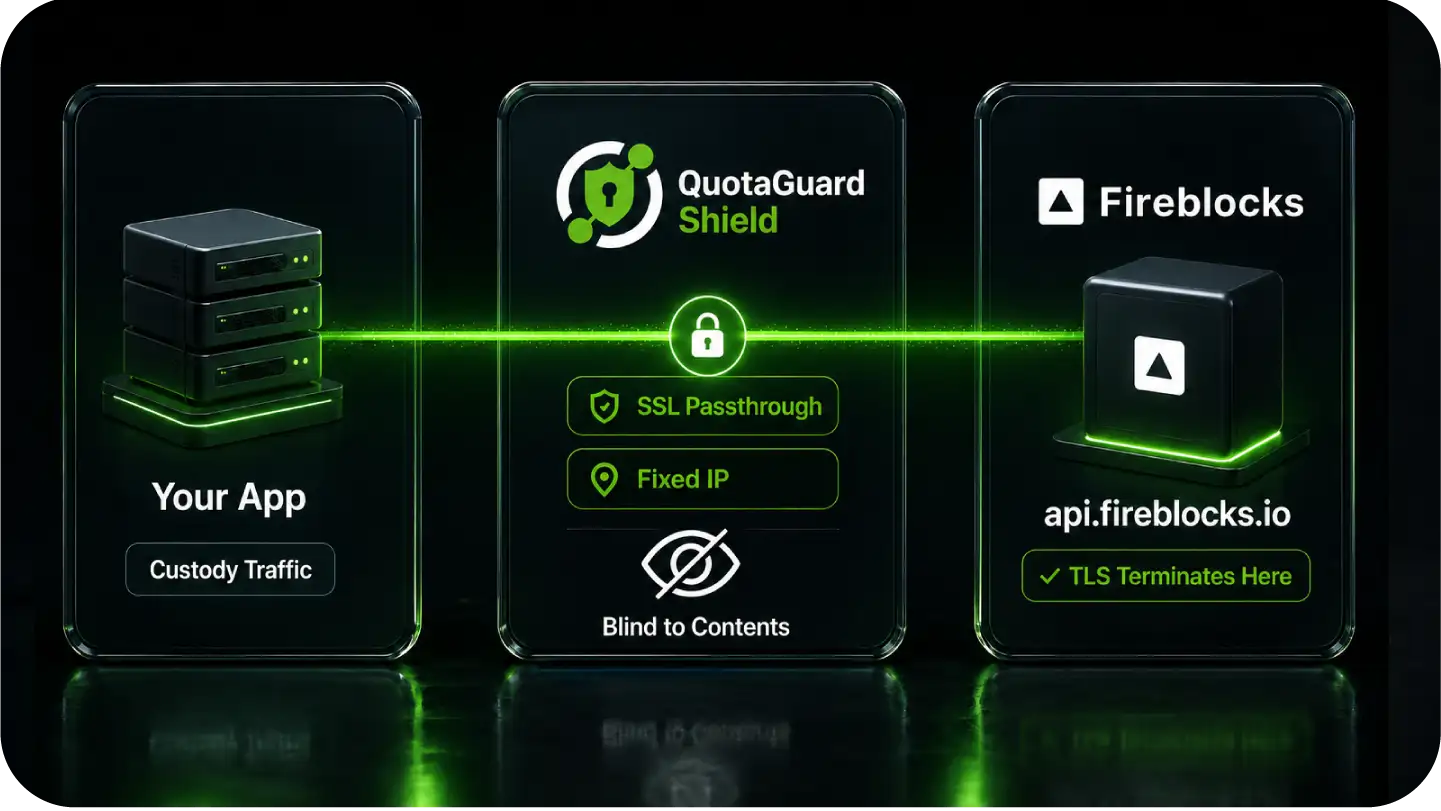
For an institutional custody or treasury operation, QuotaGuard Shield is the stronger choice, because it changes what the proxy is able to see.
FAQs
Common questions about Fireblocks static IPs and QuotaGuard.
It does the moment you allowlist IPs on an API key.
Fireblocks accepts requests from any address only while a key's allowlist is empty, which is acceptable in a sandbox but not for a production custody key that should never be reachable from an arbitrary IP.
As soon as you tighten that key, your client has to present a fixed address on every call, and a cloud host's rotating egress cannot.
A static IP is what lets you lock the key down and keep the integration working.
Because Fireblocks accepts only /32 addresses on the allowlist.
There is no CIDR or subnet option, so you cannot register a provider's published range as a fallback for rotating egress the way you might on a service that allows blocks.
The only thing the allowlist will take is one or more specific /32 IPs, which is exactly what QuotaGuard provides as a fixed pair.
That restriction is deliberate on Fireblocks' part, since a broad range would weaken the control it is meant to enforce.
In the Fireblocks Console, open the API key's settings and add both of your QuotaGuard static IPs to its IP allowlist as /32 entries.
Add both, since traffic is load-balanced and can leave from either address, and registering only one is a common cause of intermittent rejections.
Then route your client's calls to api.fireblocks.io through QuotaGuard, and every request will arrive from an allowlisted address. The allowlist is per key, so repeat this for each key that runs from the same client.
No, and it is worth keeping them separate because both use the word whitelist.
The IP allowlist controls which source addresses are allowed to call the API, which is what QuotaGuard's static IPs satisfy.
Destination address whitelisting is a different feature that controls which addresses you can send assets to, and it goes through the Admin Quorum approval process, with the One Time Address feature as an alternative for non-whitelisted destinations.
QuotaGuard is relevant only to the first one, the source-IP allowlist.
Static satisfies the allowlist and is enough to make the connection work.
For institutional custody, Shield is the stronger choice, because it uses SSL passthrough and never decrypts the traffic between your app and Fireblocks.
If your workspace is under SOC 2 or similar review, or your policy requires that no third party in the path can read custody traffic, choose Shield.
Both give you the same fixed /32 IPs, so the decision is about what the proxy is permitted to see, not about connectivity.
No. QuotaGuard carries your outbound REST calls to the Fireblocks API at the network layer and nothing else.
It does not sit in the Co-Signer path, does not see your key shares, and does not participate in signing or in the Co-Signer's approve-or-reject callback.
You are adding a fixed network identity for API requests, and your transaction-security model is entirely unchanged.
Yes, with one caveat.
The Fireblocks JavaScript SDKs and the legacy Python SDK route through the proxy with their normal settings, and the RSA-signed authentication is unaffected because the proxy changes only the source IP, not the signed request.
The newer Python SDK does not expose a proxy setting, so for that one you route through the legacy Python SDK or apply a host-level proxy.
Either way your calls exit from your two static IPs.
No, those are two unrelated problems.
A token-not-accepted error means the API key or the RSA signature on the request is wrong, which is an authentication issue you would see with or without a proxy.
An IP-related refusal comes from the allowlist and is about where the request originated.
QuotaGuard addresses the source-IP side and has no effect on signing, so a request that authenticates correctly today will still authenticate correctly through the proxy.
Yes, on QuotaGuard Enterprise plans.
Dedicated IPs are reserved for your account and shared with no other QuotaGuard customer, which is appropriate when a custody key's allowlist should be satisfiable only by traffic that is yours.
Request them from support after signup with your username and region.
For most teams the standard pair is sufficient, but dedicated IPs are there when a review specifically calls for them.
Yes.
The same pair of IPs can sit on the allowlist of every key that runs from one client, or you can give a separate workspace its own subscription and its own pair for stricter isolation.
The allowlist is per key, so you control exactly which keys recognize your QuotaGuard identity.
When you need to update IPs, Fireblocks can list the keys paired to a given Co-Signer, which makes finding every affected allowlist straightforward.
QuotaGuard covers the outbound direction, your client calling the Fireblocks API.
Fireblocks webhooks flow the other way, from Fireblocks to an endpoint you host, and that direction needs a publicly reachable URL rather than an outbound allowlist entry.
If you want a fixed inbound endpoint for that traffic for your own security or compliance reasons, QuotaGuard Static includes inbound proxy capability on direct plans starting at $19 a month.
The Co-Signer's callback handler is a separate inbound server again, and QuotaGuard does not sit in that path.
Still have questions?
We don’t outsource Support to non-Engineers.
Reach out directly to the Engineers who built Shield to discuss your specific architecture, integration challenges, or compliance constraints here 👇
🚀 Ready to Get Started? Choose Your QuotaGuard Path
QuotaGuard STATIC
QuotaGuard SHIELD
Trusted by Engineering Teams Everywhere
Reliability Engineered for the Modern Cloud
For over a decade, QuotaGuard has provided reliable, high-performance static IP and proxy solutions for cloud environments like Heroku, Kubernetes, and AWS.
Get the fixed identity and security your application needs today.