
Inbound & Outbound Static IPs for GitLab CI/CD Pipelines
Give your GitLab CI/CD jobs a fixed, allowlistable IP so pipelines can deploy to firewalled servers and call IP-restricted APIs without breaking.
GitLab.com SaaS runners rotate their outbound IP on every job.
QuotaGuard gives you two static IPs that never change, with US or EU data residency.
Enterprise Connectivity & Allowlisting
GitLab.com hosted runners run on shared Google Cloud and AWS infrastructure, and GitLab states in its own documentation that it does not provide static IP addresses for outgoing connections from CI/CD runners.
The native workaround is allowlisting GitLab's entire GCP and AWS ranges, which a security team will reject.
Note: QuotaGuard is designed for connecting GitLab CI/CD pipelines to IP-restricted B2B resources like deployment targets, SQL databases, internal APIs, and enterprise partner gateways. This solution is not intended for scraping consumer sites that block cloud infrastructure.

Native CI/CD Configuration
QuotaGuard works through GitLab's CI/CD variable system.
No custom runner images, no VPC changes, no edits to your pipeline beyond setting variables on the jobs that need a static IP.
CI/CD Variable Injection
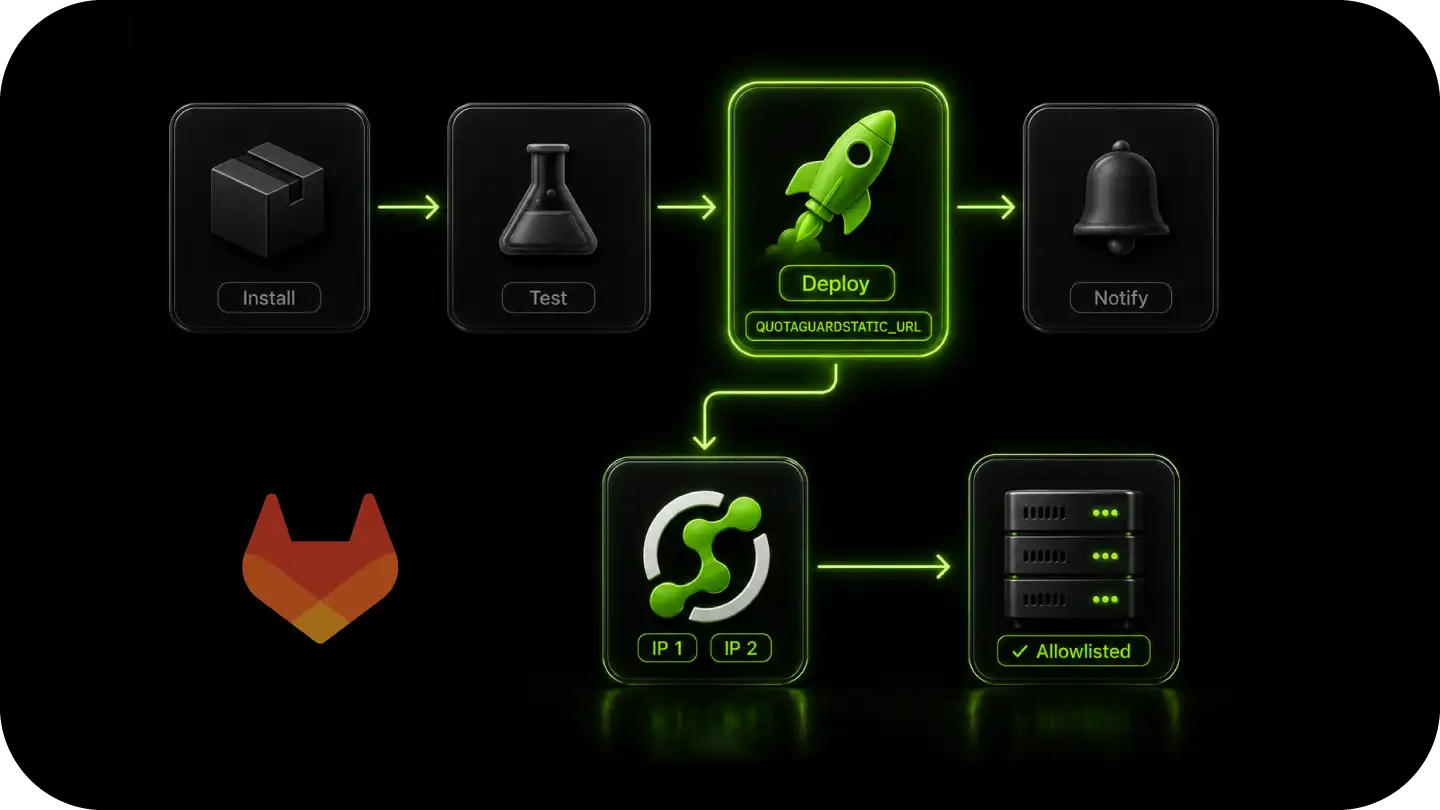
Store your QuotaGuard connection string as a masked CI/CD variable named QUOTAGUARDSTATIC_URL in Settings, CI/CD, Variables. Then set the proxy variables on the specific job that hits a restricted destination.
Most HTTP clients in Node.js, Python, Ruby, and Go, along with curl and git over HTTPS, respect these automatically. Set the variables on the individual job, not at the top of the pipeline, so package installs, artifact downloads, and GitLab API calls do not route through the proxy unnecessarily. Use NO_PROXY to exclude GitLab's own endpoints.
QGTunnel for Database Jobs
For CI jobs that open raw TCP connections to a firewalled database, such as migration or seed jobs against PostgreSQL, MySQL, or MongoDB, an HTTP proxy is not enough.
QGTunnel provides transparent SOCKS5 proxying. Wrap the job command with QGTunnel and your database driver connects to the original hostname while traffic exits from your two static IPs. No application code changes.
Per-Pipeline and Per-Environment Isolation
Use separate QuotaGuard connection strings for staging and production pipelines to keep development traffic separate from live data.
Scope the proxy to the exact jobs that need it, and verify firewall connectivity in a staging pipeline before it matters in production.
Reliability for Production Pipelines
Pipelines run in bursts and scale fast.
QuotaGuard's proxy layer handles that without becoming the bottleneck, and gives you a fixed network identity your partners can trust across every job.

FAQs
Technical Configuration and Setup for GitLab CI/CD
No.
GitLab's own documentation states it does not provide static IP addresses for outgoing connections from CI/CD runners.
To use an IP-based firewall, GitLab tells you to allow the full Google Cloud and AWS IP ranges for its runner regions, which is thousands of shared addresses.
QuotaGuard gives you two static IPs instead.
Add a step that runs curl https://ip.quotaguard.com from inside the job after configuring the proxy.
The response returns the IP your request came from.
It should match one of the two static IPs in your QuotaGuard dashboard.
Run it a few times and you will see both IPs in rotation.
Yes, via QGTunnel. The HTTP proxy handles HTTP and HTTPS traffic.
For raw TCP connections to PostgreSQL, MySQL, or native MongoDB drivers in a migration or seed job, QGTunnel routes those connections through your static IPs.
Configure a tunnel in the QuotaGuard dashboard for your database host and port, then wrap your job command with QGTunnel.
Shared GitLab.com SaaS runners are the primary use case, since you cannot pin their egress.
On private or self-hosted runners you control the host and can pin egress yourself, so you may not need a proxy.
QuotaGuard still works there if you would rather not build and maintain your own NAT or egress IP.
Yes.
The static IPs are assigned to your QuotaGuard account, not to a specific runner or job. Every job reads the proxy URL from CI/CD variables and connects through the same two IPs.
Your partners never need to update their allowlists after the initial setup.
Routing through a proxy adds one network hop. In the same region that is typically 10 to 20ms. Cross-region adds 50 to 100ms.
Select a QuotaGuard region that matches your runner region to keep latency minimal.
For deploy calls and API requests this is imperceptible.
Yes, at three levels.
Running your pipeline traffic through a QuotaGuard EU region in Frankfurt, Ireland, or London keeps it exiting from an EU IP, which meets the literal data-residency requirement on shared infrastructure.
Enterprise plans give you dedicated EU IPs, which removes the shared-tenancy question an auditor will raise.
For the strongest guarantee, the Data Residency add-on locks all proxy traffic, static IPs, and connection logs to the EU with no cross-border failover, starting at $899 per month on top of your plan. See the US and EU data residency page for details.
Yes.
Select a US or EU region at sign-up, and your two static IPs are US-based or EU-based to match.
Traffic is routed within that region's infrastructure, giving you a fixed regional outbound identity.
This supports data-residency requirements, including GDPR for EU traffic and in-country residency needs for US businesses.
Still have questions?
We don’t outsource Support to non-Engineers.
Reach out directly to the Engineers who built Shield to discuss your specific architecture, integration challenges, or compliance constraints here 👇
🚀 Ready to Get Started? Choose Your QuotaGuard Path
QuotaGuard STATIC
QuotaGuard SHIELD
Trusted by Engineering Teams Everywhere
Reliability Engineered for the Modern Cloud
For over a decade, QuotaGuard has provided reliable, high-performance static IP and proxy solutions for cloud environments like Heroku, Kubernetes, and AWS.
Get the fixed identity and security your application needs today.