
Give Hermes MCP connections and HTTP tools two fixed outbound IPs for services that require source-IP allowlisting.
Reach an approved MCP endpoint or partner API from a changing runtime by routing the requesting client through QuotaGuard. Add both assigned IPs to that destination’s policy while keeping its authentication and tool permissions in place.
Choose the route that fits your Hermes deployment. The full Hermes guide covers remote MCP connections, local tool servers and commands running in separate environments.
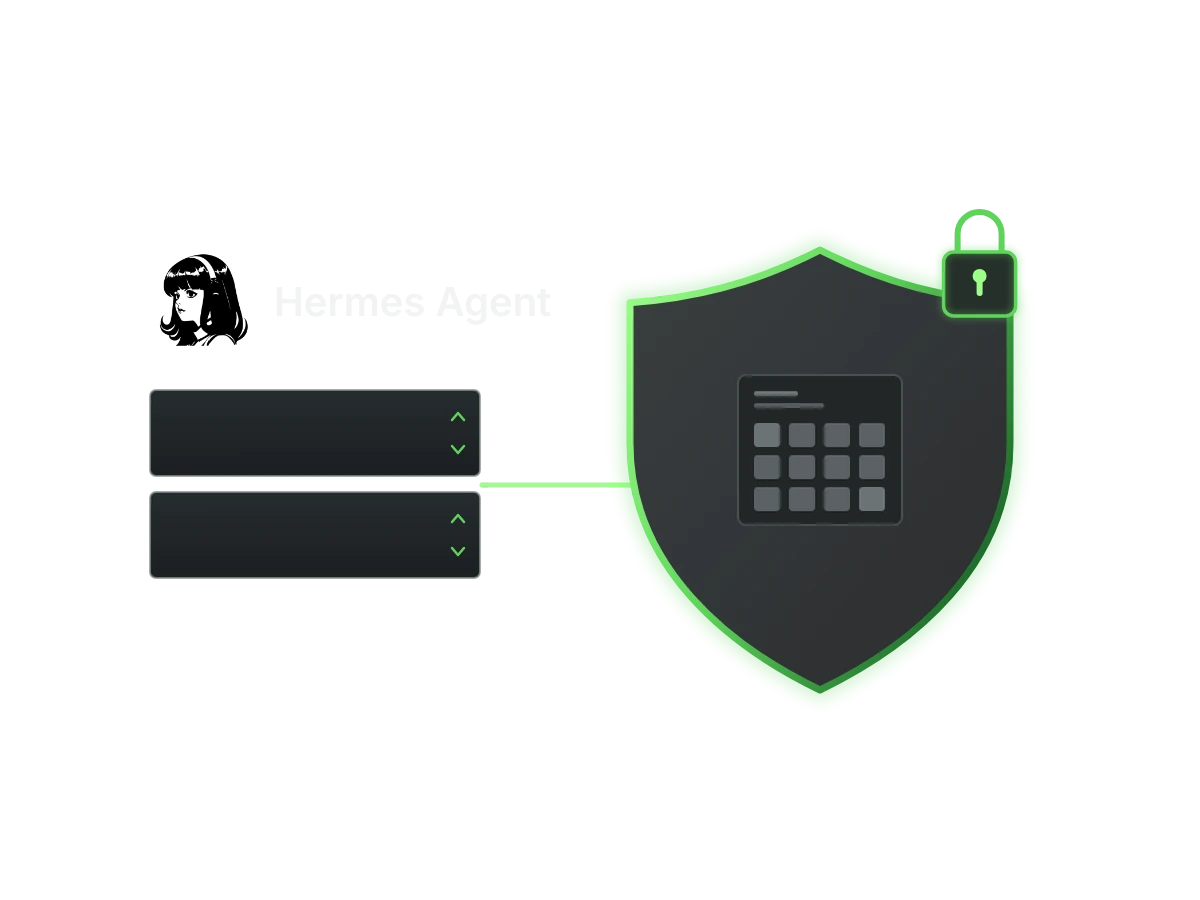
Give your Hermes MCP connection a stable source address when the destination requires an IP allowlist. QuotaGuard sits between the Hermes client and the remote endpoint that checks the source IP.
Hermes documents proxy support for HTTP and SSE MCP connections. That gives you a supported connection path without treating every request made during an agent session as the same network hop.
Connect using the remote server’s published MCP URL and supported transport. Hermes supports remote HTTP and SSE connections, but an ordinary REST endpoint is not an MCP server. Use an HTTP tool for a REST API rather than changing an MCP transport setting.
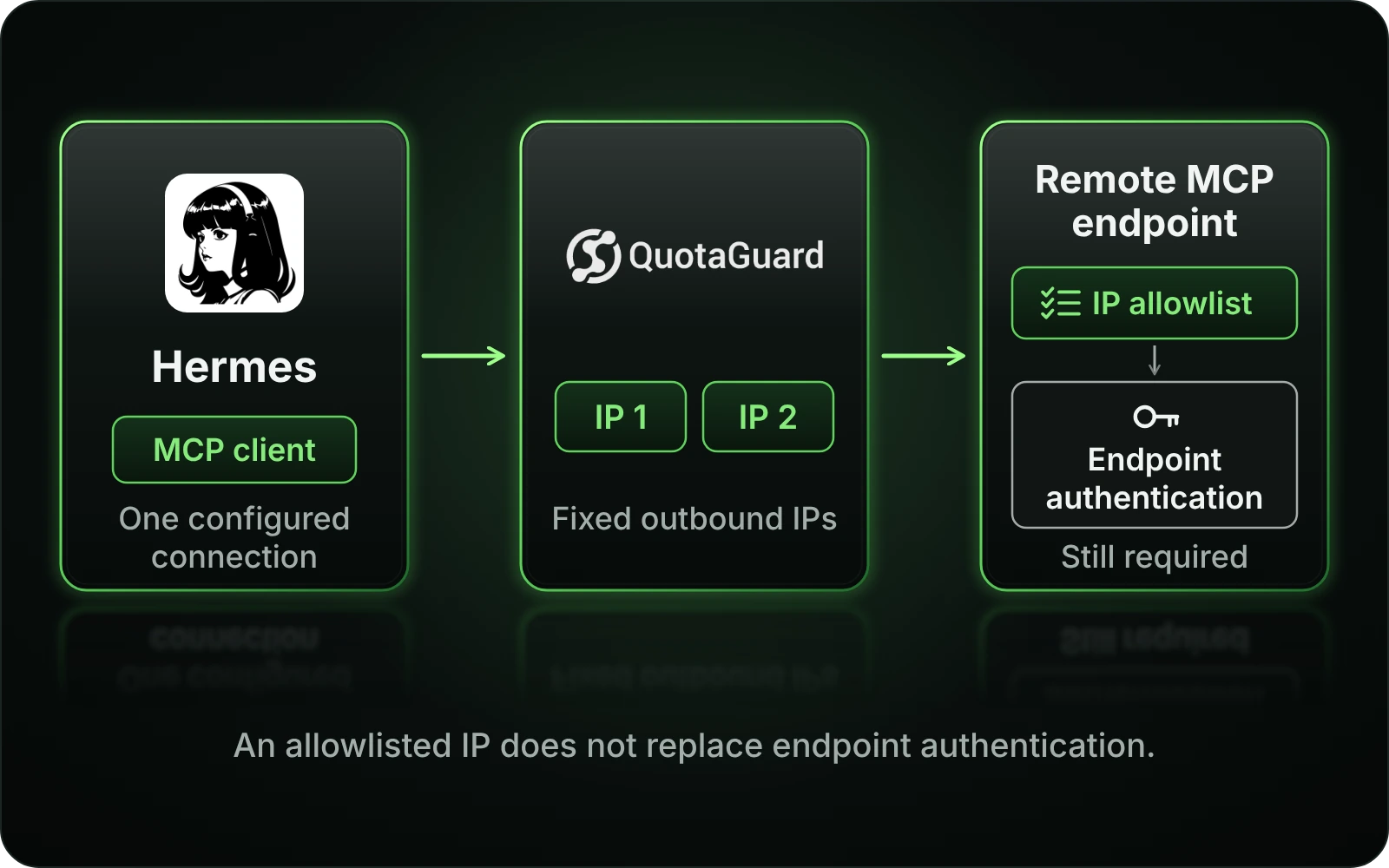
QuotaGuard authenticates the proxy connection; the MCP endpoint still enforces its own OAuth grant, token or other supported authentication. A fixed source IP satisfies a network rule, not permission to use a tool. Keep those credentials and permissions with the destination’s configuration.
Put both dashboard IPs on the MCP operator’s source-IP policy because either can be used for a connection. The destination controls the policy’s scope and address format. Hermes itself does not impose a universal IP allowlist, so use this route where the endpoint actually requires one.
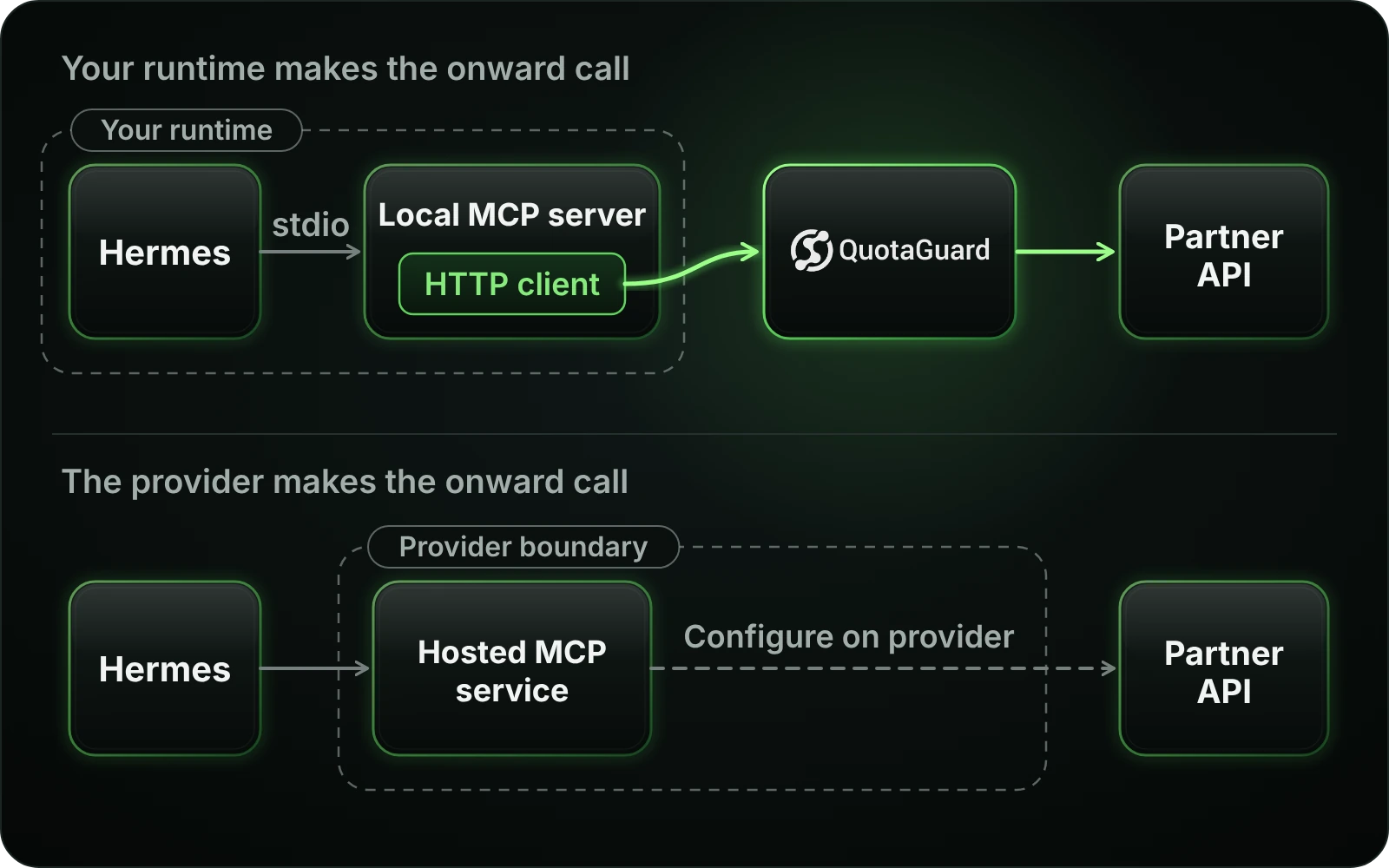
Put the fixed IP on the request your partner API receives. A local stdio MCP server can keep its local connection to Hermes while its own HTTP client sends the API call through QuotaGuard.
This distinction matters for inventory lookups, internal operational tools and other customer-owned MCP servers. The API sees the tool server’s outgoing request, not the local exchange between Hermes and that tool.
Hermes passes stdio servers an explicitly configured environment plus a safe baseline, rather than the entire parent shell environment. Supply the required proxy configuration to the selected server and use its HTTP client’s supported proxy settings. Setting a variable on the parent alone is not proof that the child’s API call uses it.
Routing Hermes through QuotaGuard changes the source seen by the hosted MCP endpoint. It does not automatically change the source of that provider’s next API request. That onward route must be configured on the provider’s server-side client, which requires control of that server or a supported provider setting.
Hermes can coordinate MCP tools, model providers, browsers and messaging adapters in one session. These clients do not all share one guaranteed proxy configuration. Configure the client that reaches the protected destination, and preserve deliberate bypasses for connections that should remain direct.
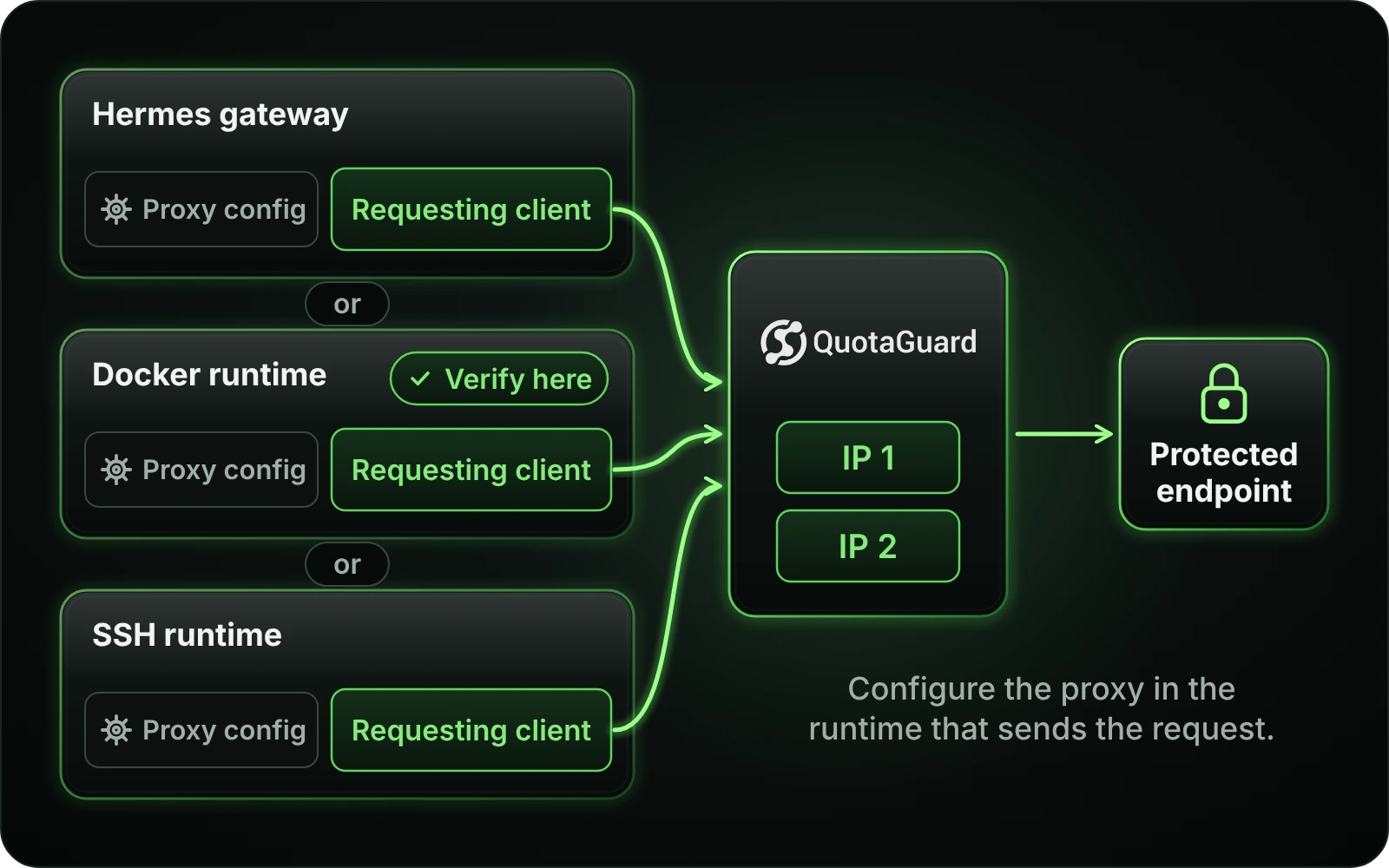
Keep source-IP approval attached to the process that actually opens the connection. A Hermes gateway, local MCP child and Docker or SSH terminal can execute in different environments even when they serve the same conversation.
QuotaGuard’s public IP check lets you confirm a supported client’s outgoing address before connecting it to the protected service. Match that address to the assigned pair, then verify the actual MCP or tool-client path.
For gateway-owned MCP connections, update the active profile or service environment and restart the gateway that opens the connection. A new terminal export does not update an already running process. Refreshing MCP configuration is not a substitute for restarting a gateway whose startup proxy environment changed.
A command running in Docker, SSH or a cloud terminal makes its network request from that runtime. Configure the supported HTTP client there, rather than assuming the machine launching Hermes controls its egress. Keep subscription secrets in that runtime’s appropriate secret configuration.
A successful curl check verifies curl, not every Hermes client. Confirm the client used for the real job and account for streaming reconnects. Static preserves an HTTPS destination’s encrypted payload inside the tunnel; Shield also encrypts the client-to-proxy connection when that additional TLS layer is required.
Common questions about Hermes Agent static IPs and QuotaGuard.
When the MCP endpoint or API requires an approved source IP and the requesting runtime does not already provide a suitable stable address. Hermes itself does not require a static IP for ordinary use. Identify the destination’s policy and the client that reaches it before adding a proxy. The IP allowlist remains separate from API authentication.
No. Hermes documents proxy variables for remote HTTP and SSE MCP connections, but local tool servers, terminal backends, model providers and browsers have their own clients and environments. Matching bypass rules deliberately connect directly. Configure and verify the client that actually calls the IP-restricted service.
Its onward HTTP client does. The local stdio exchange with Hermes is not the network request that the partner API checks. Hermes filters the child environment, so pass the required configuration explicitly and use that HTTP client’s supported proxy mechanism. Verify the API-facing path rather than relying on the parent shell’s settings.
Not by itself. QuotaGuard changes the source seen by the MCP endpoint that Hermes contacts. If that service then calls a separate API, the service’s server-side client controls the next connection. Configure that client where you control it, or use a customer-owned MCP server when the hosted provider does not offer the required routing control.
The terminal check and the Hermes gateway may run in different processes or environments. A running gateway does not acquire a new proxy setting merely because it was exported in another shell. Update the gateway’s actual startup environment and restart it, then check the MCP or tool connection used for the job. An MCP configuration reload alone does not replace that restart.
No. Proxy authentication identifies your QuotaGuard subscription, while the MCP endpoint still requires its own authorization. Hermes supports destination authentication independently of the proxy connection. Keep both configurations in place and do not treat an approved source IP as permission to invoke a tool.
QuotaGuard HTTP CONNECT tunnels have a 600-second lifetime cap, so a long SSE or streaming HTTP connection needs safe reconnect handling. An application heartbeat does not remove that cap. A supported SOCKS route is a separate client and protocol choice, not a drop-in replacement for every MCP transport. Follow the product-specific guidance before changing the connection type.
Yes, through a separately configured inbound route to a listener you operate. Outbound MCP proxy settings do not create that listener or its public route. Configure the origin, DNS and TLS for the inbound path, and retain webhook signature validation and any MCP authentication in the application. A local OAuth callback listener remains local unless you deliberately configure a supported inbound route.
For over a decade, QuotaGuard has provided reliable, high-performance static IP and proxy solutions for cloud environments like Heroku, Kubernetes, and AWS.
Get the fixed identity and security your application needs today.