How to use QuotaGuard with Hermes
Two ways to use this guide: follow the Quickstart yourself, or share this page with your AI coding agent to go deeper when needed. The reference sections help you and your AI assistant adapt the setup to your environment, verify the connection and troubleshoot your integration.
Follow these steps to use QuotaGuard with Hermes.
Guided setup (Quickstart): verify one Hermes execution route
Use your existing Hermes installation and QuotaGuard subscription, Python 3 and curl on the requesting runtime. No new provider key, destination account or API token is needed for the public IP check. Choose Static (http://, port 9293) or Shield (https://, port 9294); curl must support the selected proxy transport. The Ruby reference below remains Static-only.
1. Supply the selected subscription and both IPs
From Setup → Outbound connection information, have your approved secret workflow supply QG_PRODUCT=static and QUOTAGUARDSTATIC_URL, or QG_PRODUCT=shield and QUOTAGUARDSHIELD_URL. Supply QG_EXPECTED_IPS as the two assigned IPv4 addresses separated by a comma, without /32. Copy the complete assigned URL; do not change its scheme or use your QuotaGuard account password. Keep credentials out of prompts, command arguments, repositories and logs.
2. Configure the actual gateway or terminal runtime before testing
For gateway-owned connections, run hermes config env-path for the intended profile and use that profile/service’s private secret mechanism. Proxy-aware gateway clients need all six HTTP/HTTPS/ALL_PROXY names in upper and lowercase set to the selected URL, plus consistent NO_PROXY/no_proxy values that do not bypass protected hosts. Use actual values injected securely; .env shell-style references are not assumed to expand. Preserve existing profile configuration and required variables.
For the terminal-tool check below, merge this names-only list into the selected profile’s existing terminal mapping in config.yaml. Retain any required existing env_passthrough entries; do not replace the whole config. Values supplied only through the profile’s private environment need this explicit terminal declaration:
terminal:
  env_passthrough:
    - QG_PRODUCT
    - QUOTAGUARDSTATIC_URL
    - QG_EXPECTED_IPS
For Shield, replace the QUOTAGUARDSTATIC_URL list entry with QUOTAGUARDSHIELD_URL. Supply the matching values through the same profile’s private secret mechanism. check-curl.py selects its proxy explicitly, so it does not need the six standard proxy aliases passed to the terminal. The list forwards selected values to terminal commands; it does not set the gateway proxy or MCP subprocess environment. MCP entries use their own env mapping. Restart the Hermes process serving this profile after changing the list; use the Gateway restart guidance below where applicable. See Hermes environment passthrough.
If the gateway is already running, update its real launch/service environment and restart it (hermes gateway restart for the existing managed gateway) before reconnecting with hermes chat. A chat-client export alone does not update it. For a process you start directly, save launch-hermes.py and qg_client.py beside each other and use python3 launch-hermes.py hermes chat; it sets aliases on its child, not an existing gateway.
For a Docker/SSH/cloud terminal backend, inject the subscription and pair into that runtime using its approved controls. Confirm its policy permits DNS and access to the assigned proxy and HTTPS IP-check endpoint. These helpers select QuotaGuard explicitly; do not overwrite iron-proxy or another runtime’s injected proxy/CA controls to force them through. Use an approved compatible route instead. The gateway reference and terminal-runtime reference retain the detailed distinctions.
3. Run the check in the requesting runtime
Save and review check-curl.py there. Run it through Hermes’s terminal tool if that is the route you intend to verify, with the required values already injected:
python3 check-curl.py proxy
4. Confirm the first success
{"client": "curl", "route": "proxy", "http_status": 200, "matches_dashboard_pair": true}
Success requires HTTP 200, exit 0 and an IP matching either assigned address. The helper compares the response privately and sends no destination bearer token. Alternation is not required. This verifies that runtime’s curl request, not the gateway’s MCP/provider route or another client. A direct baseline is optional only where direct access is permitted. For remote MCP or a local stdio tool’s onward API request, use the corresponding reference below to configure and verify that separate hop.
QuotaGuard Shield: terminal-client setup
Use the quickstart’s explicit curl client with the Shield subscription’s assigned https:// URL on port 9294. Keep proxy and destination TLS verification enabled and use an HTTPS-proxy-capable curl build on the requesting runtime.
- Through that runtime’s trusted secret mechanism, supply
QG_PRODUCT=shield,QUOTAGUARDSHIELD_URLandQG_EXPECTED_IPScontaining both Shield IPv4 addresses separated by a comma. - For a Hermes terminal-tool request, merge
QG_PRODUCT,QUOTAGUARDSHIELD_URLandQG_EXPECTED_IPSinto the intended profile’s existingterminal.env_passthroughlist, as described in quickstart step 2. Restart the Hermes process serving that profile. A remote/container backend needs the values and permitted DNS/access on that execution host. - Save check-curl.py there and run
python3 check-curl.py proxythrough the intended terminal tool. Require exit 0,http_status: 200andmatches_dashboard_pair: true. The helper sends no destination bearer token.
This explicit client selects Shield directly. Gateway-owned requests instead use the gateway launch/service configuration; MCP entries use their own environment and compatible client. Do not replace iron-proxy or another policy-injected route. The Ruby example remains Static-only.
Programmatic setup and reference: connection details, gateway and clients
The ordered quickstart above covers the first IP check. The full setup, illustrations and client examples follow for other supported routes.
Reference requirements
- An existing QuotaGuard Static or Shield subscription.
- Python 3 and curl.
- An existing Hermes installation.
The public IP-check endpoint requires no extra account or API token. Keep HTTPS certificate verification enabled throughout.
Connection and runtime setup
Find your proxy URL and both assigned IP addresses
- Select the correct Static or Shield subscription in your QuotaGuard dashboard. If you have more than one subscription, use the selector in the upper-right corner. See the dashboard navigation guide.
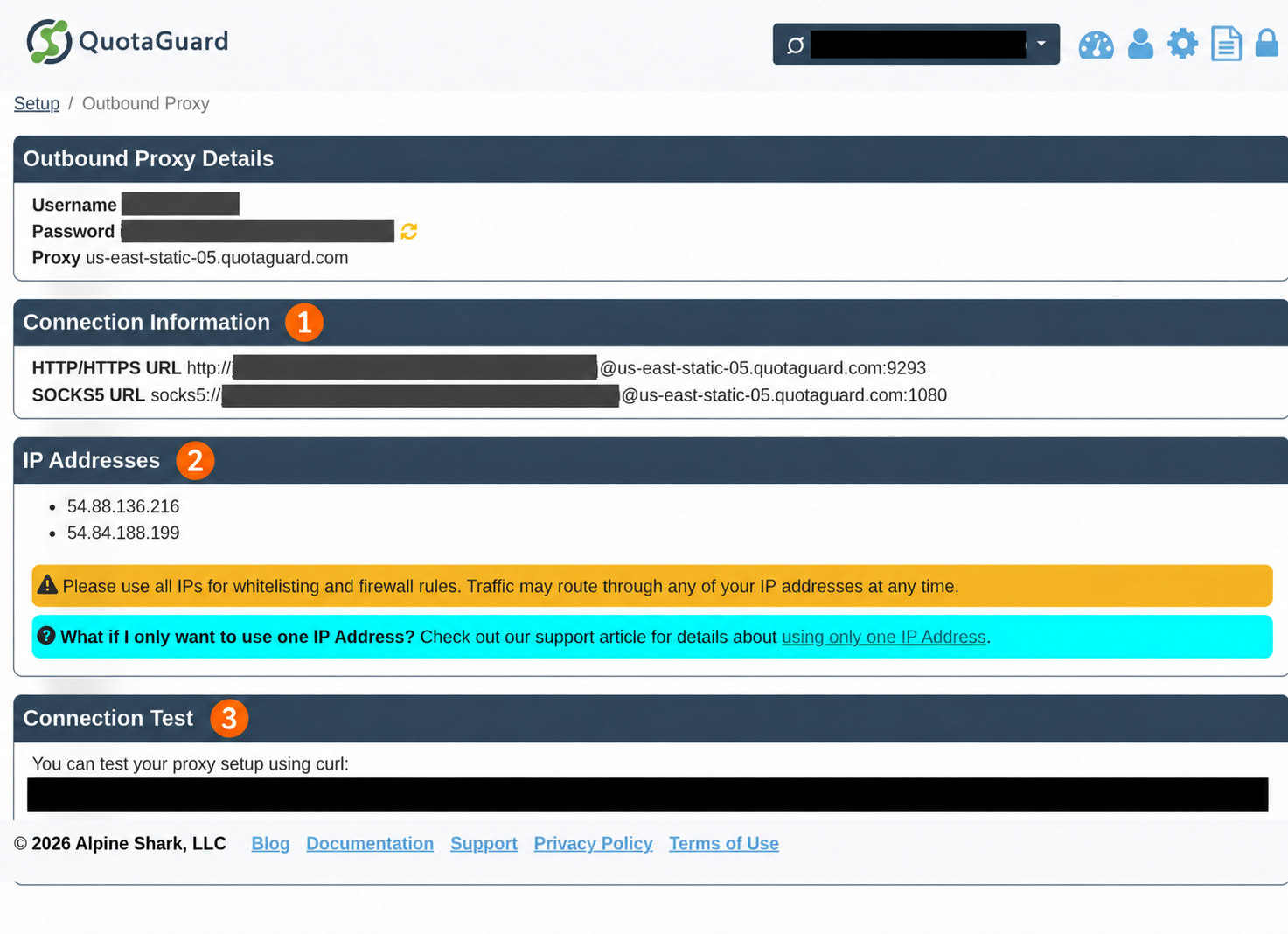
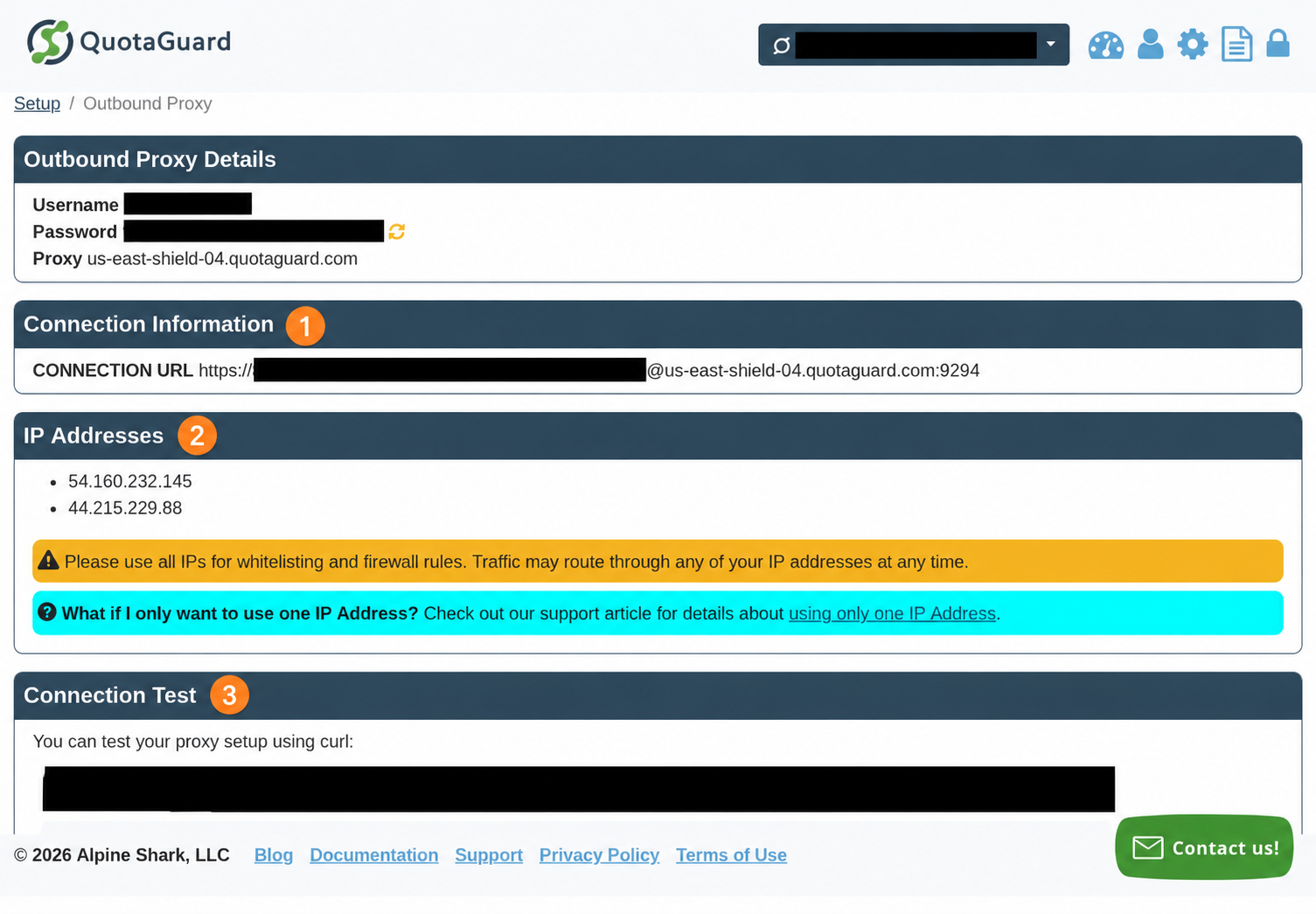
- Open Setup → Outbound Proxy → Connection Information. This page contains the proxy username, proxy password, host, connection URLs, and assigned IP addresses. See where to find your proxy credentials and connection URL.
- Copy the full proxy connection URL and both IPv4 addresses for that subscription. Store the URL in your runtime’s secret manager or private environment file. Use the subscription’s proxy credentials, not your QuotaGuard account login password.
Set these values in the environment where you will run the commands:
| Variable | Value to supply |
|---|---|
QG_PRODUCT |
static, or shield for your Shield subscription |
QUOTAGUARDSTATIC_URL |
Your full Static connection URL, if using Static |
QUOTAGUARDSHIELD_URL |
Your full Shield connection URL, if using Shield |
QG_EXPECTED_IPS |
Both assigned dashboard IPv4 addresses, comma-separated, with no /32 suffix here |
Static uses an http:// proxy URL on port 9293. Shield uses an https:// proxy URL on port 9294. Copy your region-specific connection; do not substitute a hostname from another subscription or change the scheme to match the destination’s HTTPS URL. See where to find your connection details.
If a protected service has an IP allowlist, add both dashboard IPs there, as individual addresses or two /32 entries according to that service’s format. Do not resolve the proxy hostname to discover allowlist addresses. The public IP-check endpoint itself needs no allowlist. Why both IP addresses must be allowlisted.
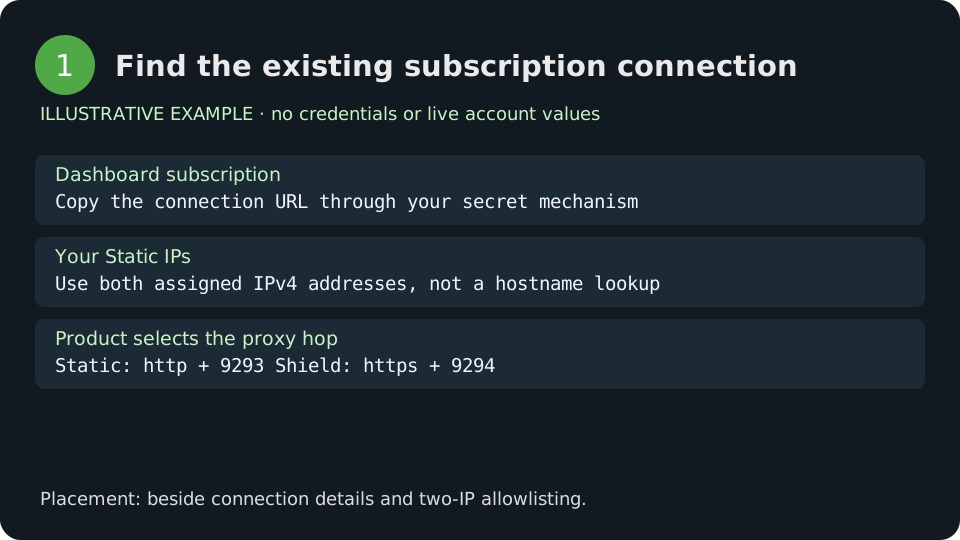
Figure 1. Connection and IP-pair checklist. Illustration, not a dashboard capture.
These are redacted, annotated dashboard captures. Use your own subscription’s current connection URL and both assigned IPs. The numbered markers identify connection information, both IP addresses, and the connection test.
Check an explicit curl route
Save the complete helper below as check-curl.py. It needs only Python’s standard library and curl. The proxy connection is passed to curl through stdin, with curl’s URL globbing disabled and no retries or redirects.
check-curl.py
"""One direct OR one explicit proxy request; proxy secret is sent via stdin, not argv."""
import ipaddress
import json
import os
import subprocess
import sys
from urllib.parse import urlsplit

def connection():
    product = os.environ.get("QG_PRODUCT", "static").lower()
    if product not in ("static", "shield"):
        raise ValueError("QG_PRODUCT must be static or shield")
    shield = product == "shield"
    key = "QUOTAGUARDSHIELD_URL" if shield else "QUOTAGUARDSTATIC_URL"
    raw = os.environ.get(key, "")
    u = urlsplit(raw)
    if not (u.scheme == ("https" if shield else "http") and
            u.port == (9294 if shield else 9293) and u.hostname and
            u.username and u.password and not u.query and not u.fragment
            and u.path in ("", "/")):
        raise ValueError("Invalid dashboard proxy connection")
    return raw

def config(mode):
    if mode == 'direct':
        return 'proxy = ""\nnoproxy = "*"\n'
    value = connection()
    if any(ord(c) < 32 or ord(c) == 127 for c in value):
        raise ValueError('Invalid proxy connection')
    value = value.replace('\\', '\\\\').replace('"', '\\"')
    return 'proxy = "' + value + '"\nnoproxy = ""\n'

def run(mode):
    if mode not in ('direct', 'proxy'):
        raise ValueError('Choose direct or proxy')
    pair = [str(ipaddress.IPv4Address(x.strip()))
            for x in os.environ.get('QG_EXPECTED_IPS', '').split(',')]
    if len(set(pair)) != 2 or len(pair) != 2:
        raise ValueError('Two dashboard IPv4 addresses required')
    r = subprocess.run(['curl', '-q', '--config', '-', '--globoff', '--silent',
                        '--fail', '--connect-timeout', '10', '--max-time', '30',
                        '--write-out', '\nQG_HTTP %{http_code}\n',
                        '--url', 'https://ip.quotaguard.com'],
                       input=config(mode), capture_output=True, text=True, check=True)
    body, marker, status = r.stdout.rpartition('\nQG_HTTP ')
    if not marker or status.strip() != '200':
        raise RuntimeError('IP check did not return HTTP 200')
    observed = str(ipaddress.IPv4Address(json.loads(body)['ip']))
    matches = observed in pair
    if mode == 'proxy' and not matches:
        raise RuntimeError('Wrong proxy egress')
    return {'client': 'curl', 'route': mode, 'http_status': 200, 'matches_dashboard_pair': matches}

if __name__ == '__main__':
    try:
        print(json.dumps(run(sys.argv[1] if len(sys.argv) > 1 else 'proxy')))
    except subprocess.CalledProcessError as error:
        hints = {5: 'Proxy DNS failed; check assigned hostname and permitted DNS route.',
                 7: 'Connection failed; check host/port, reachability and runtime policy.',
                 22: 'HTTP error; proxy or destination may have rejected the request.',
                 56: 'Receive/CONNECT failure; check authentication, policy and client compatibility.'}
        hint = hints.get(error.returncode, 'Check the selected client, TLS trust and permitted route.')
        raise SystemExit(f'curl exit {error.returncode}: {hint}') from None
    except (ValueError, KeyError):
        raise SystemExit('Check product, assigned connection and both dashboard IPv4 addresses; IP response must be valid JSON.') from None
    except OSError:
        raise SystemExit('curl could not start; check that it is installed in this execution runtime.') from None
    except Exception:
        raise SystemExit('IP check failed: require HTTP 200 and a dashboard-pair IP; review the selected route.') from None
Run the proxy check once. The direct baseline is optional and only for a runtime whose policy permits it; neither mode is a workaround for a managed proxy restriction:
python3 check-curl.py proxy
# Optional permitted direct baseline:
python3 check-curl.py direct
Expected summary for a host whose direct route is outside your QuotaGuard pair:
{"client": "curl", "route": "direct", "http_status": 200, "matches_dashboard_pair": false}
{"client": "curl", "route": "proxy", "http_status": 200, "matches_dashboard_pair": true}
The endpoint returns JSON shaped as {"ip":"<observed IPv4 address>"}; the helper compares it privately with the two dashboard addresses. A direct route can already match if your network has another configured egress path. A successful proxy check must match either dashboard IP, and repeated checks need not alternate between them.
This result verifies this curl client’s route; use the corresponding client check below for your MCP server or other runtime.
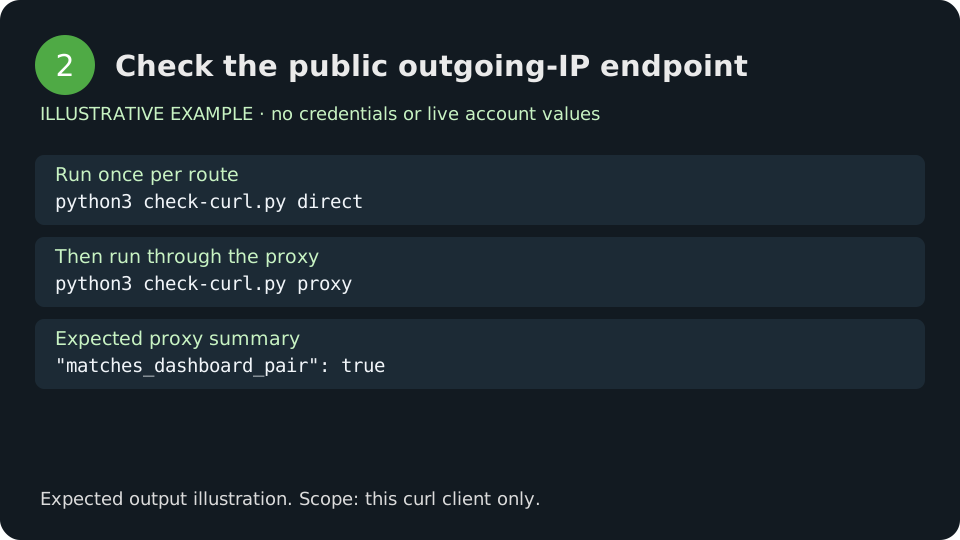
Figure 2. Expected public IP-check workflow. Illustrative output.
Set consistent proxy variables for the gateway
For Static, set these variables in the environment that starts your profile’s gateway. If a gateway is already running, complete the persistence and restart steps before running hermes chat. Current hermes chat attaches to the profile gateway; changing only the chat client’s shell does not reconfigure that gateway. Hermes CLI and gateway architecture
export HTTP_PROXY="$QUOTAGUARDSTATIC_URL"
export HTTPS_PROXY="$QUOTAGUARDSTATIC_URL"
export ALL_PROXY="$QUOTAGUARDSTATIC_URL"
export http_proxy="$QUOTAGUARDSTATIC_URL"
export https_proxy="$QUOTAGUARDSTATIC_URL"
export all_proxy="$QUOTAGUARDSTATIC_URL"
export NO_PROXY='localhost,127.0.0.1,::1'
export no_proxy="$NO_PROXY"
hermes chat
For Shield, use QUOTAGUARDSHIELD_URL in all six proxy assignments instead. HTTPS_PROXY describes the destination protocol; its value is still the exact dashboard proxy URL, including http:// for Static and https:// for Shield. Harmonizing upper- and lowercase variables avoids different clients selecting different connections.
When present in the gateway that opens the connection, these variables configure Hermes’s documented HTTP/SSE MCP proxy route. Clients that recognize these variables can also use them, but custom HTTP clients, provider SDKs and remote execution environments have their own configuration. A matching NO_PROXY entry deliberately bypasses the proxy; keep protected destinations out of it. Hermes also bypasses loopback MCP endpoints. Hermes remote MCP proxy behavior
Persist the configuration for the correct profile
Run hermes config env-path to locate the active profile’s private environment file. Save the complete proxy variable values there, or inject them through your runtime’s secret manager. Do not assume a .env loader expands shell assignments such as HTTPS_PROXY=$QUOTAGUARDSTATIC_URL; use actual injected values or the launcher below. Keep the file out of source control and restrict its access, for example chmod 600 /actual/path/to/.env on Unix.
If multiple profiles share one gateway, configure the proxy in that gateway’s launch or service environment. Proxy settings are process-wide: putting them only in a secondary profile’s .env does not create a separate remote-MCP route. Keep profile-specific MCP endpoint credentials in the corresponding profile. Gateway proxy selection.
After changing the proxy environment, restart the actual gateway before reconnecting with hermes chat. For an existing managed gateway, use hermes gateway restart; for another process manager, restart the Hermes service with its configured environment. Use the same selected profile for the environment file, restart, and chat commands. A terminal export or client reconnect does not update an already running gateway. Use /reload-mcp only on a surface that supports it to refresh MCP configuration and tools; it does not replace a gateway restart when startup proxy variables change. Hermes CLI reference, profile configuration
For a process you start directly, this launcher sets the six proxy aliases from the selected subscription connection. Save qg_client.py from the Python client reference beside it. It configures its child and newly started descendants without writing a file or printing the connection. It cannot change a gateway that is already running.
launch-hermes.py
"""Launch a command with consistent proxy variables, without printing their values."""
import os
import sys
from qg_client import connection, ConfigurationError

def environment():
    env = dict(os.environ)
    proxy = connection()
    # A deliberate bypass list. Protected destinations must not match it.
    bypass = env.get('QG_NO_PROXY', 'localhost,127.0.0.1,::1')
    for name in ('HTTP_PROXY', 'HTTPS_PROXY', 'ALL_PROXY',
                 'http_proxy', 'https_proxy', 'all_proxy'):
        env[name] = proxy
    env['NO_PROXY'] = env['no_proxy'] = bypass
    return env

if __name__ == '__main__':
    if len(sys.argv) < 2:
        raise SystemExit('Usage: python launch-hermes.py COMMAND [ARG ...]')
    try:
        env = environment()
    except ConfigurationError:
        raise SystemExit('Proxy configuration missing or invalid') from None
    os.execvpe(sys.argv[1], sys.argv[1:], env)
python3 launch-hermes.py hermes chat
The command above can attach to an existing gateway; complete the gateway environment and restart steps first in that case. To use this launcher in a service’s startup command, supply the subscription variables through that service’s secret manager. The launcher does not read Hermes’s .env itself. To select a profile, pass your normal Hermes profile arguments after hermes.
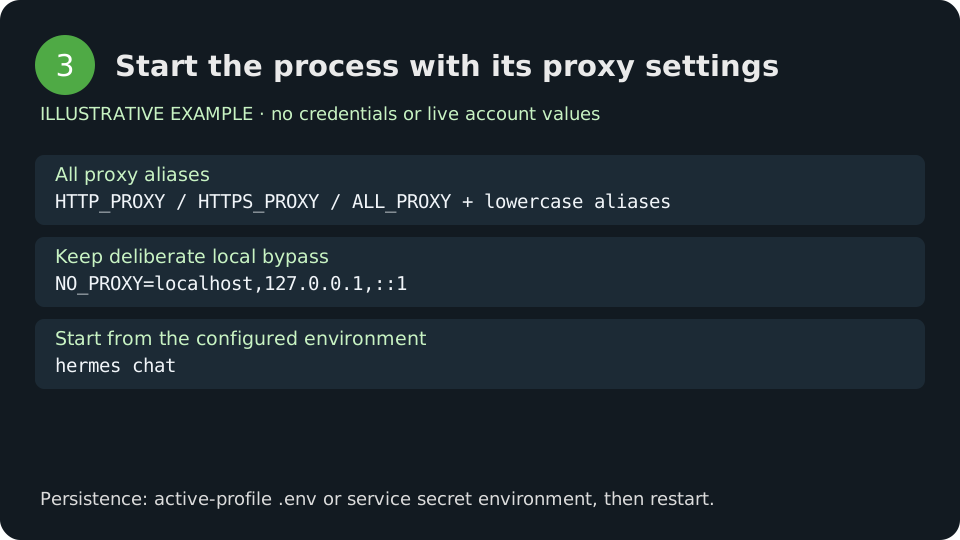
Figure 3. Process startup and persistence. Configuration illustration.
Choose the network hop that needs a fixed IP
Use QuotaGuard at the requesting client, before the destination’s IP check. Hermes can coordinate several machines and clients during one conversation, so the right configuration depends on who opens the connection.
| Job | Actual request path | Where QuotaGuard belongs |
|---|---|---|
| Reach an IP-restricted remote HTTP/SSE MCP server | Hermes host → QuotaGuard → MCP endpoint | Proxy environment of the profile gateway that opens the MCP connection |
| A local stdio MCP tool calls a partner API | Hermes → local stdio IPC → MCP child → QuotaGuard → partner API | Explicit proxy on the child’s HTTP client and required env in its MCP entry |
| A hosted MCP server calls another API | Hermes → MCP service; MCP service → API | On the hosted MCP server’s outbound client; requires control of that server |
| Run curl or a script in a terminal backend | Actual terminal runtime → QuotaGuard → endpoint | In that local/container/SSH/cloud runtime |
| Send model inference requests | Hermes provider client → selected model backend | The selected provider client’s supported proxy configuration |
| Browse a website | Local or provider-hosted browser → website | Browser-specific proxy configuration at that browser runtime |
| Connect a messaging adapter | Gateway adapter → messaging service | Adapter’s documented proxy configuration |
| Receive an inbound webhook | Sender → QuotaGuard inbound address → your listener | Separate inbound proxy configuration and listener authentication |
A host with an already stable, approved outbound IP may not need another proxy. QuotaGuard is useful when a destination requires source-IP approval and your requesting runtime lacks the stable address or shared subscription identity you need. Hermes itself does not impose a universal IP allowlist, and a source allowlist does not replace API authentication.
For an HTTPS destination the path is:
HTTP client → authenticated QuotaGuard proxy → destination TCP port
                  CONNECT tunnel contains client↔destination TLS
With Static the customer-to-proxy connection is plaintext, including proxy authentication and CONNECT metadata; the HTTPS application payload remains encrypted between the client and destination. Shield wraps the proxy connection in an additional TLS layer. Shield terminates that outer layer to authenticate the proxy request; it does not decrypt the inner HTTPS payload. Neither product makes the proxy a private-network VPN or supplies DNS reachability into an arbitrary private service.
Remote HTTP and SSE MCP: configure the connection Hermes opens
Give an IP-restricted MCP endpoint a stable source by running Hermes with the proxy environment from the quick start. Merge the server entry into the active profile’s existing mcp_servers mapping in config.yaml; do not replace other entries or append a duplicate mapping key. These are separate from your QuotaGuard proxy credentials.
Streamable HTTP configuration
# Merge into the active profile config.yaml. Values are resolved from its environment.
mcp_servers:
  partner_remote:
    url: "${PARTNER_MCP_URL}"
    headers:
      Authorization: "Bearer ${PARTNER_MCP_TOKEN}"
    connect_timeout: 30
    timeout: 60
Set PARTNER_MCP_URL and PARTNER_MCP_TOKEN using the endpoint and token provided by your MCP operator. The URL must be the operator’s actual MCP endpoint; a normal JSON REST endpoint is not an MCP server. Hermes resolves ${VAR} references in configured MCP URLs and headers at connection time. Keep real tokens in the profile’s secret mechanism rather than the YAML file. Hermes MCP configuration
After setting your environment, use the documented diagnostic command:
python3 launch-hermes.py hermes mcp test partner_remote
That command makes a real MCP connection when you choose to run it. It checks the MCP protocol and discovery; a read-only tool request confirms the actual operation and authorization needed for your integration. A reachable endpoint or an unauthenticated tool list alone does not establish that a protected tool is authorized.
Legacy SSE configuration
# Use only when the operator's MCP endpoint documents the legacy SSE transport.
mcp_servers:
  partner_sse:
    url: "${PARTNER_MCP_SSE_URL}"
    transport: sse
    headers:
      Authorization: "Bearer ${PARTNER_MCP_TOKEN}"
    connect_timeout: 30
    timeout: 60
Use transport: sse only for an endpoint that documents legacy SSE. Keep the operator’s correct SSE URL; changing the transport flag does not convert a REST endpoint into MCP. The same Hermes proxy environment applies. Current Hermes supports Streamable HTTP and legacy SSE; prefer the transport the server publishes.
OAuth and mTLS keep their own authentication
For an OAuth MCP server, replace the bearer-header configuration with the server’s documented OAuth settings, beginning with auth: oauth. Use hermes mcp login <server> to complete the operator’s supported login flow; the service’s approval and application registration requirements still apply. Proxy credentials authenticate to QuotaGuard, while OAuth authorizes the MCP connection. A browser callback is another hop and does not acquire a fixed public address merely because the MCP client uses an outbound proxy.
Hermes supports client_cert and client_key on remote MCP entries when the endpoint requires mTLS. CONNECT carries the client-to-destination TLS handshake through QuotaGuard; the destination still validates the client certificate. Keep certificate verification and client-key protections enabled. mTLS alone does not require Shield; choose Shield when the proxy hop itself requires TLS or your data policy calls for it.
Make streaming reconnects part of the client design
QuotaGuard HTTP CONNECT tunnels have a 600-second lifetime cap on Static and Shield. An SSE or streaming HTTP session can therefore reconnect around ten minutes even while data is flowing. Application heartbeats do not extend that cap. Let the MCP client’s reconnect handling recover, and make application operations safe to resume. Avoid automatically replaying a write after a disconnect unless the API supplies idempotency semantics.
SOCKS5 has no fixed tunnel lifetime cap, but deploys and failover can still drop a connection. It is a separate client/protocol choice; do not replace a Shield URL with a plaintext SOCKS URL or assume every MCP/SDK installation includes SOCKS dependencies. See HTTP versus SOCKS.
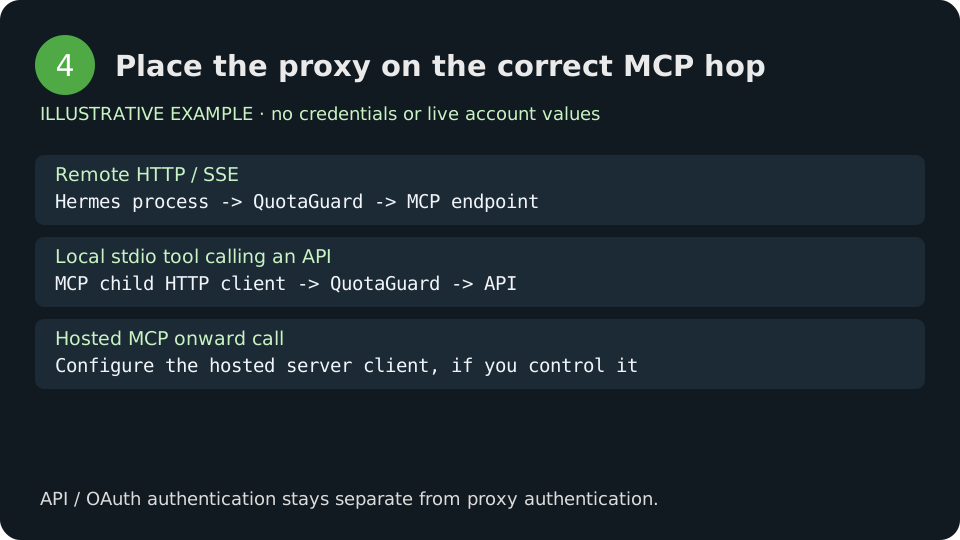
Figure 4. Remote MCP and onward API calls are different hops. Architecture illustration.
Local stdio MCP: proxy the server’s onward API call
Keep Hermes’s local MCP connection on stdin/stdout and configure the API client inside the MCP server. This is the useful route when the API behind the tool, rather than the MCP listener, has an allowlist.
The complete example exposes two small tools: check this server’s egress against the dashboard pair, and read one fixed partner status URL. It accepts no arbitrary target URL from the model, performs no writes, and returns no partner response body. The public check works without a partner account; configure the partner values only if you want the optional second tool.
Use Python 3.10 or later. In a separate virtual environment install the following dependencies; these are for the delivered example server, not a request to replace Hermes’s managed dependencies:
httpx==0.28.1
mcp==2.3.0
requests==2.32.5
python3 -m venv .venv
.venv/bin/python -m pip install -r requirements.txt
Save qg_client.py from the Python client reference beside this server:
"""A small customer-owned stdio MCP server; HTTP requests use qg_client explicitly."""
from mcp.server import MCPServer
from qg_client import check_egress, partner_status
mcp = MCPServer('partner-via-quotaguard')

@mcp.tool()
def verify_partner_client_egress() -> dict:
    """Check whether this server's HTTP client uses the configured dashboard IP pair."""
    try:
        return check_egress()
    except Exception:
        return {'verified': False, 'error': 'Egress check failed; operator review required'}

@mcp.tool()
def read_partner_status() -> dict:
    """Read the fixed operator-configured partner status endpoint. No writes."""
    try:
        return partner_status()
    except Exception:
        return {'ok': False, 'error': 'Partner request failed; operator review required'}

if __name__ == '__main__':
    mcp.run(transport='stdio')
The server uses the MCP Python SDK’s current MCPServer API. If you maintain a separate SDK v1 server, retain its documented FastMCP setup and apply the same HTTPX proxy configuration to its onward HTTP client. MCP Python SDK
Merge this entry into the active profile’s config.yaml, replacing the executable and script paths:
# Replace absolute paths with your installed Python and the delivered server path.
mcp_servers:
  partner_qg:
    command: "/absolute/path/to/.venv/bin/python"
    args: ["/absolute/path/to/partner_mcp.py"]
    env:
      QG_PRODUCT: "static"
      QUOTAGUARDSTATIC_URL: "${QUOTAGUARDSTATIC_URL}"
      QG_EXPECTED_IPS: "${QG_EXPECTED_IPS}"
      PARTNER_STATUS_URL: "${PARTNER_STATUS_URL}"
      PARTNER_API_TOKEN: "${PARTNER_API_TOKEN}"
    tools:
      include: [verify_partner_client_egress, read_partner_status]
For Shield, set this entry’s QG_PRODUCT to shield and replace the QUOTAGUARDSTATIC_URL entry with QUOTAGUARDSHIELD_URL: "${QUOTAGUARDSHIELD_URL}". Pass the matching connection explicitly. Hermes filters a stdio subprocess’s environment; having a variable on the parent process is not enough to assume it reaches every child. Hermes stdio environment behavior
Reload MCP on a surface that supports /reload-mcp, or restart the profile’s gateway after the configuration is available. Then select verify_partner_client_egress. Success returns verified: true and matches_dashboard_pair: true. Only after that, configure the operator’s fixed PARTNER_STATUS_URL and separate bearer PARTNER_API_TOKEN if you need read_partner_status.
When a remote MCP provider operates the onward client, ask that provider about its source-IP feature or run your own server. Proxying Hermes’s connection to that provider changes the source address the MCP endpoint sees, not the source address a downstream API sees from the provider’s infrastructure.
Terminal runtimes: put the connection where commands execute
Run the public IP check from the actual terminal backend before moving the partner call there. A laptop shell and a Docker, SSH, Modal, Daytona or Vercel sandbox are different environments. The quick-start variables on the gateway host cannot establish that a remote command inherits them. Hermes documents these backends independently. Hermes terminal tools and backends
For a local runtime, supply the variables to that process and run the same curl helper. Values stored only in the selected profile’s private environment need the terminal.env_passthrough entries from quickstart step 2; existing nonblocked process variables can already be inherited. For an existing remote runtime, use its secret mechanism to supply the selected subscription connection and run the same helper there. If its HTTP library ignores environment variables, attach the proxy explicitly as shown in the client reference below.
For SSH passthrough, the remote SSH server must accept the declared names through its AcceptEnv policy; otherwise use the remote runtime’s approved secret mechanism. Docker and cloud backends retain their own environment controls. For generic clients that read standard proxy variables, declare only the exact names they need and supply those values separately. Do not forward unrelated provider credentials. Hermes terminal environment controls
If Hermes itself runs in an existing container, pass variables by name from the runtime environment you configured, for example Docker’s --env QUOTAGUARDSTATIC_URL --env HTTP_PROXY --env HTTPS_PROXY --env NO_PROXY. Supply upper/lowercase aliases as required by the clients you run. Values do not need to appear in the Docker command line. Keep the existing image, volumes, user and startup command; proxy configuration does not require a new account or image.
A Hermes-managed terminal container is separate from that host process. Apply the runtime’s documented environment configuration or inject secrets into the executing process; do not assume a generic docker run example configures a container managed by Hermes.
Hermes OAuth proxy and iron-proxy serve different jobs
hermes proxy exposes a local OpenAI-compatible endpoint that attaches existing OAuth provider credentials. It is an application-level subscription proxy, not the external authenticated forward proxy connection documented here. Hermes command reference
hermes egress manages iron-proxy credential injection for the Docker terminal backend. Its trusted local CA enables TLS interception so it can replace opaque tokens with real upstream credentials on the host. That differs from QuotaGuard’s CONNECT passthrough, which does not rewrite the destination’s authentication headers. The Hermes documentation says host-process model calls remain outside that Docker injection path and other terminal backends do not receive the same wiring. Hermes iron-proxy architecture
Do not overwrite iron-proxy’s generated proxy/CA environment with QuotaGuard variables. An architecture that needs both credential injection and fixed external egress needs an explicitly supported upstream proxy route at the injection proxy or an appropriate network design. No arbitrary iron-proxy → QuotaGuard chaining setting is established by the cited Hermes documentation.
Client reference: route the HTTP call explicitly
Attach the proxy to the HTTP client you use inside a tool, script or customer-owned MCP service. These examples all target the public IP endpoint, so they require no additional destination account. Keep destination API tokens separate when adapting a client to your own API.
Python HTTPX and Requests
Save this complete qg_client.py beside the launcher or example server:
"""Explicit HTTPX client for an existing QuotaGuard subscription; never logs secrets."""
import ipaddress
import os
import re
from urllib.parse import urlsplit

class ConfigurationError(ValueError):
    pass

def connection():
    product = os.environ.get('QG_PRODUCT', 'static').lower()
    names = {'static': ('QUOTAGUARDSTATIC_URL', 'http', 9293),
             'shield': ('QUOTAGUARDSHIELD_URL', 'https', 9294)}
    if product not in names:
        raise ConfigurationError('QG_PRODUCT must be static or shield')
    key, scheme, port = names[product]
    raw = os.environ.get(key, '')
    try:
        u = urlsplit(raw)
        valid = (u.scheme == scheme and u.port == port and u.hostname
                 and u.username and u.password and u.path in ('', '/')
                 and not u.query and not u.fragment)
    except ValueError:
        valid = False
    if not valid:
        raise ConfigurationError('Missing or invalid dashboard proxy connection')
    return raw

def client():
    import httpx
    return httpx.Client(proxy=connection(), trust_env=False,
                        timeout=httpx.Timeout(30.0, connect=10.0),
                        follow_redirects=False)

def check_egress():
    pair = [x.strip() for x in os.environ.get('QG_EXPECTED_IPS', '').split(',') if x.strip()]
    try:
        if len(pair) != 2 or len(set(pair)) != 2:
            raise ValueError()
        pair = {str(ipaddress.IPv4Address(x)) for x in pair}
    except ValueError:
        raise ConfigurationError('Set QG_EXPECTED_IPS to the two dashboard IPv4 addresses') from None
    with client() as c:
        r = c.get('https://ip.quotaguard.com')
        r.raise_for_status()
        if r.status_code != 200:
            raise RuntimeError('IP check did not return HTTP 200')
        observed = str(ipaddress.IPv4Address(r.json()['ip']))
    if observed not in pair:
        raise RuntimeError('Observed egress is outside the dashboard pair')
    return {'verified': True, 'route': 'this HTTPX client', 'matches_dashboard_pair': True}

def partner_status():
    url = os.environ.get('PARTNER_STATUS_URL', '')
    u = urlsplit(url)
    if u.scheme != 'https' or not u.hostname or u.username or u.password or u.fragment or u.query:
        raise ConfigurationError('Set a fixed HTTPS PARTNER_STATUS_URL without credentials or query')
    if u.hostname.lower() == 'ip.quotaguard.com':
        raise ConfigurationError('Use check_egress for the public IP check; do not send a partner token there')
    token = os.environ.get('PARTNER_API_TOKEN', '')
    if not re.fullmatch(r'[A-Za-z0-9._~+/-]+=*', token):
        raise ConfigurationError('Set the partner API bearer token securely')
    with client() as c:
        r = c.get(url, headers={'Authorization': 'Bearer ' + token})
        r.raise_for_status()
    # Do not expose response bodies, URLs, tokens or proxy connection details to the model.
    return {'ok': True, 'http_status': r.status_code}

if __name__ == '__main__':
    try:
        print(check_egress())
    except Exception:
        raise SystemExit('Egress check failed; review configuration and the troubleshooting table') from None
The client uses httpx.Client(proxy=..., trust_env=False) with explicit timeouts and redirect control. Run python qg_client.py with HTTPX installed to check pair membership through that client. Using trust_env=False prevents an ambient NO_PROXY or inherited proxy from changing this explicit client’s route; certificate verification remains on. Async tools use the same settings on httpx.AsyncClient. HTTPX proxy configuration, environment behavior
Requests uses a different client configuration:
import ipaddress
import json
import os
import requests
from qg_client import connection

def check():
    with requests.Session() as s:
        s.trust_env = False
        r = s.get('https://ip.quotaguard.com',
                  proxies={'http': connection(), 'https': connection()},
                  timeout=(10, 30), allow_redirects=False)
        r.raise_for_status()
        return r.json()['ip']

if __name__ == '__main__':
    try:
        observed = str(ipaddress.IPv4Address(check()))
        pair = [str(ipaddress.IPv4Address(x.strip()))
                for x in os.environ.get('QG_EXPECTED_IPS', '').split(',')]
        if len(pair) != 2 or len(set(pair)) != 2 or observed not in pair:
            raise ValueError('Dashboard pair mismatch')
        print(json.dumps({'client': 'requests', 'matches_dashboard_pair': True}))
    except Exception:
        raise SystemExit('Requests proxy check failed') from None
Success prints {"client": "requests", "matches_dashboard_pair": true} after checking the returned IP against QG_EXPECTED_IPS. The proxies mapping covers both destination schemes. Session.trust_env=False prevents inherited environment settings from overriding this explicit route. For custom organization trust roots, configure the approved CA bundle explicitly rather than disabling TLS verification. The example suppresses raw exception text because it can include network details. Requests proxy reference
Node.js: undici fetch and Axios
Use the dispatcher with the fetch implementation that accepts it. Node’s environment-proxy behavior depends on runtime version and startup options; an explicit dispatcher avoids making a global assumption. Axios requires its own agent; proxy: false prevents Axios from separately interpreting ambient proxy settings on top of that agent. undici ProxyAgent, Axios configuration
// npm install undici https-proxy-agent axios
import { ProxyAgent, fetch } from 'undici';
import { HttpsProxyAgent } from 'https-proxy-agent';
import axios from 'axios';

const name = process.env.QG_PRODUCT === 'shield' ? 'QUOTAGUARDSHIELD_URL' : 'QUOTAGUARDSTATIC_URL';
const proxy = process.env[name];
if (!proxy) throw new Error('Dashboard proxy connection is required');
const endpoint = 'https://ip.quotaguard.com';
const pair = new Set((process.env.QG_EXPECTED_IPS || '').split(',').map(x => x.trim()));
function assertIP(data) {
  if (pair.size !== 2 || pair.has('') || !pair.has(data.ip)) throw new Error('IP outside configured dashboard pair');
}
// Choose one client per run so the example makes exactly one request.
try {
  if (process.argv[2] === 'axios') {
    const agent = new HttpsProxyAgent(proxy);
    try {
      const response = await axios.get(endpoint, {
        httpsAgent: agent, proxy: false, timeout: 30000, maxRedirects: 0
      });
      assertIP(response.data);
    } finally { agent.destroy(); }
  } else {
    const dispatcher = new ProxyAgent(proxy);
    try {
      const response = await fetch(endpoint, { dispatcher, redirect: 'error', signal: AbortSignal.timeout(30000) });
      if (!response.ok) throw new Error('IP endpoint rejected the request');
      assertIP(await response.json());
    } finally { await dispatcher.close(); }
  }
  console.log('Selected Node client egress matches dashboard pair');
} catch {
  console.error('Node proxy check failed; review client configuration');
  process.exitCode = 1;
}
Run node node-client.mjs for one undici request, or node node-client.mjs axios for one Axios request. The example does not run both clients implicitly. Each needs its packages installed in your own tool project. An agent installed on one HTTP library does not configure every library in that process.
Go net/http
Create a dedicated transport with http.ProxyURL instead of relying on a process-wide default. HTTPS proxy URLs provide the outer TLS connection for Shield. Go HTTP transport
package main

import (
	"encoding/json"
	"fmt"
	"net/http"
	"net/url"
	"os"
	"strings"
	"time"
)

func run() error {
	key := "QUOTAGUARDSTATIC_URL"
	if os.Getenv("QG_PRODUCT") == "shield" {
		key = "QUOTAGUARDSHIELD_URL"
	}
	proxy, err := url.Parse(os.Getenv(key))
	if err != nil || proxy.Host == "" || proxy.User == nil {
		return fmt.Errorf("proxy required")
	}
	transport := http.DefaultTransport.(*http.Transport).Clone()
	transport.Proxy = http.ProxyURL(proxy)
	defer transport.CloseIdleConnections()
	c := &http.Client{Transport: transport, Timeout: 30 * time.Second,
		CheckRedirect: func(req *http.Request, via []*http.Request) error { return http.ErrUseLastResponse }}
	r, err := c.Get("https://ip.quotaguard.com")
	if err != nil {
		return fmt.Errorf("request failed")
	}
	defer r.Body.Close()
	if r.StatusCode != 200 {
		return fmt.Errorf("unexpected status")
	}
	var body struct {
		IP string `json:"ip"`
	}
	if json.NewDecoder(r.Body).Decode(&body) != nil {
		return fmt.Errorf("invalid JSON")
	}
	pair := strings.Split(os.Getenv("QG_EXPECTED_IPS"), ",")
	if len(pair) != 2 || strings.TrimSpace(pair[0]) == strings.TrimSpace(pair[1]) {
		return fmt.Errorf("dashboard pair required")
	}
	if body.IP != strings.TrimSpace(pair[0]) && body.IP != strings.TrimSpace(pair[1]) {
		return fmt.Errorf("wrong IP")
	}
	return nil
}
func main() {
	if run() != nil {
		fmt.Fprintln(os.Stderr, "Go proxy check failed")
		os.Exit(1)
	}
	fmt.Println("Go client egress matches dashboard pair")
}
Ruby Net::HTTP
This example uses the standard library’s HTTP proxy route for Static, with HTTPS to the destination. Its proxy transport does not supply Shield’s required outer TLS; use an HTTPS-proxy-capable client when your subscription is Shield. Ruby Net::HTTP proxy reference
# Static HTTP forward proxy only. This Net::HTTP example does not add outer TLS for Shield.
require 'net/http'
require 'uri'
require 'json'
begin
  proxy = URI(ENV.fetch('QUOTAGUARDSTATIC_URL'))
  raise 'Static URL required' unless proxy.scheme == 'http' && proxy.port == 9293
  target = URI('https://ip.quotaguard.com')
  proxy_class = Net::HTTP::Proxy(proxy.host, proxy.port,
    URI::DEFAULT_PARSER.unescape(proxy.user), URI::DEFAULT_PARSER.unescape(proxy.password))
  http = proxy_class.new(target.host, target.port)
  http.use_ssl = true
  http.open_timeout = 10
  http.read_timeout = 30
  # Avoid Net::HTTP's automatic retry of idempotent requests in this check.
  http.max_retries = 0
  response = http.get(target.request_uri)
  raise 'HTTP status' unless response.code == '200'
  ip = JSON.parse(response.body).fetch('ip')
  pair = ENV.fetch('QG_EXPECTED_IPS').split(',').map(&:strip)
  raise 'Dashboard pair mismatch' unless pair.uniq.length == 2 && pair.include?(ip)
  puts 'Ruby client egress matches dashboard pair'
rescue StandardError
  abort 'Ruby proxy check failed'
end
PHP cURL
Use the complete dashboard URL as CURLOPT_PROXY. Shield requires a libcurl build supporting HTTPS proxy connections; verify that capability in the PHP runtime you deploy. The destination’s TLS verification and the proxy’s TLS verification stay enabled. PHP cURL options
<?php
// Requires ext-curl and a libcurl build that supports HTTPS proxies for Shield.
try {
    $key = getenv('QG_PRODUCT') === 'shield' ? 'QUOTAGUARDSHIELD_URL' : 'QUOTAGUARDSTATIC_URL';
    $proxy = getenv($key);
    if (!$proxy) throw new RuntimeException('Proxy required');
    $ch = curl_init('https://ip.quotaguard.com');
    curl_setopt_array($ch, [CURLOPT_PROXY => $proxy, CURLOPT_NOPROXY => '',
        CURLOPT_RETURNTRANSFER => true, CURLOPT_FOLLOWLOCATION => false,
        CURLOPT_CONNECTTIMEOUT => 10, CURLOPT_TIMEOUT => 30]);
    $raw = curl_exec($ch);
    $status = curl_getinfo($ch, CURLINFO_RESPONSE_CODE);
    curl_close($ch);
    if ($raw === false || $status !== 200) throw new RuntimeException('Request failed');
    $body = json_decode($raw, true, 512, JSON_THROW_ON_ERROR);
    $pair = array_map('trim', explode(',', getenv('QG_EXPECTED_IPS') ?: ''));
    if (count(array_unique($pair)) !== 2 || !in_array($body['ip'], $pair, true)) throw new RuntimeException('Wrong IP');
    echo "PHP client egress matches dashboard pair\n";
} catch (Throwable $e) {
    fwrite(STDERR, "PHP proxy check failed\n");
    exit(1);
}
SOCKS5 and QGTunnel for non-HTTP tools
Use a protocol-aware path when a tool connects to PostgreSQL, MySQL, Redis, MongoDB, SSH, SFTP or another raw TCP service. Setting HTTPS_PROXY on a database driver does not turn it into an HTTP client.
| Subscription | HTTP proxy | SOCKS transport |
|---|---|---|
| Static | http://, port 9293 |
SOCKS5, port 1080, with the subscription credentials |
| Shield | https://, port 9294 |
Secure SOCKS over TLS, port 1081, with the subscription credentials |
Use the dashboard’s region-specific connection details. Static’s 1080 and 9293 ports are not available on Shield. A normal socks5:// client does not automatically provide the TLS wrapper required for Shield Secure SOCKS. Use the documented Secure SOCKS/QGTunnel path for that product. SOCKS quick start, proxy connection details
With a SOCKS-aware driver, configure the driver’s supported proxy fields and keep database TLS, hostname validation and database authentication. With HTTPX, the documented httpx[socks] extra enables a Static SOCKS5 client; supply the Static SOCKS connection on 1080 instead of changing the HTTP quick-start client in place. This is useful for HTTP sessions that need a SOCKS transport, not a substitute for a database driver’s protocol support.
Run a fixed TCP tool through QGTunnel
QGTunnel opens a local listener and forwards matching connections through QuotaGuard. In your subscription dashboard use Setup (gear icon, top-right) → QGTunnel Configuration → Create a Tunnel. Configure a specific remote service and choose a local port. For an example PostgreSQL service:
| Setting | Example value |
|---|---|
| Remote destination | tcp://db.example.com:5432, replaced by your real reachable database hostname |
| Local port | 15432, an unused local port |
| Transparent | false for this explicit-listener setup |
Set the existing subscription connection through your runtime’s secret manager or private environment file. Install the published QGTunnel package into the tool project, preserving both bin/qgtunnel and vendor/. The documented distribution URL is shown below; downloading or starting it is your operator’s separate runtime step, not required to read this guide.
curl --globoff --fail --silent --show-error --location \
  --output qgtunnel.tar.gz \
  --url 'https://s3.amazonaws.com/quotaguard/qgtunnel-latest.tar.gz'
tar -xzf qgtunnel.tar.gz
Start the actual database client under the wrapper from that project directory:
./bin/qgtunnel psql 'host=db.example.com hostaddr=127.0.0.1 port=15432 sslmode=verify-full'
The explicit listener uses hostaddr=127.0.0.1, while host=db.example.com preserves PostgreSQL’s server-name check. Supply database credentials separately through your approved database secret mechanism. A customer-owned MCP database server can be launched under the same wrapper instead of psql, with its own documented connection parameters. QGTunnel behavior, QGTunnel reference
For a pre-existing Docker tool deployment, preserve the package directories and working directory:
FROM python:3.12-slim
WORKDIR /app
COPY bin/qgtunnel /app/bin/qgtunnel
COPY vendor /app/vendor
COPY . /app
RUN chmod +x /app/bin/qgtunnel
ENTRYPOINT ["/app/bin/qgtunnel"]
CMD ["python", "database_mcp.py"]
This is a deployment pattern for your own database MCP application, not a Hermes backend configuration. Install that application’s dependencies as normal, and inject secrets only at runtime. When using transparent mode instead, QGTunnel overrides configured destination hostnames to localhost through its bundled preload library. Launching outside the directory containing bin/ and vendor/, or using a runtime that ignores the preload, can bypass that override. Prefer the explicit listener when your driver can accept separate connection and TLS-hostname parameters.
For Shield, follow the product-specific Secure SOCKS/QGTunnel instructions rather than adapting Static’s port or an old guide’s unencrypted tunnel settings. Shield setup
Model backends, browsers and messaging
Keep each route’s identity explicit. The MCP settings above configure MCP connections; they do not establish the networking behavior of every selected model provider or SDK. Apply the selected provider’s documented client/proxy options and verify from that provider client when its endpoint requires a fixed source. In particular, a local OAuth subscription proxy is a local application endpoint, not evidence that the upstream model request uses QuotaGuard.
Hermes can use a local browser or a cloud browser provider. The browser’s website requests originate where that browser runs. Proxying the control request to Browserbase, Browser Use or another provider does not configure that provider’s browser egress. Hermes can also use a local sidecar for private/LAN URLs while public URLs use a cloud browser, so one browser session may involve different routes. Choose the provider’s documented proxy support or a browser runtime you control. Hermes browser architecture
Messaging is another client path. Channel-specific settings belong to the corresponding adapter, not to the tool’s HTTP client. Configure an adapter’s supported proxy setting when the messaging connection itself needs fixed egress, then check that adapter’s protocol support before selecting Shield or SOCKS. This does not change the source IP of an MCP tool’s onward API call.
An IP proxy controls the connections configured to use it. If your application also needs mandatory egress restrictions, use runtime/network policy for that separate requirement; proxy variables alone do not establish containment.
Inbound webhooks and callbacks
Expose a stable inbound address when a sender or firewall needs a fixed destination for your Hermes-facing webhook or customer-owned MCP service. Both QuotaGuard products support inbound configurations, and direct plans include inbound from Starter. Configure the origin/listener, DNS, TLS and application authentication for that inbound route separately. Inbound setup guide
Both products issue a getstatica.com hostname and support a custom-domain CNAME. Static inbound terminates client TLS using the configured certificate; its forwarding hop is encrypted when the forwarding URL uses HTTPS. Shield inbound passes the TLS stream through to the origin using SNI routing. Keep webhook signature validation, callback state checks and MCP authentication on the application. Outbound proxy settings neither create a public listener nor replace those checks.
A subscription uses the same two assigned IPs in both directions, but the allowlist meaning differs: for an outbound API the pair is your source; for an inbound webhook it is the destination. A local OAuth loopback listener remains local unless you deliberately configure a supported inbound route.
Troubleshooting by symptom
| Symptom | Likely cause and next action |
|---|---|
407 Proxy Authentication Required |
Proxy authentication failed. Confirm the active subscription’s full URL, username/password encoding and product port. This is separate from an API token failure. Do not paste the connection into logs or support messages. |
Destination 401 or 403 |
The API or MCP service may reject credentials, scopes, roles or source policy. Confirm pair membership through the same client, then check the destination’s authentication and both allowlist entries. |
| curl check passes but MCP fails | Different client or process. Check the gateway’s actual startup environment, active profile, endpoint URL, and MCP transport. Use hermes mcp test <name> for protocol diagnostics, but that command opens its own test connection; a successful shell test does not prove that an already running gateway inherited the same route. MCP test implementation |
| Wrong outgoing IP | Inspect upper/lowercase proxy settings, NO_PROXY, OS bypass rules, the actual HTTP library and the actual execution runtime. Explicit-client examples avoid ambient proxy settings. |
| Only one dashboard IP appears | Normal. Assignment is per connection and connections may be reused. Keep both allowlisted; do not require successive checks to alternate. |
| TLS error connecting to Shield | Confirm the https:// proxy scheme on 9294 and a client supporting HTTPS proxies. Update the approved CA trust configuration; do not turn verification off. |
| Connection refused or timeout before proxy authentication | Confirm network access to the dashboard hostname and correct product port from the requesting host. Check host firewall, DNS and remote-runtime environment. Do not replace the hostname with an allowlist IP. |
| Stream disconnects near ten minutes | CONNECT’s 600-second lifetime cap. Reconnect safely or select a supported SOCKS route for a long-lived client. Heartbeats do not extend CONNECT lifetime. |
| Stdio tool lacks the variable | Add the required value through that server entry’s env mapping. Hermes filters child environments; restart/reload the server after config changes. |
| SSE returns 404/405 or MCP initialization fails | Confirm the operator’s exact endpoint and transport. A REST URL is not an MCP endpoint. Change to SSE only when the server documents SSE. |
| OAuth worked once, then gateway tools stop | Reauthorize the expired MCP grant with the documented login command. Background gateway probing does not open an interactive login browser. Proxy auth does not renew an MCP grant. |
Changed .env, existing daemon behaves the same |
Restart the actual daemon with the updated environment. A new terminal export does not mutate a running process. Check the selected profile. |
| Remote browser or terminal shows another IP | Configure the browser/remote runtime’s own supported client route. The local gateway’s environment is a different scope. |
| iron-proxy stops injecting credentials | Restore its generated CA/proxy setup. Do not replace its local proxy variables with an external QG URL or invent an upstream chaining option. |
| QGTunnel resolves configured host normally in transparent mode | The hostname override is not applied. Check project working directory, bundled preload library and runtime compatibility. |
| QGTunnel resolves localhost but connection is refused | The listener is not up or the local port is wrong/in use. Check the configured local listener and wrapper startup. |
| Some destinations fail after a region/product change | The destination allowlists still contain the old pair. Stage both new IPs on every affected destination, update the runtime connection, then retire the old entries after cutover. |
The curl helper prints only a numeric exit and fixed hint on failure; it never echoes raw stderr, connection URLs or error bodies. Codes 5, 7, 22 and 56 narrow the investigation but do not prove a root cause; HTTP status and source-IP evidence must come from the same client/runtime.
For support, share the product, client/runtime versions, error category, failing hop and whether the same client’s IP check matched the dashboard pair. Keep proxy URLs, passwords, tokens and raw traces private. QuotaGuard’s dashboard diagnostics can help your authorized operator distinguish a received authentication failure from a connection that never reached the proxy.
Select Static, Shield and the right address ownership
| Feature | QuotaGuard Static | QuotaGuard Shield |
|---|---|---|
| HTTP proxy connection | http:// on 9293 |
https:// on 9294 |
| SOCKS transport | SOCKS5 on 1080 | Secure SOCKS over TLS on 1081 |
| Customer-to-proxy hop | Plaintext | TLS encrypted |
| Outbound HTTPS payload | Tunneled end-to-end, never decrypted at the proxy | Tunneled end-to-end, never decrypted at the proxy |
| Typical choice | General API/MCP traffic when the plaintext proxy hop meets policy | Regulated data or environments requiring TLS on every network hop |
| Direct Starter price | $19/month | $29/month |
| Direct Enterprise price | $219/month | $269/month |
Direct Starter, Production and Business use shared static IP pairs. Enterprise includes dedicated IPs and proxy resources. If a vendor requires an exclusive source address, confirm that requirement before submitting a shared pair. An IP allowlist is a network control; API tokens, MCP scopes and authorization still apply. Current QuotaGuard pricing
Choose Shield for regulated-data paths or an explicit requirement to encrypt the proxy connection. The selected product is one part of your architecture; HIPAA BAA coverage requires QuotaGuard review and signed documentation. Static and Shield use separate IP pools, so switching products requires registering the new pair.
Use a proxy region near the requesting runtime unless your destination or data policy requires another location. Both IPs in the subscription’s pair belong to the selected region. Region moves change the pair; coordinate all destination allowlists and the runtime connection during the supported overlap. Normal failover uses the other assigned address, and existing connections may need to reconnect.
Continue with your existing subscription
Keep the public IP check as a small smoke check for each client/runtime you add. Then connect your protected MCP endpoint or optional partner tool using the same explicit route and the destination’s separate credentials.
Find the broader AI agent static IP guidance, browse Automation guides, or contact QuotaGuard support with the failing hop and sanitized error category.
Download the complete examples
These files retain the complete source examples shown in this guide. Review them before use and supply your own runtime secrets. Environment templates are downloaded as runtime.env.example; store real values only through your approved private workflow.
- check-curl.py
- go-client.go
- hermes-remote.yaml
- hermes-sse.yaml
- hermes-stdio.yaml
- launch-hermes.py
- messaging-static.sh
- node-client.mjs
- partner_mcp.py
- php-client.php
- qg_client.py
- requests-client.py
- requirements.txt
- ruby-client.rb
- runtime.env.example