How to use QuotaGuard with Codex
Two ways to use this guide: follow the Quickstart yourself, or share this page with your AI coding agent to go deeper when needed. The reference sections help you and your AI assistant adapt the setup to your environment, verify the connection and troubleshoot your integration.
Follow these steps to use QuotaGuard with Codex.
Guided setup (Quickstart): Static from a local Codex command
Use an existing QuotaGuard Static subscription, a trusted local Codex CLI installation already signed in, and curl. No new OpenAI key or destination API token is needed for this public IP check. This path and the helper below are Static-only.
1. Get the Static connection and both IPs
Open Setup → Outbound and find your connection details. Have your approved secret manager or trusted launcher supply the complete assigned HTTP proxy URL as QUOTAGUARDSTATIC_URL. Use subscription proxy credentials, not your account login. Keep both dashboard IPs for comparison. Never paste credentials into Codex prompts, repository files, commands or logs.
2. Configure command networking before testing
Review config-combined.toml. Replace assigned-proxy-host.example with your subscription’s exact public proxy hostname, without credentials. Merge its keys into your existing ~/.codex/config.toml: put the root default_permissions key before every table header, merge existing tables rather than appending duplicates, and preserve required runtime variables. Migrate legacy include_only / exclude rules together; do not mix them with filters in one layer. The example enables command networking, sandbox-proxy enforcement and upstream chaining, and allows the proxy and IP-check hosts.
Use the existing approved policy if it already permits this route; this example is not required in every environment. Permission profiles cannot be mixed with legacy sandbox_mode / sandbox_workspace_write settings. Have your administrator resolve managed-policy conflicts rather than replacing or bypassing them. See the combined configuration and merging notes for the complete inline example.
3. Launch Codex with the upstream environment
Save and review start-codex.sh in your trusted project. From the trusted parent shell, where the secret launcher already supplied QUOTAGUARDSTATIC_URL, run:
bash ./start-codex.sh
The launcher sets the upstream proxy before Codex starts. Inside a running command sandbox, preserve its injected proxy variables; do not rerun the launcher or replace them to evade policy.
4. Check the IP from Codex’s command tool
Ask Codex to run this command. It uses the effective proxy chain and sends no destination authorization header:
curl -q --globoff --fail --silent --show-error \
  --connect-timeout 10 --max-time 30 --write-out '\nHTTP %{http_code}\n' \
  https://ip.quotaguard.com
Success means HTTP 200, curl exit 0, and a returned IP matching either dashboard IP. Requests need not alternate. This verifies curl in that command context, not every provider, MCP or browser connection. If blocked, use diagnostics; keep network controls intact. A direct comparison is optional only where your policy permits it.
QuotaGuard Shield: HTTPS-proxy client on the host
Use this path for a customer-controlled HTTPS client on a trusted host outside Codex’s network-proxied command sandbox. Keep the Static sandbox quickstart above separate; start-codex.sh, config-combined.toml and qg_get.py remain Static examples.
- Obtain the Shield subscription’s complete assigned
https://proxy URL (port 9294) and both dashboard IPs. Have your approved secret launcher supply that URL as bothhttps_proxyandHTTPS_PROXYto the host-shell client. Do not paste it into command arguments or change a Static URL’s scheme. Preserve required network policy; neitherno_proxynorNO_PROXYmay bypass the IP-check host. - Use a curl build with HTTPS-proxy support and permitted DNS/access to the assigned Shield host and port. Keep verification of both proxy and destination certificates enabled; see curl’s proxy transport reference.
- In that configured host shell, run:
curl -q --globoff --fail --silent --show-error \
  --connect-timeout 10 --max-time 30 --write-out '\nHTTP %{http_code}\n' \
  https://ip.quotaguard.com
Require HTTP 200, curl exit 0 and an IP matching either Shield dashboard address. This configures that host client’s route; it does not configure Codex’s provider or sandbox upstream. For a customer-operated MCP service, configure its own compatible HTTPS-proxy client on the API-facing host, following the MCP process reference. Keep sandbox-injected proxy variables intact.
Programmatic setup and reference: routes, clients and troubleshooting
The sections below retain the deeper setup and request examples. The quickstart above is the ordered path for the first Static IP check.
Identify the network leg
Use QuotaGuard when a command or customer-operated MCP service used by OpenAI Codex must call a public HTTPS API that restricts access by source IP. Configure the client making that request, then allowlist both QuotaGuard addresses at the destination.
| Traffic | Configuration owner and scope |
|---|---|
| Codex model-provider requests | The Codex client/provider network path. Shell filters control spawned commands, not provider routing. A model gateway base_url is not a forward-proxy setting. |
| Commands and subprocesses | The actual client, its environment, and the command sandbox. curl, a Python HTTP client and a database driver can use different transports. |
| Local stdio MCP server calling an API | The MCP process environment and the server’s outbound HTTP client. stdio itself has no network egress. |
| Remote MCP server | Codex-to-MCP and MCP-to-API are separate legs. Configure the API-facing server if you control it. |
| Hosted MCP/apps/connectors | Operator-controlled execution. Local proxy settings do not establish an egress route there. |
| Browser, browser automation and hosted search | Their own client or service controls. Browser subprocesses may need explicit browser proxy configuration; a shell variable alone proves nothing about browser traffic. |
OpenAI documents shell environments, MCP, and the command sandbox proxy separately. Keep a route record for each relevant leg: execution host, requesting client, proxy configuration and evidence at the destination. A successful IP check establishes only the checked client path.
Select the product and allowlist both addresses
This guide covers QuotaGuard’s managed outbound static-IP proxy service at quotaguard.com, unrelated to projects named QuotaGuard that monitor quotas. For direct OpenAI API traffic, use the separate OpenAI API integration.
Use proxy connection details for the assigned proxy hostname, authenticated connection URL and static IPs. In the destination’s IP restriction settings, add both assigned IPs, as individual addresses or /32 CIDRs when required. Either address can be used; repeated requests need not alternate. See why two IP addresses.
The examples below use QuotaGuard Static’s authenticated HTTP proxy URL, on its assigned hostname and HTTP proxy port (9293). Copy the exact QUOTAGUARDSTATIC_URL from the subscription connection details rather than constructing credentials or resolving a hostname for allowlist addresses. An HTTPS destination uses CONNECT through that HTTP proxy. Destination TLS stays intact; Static does not encrypt the client-to-proxy hop or its proxy authentication. How proxying works explains the tunnel.
| Outbound property | QuotaGuard Static | QuotaGuard Shield |
|---|---|---|
| Client-to-proxy hop | Plaintext HTTP proxy connection | TLS-encrypted HTTPS proxy connection |
| Destination HTTPS payload | Tunneled end-to-end, never decrypted at the proxy | Tunneled end-to-end, never decrypted at the proxy |
| Example fit | Non-regulated HTTPS client with HTTP proxy support | Regulated workload or policy requiring TLS on the proxy hop, with compatible client |
| Direct starting price | $19/month | $29/month |
Choose QuotaGuard Shield if that proxy hop must use TLS. It needs an HTTPS-proxy-capable client or a documented adapter. Do not replace http:// with https:// on a Static connection string: use the assigned Shield connection information. The Shield HTTPS-proxy setup guidance explains the HTTPS transport, compatible clients and QGPass adapter (the surrounding provisioning instructions are Heroku-specific). An adapter needs its own process and policy review. This guide’s helper accepts Static HTTP proxies only. For codex-cli 0.164.0, keep this guide’s command-sandbox upstream recipe on Static. Use the Shield host-client path for an HTTPS-proxy-capable client outside that chain.
These are redacted, annotated dashboard captures. Use your own subscription’s current connection URL and both assigned IPs. The numbered markers identify connection information, both IP addresses, and the connection test.
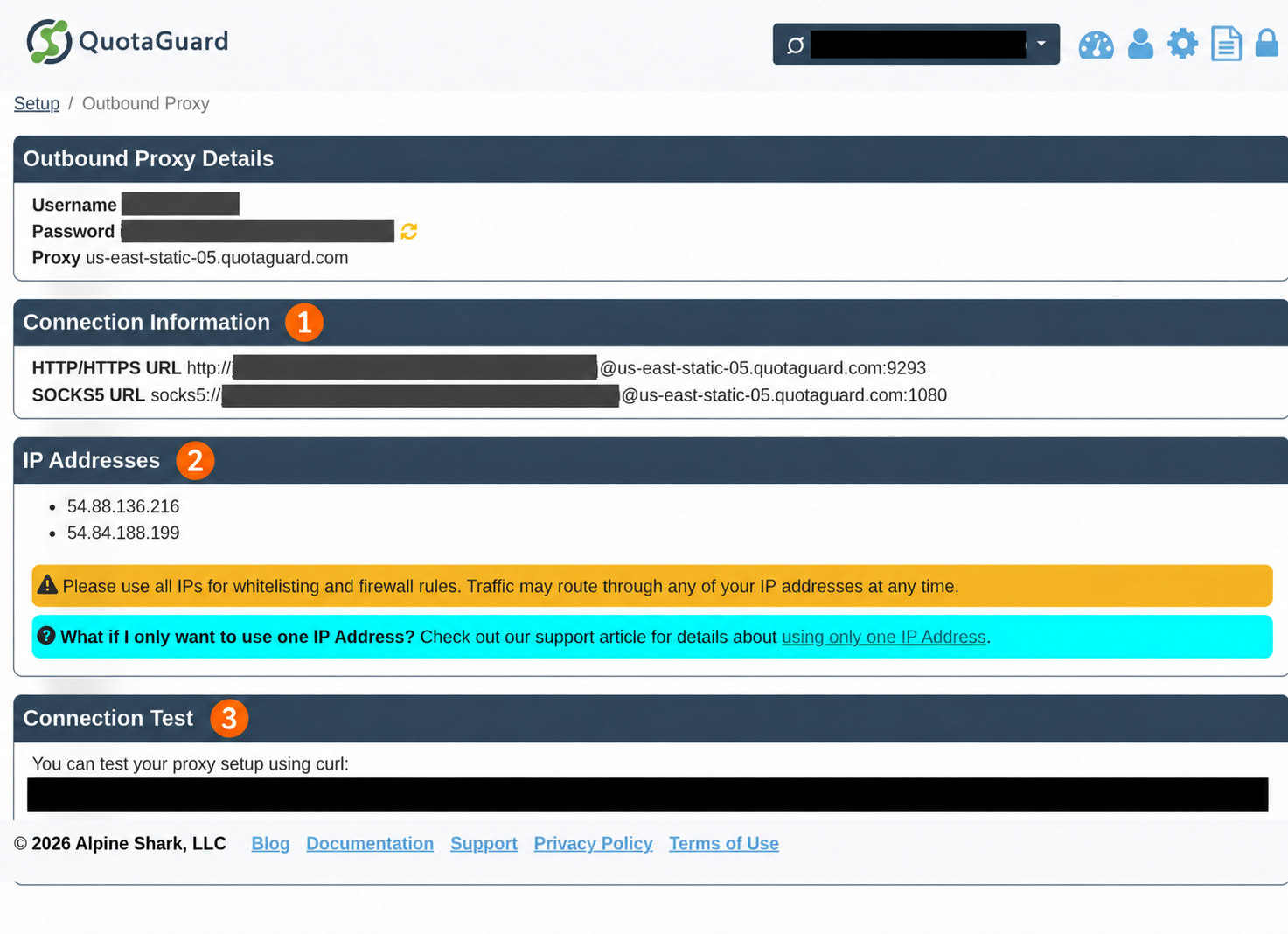
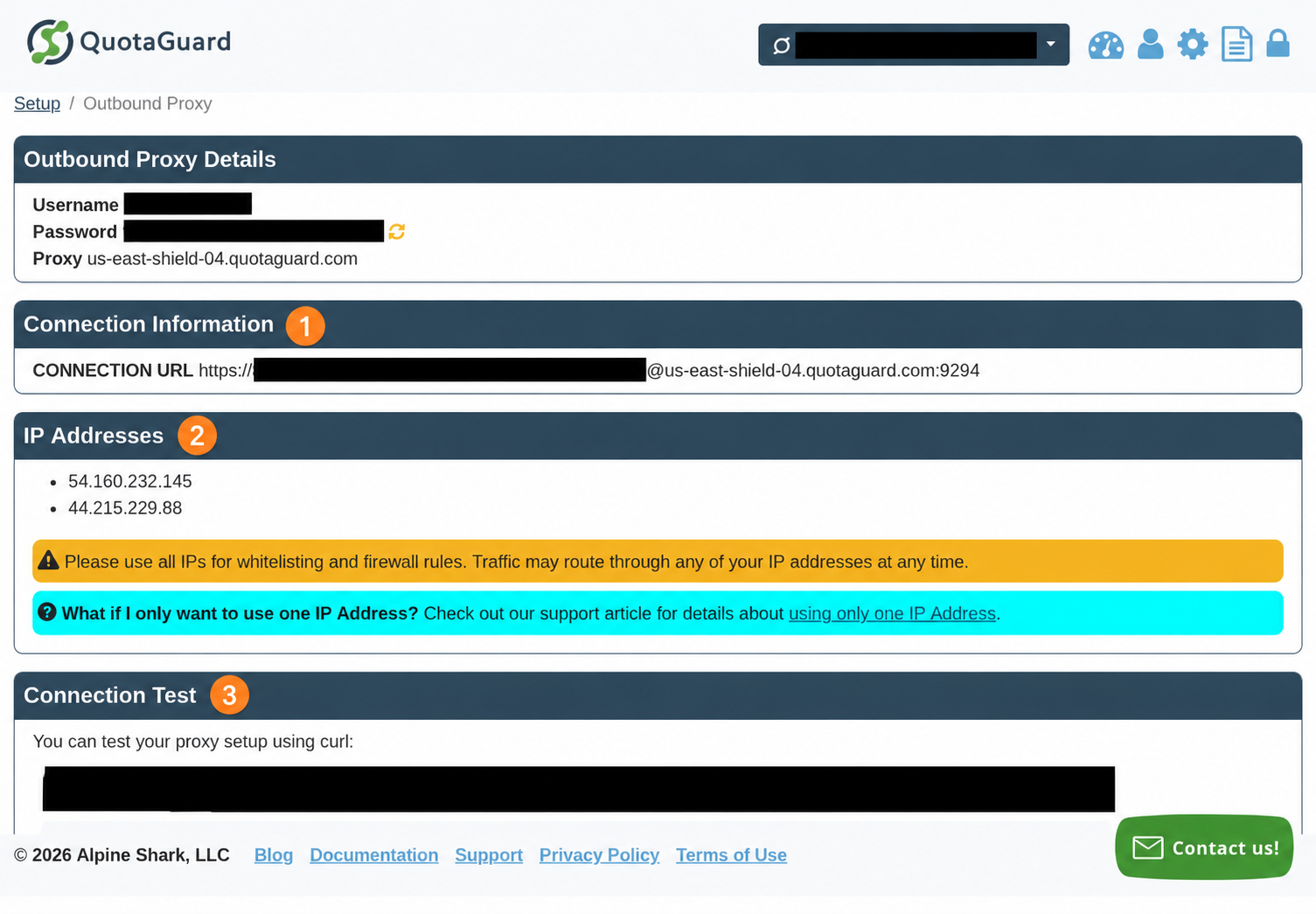
The qg_get.py helper supports Static only. For Shield, use the HTTPS-proxy host-client setup above.
Starter, Production and Business use shared static IP pairs. Enterprise provides dedicated IPs and proxy resources. Shared IP allowlisting is not exclusive to one customer; retain destination authentication. Choose isolation independently from encryption; consult current pricing. IP allowlisting supplements the destination’s tokens, roles and scopes.
A proxy cannot make a private-only network reachable. Use the destination’s supported private connectivity. A fixed egress IP or managed NAT on your own execution host can be a suitable native alternative. For raw database TCP, use the appropriate SOCKS/tunnel client rather than the HTTP-only examples below.
Supply the local CLI environment safely
Examples target a trusted local CLI execution host with Python 3.11+ and curl. Inspect codex --version, python3 --version and curl --version locally to record the versions used for your deployment. Configuration follows the current official OpenAI references below; permission profiles are beta and the command proxy is experimental.
Supply QUOTAGUARDSTATIC_URL using your approved local secret manager or trusted process launcher. Use the complete assigned HTTP URL, with credentials correctly URL encoded. Keep it out of prompts, repository files, command arguments, shell tracing and logs. The name is our application convention, not a special Codex configuration key.
Save this launcher as start-codex.sh and run it from the trusted project directory after your launcher has supplied the environment:
#!/usr/bin/env bash
# Run from the trusted project directory. The secret is supplied by your launcher.
set -euo pipefail
set +x
: "${QUOTAGUARDSTATIC_URL:?Provide the Static HTTP URL through your secret manager}"
export QUOTAGUARDSTATIC_URL
# Compatible clients may read these; this does not configure every Codex tool.
export HTTP_PROXY="$QUOTAGUARDSTATIC_URL" HTTPS_PROXY="$QUOTAGUARDSTATIC_URL"
export http_proxy="$QUOTAGUARDSTATIC_URL" https_proxy="$QUOTAGUARDSTATIC_URL"
export NO_PROXY='localhost,127.0.0.1,::1' no_proxy='localhost,127.0.0.1,::1'
exec codex "$@"
bash start-codex.sh
The standard proxy variables help clients that honor them. They do not force every SDK, browser or Codex capability through QuotaGuard. NO_PROXY keeps loopback direct; do not add a protected destination that must use QuotaGuard. Keep proxy credentials separate from destination API credentials. Any child process receiving a credential-bearing environment can read it: only run trusted code in this environment.
Preserve the variables in command subprocesses
Merge this table into ~/.codex/config.toml (or your existing configured user location). Codex config basics describes config layers and trusted-project overrides. Preserve existing unrelated configuration; do not append duplicate TOML tables.
# Merge into your local user config; never store proxy credentials here.
[shell_environment_policy]
inherit = "all"
ignore_default_excludes = false

[shell_environment_policy.filters]
"PATH" = "include"
"HOME" = "include"
"TMPDIR" = "include"
"SYSTEMROOT" = "include"
"QUOTAGUARDSTATIC_URL" = "include"
"HTTP_PROXY" = "include"
"HTTPS_PROXY" = "include"
"NO_PROXY" = "include"
"QG_TARGET_URL" = "include"
"QG_DESTINATION_BEARER" = "include"
"QG_AUTH_HOST" = "include"
Starting from inherit = "all" makes the proxy values candidates for inheritance; the include rules then keep only matching names. With inherit = "core", an include rule does not retrieve a variable omitted from the starting environment. Add other non-secret runtime names your specific client needs. Do not put credentials in set or in project configuration.
Filters match case-insensitively, so uppercase patterns also match lowercase proxy names. Automatic exclusions run first when ignore_default_excludes = false; custom exclusions, set values and the include allowlist follow. Includes cannot restore an earlier exclusion. Legacy: exclude and include_only arrays still work, but must not coexist with filters in the same configuration layer. Migrate the existing rules together. See OpenAI’s shell policy reference.
In a command actually spawned by Codex, inspect presence without printing values:
python3 - <<'PY'
import os
for name in ("QUOTAGUARDSTATIC_URL", "HTTPS_PROXY", "https_proxy", "NO_PROXY"):
    print(name + ": " + ("present" if os.environ.get(name) else "missing"))
PY
Expected: required variables report present. This checks inheritance, not routing. Login-shell initialization, shell snapshots or wrappers can change the environment; inspect the final spawned command. Environment filtering is not a security boundary against credential files or helpers.
App and IDE execution
The CLI and IDE share configuration layers, but each running process needs the environment values. Exports in a terminal do not retroactively configure an already-running app, extension host, remote machine or container. Use that surface’s approved environment injection and restart the affected process, then repeat the presence check in its actual command tool. Do not assume a ~/.codex/.env recipe applies to every current surface: the current public environment reference does not establish it as a universal secret-loading mechanism.
Permit the command network route
Environment variables and network permission are separate. When using the current permission model, this is a complete minimal policy example for a workspace-editing session. Replace assigned-proxy-host.example with the exact assigned public proxy hostname. Add an approved API hostname only when needed; keep the IP-check host only if the diagnostic is permitted.
Combined CLI configuration
The inline example and config-combined.toml download are identical. Do not concatenate the separate environment and permission fragments: TOML keys after [shell_environment_policy.filters] stay inside that table, so an appended default_permissions would not be a root key.
# Merge keys into existing user config; do not overwrite it or concatenate fragments.
# This root key MUST precede every table header.
default_permissions = "qg-api"

# Merge into your local user config; never store proxy credentials here.
[shell_environment_policy]
inherit = "all"
ignore_default_excludes = false

[shell_environment_policy.filters]
"PATH" = "include"
"HOME" = "include"
"TMPDIR" = "include"
"SYSTEMROOT" = "include"
"QUOTAGUARDSTATIC_URL" = "include"
"HTTP_PROXY" = "include"
"HTTPS_PROXY" = "include"
"NO_PROXY" = "include"
"QG_TARGET_URL" = "include"
"QG_DESTINATION_BEARER" = "include"
"QG_AUTH_HOST" = "include"

[features.network_proxy]
enabled = true
allow_upstream_proxy = true

[permissions.qg-api]
extends = ":workspace"

[permissions.qg-api.network]
enabled = true
allow_upstream_proxy = true

[permissions.qg-api.network.domains]
"assigned-proxy-host.example" = "allow"
"ip.quotaguard.com" = "allow"
# Add only the exact approved API host when you need that optional destination.
# "api.vendor.example" = "allow"
Merge deliberately: permission profiles and older sandbox_mode / sandbox_workspace_write settings do not compose. Remove conflicting legacy settings only as part of your approved configuration migration; do not bypass organizational policy. Managed requirements can constrain which profiles and destinations are available. See OpenAI permissions.
network.enabled permits commands to use networking. The command network proxy is experimental and version-sensitive. This example explicitly enables it; allowed domains alone do not activate enforcement. Existing managed requirements may already activate the proxy, so do not infer effective behavior from a universal default. With network enabled and the proxy off, profile domain rules are not enforced on direct networking.
allow_upstream_proxy allows the sandbox command proxy to chain through an upstream proxy from the environment. Leave the command proxy’s loopback listener defaults alone: proxy_url is its listener, not the field for your authenticated QuotaGuard URL. Preserve the sandbox-provided proxy variables inside the command; use the launcher environment for the upstream connection. Do not overwrite them inside a running sandbox to try to evade policy. The exact executor must support the chain and the effective policy must permit it. Configuration reference documents these controls.
Administrator [experimental_network] requirements can also start and constrain the command proxy. Check effective enabled, domain rules and allow_upstream_proxy. In supported Codex Cloud paths an explicit allow_local_binding = false can block upstream-proxy reachability; that Cloud behavior is not a reason to enable broad local access on your laptop. Inherited denies and environment internet restrictions still matter. See managed network requirements.
For commands under an active managed sandbox proxy, prefer the sandbox-injected proxy route and verify its upstream behavior. The explicit curl wrapper in the next section is for a customer-controlled client path that policy permits to reach QuotaGuard directly. It is not a workaround for a blocked sandbox. Keep both paths distinct in your route record.
Host-shell helper: direct access to QuotaGuard
Use this helper only from a trusted host shell or another explicitly permitted direct-route context. It selects QuotaGuard explicitly and needs DNS resolution and direct connectivity to the assigned proxy host. Inside Codex’s network-proxied command sandbox, use the quickstart curl command with the injected proxy environment instead. Do not run this direct-route helper in a CLI 0.164.0 sandbox that cannot resolve the proxy host; use the injected route without bypassing policy.
Save the following complete file as qg_get.py. It reads the secret from the environment and supplies curl configuration on stdin, keeping the proxy URL out of curl’s command arguments. It ignores .curlrc, disables bypass for this explicit request, retains TLS verification, has timeouts, follows no redirects and suppresses API response bodies. It performs only an HTTPS GET.
#!/usr/bin/env python3
"""Host-shell/direct-route HTTPS GET through Static; credentials go to curl on stdin."""
import os
import subprocess
import sys
from urllib.parse import urlsplit


class IPCheckBearerError(ValueError):
    """The public IP check must never receive destination credentials."""


def config_quote(value):
    if any(ord(c) < 32 or ord(c) == 127 for c in value):
        raise ValueError("Control characters are not allowed")
    return '"' + value.replace('\\', '\\\\').replace('"', '\\"') + '"'


def build_config(proxy, target, bearer=None, auth_host=None):
    p, t = urlsplit(proxy), urlsplit(target)
    if (p.scheme != "http" or not p.hostname or not p.username
            or not p.password or p.path not in ("", "/") or p.query or p.fragment):
        raise ValueError("Expected the authenticated Static HTTP proxy URL")
    if (t.scheme != "https" or not t.hostname or t.username or t.password
            or t.fragment):
        raise ValueError("Expected an HTTPS destination without URL credentials")
    auth = []
    if bearer:
        if t.hostname.lower() == "ip.quotaguard.com":
            raise IPCheckBearerError("Destination bearer is not allowed for the IP check")
        if (not auth_host or t.hostname.lower() != auth_host.lower()
                or t.port not in (None, 443)):
            raise ValueError("Destination credential requires its approved HTTPS host")
        auth = ["header = " + config_quote("Authorization: Bearer " + bearer)]
    return "\n".join([
        "proxy = " + config_quote(proxy),
        "url = " + config_quote(target),
        'noproxy = ""',
        'proto = "=https"',
        "connect-timeout = 10", "max-time = 30",
        "silent", "show-error", "fail", "globoff",
        "write-out = " + config_quote(r"\nQG_STATUS %{http_connect} %{response_code}\n"),
    ] + auth + ["\n"])


def main():
    try:
        config = build_config(os.environ["QUOTAGUARDSTATIC_URL"],
                              os.environ["QG_TARGET_URL"],
                              os.environ.get("QG_DESTINATION_BEARER"),
                              os.environ.get("QG_AUTH_HOST"))
        # -q must be first: ignore ~/.curlrc, including redirects or tracing.
        # Capture failures; do not print raw stderr, URLs, or response bodies.
        result = subprocess.run(["curl", "-q", "--config", "-"],
                                input=config, text=True, capture_output=True,
                                timeout=35, check=False)
    except IPCheckBearerError:
        print("IP check rejects QG_DESTINATION_BEARER. Run: "
              "env -u QG_DESTINATION_BEARER QG_TARGET_URL=https://ip.quotaguard.com "
              "python3 qg_get.py", file=sys.stderr)
        return 2
    except (KeyError, ValueError):
        print("Missing or invalid proxy/destination configuration", file=sys.stderr)
        return 2
    except (OSError, subprocess.TimeoutExpired):
        print("curl unavailable or request timed out", file=sys.stderr)
        return 2
    body, marker, status = result.stdout.rpartition("\nQG_STATUS ")
    codes = status.strip().split()
    valid_status = (bool(marker) and len(codes) == 2
                    and all(len(code) == 3 and code.isascii() and code.isdigit() for code in codes))
    connect, response = map(int, codes) if valid_status else (None, None)
    if result.returncode:
        hints = {
            5: "Proxy DNS lookup failed; check the assigned hostname and permitted DNS/network route.",
            6: "Host DNS lookup failed; check hostname and resolver/network policy.",
            7: "Connection failed; check proxy host/port, reachability and network policy.",
            22: "HTTP error (400 or higher); confirm whether the proxy or destination rejected it. Check authentication and policy.",
            28: "Request timed out; check reachability, network policy and upstream availability.",
            35: "TLS handshake failed; check client transport and approved CA configuration.",
            56: "Receive or CONNECT failure; possible proxy rejection, policy denial or connection interruption. Exit code alone cannot identify the cause.",
            60: "TLS certificate verification failed; check approved CA trust. Do not disable verification.",
        }
        hint = hints.get(result.returncode, "Check the requesting client and permitted route with sanitized diagnostics.")
        detail = ""
        if valid_status:
            detail = f" CONNECT HTTP {connect:03d}; destination HTTP {response:03d} (000 = not reported)."
            if connect == 407:
                hint = "Proxy authentication rejected; check assigned connection credentials privately."
            elif connect >= 400:
                hint = "Proxy rejected CONNECT; check its authentication and policy."
            elif 200 <= connect < 300 and response >= 400:
                hint = "Destination returned an HTTP error after CONNECT; check its authentication, scope and IP policy."
        print(f"Request failed (curl exit {result.returncode}).{detail} {hint}", file=sys.stderr)
        return result.returncode
    if not valid_status:
        print("curl status fields unavailable; request result not verified.", file=sys.stderr)
        return 2
    # Print only the expected IP-check response, never arbitrary API payloads.
    if os.environ["QG_TARGET_URL"] == "https://ip.quotaguard.com":
        print(body.strip())
    else:
        print("HTTPS GET succeeded; response body suppressed")
    return 0


if __name__ == "__main__":
    raise SystemExit(main())
For the host-shell/direct-route helper, run this only where the host is permitted to reach QuotaGuard directly. Use quickstart curl for a network-proxied Codex command sandbox:
# Explicit Static client path; only where direct access to QuotaGuard is permitted.
env -u QG_DESTINATION_BEARER QG_TARGET_URL=https://ip.quotaguard.com python3 qg_get.py

# Environment-selected path, including an active sandbox proxy and its upstream.
# -q ignores ~/.curlrc; no --proxy override is added here.
curl -q --fail --silent --show-error --connect-timeout 10 --max-time 30 \
  https://ip.quotaguard.com
Run the IP check without QG_DESTINATION_BEARER; env -u removes it only for this invocation and leaves the parent environment unchanged. The helper rejects bearer credentials for the IP-check host with a specific safe error, even if QG_AUTH_HOST is set to that host. The MCP sample only forwards its listed variables; it does not set a bearer token.
Expected: HTTP 200 and one of the two assigned QuotaGuard IPs. Treat the response as the service returns it, rather than depending on a particular JSON envelope. An environment-selected check succeeds only if that particular client’s effective proxy chain reaches QuotaGuard. Neither check proves another SDK, MCP connection, browser or model request uses the same route.
For an existing approved HTTPS API’s read-only resource, set QG_TARGET_URL to that resource and run qg_get.py. Expected without destination authentication: the API may reject the request even though proxy routing worked. The wrapper’s success message means an HTTP GET succeeded, not that a business operation or all authentication scopes were validated. For a destination that uses bearer authentication, the wrapper also supports QG_DESTINATION_BEARER, supplied by the same approved secret launcher. Set the non-secret QG_AUTH_HOST to the exact approved API hostname; the script rejects a credential on another host, a non-443 port or the IP-check host. It sends destination authorization separately from proxy authentication and follows no redirects. Example invocation, with the bearer value already injected:
QG_TARGET_URL="$APPROVED_READ_ONLY_API_URL" \
QG_AUTH_HOST="$APPROVED_API_HOST" python3 qg_get.py
Expected on success: HTTPS GET succeeded; response body suppressed. A client using OAuth refresh, mTLS or another authentication mechanism should use its existing approved implementation with explicit proxy support. Check the destination’s access logs or specific IP-denial response. Do not put tokens in URLs.
For application HTTP clients, configure their proxy support explicitly. Reuse the QuotaGuard Node HTTPS reference or Python quick start for the actual stack. Do not assume Node fetch, a package manager and curl have identical environment handling.
Configure MCP at the API-facing process
For an existing customer-operated local stdio MCP server, add a table like this with the actual executable path:
# Existing customer-operated stdio server, with a proxy-aware outbound client.
[mcp_servers.protected_api]
command = "/absolute/path/to/your-existing-mcp-server"
env_vars = ["QUOTAGUARDSTATIC_URL", "HTTP_PROXY", "HTTPS_PROXY", "http_proxy", "https_proxy", "NO_PROXY", "no_proxy"]
env_vars forwards named values from the local Codex process. Configure the server’s own HTTP client to use that proxy, or explicitly read QUOTAGUARDSTATIC_URL in its outbound client configuration. Forwarding variables alone cannot change a library that ignores them. Keep server authentication in its approved mechanism. These controls come from OpenAI’s stdio MCP reference; shell command filters are not a substitute for MCP configuration.
For a remote MCP server you operate, configure QuotaGuard in its deployment for server-to-API calls. If the Codex-to-MCP connection itself is IP restricted, that is a separate client transport requiring its own supported proxy path and destination evidence. A remote MCP url identifies the server, not a forward proxy. Hosted connectors and third-party MCP servers require operator-supported egress controls; local exports do not configure them. Reuse QuotaGuard’s MCP network-path guidance for server placement rather than treating one client setting as a whole MCP architecture.
Handle hosted environments as a separate deployment
OpenAI’s current Cloud environments page distinguishes direct environment variables from network secrets. Programs receive placeholders for network secrets; substitution applies to allowed HTTPS services on port 443 during setup and tasks. This does not establish support for using such a placeholder as QuotaGuard HTTP CONNECT proxy authentication. Use the actual executor’s supported upstream-proxy and credential controls; this guide does not claim an arbitrary hosted connector or Cloud route is compatible.
Legacy Codex Cloud: the separate legacy environment page says secrets are available only to setup scripts and are removed before the agent phase. Setup scripts run in a separate shell, so exports do not persist. Do not copy setup-only secrets into .bashrc, a repository file or cached configuration to evade that boundary. Plain environment variables are available throughout a legacy task but expose raw values to task code. Legacy internet settings are also separate from local policy.
ChatGPT Work Cloud has separate capability permissions and does not inherit Codex Agent Security requirements. Follow the applicable hosted configuration rather than transplanting local TOML or legacy setup instructions. For a deployment without a supported customer-controlled proxy path, use its supported fixed egress/private connectivity or run the approved API client on infrastructure you control.
Diagnose the failing layer
| Symptom | Likely layer | Action |
|---|---|---|
| curl exit 5: proxy DNS lookup failed | The proxy hostname could not be resolved | Verify the assigned hostname, DNS access and effective network policy. A policy-blocked resolver can resemble a DNS outage. |
| curl exit 6: host DNS lookup failed | The remote hostname could not be resolved | Check the target hostname and the resolver available to that execution context. |
| curl exit 7: connection failed | Host or proxy could not be reached | Check host/port, service availability, firewall and sandbox permissions. This code alone cannot distinguish them. |
| curl exit 22: HTTP error | An HTTP response was 400 or higher under --fail |
Determine whether it came from a proxy or destination using sanitized status/log evidence. Do not assume an IP block or bad password from the exit code alone. |
| curl exit 56: receive / CONNECT failure | Failure receiving network data, possibly a rejected CONNECT or broken connection | Check proxy authentication, upstream-chain compatibility and policy. This code does not reliably identify which one failed. |
| Wrong public IP | Different execution host/client, NO_PROXY, or upstream route absent |
Check the exact client and destination logs. Compare explicit and environment-selected paths only where policy permits. Reuse coding-agent wrong-IP guidance. |
| HTTP 407 / CONNECT authentication failure | Proxy authentication | Check assigned host, URL encoding and injected credential presence without printing the URL. curl may report a CONNECT failure rather than a destination status. |
| HTTP 401/403 from the API | Destination authentication, scope, or IP policy | Confirm both assigned IPs, token scope and the API’s specific error. A generic 403 alone does not prove an IP block. |
| Network denied, timeout before CONNECT | Sandbox, firewall, domain policy or unavailable upstream | Check network enablement, proxy activation, both host rules, effective upstream permission and permitted proxy port. Do not disable the sandbox to make the check pass. |
| Terminal works; Codex command fails | Missing inherited environment or different process | Run the presence check in that command, review filters and shell startup behavior, and restart the process that needs new values. |
| CONNECT tunnel closes around 600 seconds | Fixed HTTPS CONNECT tunnel lifetime, independent of idle time | Refresh pooled connections before 600 seconds; reconnect interrupted streams with bounded backoff and safe resume/retry semantics. Heartbeats do not extend this cap. This limit applies to CONNECT tunnels, not every proxy protocol or route. |
| Certificate / TLS failure | Destination trust, corporate CA, or wrong proxy transport | Keep verification enabled. curl uses its own CA options; Codex’s CODEX_CA_CERTIFICATE/SSL_CERT_FILE controls its own HTTPS/login/WebSocket clients. Match Static HTTP vs Shield HTTPS correctly. |
For a credential-safe HTTP failure diagnostic, use the same helper on the permitted host-shell/direct route with your approved read-only destination. Keep its existing secret injection; do not move the proxy URL into --proxy arguments, enable verbose tracing or print raw stderr. The helper sends configuration on stdin and prints only numeric CONNECT/destination status fields and fixed hints on failure:
QG_TARGET_URL="$APPROVED_READ_ONLY_API_URL" \
QG_AUTH_HOST="$APPROVED_API_HOST" python3 qg_get.py
CONNECT HTTP 407; destination HTTP 000: proxy authentication was rejected. Check the assigned connection credentials privately.CONNECT HTTP 200; destination HTTP 401(or another 4xx): CONNECT succeeded and the destination returned an error. Check destination authentication, scope and IP policy; a 403 alone does not prove an IP block.000means no status was reported. Missing fields, DNS failures and interrupted connections remain ambiguous. In the Codex sandbox, retain quickstart curl and consult sanitized policy/destination logs; do not switch to the direct helper as a workaround.
These fields use curl’s documented http_connect and response_code; the helper does not expose raw URLs, headers or error bodies.
The helper emits fixed hints based on curl exit codes, never raw stderr, connection URLs or error response bodies. Codes 5, 7, 22 and 56 narrow the investigation but do not prove a root cause. A timeout (28), TLS handshake failure (35) or certificate failure (60) has its own safe hint. Check managed denials and DNS/network policy without disabling controls.
For the TLS variables, see the official Codex environment reference. Share sanitized exit codes, execution surface, client/version and affected leg with support; omit proxy URLs, tokens, raw headers and sensitive response bodies.
Keep inbound callbacks separate
For an existing webhook receiver or OAuth callback service that needs stable inbound addresses, QuotaGuard also offers inbound proxying. Use the inbound setup guide for the receiving service. Outbound environment settings do not configure that listener or OAuth redirect registration; retain the provider’s callback authentication and verification. This command-egress guide does not require creating a receiver.
Choose the next step for a supported route
Use the AI-agent hub for broader architectures, and current plans when your client and destination match the supported path. Contact an engineer for dedicated infrastructure or a Shield/client transport review.
Download the complete examples
These files retain the complete source examples shown in this guide. Review them before use and supply your own runtime secrets. Environment templates are downloaded as env.example; store real values only through your approved private workflow.
- config-combined.toml
- env.example
- local-mcp.toml
- permission-profile.toml — standalone policy reference; use
config-combined.tomlfor the quickstart, not concatenated fragments. - qg_get.py
- shell-environment.toml
- start-codex.sh