Getting Started
Table of contents
This guide walks through authenticating with the QuotaGuard Usage API and pulling your usage data programmatically.
What the API does
The Usage API lets you read your account’s request and bandwidth usage without logging in to the dashboard. It is read-only in v1. Common use cases:
- Building a usage tracker or dashboard inside your own systems.
- Alerting when you approach your plan’s request or bandwidth limit.
- Pulling monthly usage history for reporting.
The API exposes two endpoints:
GET /subscriptions– list the subscriptions on your account.GET /subscriptions/{id}/usage– monthly usage for a specific subscription.
The base URL is https://dash.quotaguard.com/api/v1.
Generating an API key
API keys are managed in the customer dashboard at https://dash.quotaguard.com/account/management, in the “API Access” section.

- Enter a name in the Key name field (e.g.,
production-monitoring,weekly-report-script). Names help you identify which system is using which key. - Optionally pick an expiry date. Keys default to one year from creation; you can choose any date up to that maximum. Shorter expiries are encouraged if your security policy requires periodic rotation.
- Click Create API Key. The full key is shown once in a confirmation modal.
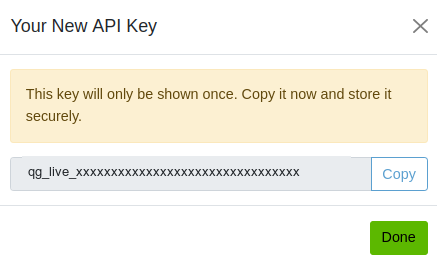
Copy the key immediately and store it somewhere secure. After the modal closes, only a masked version is shown on the dashboard. The full key cannot be retrieved later. If you lose it, you will need to revoke the key and generate a new one.
You can have up to 10 keys per account. Issuing a separate key per system (one for your monitoring stack, another for a CI script, etc.) means you can revoke a single key without affecting other integrations.
Authenticating requests
All API requests must include the key as a Bearer token in the Authorization header.
Authorization: Bearer qg_live_xxxxxxxxxxxxxxxxxxxxxxxxxxxxxxxx
A complete request:
curl -H "Authorization: Bearer qg_live_xxxxxxxxxxxxxxxxxxxxxxxxxxxxxxxx" \
     https://dash.quotaguard.com/api/v1/subscriptions
Requests without a valid Authorization header return HTTP 401:
{
  "error": {
    "code": "unauthorized",
    "message": "Invalid or missing API key."
  }
}
The same 401 response is returned for missing keys, unknown keys, expired keys, and revoked keys. We do not distinguish between these cases in the response, so an attacker cannot probe whether a particular string was once valid.
Key expiry and rotation
Every key has an expiry date. Once the date is reached, the key stops authenticating immediately (no grace period).
To prepare for expiry, we send email warnings at 30, 14, 7, and 1 days before the expiry date. The email lists the key’s name and expiry date and links to the dashboard. Short-lived keys receive fewer warnings: any threshold larger than the key’s initial lifetime is skipped, since those warnings would either pre-date the key or fire immediately at creation. For example, a 14-day key gets warnings at 7 and 1 days, and a 1-day key gets no warnings.
To rotate a key:
- Generate a new key in the dashboard.
- Update your systems to use the new key.
- Revoke the old key.
Revocation is immediate. Any system still using the revoked key will start receiving 401 responses.
Rate limiting
The API enforces a limit of 60 requests per minute per key. Responses include rate limit headers:
X-RateLimit-Limit: 60
X-RateLimit-Remaining: 59
X-RateLimit-Reset: 1714824000
If you exceed the limit, you receive HTTP 429 with a Retry-After header indicating how many seconds to wait before retrying:
{
  "error": {
    "code": "rate_limit_exceeded",
    "message": "You have exceeded the rate limit of 60 requests per minute."
  }
}
For typical polling use cases (checking usage every few minutes), 60 requests per minute is generous and you should not run into this limit.
Error responses
All errors use the same envelope:
{
  "error": {
    "code": "<error_code>",
    "message": "<human-readable description>"
  }
}
| HTTP status | Code | When |
|---|---|---|
| 400 | invalid_request |
Malformed query parameter (e.g., bad date format on from/to). |
| 401 | unauthorized |
Missing, unknown, expired, or revoked API key. |
| 404 | subscription_not_found |
The subscription ID does not exist on your account. |
| 429 | rate_limit_exceeded |
You exceeded 60 requests per minute. See Retry-After. |
| 500 | server_error |
Unexpected error on our side. Safe to retry after a brief delay. |
Quick example
List your subscriptions:
$ curl -H "Authorization: Bearer qg_live_..." https://dash.quotaguard.com/api/v1/subscriptions
{
  "subscriptions": [
    {
      "id": "fksexz1b7td8xv",
      "app_name": "my-heroku-app",
      "plan": "static_enterprise",
      "plan_display": "Static: Enterprise",
      "status": "active",
      "platform": "heroku",
      "created_at": "2024-06-15T10:30:00Z"
    }
  ]
}
Get usage for a subscription (defaults to the current month plus 6 prior):
$ curl -H "Authorization: Bearer qg_live_..." \
       https://dash.quotaguard.com/api/v1/subscriptions/fksexz1b7td8xv/usage
Limit to a custom date range:
$ curl -H "Authorization: Bearer qg_live_..." \
       "https://dash.quotaguard.com/api/v1/subscriptions/fksexz1b7td8xv/usage?from=2026-01&to=2026-03"
The response contains the plan and allowance, then a usage array with one entry per month, broken down by HTTP, SOCKS, and inbound proxy types and totaled at the bottom. Each entry includes both raw counts and percentage of plan allowance.
Need help?
- Manage your API keys: https://dash.quotaguard.com/account/management
- Support: support@quotaguard.com