QuotaGuard and Claude Code Integration Guide
Two ways to use this guide: follow the Quickstart yourself, or share this page with your AI coding agent to go deeper when needed. The reference sections help you and your AI assistant adapt the setup to your environment, verify the connection and troubleshoot your integration.
Follow these steps to use QuotaGuard with Claude Code.
Guided setup (Quickstart): check one Claude Code command route
Use an existing Static or Shield subscription, Claude Code CLI already signed in, curl, and Python 3.9+ for the launcher. No new provider key or protected API account is needed. This local CLI path uses Static’s HTTP proxy URL or Shield’s HTTPS proxy URL; curl must support the selected transport. Requests is only needed for the optional Python client below.
1. Get the proxy connection and both IPs
Open your subscription’s connection information. Have your approved secret workflow supply the complete URL as QG_PROXY_URL, or set QG_PROXY_FILE to an existing owner-only private file containing it. Use the assigned scheme and port; do not convert a Static URL to HTTPS. Keep both dashboard IPs for comparison and use proxy credentials, not your account login. Never paste the URL into prompts, command arguments, history or shared files.
2. Permit the intended sandbox route
Before the first check, inspect the effective policy with /sandbox in your existing Claude Code session. If sandboxing is active, use your approved domain/managed-policy process to permit ip.quotaguard.com; an existing rule may already allow it. Preserve the local policy proxy, denied hosts and other restrictions. Do not put QuotaGuard’s remote port into a local proxy-listener setting. Corporate gateways or managed locks require their approved routing design, not a replacement upstream chosen to bypass them. Exit that session before relaunching with the upstream below.
3. Launch from the configured parent shell
Save and review qg_route.py in your trusted project. With the secret already supplied, run this in the normal parent terminal, outside the Bash sandbox:
python3 qg_route.py claude
The launcher aligns both cases of HTTP/HTTPS proxy variables and uses loopback bypasses unless you supply an approved QG_NO_PROXY list. Ensure that list excludes the IP-check host and protected destinations; wildcard bypass is rejected. Review existing corporate requirements first: the launcher replaces the upstream and does not chain two remote proxies. Inside the Bash sandbox, keep its injected proxy environment; do not rerun this launcher there.
4. Ask Claude to run the IP check through its Bash tool
env -u DESTINATION_TOKEN curl -q --globoff --fail --silent --show-error \
  --connect-timeout 10 --max-time 30 --write-out '\nHTTP %{http_code}\n' \
  https://ip.quotaguard.com
Success means HTTP 200, curl exit 0 and an IP matching either dashboard IP. The optional destination token is cleared only for this invocation; curl sends no destination authorization header. Repeated requests need not alternate. This proves that command’s curl route, not every provider, MCP or browser route. If blocked, use diagnostics, preserving sandbox controls. A direct baseline is optional only where your policy permits it.
QuotaGuard Shield: local CLI and command clients
For Shield, use the existing quickstart with the subscription’s complete https:// URL on port 9294. Claude Code supports an HTTPS proxy through its startup environment; see official network configuration.
- Have your trusted secret mechanism supply the Shield URL as
QG_PROXY_URL, or put it in the owner-only file selected byQG_PROXY_FILE. Save qg_route.py. Ensure the requesting host permits the assigned Shield host/port and curl supports HTTPS proxies; keep certificate verification enabled. - Complete the quickstart’s sandbox policy step, then run
python3 qg_route.py claudefrom the normal parent terminal. The launcher supplies the selected HTTPS upstream before Claude starts. Preserve the Bash sandbox’s injected local proxy; do not launch the wrapper again inside it. - Ask Claude’s Bash tool to run the quickstart IP-check command. Require HTTP 200, curl exit 0 and either Shield dashboard IP. To check a compatible host-shell curl independently, prefix that same curl command with
python3 qg_route.pyin the trusted parent shell; its result covers that host client only.
A local MCP subprocess or remote MCP server has its own environment and HTTP client; use the MCP client instructions for that separate connection. An HTTPS upstream setting does not select the route for every tool or browser.
Programmatic setup and reference: processes, settings and clients
The sections below cover persistent settings, other execution surfaces, MCP, protected destinations and troubleshooting. They are reference material after the ordered first check above.
Choose the traffic path that needs fixed egress
QuotaGuard gives supported Claude Code HTTP requests two fixed outbound IP addresses for IP-allowlisted services. Choose the process making the protected request, configure its proxy path, and add both subscription addresses to the destination allowlist.
Keep the protected API call on a stable route while preserving Claude Code’s security controls. This guide covers customer-controlled local CLI, SSH/WSL, containers, and remote hosts where the HTTP client supports the selected proxy. A proxy environment variable configures compatible clients; it is not a system-wide network tunnel.
Typical jobs include calling an IP-restricted partner API, running authorized integration checks against a staging service, or letting a local MCP tool fetch protected data. The destination must be reachable from QuotaGuard. A public proxy does not create access to a private subnet, private DNS zone, or VPN-only service.
| Request path | Configure here | What that establishes |
|---|---|---|
| Claude Code to its model provider | Claude Code’s proxy environment or applicable settings scope | The provider connection’s route, not the route of every tool |
| Commands and subprocess HTTP calls | The actual execution environment and HTTP library | That client only; child processes can change or ignore proxy settings |
| Native sandboxed Bash commands | Upstream proxy before Claude Code starts; keep the built-in local proxy | Approved domains pass through the local policy proxy and then the upstream |
| Local stdio MCP server to an API | The MCP server process and its HTTP library | Server outbound HTTP; stdio itself stays local |
| Claude Code to a remote HTTP MCP server | Claude Code’s proxy configuration, checked for that transport | Client-to-MCP connection only |
| Remote MCP server or hosted connector to a destination | The server/connector execution host, if you control it | Local Claude Code settings do not configure this second hop |
| Browser, browser extension, or browser automation | The actual browser’s supported proxy control and execution host | A CLI export alone does not establish browser egress |
| Hosted Claude Code execution | The hosted environment’s documented network controls | Do not infer support from a local terminal result |
Anthropic documents HTTP/HTTPS proxy settings, sandbox boundaries, and MCP configuration. The Bash sandbox covers commands and their descendants. Built-in web tools, hooks, and local MCP servers have separate execution and permission paths. Do not infer their IP from a Bash check.
Native alternatives: retain a company VPN, approved gateway, or existing fixed egress on the exact execution host if it already meets the destination’s policy. Claude Code’s sandbox domain allowlist controls where commands may connect; it does not assign a static public source address. QuotaGuard supplies managed egress for compatible clients when that fixed identity is needed.
Get the two addresses and keep secrets local
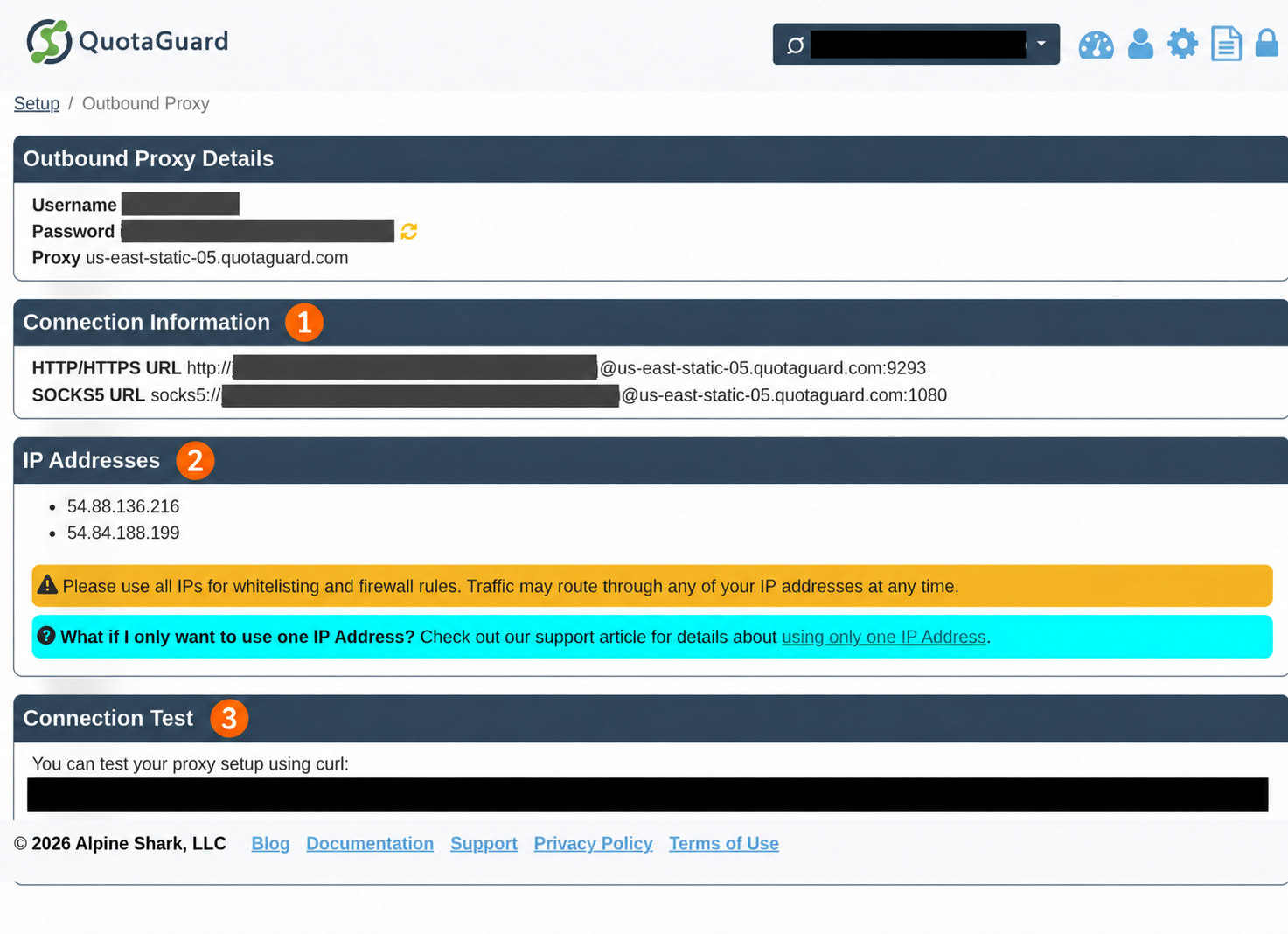
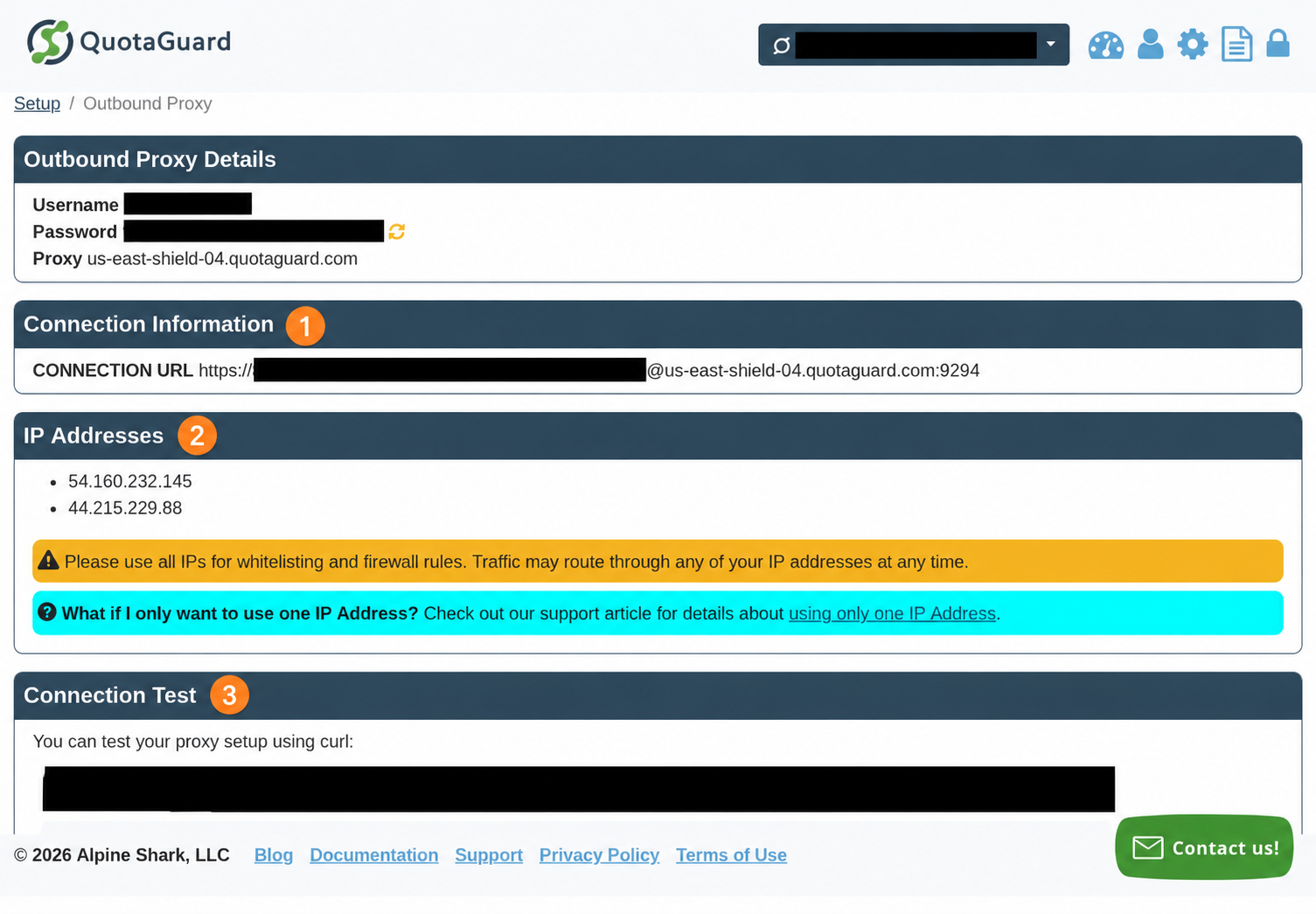
Use the selected subscription’s Outbound Connection Information: Subscription Setup, then Outbound Proxy > Connection Information. Copy the complete HTTP connection URL and exactly the two static IPs shown there. Allowlist both at the protected destination, as two individual IPv4 addresses or two /32 entries if the destination requires CIDR. Do not use the addresses obtained by resolving the proxy hostname. Why two IP addresses explains routing and failover.
Store the proxy URL in an existing secret manager or an owner-only file outside the repository. The URL includes a username and password. Keep it out of prompts, shared settings, shell history, screenshots, process arguments, and logs. Do not print the environment or use verbose request tracing in shared logs. Environment variables and user settings are still secrets accessible to sufficiently privileged local processes, so apply normal host and agent access controls.
The examples use QG_PROXY_URL or QG_PROXY_FILE as local inputs. These are example variable names, not automatic Claude Code or QuotaGuard controls. For a Static deployment, an existing QUOTAGUARDSTATIC_URL secret can supply QG_PROXY_URL. For Shield, use the actual QUOTAGUARDSHIELD_URL value. Preserve the URL’s scheme, hostname, port, and encoded credentials exactly. The examples contain no working credentials.
If creating a private file through your approved secret workflow, make its permissions owner-only, for example chmod 600 /absolute/private/path/quotaguard-proxy-url. Its only content is the connection URL. Avoid putting the URL itself in a terminal command. Choose the proxy region close to the execution host when provisioning; a later region change requires a planned connection and allowlist update.
These are redacted, annotated dashboard captures. Use your own subscription’s current connection URL and both assigned IPs. The numbered markers identify connection information, both IP addresses, and the connection test.
Configure the intended process before launch
Start with claude --version to record the version you operate. These examples follow the current official documentation; compare it with your installed version when a named setting is unavailable. Python examples use Python 3.9+ and Requests 2.32.5. They do not require an Anthropic API key or a new service.
Route a command only, or launch terminal Claude Code with an upstream
Save this complete launcher as qg_route.py on the execution host. It accepts a secret input, aligns uppercase and lowercase proxy settings, limits bypasses to loopback by default, and replaces itself with the requested process. It does not install a tunnel or configure software that ignores proxy variables.
#!/usr/bin/env python3
"""Start a customer-controlled HTTP client with a deliberate proxy environment."""
import os
from pathlib import Path
import stat
import sys
from urllib.parse import urlsplit


def proxy_url(env):
    value = env.get('QG_PROXY_URL', '')
    if not value:
        location = env.get('QG_PROXY_FILE')
        if not location:
            raise ValueError('Set QG_PROXY_URL or QG_PROXY_FILE through local secret storage.')
        path = Path(location).expanduser()
        with path.open(encoding='utf-8') as source:
            info = os.fstat(source.fileno())
            if not stat.S_ISREG(info.st_mode) or info.st_mode & 0o077:
                raise ValueError('Proxy secret must be a regular file with owner-only permissions.')
            if hasattr(os, 'getuid') and info.st_uid != os.getuid():
                raise ValueError('Proxy secret must belong to the current user.')
            value = source.read(8193).strip()
    if len(value) > 8192 or any(c.isspace() for c in value):
        raise ValueError('Proxy URL contains whitespace or is too long.')
    try:
        parsed = urlsplit(value)
        valid = (parsed.scheme in ('http', 'https') and parsed.hostname
                 and parsed.port and parsed.username and parsed.password
                 and parsed.path in ('', '/') and not parsed.query and not parsed.fragment)
    except ValueError:
        valid = False
    if not valid:
        raise ValueError('Use the complete authenticated HTTP or HTTPS proxy URL from QuotaGuard.')
    return value


def routed_env(env):
    result = dict(env)
    value = proxy_url(env)
    for key in ('http_proxy', 'HTTP_PROXY', 'https_proxy', 'HTTPS_PROXY'):
        result[key] = value
    bypass = env.get('QG_NO_PROXY', 'localhost,127.0.0.1,::1')
    if '*' in bypass:
        raise ValueError('Choose explicit bypass hosts; wildcard bypass is not accepted.')
    result['no_proxy'] = result['NO_PROXY'] = bypass
    result.pop('ALL_PROXY', None)
    result.pop('all_proxy', None)
    # Children get only the standard proxy variables, not the source secret inputs.
    result.pop('QG_PROXY_URL', None)
    result.pop('QG_PROXY_FILE', None)
    return result


def main(argv):
    if not argv:
        print('Usage: python3 qg_route.py COMMAND [ARG ...]', file=sys.stderr)
        return 2
    try:
        env = routed_env(os.environ)
        os.execvpe(argv[0], argv, env)
    except (ValueError, OSError) as exc:
        # Exception strings from exec/path parsing may contain sensitive input.
        print('Proxy launcher failed (' + type(exc).__name__ + '); check secret inputs and executable.', file=sys.stderr)
        return 2


if __name__ == '__main__':
    sys.exit(main(sys.argv[1:]))
Use the exact connection URL from your subscription’s dashboard, supplied by secret storage. The file-path input avoids placing that URL in a command argument:
export QG_PROXY_FILE=/absolute/private/path/quotaguard-proxy-url
python3 qg_route.py claude
This routes Claude Code’s proxy-aware provider connection and supplies an environment to descendants. Use this launcher outside Claude Code’s native Bash sandbox. Within that sandbox, preserve its injected local proxy variables; do not run this launcher there to replace them with a remote proxy.
If only one command needs QuotaGuard, leave Claude Code’s provider route unchanged and invoke the launcher for that command on a customer-controlled execution host outside the native Bash sandbox. For sandboxed commands, use the upstream approach in sandbox routing instead. A remote shell, container, CI runner, or GUI-launched server needs configuration at its own boundary; it may not inherit your terminal environment.
Review existing corporate proxy requirements before selecting a new upstream. This launcher intentionally replaces all four HTTP proxy variables, removes inherited ALL_PROXY alternatives, and replaces bypass settings with QG_NO_PROXY or loopback. It does not chain two remote proxies. If policy already requires a corporate gateway, use its approved routing design.
Save applicable user settings for background or Desktop sessions
For persistent settings, merge the following env entries into ~/.claude/settings.json, preserving existing keys and sandbox policy. Merge the env object into any existing env object; do not append a second JSON document or replace the whole settings file. Never copy the placeholder URLs unchanged. Replace each example URL locally with the exact dashboard URL, then protect the file as a secret. This JSON contains literal values; ${QG_PROXY_URL} expansion is not being promised for settings.json.
{
  "env": {
    "https_proxy": "http://USERNAME:PASSWORD@ACCOUNT-PROXY-HOST.invalid:9293",
    "HTTPS_PROXY": "http://USERNAME:PASSWORD@ACCOUNT-PROXY-HOST.invalid:9293",
    "http_proxy": "http://USERNAME:PASSWORD@ACCOUNT-PROXY-HOST.invalid:9293",
    "HTTP_PROXY": "http://USERNAME:PASSWORD@ACCOUNT-PROXY-HOST.invalid:9293",
    "no_proxy": "localhost,127.0.0.1,::1",
    "NO_PROXY": "localhost,127.0.0.1,::1"
  }
}
For Shield, use the complete https:// connection URL with its dashboard port in every proxy value. An HTTPS destination can still use Static’s http:// proxy URL; the URL scheme describes the client-to-proxy protocol. Claude Code does not support SOCKS proxies. ALL_PROXY=socks5://... is not a supported substitute. Outbound HTTPS mechanics distinguishes the two encryption layers.
Claude Code selects the first set value in this order: https_proxy, HTTPS_PROXY, http_proxy, HTTP_PROXY. A stale lowercase value can override a new uppercase value. Set both cases consistently and audit no_proxy and NO_PROXY. Do not put the protected host in the bypass list; never use NO_PROXY=* to fix a routing failure.
Shell exports are read once when Claude Code starts. Exit and relaunch terminal Claude Code from the configured shell after changing them. Editing exports in another terminal does not update a running session. For persistent or managed changes, start a fresh affected session to confirm effective settings; do not assume shell-export behavior describes every managed setting’s reload behavior.
Background agents use a shared per-user supervisor that can outlive the dispatching shell. Anthropic recommends delivering network variables through user or managed settings, because shell inheritance depends on which shell first started the supervisor. A wrapper earlier on PATH is not a deployment mechanism for all background workers. See background agent network configuration for the supported administrative launcher controls.
In Desktop sessions where the app manages the provider connection, including applicable third-party-provider Code sessions and Cowork, proxy settings are accepted from managed settings and ~/.claude/settings.json, not repository settings. Local, SSH, or WSL Code-tab sessions signed in through claude.ai follow the terminal-style scope rules. Cloud execution follows its own hosting rules. Do not assume .claude/settings.local.json or a terminal export redirects every Desktop or hosted request. These distinctions come from Anthropic’s network scope rules.
Keep the sandbox proxy and destination policy intact
Keep sandboxed commands on the local policy path. Configure QuotaGuard as the upstream HTTP/HTTPS proxy before Claude Code starts, then let the sandbox inject its own proxy settings into commands. Anthropic documents that the built-in proxy checks the requested domain before tunneling allowed connections through that upstream. Both authenticated http:// and https:// upstream URLs are supported.
Use /sandbox to inspect the effective policy. Add only the specific protected destination hosts your organization approves through its existing permission or managed-settings process. A managed domain lock may require an administrator’s policy change. Keep existing denied domains, filesystem limits, and security controls in place.
Do not enter QuotaGuard’s remote port as sandbox.network.httpProxyPort or socksProxyPort. Those settings select replacement proxy listeners on the same machine. Once such a replacement applies, that proxy takes over network filtering; it is not an upstream shortcut, and Claude Code does not automatically forward it to HTTPS_PROXY. Follow Anthropic’s upstream and custom-proxy distinction.
A sandbox denial is a policy result. Do not disable the sandbox, add a broad excluded command, change security modes, overwrite its injected proxy environment, or retry unsandboxed as a connectivity fix. Tools that ignore proxy variables, raw TCP/database clients, and browser processes need their own approved network design. Claude Code’s lack of SOCKS support remains true even though its sandbox uses a local SOCKS listener internally.
Route the actual tool or MCP client
Use curl in the right environment
Outside the native Bash sandbox, this runs a bounded HTTPS IP check using the launcher’s environment:
python3 qg_route.py curl -q --globoff --fail --silent --show-error \
  --connect-timeout 10 --max-time 30 https://ip.quotaguard.com
Inside a configured Claude Code Bash sandbox, ask Claude to run the following command through its Bash tool, preserving its injected environment:
curl -q --globoff --fail --silent --show-error \
  --connect-timeout 10 --max-time 30 https://ip.quotaguard.com
The diagnostic hostname must be permitted by the existing sandbox policy before that check can run. An approved read-only call to the real protected destination, verified in its access logs, is more specific evidence. Typing a command yourself at Claude Code’s ! prompt usually runs outside the Bash sandbox, so it is not the same sandbox check. curl’s proxy documentation also explains why different tools need their own environment checks; in particular, curl accepts http_proxy in lowercase for HTTP URLs.
For an optional direct baseline outside the sandbox, only where direct HTTPS is permitted, use:
curl -q --noproxy '*' --fail --silent --show-error \
  --connect-timeout 10 --max-time 30 https://ip.quotaguard.com
A direct result need not differ if the host already has QuotaGuard egress. Do not use a direct retry to work around a sandbox denial.
Preserve the HTTP route in a Python tool
Save as protected_get.py. It requires an effective inherited HTTP/HTTPS proxy, checks an HTTPS URL, disables redirects so a token is not forwarded by a new application-level request, sets connect/read timeouts, and prints only the HTTP status. Destination bearer authentication is optional and separate from proxy authentication. The helper rejects DESTINATION_TOKEN for the public IP-check host; for that check use env -u DESTINATION_TOKEN PROTECTED_URL=https://ip.quotaguard.com python3 protected_get.py inside an already configured sandbox, or prefix that command with the launcher only on an approved host outside the sandbox. This helper reports status only; use curl above to compare the returned IP. It streams without consuming the response body, which is enough for a status diagnostic.
#!/usr/bin/env python3
"""Read one HTTPS resource, preserving the caller's HTTP proxy chain."""
import os
import sys
from urllib.parse import urlsplit
import requests


class ConfigurationError(ValueError):
    """A controlled configuration message authored by this helper."""


class IPCheckTokenError(ValueError):
    """The public IP check must not receive destination credentials."""


def get_status(url, token=None):
    parsed = urlsplit(url)
    if parsed.scheme != 'https' or not parsed.hostname or parsed.username or parsed.password:
        raise ConfigurationError('Use an HTTPS destination without credentials in its URL.')
    effective_proxy = requests.utils.get_environ_proxies(url).get('https')
    if not effective_proxy or urlsplit(effective_proxy).scheme not in ('http', 'https'):
        raise ConfigurationError('No effective HTTP/HTTPS proxy for the protected HTTPS destination.')
    if token and parsed.hostname.lower() == 'ip.quotaguard.com':
        raise IPCheckTokenError('Destination tokens are not allowed for the public IP check.')
    headers = {'Accept': 'application/json'}
    if token:
        headers['Authorization'] = 'Bearer ' + token
    # trust_env=True is deliberate: inside the Bash sandbox this uses its local
    # proxy, which enforces policy before forwarding to the configured upstream.
    with requests.Session() as session:
        session.trust_env = True
        with session.get(url, headers=headers, timeout=(10, 30),
                         allow_redirects=False, stream=True) as response:
            return response.status_code


def main():
    try:
        url = os.environ.get('PROTECTED_URL')
        if not url:
            raise ConfigurationError('Set PROTECTED_URL to the intended HTTPS destination.')
        status = get_status(url, os.environ.get('DESTINATION_TOKEN'))
    except IPCheckTokenError:
        print('IP check rejects DESTINATION_TOKEN. Run: env -u DESTINATION_TOKEN '
              'PROTECTED_URL=https://ip.quotaguard.com python3 protected_get.py', file=sys.stderr)
        return 2
    except ConfigurationError as error:
        print(str(error), file=sys.stderr)
        return 2
    except requests.exceptions.SSLError:
        print('TLS verification or handshake failed; check approved CA trust and proxy transport. '
              'Keep certificate verification enabled.', file=sys.stderr)
        return 2
    except requests.exceptions.ProxyError:
        print('Proxy connection failed; check proxy authentication, permitted route and upstream '
              'compatibility. This exception alone does not identify the cause.', file=sys.stderr)
        return 2
    except requests.exceptions.Timeout:
        print('Request timed out; check reachability, network policy and service availability.', file=sys.stderr)
        return 2
    except requests.exceptions.ConnectionError:
        print('Connection failed; check DNS, host reachability and network policy.', file=sys.stderr)
        return 2
    except (KeyError, ValueError, OSError, requests.RequestException):
        print('Request failed; inspect redacted diagnostics and route settings.', file=sys.stderr)
        return 2
    print('HTTP status:', status)
    return 0 if 200 <= status < 300 else 1


if __name__ == '__main__':
    sys.exit(main())
Install the documented library into your existing tool environment if needed:
python3 -m pip install 'requests==2.32.5'
For a command outside the native sandbox, provide PROTECTED_URL and, if required, DESTINATION_TOKEN using your normal local secret workflow, then run:
python3 qg_route.py python3 protected_get.py
Inside the Bash sandbox with an upstream configured, ask Claude to run python3 protected_get.py directly. Its inherited local proxy remains the first hop. Requests’ default trust in environment settings is deliberate here. Do not replace that local proxy with QG_PROXY_URL inside the sandbox. See the QG Python reference and Requests environment behavior. A TLS-enabled proxy also requires the installed client’s HTTPS-proxy support and trust configuration.
For a Node tool, configure its actual HTTP library instead of assuming every fetch, SDK, or spawned process respects these variables. The established QG Node HTTPS reference supplies the client-specific setup. In a Bash sandbox, a client adapter must preserve the local policy proxy as the first hop. Language examples do not configure a remote server or a browser on another host.
Pass proxy settings to an existing local stdio MCP server
The following is a complete .mcp.json configuration shape for an existing Python MCP server. Replace the executable path with the real server entry point. Supply QG_PROXY_URL to the process that starts Claude Code through secret storage; this example uses MCP’s documented ${VAR} expansion and does not store the credential in the shared file.
{
  "mcpServers": {
    "protected-tools": {
      "type": "stdio",
      "command": "python3",
      "args": ["/absolute/path/to/existing_mcp_server.py"],
      "env": {
        "http_proxy": "${QG_PROXY_URL}",
        "HTTP_PROXY": "${QG_PROXY_URL}",
        "https_proxy": "${QG_PROXY_URL}",
        "HTTPS_PROXY": "${QG_PROXY_URL}",
        "no_proxy": "localhost,127.0.0.1,::1",
        "NO_PROXY": "localhost,127.0.0.1,::1"
      }
    }
  }
}
The server’s HTTP client must honor these variables or use an explicit compatible proxy adapter. The env block sets values for this MCP process only. Local MCP servers run outside Claude Code’s Bash sandbox, so do not assume its domain allowlist constrains them. Apply the server’s own access controls and least-privilege credentials. Diagnose source IP from an existing server tool’s outbound request and destination logs, not from an unrelated Bash curl command.
The launcher’s file-input method removes QG_PROXY_URL from its child environment, so it does not supply ${QG_PROXY_URL} for this configuration. For this MCP option, inject that named secret into the Claude Code host process directly. If a variable is missing, current Claude Code can warn and leave literal expansion text in the configuration; a configuration that loads is not proof the server authenticated. Use /mcp or claude mcp list to inspect server status without sharing secret-bearing output.
Configure a remote HTTP MCP connection separately from server egress
For an existing remote MCP server, this complete configuration identifies the client connection and optional bearer authentication:
{
  "mcpServers": {
    "protected-remote": {
      "type": "http",
      "url": "${PROTECTED_MCP_URL}",
      "headers": {
        "Authorization": "Bearer ${PROTECTED_MCP_TOKEN}"
      }
    }
  }
}
Supply PROTECTED_MCP_URL and PROTECTED_MCP_TOKEN using the host’s normal secret mechanism. For OAuth servers, follow their documented OAuth flow instead of inventing a bearer token. Use Claude Code’s own proxy configuration for its outbound HTTP connection, then check that connection in the MCP server’s access logs. The headers field authenticates to the server; it is not a proxy setting.
A second request made by the hosted server or a managed connector to a protected API starts on that server’s host. Configure QuotaGuard there only if the operator exposes a supported proxy/client control. An env entry for a local stdio server does not configure a remote HTTP backend. The existing MCP static-IP guide explains server placement; use it rather than treating MCP as one network hop.
Keep browsers and raw TCP on their own supported paths
A browser extension or browser automation may run on your laptop, another machine, or hosted infrastructure. Configure the actual browser using a supported proxy mechanism, including proxy authentication and TLS support where needed. Do not infer browser egress from Claude Code or curl. Use the established browser proxy documentation for its named client if applicable.
Claude Code’s provider proxy does not add SOCKS support to SSH, PostgreSQL, MongoDB, Redis, or other raw TCP tools. Compatible customer-controlled clients can use QuotaGuard SOCKS5 or QGTunnel through a separately approved path; do not transplant those settings into Claude Code’s provider configuration or bypass its sandbox. Start with the existing outbound proxy documentation for that client’s reference.
Verify each route and interpret the result
A user-run HTTPS IP check should return:
{"ip":"<one of the two addresses shown for the selected subscription>"}
The returned address must match either dashboard address. Repeating the check may show the same address; alternation is not required. Both still belong on the destination allowlist.
For each protected integration, record the execution host, client/library, effective settings scope, observed destination source IP, and authentication result. Check in this order:
- Confirm the affected process restarted after shell-export changes and inspect effective settings locally.
/statuscan show the configured proxy; configuration visibility does not prove a request used it. Treat displayed URLs and debug logs as secrets. - Check the HTTP client from the actual execution context. A host-terminal curl check validates that host/client, while a Bash-tool check validates that command’s sandbox route.
- Confirm the actual protected request in destination or MCP server logs. A successful IP echo alone does not prove destination authentication, OAuth callbacks, hosted backend calls, browser traffic, or every agent tool.
- Keep the original destination authorization controls and existing approved access during cutover. Verify an intended read-only operation before running writes; use retries only where the operation’s semantics permit them.
Diagnose the failing layer
| Symptom | Likely layer | Next check |
|---|---|---|
| Wrong public IP | Bypass, stale lowercase variable, different host/client | Check both cases, NO_PROXY, actual process scope, and library support. Follow the existing wrong-IP guide. |
| 407 Proxy Authentication Required | Proxy authentication | Confirm the complete connection URL, selected subscription, and credential encoding privately. Keep destination tokens separate. |
| Destination 401 or 403 | Destination authentication, authorization, allowlist, or WAF | Confirm the destination saw an expected IP, both are allowed, and credentials/scopes match. A 403 alone does not identify the proxy as the cause. |
| Host not allowed or sandbox denial | Sandbox policy | Inspect /sandbox; use the existing approval/managed-policy process for the exact host. Preserve restrictions and the local proxy. |
| Works in terminal, fails in tool/MCP/background worker | Missing inherited environment or different settings scope | Configure the actual execution process. Use user/managed settings for background agents; check the MCP env block and Desktop scope. |
| Certificate verify or TLS handshake failure | Trust store, wrong proxy scheme, or client HTTPS-proxy support | Verify the copied URL and certificate chain. Use approved custom CA configuration such as NODE_EXTRA_CA_CERTS for Claude Code; Python has its own trust configuration. Keep certificate validation enabled. |
| Timeout or proxy connection refused | DNS, host network policy, proxy reachability | Check the actual host’s permitted network route to the account-specific proxy. Proxy settings cannot authorize blocked cloud egress. |
| Long-lived stream disconnects | Tunnel lifecycle or network interruption | HTTP CONNECT tunnels have a 600-second lifetime on Static and Shield. Use supported reconnect behavior and safe operation semantics; Claude Code cannot switch its provider route to SOCKS. |
The Python helper prints fixed hints for proxy, DNS/connection, timeout and TLS errors without echoing raw exception strings, URLs or credentials. Proxy exceptions and curl exits alone can be ambiguous: curl 5 indicates proxy DNS resolution, 7 a failed connection, 22 an HTTP error under --fail, and 56 a receive/CONNECT failure that may involve rejection, policy or interruption. See curl error definitions. Share sanitized status/exit codes and the affected execution context, not verbose logs.
Choose Static, Shield, and shared or dedicated addresses
Match the transport to each named client. Both products tunnel outbound HTTPS without decrypting the destination payload; Shield additionally encrypts the customer-to-proxy connection. An HTTPS destination does not mean the proxy hop itself uses TLS.
| Feature | QuotaGuard Static | QuotaGuard Shield |
|---|---|---|
| Outbound proxy options | HTTP proxy; separate SOCKS5 service for compatible clients | HTTPS proxy; separate SOCKS5-over-TLS paths for compatible clients |
| Customer-to-proxy hop | Plain HTTP proxy protocol | TLS-encrypted |
| Outbound HTTPS payload | Tunneled end-to-end, never decrypted at the proxy | Tunneled end-to-end, never decrypted at the proxy |
| Claude Code provider path here | Authenticated http:// URL |
Authenticated https:// URL |
| Best fit | Ordinary API access | Regulated data or policy requiring TLS on every hop |
| Current direct Starter price | $19/month | $29/month |
Static is the starting point for ordinary API allowlisting. Choose Shield for regulated workloads or when your policy requires TLS on the proxy hop, and verify HTTPS-proxy support in each subprocess, MCP library, or browser separately. Shield does not make an otherwise unsupported transport compatible or certify a workflow’s compliance.
Direct Starter, Production, and Business plans use shared IP pairs and proxy resources. Direct Enterprise supplies dedicated addresses and resources, not a promise of an exclusive physical host. Shared source allowlisting is not a single-tenant identity control, so keep destination authentication and choose dedicated IPs if exclusivity is required. A shared-to-dedicated migration changes the IPs and connection credentials; stage the new allowlist entries before retiring the old route. See dedicated proxy migration and current pricing.
Keep inbound callbacks separate from outbound egress
Use QuotaGuard inbound proxying when a reachable customer service needs static destination IPs for inbound callers. Outbound proxy settings do not publish a laptop listener, convert local MCP stdio into HTTP, or configure an OAuth callback receiver. Inbound Static terminates TLS at the proxy; inbound Shield uses TLS passthrough. Follow the established Inbound Shield setup documentation for that separate service path.
Ready to get started?
Explore the AI-agent hub, or compare QuotaGuard plans. For architecture help, contact a QuotaGuard engineer with the client, host, transport, and a redacted failure description.
Download the complete examples
These files retain the complete source examples shown in this guide. Review them before use and supply your own runtime secrets. Environment templates are downloaded as env.example; store real values only through your approved private workflow.
- env.example
- mcp-http.json
- mcp-stdio.json
- protected_get.py
- qg_route.py
- requirements.txt
- settings.example.json