QuotaGuard and OpenClaw Integration Guide
Two ways to use this guide: follow the Quickstart yourself, or share this page with your AI coding agent to go deeper when needed. The reference sections help you and your AI assistant adapt the setup to your environment, verify the connection and troubleshoot your integration.
Follow these steps to use QuotaGuard with OpenClaw.
Guided setup (Quickstart): configure the route and check its client
Use an existing OpenClaw installation and QuotaGuard subscription. Managed routing below is pinned to OpenClaw v2026.10.7, which requires Node.js >=24.22.1 <25 || >=26.12.1 (release package requirements). The explicit checker needs Python 3 and curl. No new account, provider key or destination token is needed for the public IP check. Static uses its assigned http:// proxy URL on 9293; Shield uses its assigned https:// URL on 9294 and requires HTTPS-proxy support in the actual client. Ruby’s reference remains Static-only.
1. Supply the connection and both assigned IPs
Open your subscription’s connection information. Have the trusted runtime secret mechanism supply QUOTAGUARDSTATIC_URL with the complete selected Static or Shield URL; this guide uses that variable name for either product. Supply QG_IP_1 and QG_IP_2 with its two dashboard IPv4 addresses for the checker. Do not change the URL’s scheme, use account-login credentials, or expose the URL in prompts, arguments, history or logs.
2. Configure the requesting process and policy before testing
For a foreground Gateway, save and review launch-openclaw.sh and run bash launch-openclaw.sh from the trusted parent shell after secret injection. Do not start a second Gateway over an installed/running service. An installed Gateway needs its own durable environment: merge openclaw-managed.json into existing configuration, ensure that service can resolve QUOTAGUARDSTATIC_URL securely, and run openclaw gateway restart. Merge the existing proxy object; do not replace the full config. Config proxy.proxyUrl overrides OPENCLAW_PROXY_URL; resolve any stale proxy.enabled: false through your approved settings process. Keep loopbackMode: "gateway-only". The alternative environment-only installed-service path needs regeneration; see the durable setup.
For a tool on a sandbox, container or paired node, inject the secret and comparison IPs into that execution host, not just the Gateway. The checker below selects QuotaGuard directly and requires permitted DNS/access to the proxy hostname/port and public HTTPS endpoint. Do not replace another runtime’s policy-injected proxy or bypass a denial to make it run.
If testing managed web_fetch, first use the fetch-policy fragment to disable cache/redirects for the check, merging its nested tools.web.fetch keys into existing settings. Keep the tool’s permissions and SSRF restrictions. Start or restart the affected Gateway with these check settings before testing. Managed routing delegates destination DNS to the proxy in this pinned version; retaining the fragment’s private-network setting does not restore local DNS pinning. Use only an operator-selected public URL here; a static IP is not a destination-policy firewall. The fetch reference explains the boundary.
3. Run the check for the route you selected
For an explicit curl tool/client, save qg-curl.py on that execution host and run:
env -u DESTINATION_API_TOKEN QG_TARGET_URL=https://ip.quotaguard.com python3 qg-curl.py
For the managed web_fetch route, ask OpenClaw to make its own IP-only request after the step 2 setup:
await web_fetch({ url: "https://ip.quotaguard.com", extractMode: "text" });
These are different client paths. A host-shell curl pass does not verify managed web_fetch, a remote browser or a provider fallback.
4. Confirm a fresh result from that client
The explicit checker must exit 0 and report PASS: HTTP 200; egress matches a dashboard IP. For web_fetch, confirm a fresh successful network result containing either dashboard IP, checking HTTP 200 in the request/status evidence where available. A cached or hosted-provider result does not establish Gateway egress. Repeated requests need not alternate between the two IPs. Direct comparisons are optional only where permitted. Keep destination authentication separate and allowlist both IPs when you later use a protected endpoint.
QuotaGuard Shield: managed Gateway or explicit client
Select the Shield subscription’s complete assigned https:// proxy URL on port 9294 and both dashboard IPs. OpenClaw v2026.10.7 supports HTTPS proxy endpoints in its managed proxy configuration; proxy-endpoint TLS and destination TLS are separate and both remain verified.
- Have the trusted runtime secret mechanism supply the Shield URL as
QUOTAGUARDSTATIC_URL(the existing examples use this input name for either product), plusQG_IP_1andQG_IP_2for the explicit checker. Do not change the URL’s scheme or expose its credentials in arguments. - For managed Gateway routing, merge openclaw-managed.json into the existing service configuration, preserving
loopbackMode: "gateway-only". Make the Shield value available to that service and restart the affected Gateway. For a foreground process, use launch-openclaw.sh from the configured trusted parent shell instead; do not start a duplicate Gateway. Follow the durable setup for service/environment precedence. - To check managed
web_fetch, first merge the fetch-policy fragment and follow the quickstart client check. Require a fresh HTTP 200 response containing either Shield dashboard IP; retain destination policy and SSRF restrictions. - To check an explicit tool/client instead, put qg-curl.py on its execution host with Python 3 and HTTPS-proxy-capable curl. Run
env -u DESTINATION_API_TOKEN QG_TARGET_URL=https://ip.quotaguard.com python3 qg-curl.py. Require exit 0 andPASS: HTTP 200; egress matches a dashboard IP.
The explicit checker requires permitted DNS/access to Shield from its own execution host; it does not verify managed Gateway, remote browser or provider-fallback traffic. Keep policy-injected proxy controls intact. The Ruby reference remains Static-only.
Programmatic setup and reference: process routing and client examples
The quickstart above gives the ordered first check. The complete setup, four illustrations, dashboard captures and language/protocol reference remain below.
Reference requirements
- An existing QuotaGuard Static or Shield subscription, its complete connection URL, and both assigned IPs.
- An installed OpenClaw CLI and curl on the host that will make the requests. The managed-routing behavior in this guide is pinned to OpenClaw v2026.10.7.
- A trusted secret manager or runtime environment for the connection URL, and network access to the selected proxy hostname and port.
- Permission to add both IPs to the protected destination’s allowlist. Its API authentication remains separate.
- For optional tool examples, the matching language runtime and dependencies listed in that section. The sanitized curl wrapper needs Python 3 and curl.
You need an already configured QuotaGuard subscription and OpenClaw installed. A human supplies the complete proxy connection URL through the runtime’s trusted secret or environment mechanism. Agents cannot register a QuotaGuard account yet. Use the proxy username and password inside that connection URL, not your QuotaGuard account login password.
Connection and process setup
Supply the existing subscription connection
In your QuotaGuard dashboard, open the subscription you intend to use and copy its complete connection URL and two assigned static IPs. Have your secret manager or trusted launcher supply QUOTAGUARDSTATIC_URL to the same shell, service, or container that will run OpenClaw. Use the exact dashboard value, including its scheme, region-specific hostname, port, and encoded credentials.
The variable name QUOTAGUARDSTATIC_URL is used throughout this guide for either product’s complete HTTP(S) connection URL. Static uses an HTTP proxy URL on 9293. Shield uses an HTTPS proxy URL on 9294. An HTTPS destination does not mean that a Static proxy URL should be changed to https://.
Do not put the connection URL in a prompt, source file, shell history, screenshots, or logs. Turn off shell tracing before expanding secret variables:
set +x
: "${QUOTAGUARDSTATIC_URL:?Supply the complete connection URL from your dashboard}"
Find your connection and both IPs
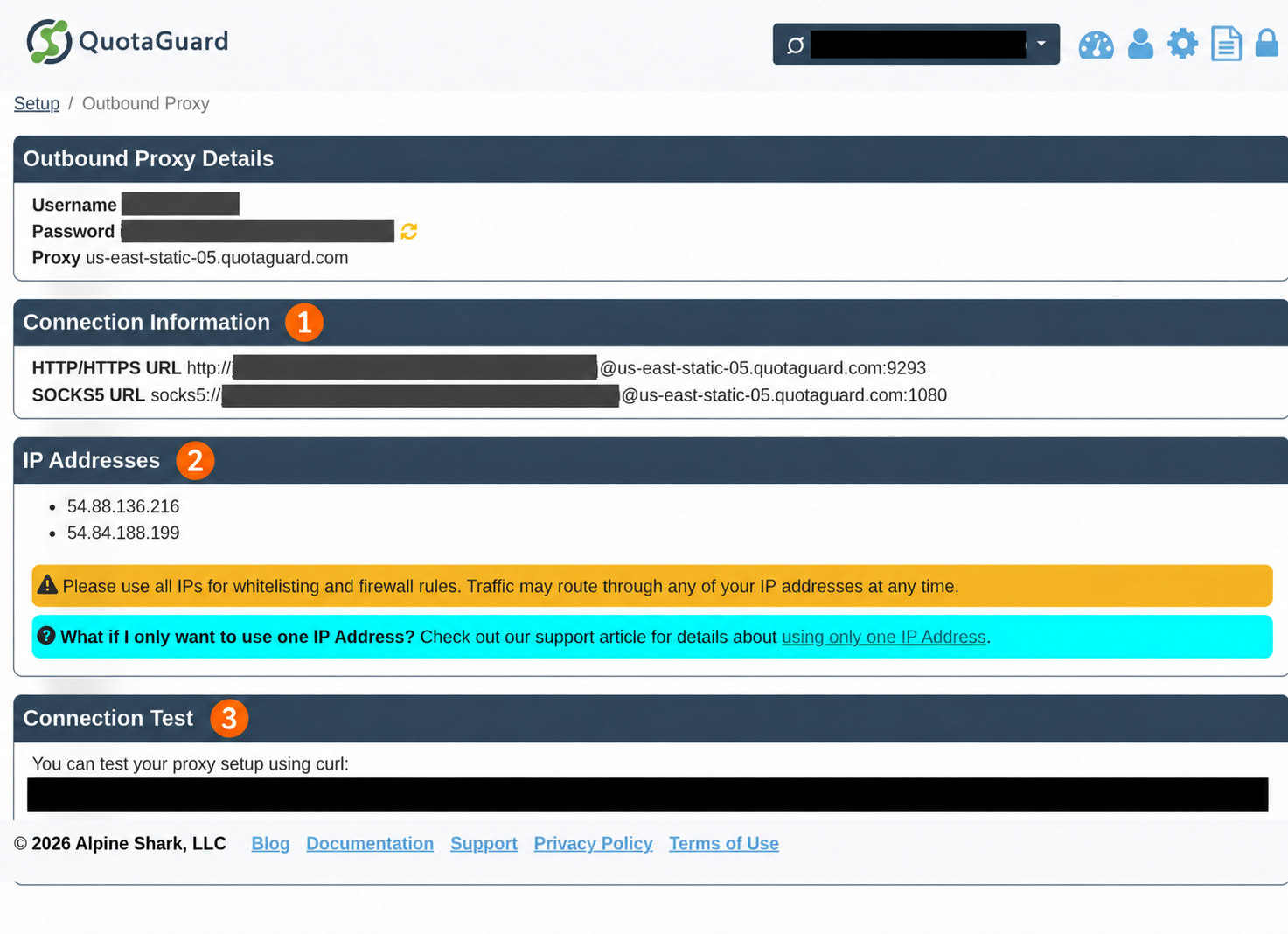
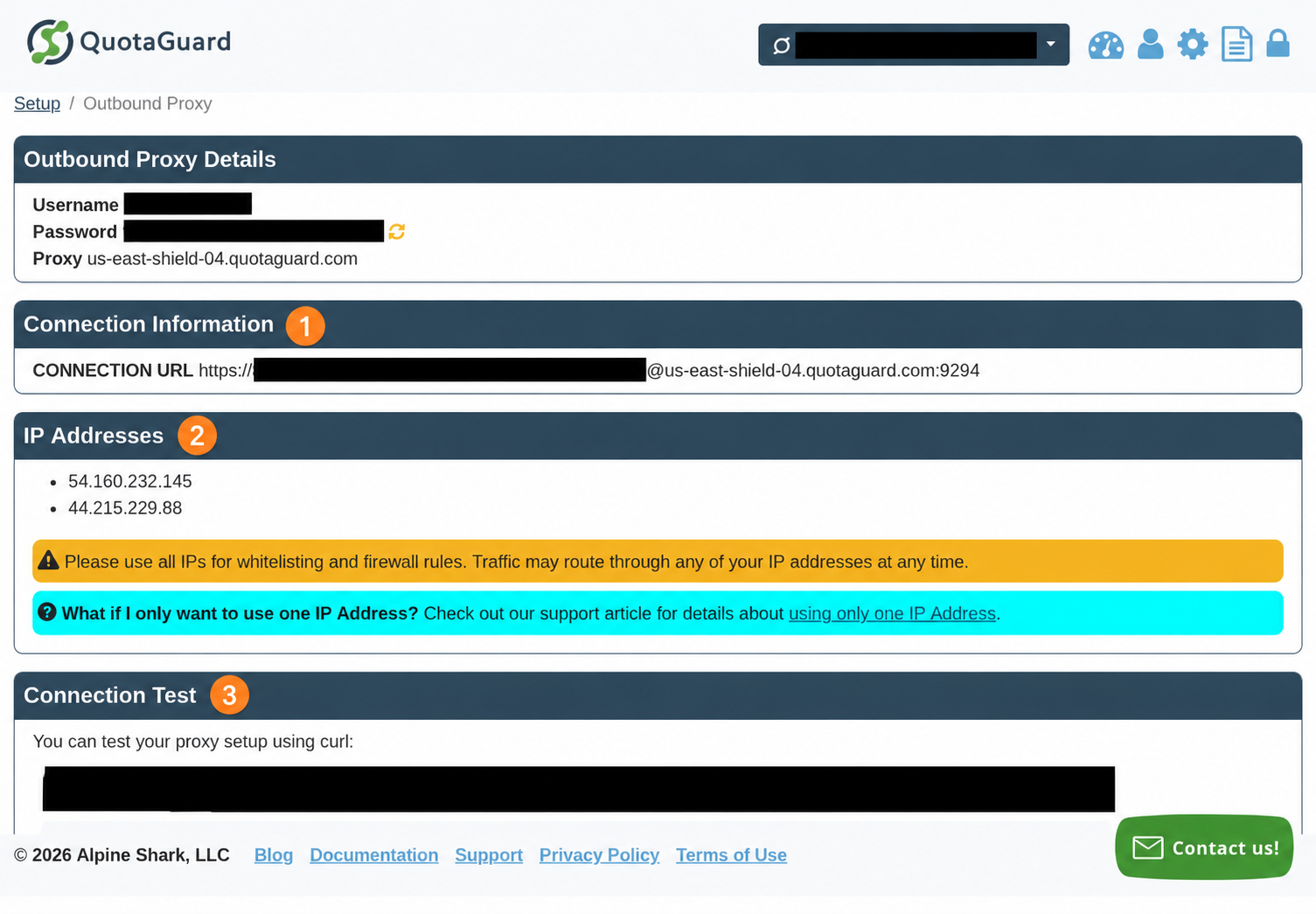
In your subscription, open Setup → Outbound Proxy → Connection Information. Copy the assigned connection URL and note both IPs. Official connection-details guide · Why both IPs matter
Real dashboard captures, redacted and annotated. Use your own subscription’s current details, not the values shown here. Static uses its HTTP proxy URL; Shield uses its HTTPS proxy URL and requires HTTPS-proxy support in the actual client.
Compare permitted direct and proxied egress
https://ip.quotaguard.com returns the outgoing IPv4 address as JSON and needs no additional account. An optional direct baseline is useful only where your runtime policy permits it. Do not bypass a sandbox or required gateway for this comparison:
curl -q --globoff --noproxy '*' --connect-timeout 10 --max-time 30 \
  --silent --fail https://ip.quotaguard.com
For an explicit client path permitted to reach QuotaGuard directly, make one request through the subscription. This sends the proxy configuration over standard input so the credential-bearing URL is not a curl command-line argument. Keep the dashboard URL percent-encoded as supplied; do not replace encoded characters with literal quotes or newlines.
printf 'proxy = "%s"\nnoproxy = ""\nurl = "https://ip.quotaguard.com"\ngloboff\nconnect-timeout = 10\nmax-time = 30\nsilent\nfail\n' \
  "$QUOTAGUARDSTATIC_URL" | curl -q --config -
Expected response shape:
{"ip":"<one of the two IPs in this subscription's dashboard>"}
The proxied result must match either dashboard IP. Do not require a different address on each call: selection is per connection, DNS can be cached, and a reused connection stays on its node. The direct result might coincidentally match if your network already uses the same egress path. This check proves curl’s route; verify each OpenClaw client that will call your protected destination.
Both commands disable curl URL globbing, ignore .curlrc, keep TLS certificate verification enabled, and make one request without redirects or retries. A failing quick check returns a nonzero exit status; the troubleshooting table below separates proxy authentication, TLS, and destination failures. For a sanitized automated pass/fail check, use the complete qg-curl.py example later in this guide.
Point the OpenClaw process at QuotaGuard
For a foreground Gateway, map the existing secret to OpenClaw’s documented environment setting:
export OPENCLAW_PROXY_URL="$QUOTAGUARDSTATIC_URL"
openclaw gateway run
proxy.proxyUrl in OpenClaw configuration takes precedence over OPENCLAW_PROXY_URL. If a previous proxy is stored there, update that setting through the config fragment below or remove the stale setting before using the environment fallback. Also check that an old proxy.enabled: false has not explicitly disabled managed routing.
This route is supported for openclaw gateway run, openclaw node run, and openclaw agent --local in OpenClaw v2026.10.7. It routes normal fetch, Node HTTP/HTTPS, and common WebSocket clients. OpenClaw documents additional local terminal UI coverage in its current online docs; use the release-specific behavior when supporting an older installation. See the official network proxy reference.
Allowlist both IPs, then verify the actual client
At the destination API or firewall, add the two IP addresses shown for this subscription. If it accepts CIDR notation, each IPv4 address is an individual /32. Keep the destination’s API token, OAuth scope, role, and other authorization requirements in place. Proxy authentication and destination authentication are separate.
For an OpenClaw route that uses web_fetch, an IP-only request is:
await web_fetch({ url: "https://ip.quotaguard.com", extractMode: "text" });
Use the tool only where your tool profile permits it. During route checks, set tools.web.fetch.cacheTtlMinutes to 0 so a cached response is not mistaken for a new network observation. Keep provider fallbacks separate: if extraction falls back to a hosted provider, that provider makes the origin request. For API commands, run the IP check with the same language client, execution host, and proxy configuration used by that command.
Keep the proxy active across service and container restarts
Installed Gateway: choose a durable configuration
A terminal export does not automatically update an already installed launchd, systemd, or Windows Scheduled Task service. OpenClaw documents the environment fallback as best suited to foreground runs. For an installed service, securely place OPENCLAW_PROXY_URL in the service’s durable environment, such as $OPENCLAW_STATE_DIR/.env (default ~/.openclaw/.env), then regenerate the service and start it:
openclaw gateway install --force
openclaw gateway start
The human or secret-management system supplies the value. Keep that file outside the agent workspace and repository and readable only by the service identity. Reinstall after changing OPENCLAW_PROXY_URL: OpenClaw copies it into the generated service environment, and a restart alone does not apply systemd’s managed-dotenv refresh to this variable. Use the correct profile and state directory for the service you are actually running.
Alternatively, merge the following into the existing OpenClaw config. OpenClaw supports environment substitution in config strings, so the checked-in fragment contains no credentials:
{
  "proxy": {
    "proxyUrl": "${QUOTAGUARDSTATIC_URL}",
    "loopbackMode": "gateway-only"
  }
}
Use the exact connection URL from your dashboard for the trusted QUOTAGUARDSTATIC_URL environment value. Ensure the service can resolve that variable at startup, using its durable trusted environment. Merge the proxy keys into the existing object; do not replace an existing config file with this small fragment or append a second JSON document. After a config change, restart the Gateway:
openclaw gateway restart
The config route survives service regeneration. If both config and OPENCLAW_PROXY_URL are present, the config value wins. OpenClaw normally preserves an existing process environment over dotenv values, and ignores protected runtime controls from a lower-trust workspace .env. See environment precedence.
Docker, Kubernetes, remote nodes, and execution hosts
Inject the connection URL at runtime into the actual container or service, using its secret mechanism. A host-only export does not reach a separately running container. Do not bake the URL into an image, Dockerfile ENV, Compose YAML, or Kubernetes manifest. A Kubernetes Secret reference or a platform-managed secret can supply the environment variable; the manifest should contain only the secret’s name and key.
When using openclaw --container ..., OpenClaw forwards OPENCLAW_PROXY_URL to the container-targeted child CLI when set. A proxy at 127.0.0.1 would mean the container itself, so OpenClaw rejects loopback proxy URLs for that path by default. Your dashboard’s remote hostname avoids that host/container ambiguity.
The execution location also matters. exec may run on the Gateway, in a sandbox, or on a paired node. Install dependencies and supply secrets to the host that actually opens the connection. Gateway environment settings do not prove that sandbox, remote node, local MCP, or browser processes received them. The exec reference describes host selection and environment behavior.
Know which network hop gets the static IP
QuotaGuard gives supported OpenClaw HTTP and WebSocket clients two static outbound IP addresses. Set OpenClaw’s managed proxy to your existing subscription’s connection URL, then allowlist both dashboard IPs at the destination.
For an HTTPS API call, the path is:
OpenClaw HTTP client
  -> authenticated QuotaGuard forward proxy
  -> destination HTTPS server
Destination sees one of the subscription's two dashboard IPv4 addresses.
The destination’s TLS session runs inside the tunnel between the client and destination. Both Static and Shield carry that HTTPS payload without decrypting it. Static’s client-to-proxy hop is plaintext, including proxy authentication and tunnel metadata. Shield adds TLS to that outer hop. Destination API authorization remains inside the destination request; it does not authenticate you to QuotaGuard.
| Request owner | Configuration and scope |
|---|---|
| OpenClaw runtime HTTP/HTTPS and common WebSocket clients | Managed proxy.proxyUrl or OPENCLAW_PROXY_URL covers the supported process clients. OpenClaw’s Proxyline runtime also replaces caller-provided Node HTTP agents. |
| Plugin with its own transport | Inspect the plugin’s documented transport settings. Some plugins need their own proxy wiring. Telegram’s Bot API uses its own HTTP/1 undici dispatcher and separately honors process proxy environment plus the OpenClaw URL fallback. |
| Tool subprocess or customer-operated MCP server | The process must receive and use a proxy setting supported by its own HTTP library. The explicit-client examples below cover this route. |
| Remote MCP or hosted fetch provider | Proxied OpenClaw-to-provider traffic does not assign QuotaGuard IPs to the provider’s separate request to the origin. Configure the component that opens the origin connection. |
| Browser | CDP control traffic and browser page traffic are distinct. Proxy configuration on the OpenClaw process does not configure every browser navigation, resource, or hosted browser. Configure and verify the browser’s own supported proxy path. |
Raw TCP, native addon, IRC, arbitrary net/tls/http2 client |
HTTP proxy hooks are not general socket interception. IRC is raw TCP/TLS and is not covered by managed HTTP routing. Use a supported SOCKS5 client or QGTunnel for the specific TCP route. |
Managed routing is process-level HTTP/WebSocket routing, not an OS network sandbox. OpenClaw’s network proxy reference states its transport limits; the browser reference describes the separate browser control path.
Preserve local Gateway and CDP connections
Keep proxy.loopbackMode: "gateway-only", the default. Loopback HTTP/WebSocket connections, including Gateway control, browser CDP, and native inference relay listeners, connect directly. LAN, tailnet, private-network, and public hosts are not general bypasses.
The proxy mode sends loopback destinations to the remote proxy, where 127.0.0.1 means that proxy, not your machine. This can break local listeners. The block mode denies the documented local control-plane/provider paths. An old blanket NO_PROXY list does not override managed routing: OpenClaw replaces inherited bypass lists with its loopback policy. Environment-only proxy routing follows different NO_PROXY rules.
Use web_fetch with the right destination policy
web_fetch makes a plain HTTP GET and extracts readable text. It does not execute JavaScript and is not a general authenticated API SDK. It checks destinations and redirects, and can use a configured provider fallback. See the official web_fetch documentation.
There are two different proxy paths to understand:
- Managed process proxy. In v2026.10.7, guarded fetch under an active managed proxy keeps hostname/IP policy checks but delegates destination DNS to the proxy. Keeping
useTrustedEnvProxyfalse does not restore local DNS pinning while managed routing is active. This follows the release’s guarded-fetch implementation. - Environment-only trusted proxy.
tools.web.fetch.useTrustedEnvProxy: trueexplicitly permits HTTP(S) proxy environment routing and proxy-side DNS resolution. OpenClaw says to use this only with an operator-controlled proxy enforcing destination policy after DNS resolution. Without a matching proxy environment variable, or whereNO_PROXYexcludes the target, it falls back to strict local DNS pinning.
QuotaGuard supplies authenticated static egress. Its verified product facts do not establish the connect-time private-address blocking or destination filtering policy described for an operator-managed security proxy. A static IP and proxy authentication do not by themselves enforce an outbound destination allowlist.
For operator-selected public API endpoints, managed routing supplies the documented static-egress path. If agents can fetch arbitrary untrusted URLs, apply independently enforced destination policy appropriate to that deployment. If you need to retain normal strict fetching while proxying only specific API commands, leave managed proxy routing off and use the explicit-client tool examples below. Those clients use operator-supplied fixed target configuration; do not turn them into an unrestricted model-selected URL relay.
This fragment disables fetch cache and redirects during a route check, and retains the private-network default. Merge it only for the check, then restore your chosen cache/redirect settings:
{
  "tools": {
    "web": {
      "fetch": {
        "useTrustedEnvProxy": false,
        "cacheTtlMinutes": 0,
        "maxRedirects": 0,
        "ssrfPolicy": {
          "dangerouslyAllowPrivateNetwork": false
        }
      }
    }
  }
}
These settings are not a replacement for destination enforcement. allowedHostnames adds exact-host exceptions to SSRF policy; it is not a general “allow only these hosts” firewall. Do not broadly enable dangerouslyAllowPrivateNetwork to fix an IP check or a proxy timeout.
OpenClaw’s openclaw proxy validate tests allowed and denied destinations. It is a policy diagnostic, not proof that every plugin or browser is proxied. It sends real requests, including a default loopback canary check; use it only within your approved network-validation scope. A passing reachability check alone cannot certify an external proxy’s filtering policy.
Give child processes the proxy configuration their client supports
If a tool uses conventional environment-aware HTTP clients, provide the variables in that tool’s own trusted runtime environment:
export HTTP_PROXY="$QUOTAGUARDSTATIC_URL"
export HTTPS_PROXY="$QUOTAGUARDSTATIC_URL"
export http_proxy="$QUOTAGUARDSTATIC_URL"
export https_proxy="$QUOTAGUARDSTATIC_URL"
export NO_PROXY='localhost,127.0.0.1,::1'
export no_proxy="$NO_PROXY"
Use the exact HTTP(S) connection URL from your subscription dashboard. Both environment variable values describe the proxy hop, so a Static subscription still uses an http:// value for HTTPS_PROXY. Set both cases consistently because precedence differs across clients. curl deliberately does not accept uppercase HTTP_PROXY for plain HTTP requests; the lowercase form covers that case. Keep a protected destination out of bypass lists.
Environment variables help only clients that read them. A library’s explicit agent, proxy option, or dispatcher may need separate configuration. The following examples attach the proxy explicitly and do not depend on NO_PROXY. They are useful for tools launched by OpenClaw, standalone MCP server methods you operate, and controlled API jobs.
Make a sanitized IP check or an optional protected API call
The dependency files for the optional Python and Node tool examples are:
requests>=2.32,<3
httpx>=0.28,<1
psycopg[binary]>=3,<4
{
  "name": "quotaguard-openclaw-tool-examples",
  "private": true,
  "type": "module",
  "engines": {"node": ">=24"},
  "dependencies": {
    "undici": ">=7 <8",
    "axios": ">=1 <2",
    "https-proxy-agent": ">=7 <8",
    "ws": ">=8 <9",
    "socks-proxy-agent": ">=8 <9"
  }
}
Install only the libraries used by your chosen tool in its execution environment. The IP check itself needs only curl and Python’s standard library.
The complete Python wrapper below drives curl using standard-input configuration. It ignores .curlrc, disables URL globbing, redirects and retries, sets timeouts, captures error output, and prints neither credentials nor response bodies. It sends destination authorization only when separately supplied and refuses to send it to the IP endpoint.
For an IP check, have your trusted launcher provide QG_IP_1 and QG_IP_2 from the same dashboard subscription; these are comparison values, not proxy DNS results. Choose the IP target explicitly and clear an optional inherited destination token for this invocation only. On an approved explicit/direct client route, run:
env -u DESTINATION_API_TOKEN QG_TARGET_URL=https://ip.quotaguard.com python3 qg-curl.py
It reports PASS: HTTP 200; egress matches a dashboard IP when the returned IP is in the pair. For an optional protected endpoint, the operator supplies QG_TARGET_URL as an approved HTTPS URL and DESTINATION_API_TOKEN as that destination’s Bearer token. The program makes one GET and reports status success. Use the destination’s actual documented auth scheme if it is not Bearer auth. Do not send API tokens to IP-check services.
#!/usr/bin/env python3
"""Exactly one HTTPS GET. No redirects, retry loop, secret argv, or body output."""
import ipaddress
import json
import os
import subprocess
import sys
from urllib.parse import urlsplit


class IPCheckTokenError(ValueError):
    """Destination credentials must not be sent to the public IP check."""


class EgressMismatchError(RuntimeError):
    """A valid IP response is outside the configured dashboard pair."""


def config(env):
    proxy = env["QUOTAGUARDSTATIC_URL"]
    target = env.get("QG_TARGET_URL", "https://ip.quotaguard.com")
    token = env.get("DESTINATION_API_TOKEN", "")
    for value in (proxy, target, token):
        if any(ord(c) < 32 or ord(c) == 127 for c in value):
            raise ValueError("Control character")
    p, t = urlsplit(proxy), urlsplit(target)
    if p.scheme not in ("http", "https") or not p.hostname or not p.username or not p.password:
        raise ValueError("Use the complete dashboard HTTP(S) connection URL")
    if p.path not in ("", "/") or p.query or p.fragment:
        raise ValueError("Invalid proxy URL")
    if t.scheme != "https" or not t.hostname or t.username or t.password or t.fragment:
        raise ValueError("Target must be a trusted HTTPS URL without userinfo or fragment")
    # JSON string quoting is compatible with curl config escapes used here.
    lines = ["silent", "show-error", "fail", "globoff", "noproxy = \"\"",
             "connect-timeout = 10", "max-time = 30", "retry = 0",
             "proxy = " + json.dumps(proxy), "url = " + json.dumps(target)]
    if token:
        if t.hostname.lower() == "ip.quotaguard.com":
            raise IPCheckTokenError("Do not send destination API tokens to an IP check")
        lines.append("header = " + json.dumps("Authorization: Bearer " + token))
    lines.append('write-out = "\\n%{http_code}"')
    return "\n".join(lines) + "\n", t.hostname == "ip.quotaguard.com"


def main():
    try:
        cfg, ip_check = config(os.environ)
        if ip_check:
            expected = {str(ipaddress.IPv4Address(os.environ[key])) for key in ("QG_IP_1", "QG_IP_2")}
            if len(expected) != 2:
                raise ValueError("Two distinct dashboard IPv4 addresses required")
        clean = {k: v for k, v in os.environ.items()
                 if not any(s in k.upper() for s in ("PROXY", "TOKEN", "SECRET", "PASSWORD", "QUOTAGUARD"))}
        # -q must be first: ignore .curlrc, which could add URLs/retries/trace.
        result = subprocess.run(["curl", "-q", "--config", "-"], input=cfg,
                                text=True, capture_output=True, timeout=35, env=clean)
        if result.returncode:
            hints = {5: "Proxy DNS failed; check assigned hostname and permitted DNS route.",
                     7: "Connection failed; check host/port, reachability and runtime policy.",
                     22: "HTTP error; proxy or destination may have rejected the request.",
                     56: "Receive/CONNECT failure; check authentication, policy and transport compatibility."}
            hint = hints.get(result.returncode, "Check client transport, TLS trust and the permitted route.")
            print(f"curl exit {result.returncode}: {hint}", file=sys.stderr)
            return 1
        body, status = result.stdout.rsplit("\n", 1)
        if not 200 <= int(status) < 300:
            raise RuntimeError("Unexpected status")
        if ip_check:
            if int(status) != 200:
                raise RuntimeError("IP check requires HTTP 200")
            observed = str(ipaddress.IPv4Address(json.loads(body)["ip"]))
            if observed not in expected:
                raise EgressMismatchError("Unexpected egress")
            print("PASS: HTTP 200; egress matches a dashboard IP")
        else:
            print("PASS: destination returned a successful HTTP status")
    except EgressMismatchError:
        print("Egress mismatch: the returned IP is outside the configured dashboard pair. "
              "Check the execution route and selected subscription.", file=sys.stderr)
        return 1
    except IPCheckTokenError:
        print("IP check rejects DESTINATION_API_TOKEN. Run: env -u DESTINATION_API_TOKEN "
              "QG_TARGET_URL=https://ip.quotaguard.com python3 qg-curl.py", file=sys.stderr)
        return 1
    except Exception:
        print("Request or egress check failed. Check configuration and the guide; no response or secret was printed.", file=sys.stderr)
        return 1
    return 0


if __name__ == "__main__":
    sys.exit(main())
There is no extra account requirement for the IP check. For a protected API, the destination’s own account/authorization requirements still apply. Keep targets, tokens, and permissions under operator control. A GET can still have application-specific effects; choose a documented read endpoint.
Configure the actual language client
For these examples, supply QUOTAGUARDSTATIC_URL from the dashboard and QG_TARGET_URL through the tool’s trusted environment. Start with QG_TARGET_URL=https://ip.quotaguard.com and no token, then use an approved protected read endpoint. Status success confirms reachability; inspect the IP-check response through the curl checker before allowing protected traffic.
Python: Requests and HTTPX
Install requests or httpx in the execution host’s Python environment. Requests uses a proxies mapping; current HTTPX uses singular proxy=, not the removed proxies= client argument. Both examples disable ambient proxy configuration and redirects. Do not log exception objects, which can carry URLs or headers.
python3 python-clients.py requests
python3 python-clients.py httpx
Choose one command for the client being checked; these are alternatives, not a two-request verification sequence.
#!/usr/bin/env python3
"""Choose requests or httpx. Trusted endpoint and auth come from operator env."""
import os
import sys
from urllib.parse import urlsplit


def main():
    try:
        target, proxy = os.environ["QG_TARGET_URL"], os.environ["QUOTAGUARDSTATIC_URL"]
        t, p = urlsplit(target), urlsplit(proxy)
        if t.scheme != "https" or t.username or t.password or not t.hostname:
            raise ValueError()
        if p.scheme not in ("http", "https") or not p.hostname or not p.username or not p.password:
            raise ValueError()
        token = os.environ.get("DESTINATION_API_TOKEN", "")
        if any(ord(c) < 32 or ord(c) == 127 for c in target + proxy + token):
            raise ValueError()
        if token and t.hostname == "ip.quotaguard.com":
            raise ValueError()
        headers = {"Authorization": "Bearer " + token} if token else {}
        mode = sys.argv[1] if len(sys.argv) == 2 else "requests"
        if mode == "requests":
            import requests
            with requests.Session() as client:
                client.trust_env = False
                response = client.get(target, proxies={"http": proxy, "https": proxy},
                                      headers=headers, timeout=(10, 30), allow_redirects=False)
        elif mode == "httpx":
            import httpx
            with httpx.Client(proxy=proxy, trust_env=False, follow_redirects=False, timeout=30) as client:
                response = client.get(target, headers=headers)
        else:
            raise ValueError()
        if not 200 <= response.status_code < 300:
            raise RuntimeError()
        print("PASS: destination returned a successful HTTP status")
    except Exception:
        print("Request failed; check configuration and the guide.", file=sys.stderr)
        return 1
    return 0


if __name__ == "__main__":
    sys.exit(main())
HTTPX documents HTTPS proxy support as limited and calls out common HTTPS-proxy handshake failures. Use the Requests/curl or Node route for Shield when that HTTPX transport cannot connect to a TLS proxy; do not change a Shield URL to HTTP to work around it. The HTTPX proxy guide explains proxy scheme selection and this limitation. Requests HTTPS-proxy support uses urllib3’s HTTP and HTTPS proxy support and requires a compatible urllib3/OpenSSL stack.
Node.js: undici fetch and axios with HttpsProxyAgent
Install undici, axios, and https-proxy-agent in the command or MCP server project. Use a maintained Node runtime compatible with those installed packages. The fetch imported from undici accepts a ProxyAgent dispatcher; axios uses httpsAgent for the HTTPS destination and proxy: false to prevent an additional ambient axios proxy layer.
node node-clients.mjs fetch
node node-clients.mjs axios
Choose one client. Each execution makes one request. Both HTTP and HTTPS proxy endpoint schemes are handled by the proxy-agent implementation; destination TLS remains separate. See undici ProxyAgent and https-proxy-agent.
import { ProxyAgent, fetch } from 'undici';
import axios from 'axios';
import { HttpsProxyAgent } from 'https-proxy-agent';

async function main() {
  const proxy = new URL(process.env.QUOTAGUARDSTATIC_URL);
  const target = new URL(process.env.QG_TARGET_URL);
  const token = process.env.DESTINATION_API_TOKEN || '';
  if (!['http:', 'https:'].includes(proxy.protocol) || !proxy.username || !proxy.password ||
      target.protocol !== 'https:' || target.username || target.password ||
      /[\x00-\x1f\x7f]/.test(token) || (token && target.hostname === 'ip.quotaguard.com')) {
    throw new Error('Invalid configuration');
  }
  const headers = token ? { Authorization: `Bearer ${token}` } : {};
  const mode = process.argv[2] || 'fetch';
  if (mode === 'fetch') {
    const dispatcher = new ProxyAgent(proxy.href);
    try {
      const response = await fetch(target, { dispatcher, headers, redirect: 'manual',
        signal: AbortSignal.timeout(30000) });
      await response.body?.cancel();
      if (!response.ok) throw new Error('Status');
    } finally { await dispatcher.close(); }
  } else if (mode === 'axios') {
    const agent = new HttpsProxyAgent(proxy.href);
    try {
      await axios.get(target.href, { httpsAgent: agent, proxy: false, headers,
        maxRedirects: 0, timeout: 30000, responseType: 'stream' }).then(response => {
          response.data.destroy();
          if (response.status < 200 || response.status >= 300) throw new Error('Status');
        });
    } finally { agent.destroy(); }
  } else { throw new Error('Choose fetch or axios'); }
  console.log('PASS: destination returned a successful HTTP status');
}
main().catch(() => { console.error('Request failed; check configuration and the guide.'); process.exitCode = 1; });
These are per-client patterns for a tool process or server you own. Inside managed OpenClaw routing, OpenClaw’s own process hooks own the route and replace explicit Node HTTP agents; adding another agent there is not a way to bypass managed policy.
Go: net/http Transport
The explicit http.ProxyURL function selects the configured proxy regardless of environment bypass lists. Go supports HTTP and HTTPS proxy URLs. The example keeps certificate verification enabled and refuses redirects. See net/http proxy support.
go run go-client.go
package main

import (
    "fmt"
    "net/http"
    "net/url"
    "os"
    "time"
)

func run() error {
    target, err := url.Parse(os.Getenv("QG_TARGET_URL"))
    if err != nil || target.Scheme != "https" || target.Hostname() == "" || target.User != nil { return fmt.Errorf("config") }
    proxy, err := url.Parse(os.Getenv("QUOTAGUARDSTATIC_URL"))
    if err != nil || (proxy.Scheme != "http" && proxy.Scheme != "https") || proxy.Hostname() == "" || proxy.User == nil { return fmt.Errorf("config") }
    token := os.Getenv("DESTINATION_API_TOKEN")
    if token != "" && target.Hostname() == "ip.quotaguard.com" { return fmt.Errorf("config") }
    transport := &http.Transport{Proxy: http.ProxyURL(proxy), TLSHandshakeTimeout: 10 * time.Second}
    defer transport.CloseIdleConnections()
    client := &http.Client{Transport: transport, Timeout: 30 * time.Second,
        CheckRedirect: func(req *http.Request, via []*http.Request) error { return http.ErrUseLastResponse }}
    req, err := http.NewRequest(http.MethodGet, target.String(), nil)
    if err != nil { return err }
    if token != "" { req.Header.Set("Authorization", "Bearer " + token) }
    response, err := client.Do(req)
    if err != nil { return err }
    defer response.Body.Close()
    if response.StatusCode < 200 || response.StatusCode >= 300 { return fmt.Errorf("status") }
    return nil
}

func main() {
    if run() != nil { fmt.Fprintln(os.Stderr, "Request failed; check configuration and the guide."); os.Exit(1) }
    fmt.Println("PASS: destination returned a successful HTTP status")
}
Ruby: Net::HTTP for Static
This example uses Net::HTTP’s proxy constructor arguments to establish an HTTPS destination tunnel through a plaintext HTTP proxy hop, so it is a Static example. It deliberately rejects HTTPS proxy URLs; the presence of use_ssl encrypts the destination session, not the proxy hop. For Shield, use a transport with documented HTTPS-proxy support, such as the curl wrapper, rather than relabeling the URL. See Net::HTTP.
ruby ruby-client.rb
require 'net/http'
require 'uri'
require 'openssl'

begin
  target = URI(ENV.fetch('QG_TARGET_URL'))
  proxy = URI(ENV.fetch('QUOTAGUARDSTATIC_URL'))
  # Net::HTTP proxy arguments below implement Static's plaintext proxy hop.
  raise 'config' unless target.scheme == 'https' && target.host && !target.userinfo
  raise 'config' unless proxy.scheme == 'http' && proxy.host && proxy.user && proxy.password
  token = ENV.fetch('DESTINATION_API_TOKEN', '')
  raise 'config' if token.match?(/[\r\n]/) || (!token.empty? && target.host == 'ip.quotaguard.com')
  http = Net::HTTP.new(target.host, target.port, proxy.host, proxy.port,
    URI::DEFAULT_PARSER.unescape(proxy.user), URI::DEFAULT_PARSER.unescape(proxy.password))
  http.use_ssl = true
  http.verify_mode = OpenSSL::SSL::VERIFY_PEER
  http.open_timeout = 10
  http.read_timeout = 30
  http.max_retries = 0
  request = Net::HTTP::Get.new(target.request_uri)
  request['Authorization'] = "Bearer #{token}" unless token.empty?
  response = http.request(request)
  raise 'status' unless response.code.to_i.between?(200, 299)
  puts 'PASS: destination returned a successful HTTP status'
rescue StandardError
  warn 'Request failed; check configuration and the guide.'
  exit 1
end
PHP: cURL, with an explicit HTTPS-proxy capability check
PHP’s cURL extension uses libcurl. An HTTPS target is independent of an HTTPS proxy; Shield requires a build advertising CURL_VERSION_HTTPS_PROXY. The example checks that feature and retains peer and hostname verification. See PHP CURLOPT options and the curl manual.
php php-client.php
<?php
// Requires PHP cURL; HTTPS-proxy support is a separate libcurl capability.
try {
    $target = getenv('QG_TARGET_URL');
    $proxy = getenv('QUOTAGUARDSTATIC_URL');
    $t = parse_url($target ?: '');
    $p = parse_url($proxy ?: '');
    if (!$t || ($t['scheme'] ?? '') !== 'https' || empty($t['host']) || isset($t['user']) ||
        !$p || !in_array($p['scheme'] ?? '', ['http', 'https'], true) || empty($p['host']) || empty($p['user']) || empty($p['pass'])) {
        throw new Exception('config');
    }
    $token = getenv('DESTINATION_API_TOKEN') ?: '';
    if (preg_match('/[\x00-\x1f\x7f]/', $token) || ($token !== '' && $t['host'] === 'ip.quotaguard.com')) { throw new Exception('config'); }
    if ($p['scheme'] === 'https' && !(curl_version()['features'] & CURL_VERSION_HTTPS_PROXY)) { throw new Exception('proxy TLS unsupported'); }
    $ch = curl_init($target);
    curl_setopt_array($ch, [CURLOPT_PROXY => $proxy, CURLOPT_NOPROXY => '',
        CURLOPT_HTTPPROXYTUNNEL => true, CURLOPT_FOLLOWLOCATION => false,
        CURLOPT_CONNECTTIMEOUT => 10, CURLOPT_TIMEOUT => 30,
        CURLOPT_SSL_VERIFYPEER => true, CURLOPT_SSL_VERIFYHOST => 2,
        CURLOPT_HTTPHEADER => $token !== '' ? ['Authorization: Bearer ' . $token] : [],
        CURLOPT_WRITEFUNCTION => static function ($ch, $data) { return strlen($data); }]);
    $ok = curl_exec($ch);
    $status = curl_getinfo($ch, CURLINFO_RESPONSE_CODE);
    curl_close($ch);
    if ($ok === false || $status < 200 || $status >= 300) { throw new Exception('request'); }
    echo "PASS: destination returned a successful HTTP status\n";
} catch (Throwable $e) {
    fwrite(STDERR, "Request failed; check configuration and the guide.\n");
    exit(1);
}
Keep streams and WebSockets working across connection changes
QuotaGuard’s HTTP CONNECT tunnels have a hard 600-second lifetime, on both Static and Shield. That is connection age, not inactivity: traffic or WebSocket pings do not extend it, and changing an idle timeout does not remove it. A stream can be interrupted mid-response when its tunnel reaches that age.
For ordinary short HTTP requests, use bounded request timeouts and refresh pooled connections before ten minutes. For WebSockets, implement reconnect with backoff, reauthentication, and the destination protocol’s resume or replay handling. Reconnecting a socket does not establish whether an in-flight write succeeded; use the destination’s idempotency or sequence mechanism before retrying actions.
For a client you control that supports SOCKS5, Static’s SOCKS5 port 1080 has no fixed CONNECT lifetime cap. Shield Secure SOCKS uses 1081 with TLS to the proxy. The same subscription keeps the same dashboard IP pair when switching between its HTTP and SOCKS routes. Deployments and failover can still drop sockets, so reconnect handling remains necessary.
OpenClaw’s managed proxy.proxyUrl accepts HTTP(S) forward proxy URLs. Do not put a SOCKS URL into that setting. To use SOCKS for a persistent connection, configure a SOCKS-aware transport owned by that tool/plugin, or use an appropriate customer-operated tunnel. This does not convert every OpenClaw WebSocket client to SOCKS automatically.
Node WebSocket through Static SOCKS5
For a WSS transport you operate, ws accepts an agent supplied by socks-proxy-agent. Have the operator supply the approved QG_WS_URL and the subscription’s Static SOCKS URL as QG_STATIC_SOCKS_URL, using its exact dashboard hostname and credentials on port 1080. socks5h delegates target DNS through this client’s proxy. This example is Static-only; it rejects Shield’s Secure SOCKS port rather than silently using plaintext on a TLS-required route. See socks-proxy-agent and ws client options.
node node-ws-socks.mjs
// Static SOCKS5 only. This receives a stream; it sends no application messages.
import WebSocket from 'ws';
import { SocksProxyAgent } from 'socks-proxy-agent';

try {
  const target = new URL(process.env.QG_WS_URL);
  const proxy = new URL(process.env.QG_STATIC_SOCKS_URL);
  const token = process.env.DESTINATION_API_TOKEN || '';
  if (target.protocol !== 'wss:' || target.username || target.password ||
      !['socks5:', 'socks5h:'].includes(proxy.protocol) || proxy.port !== '1080' ||
      !proxy.username || !proxy.password || /[\x00-\x1f\x7f]/.test(token)) {
    throw new Error('Invalid configuration');
  }
  let attempts = 0;
  let stopped = false;
  let socket;
  let timer;
  const agent = new SocksProxyAgent(proxy.href);
  function connect() {
    attempts += 1;
    socket = new WebSocket(target.href, { agent, handshakeTimeout: 10000,
      headers: token ? { Authorization: `Bearer ${token}` } : {} });
    socket.on('open', () => console.log('Connected; stream payload is not logged'));
    socket.on('message', () => { /* Process data privately with protocol-aware sequencing. */ });
    socket.on('error', () => { /* close triggers the bounded recovery path. */ });
    socket.on('close', () => {
      if (stopped) return;
      if (attempts >= 5) {
        console.error('Connection ended; automatic connection attempts exhausted.');
        process.exitCode = 1;
        agent.destroy();
        return;
      }
      timer = setTimeout(connect, Math.min(16000, 1000 * 2 ** (attempts - 1)));
    });
  }
  function stop() {
    stopped = true;
    clearTimeout(timer);
    socket?.terminate();
    agent.destroy();
  }
  process.on('SIGINT', stop);
  process.on('SIGTERM', stop);
  connect();
} catch {
  console.error('WebSocket configuration failed; check the guide.');
  process.exitCode = 1;
}
This receive-only example makes at most five connection attempts with backoff, then stops. It does not replay application actions or log stream payloads. Add the destination protocol’s resume cursor and deduplication handling where indicated before using it to process a business event stream.
QuotaGuard counts tunnel opens as requests. Reconnect frequency affects request usage; both directions’ bytes, including tunnel/TLS overhead where applicable, contribute to bandwidth. A long-lived socket is not one billed request per message. Watch your existing subscription’s usage as you add agent jobs and reconnecting channels.
Reach databases and other TCP services from an agent-owned tool
An HTTP proxy environment variable does not configure PostgreSQL, MySQL, MongoDB, Redis, SFTP, or other raw TCP drivers. Use a supported SOCKS-aware client or QGTunnel on the host that runs that tool. Keep database authentication and TLS validation in the database driver. The destination must be reachable from the QuotaGuard proxy; a private VPC address does not become reachable simply because it was put in a connection string.
Static SOCKS5 for a client that supports it
Use the subscription’s Static SOCKS5 connection URL on 1080 and its existing proxy credentials. For a curl-based HTTP check through Static SOCKS5, a socks5h:// URL instructs curl to resolve the destination through the proxy. This is a client-specific scheme convention, not a replacement for OpenClaw’s HTTP(S) managed-proxy URL. For Shield, plain socks5:// to 1081 is insufficient: that port requires Secure SOCKS with TLS on the outer connection.
Do not monkey-patch Python’s global socket module to proxy an entire OpenClaw deployment. Attach SOCKS at the specific driver/transport, or use QGTunnel’s local listener for a driver without a proxy option. That keeps the database route distinct from Gateway/CDP loopback connections.
QGTunnel: a local port for a database tool
The published PostgreSQL Direct Service QGTunnel guide documents a wrapper that runs your application with a locally configured listener. Use its current installation package and keep bin/qgtunnel together with vendor/; do not discard the bundled library.
In the dashboard, go to Setup (gear icon, top-right) > QGTunnel Configuration > Create a Tunnel. A non-transparent PostgreSQL listener can use:
| Setting | Example and reason |
|---|---|
| Remote Destination | tcp://db.example.com:5432, replaced with the real reachable database host |
| Local Port | 15432, an unused local port on the tool host |
| Transparent | false, so the tool explicitly connects to the local listener |
| Encrypted | Configure for your tunnel architecture; database TLS is a separate requirement. Do not assume a plaintext database protocol becomes encrypted end-to-end. |
Supply the existing dashboard connection as QUOTAGUARDSTATIC_URL. Download the dashboard-generated .qgtunnel configuration into the tool’s private application directory, or supply its contents through QGTUNNEL_CONFIG, as documented. Treat exported configuration as sensitive. Start the tool through the installed wrapper from its installation directory:
bin/qgtunnel python3 postgres-tool.py
The complete postgres-tool.py below runs a read-only SELECT 1. Supply PGHOST as the real database certificate hostname, and supply PGDATABASE, PGUSER, PGPASSWORD, and the database CA file path PGSSLROOTCERT through that tool’s trusted environment. Its hostaddr selects the local listener, while host remains the real TLS verification name. This is the documented PostgreSQL host/hostaddr distinction. Never disable certificate verification to make a local tunnel work.
#!/usr/bin/env python3
"""Read-only PostgreSQL probe through an already configured QGTunnel listener."""
import os
import sys


def main():
    try:
        import psycopg
        with psycopg.connect(
            host=os.environ['PGHOST'],  # Real certificate hostname.
            hostaddr='127.0.0.1',        # Local tunnel listener.
            port=int(os.environ.get('QG_DB_LOCAL_PORT', '15432')),
            dbname=os.environ['PGDATABASE'], user=os.environ['PGUSER'],
            password=os.environ['PGPASSWORD'], sslmode='verify-full',
            sslrootcert=os.environ['PGSSLROOTCERT'], connect_timeout=10,
            options='-c default_transaction_read_only=on -c statement_timeout=15000'
        ) as conn:
            with conn.cursor() as cur:
                cur.execute('SELECT 1')
                if cur.fetchone() != (1,):
                    raise RuntimeError()
        print('PASS: read-only database probe completed')
    except Exception:
        print('Database probe failed; check listener, TLS, and authorization.', file=sys.stderr)
        return 1
    return 0


if __name__ == '__main__':
    sys.exit(main())
Transparent mode is another documented option: it overrides the destination hostname to 127.0.0.1 through the bundled preload library. It requires a compatible runtime, the proper working directory, and matching listener configuration. If the override does not load, a client can resolve the real destination and connect directly. If it resolves to loopback but the listener is missing, it gets connection refused instead. Diagnose these separately. This is why a narrow database-tool wrapper is preferable to applying transparent mode indiscriminately to the whole Gateway.
QGTunnel has no fixed CONNECT lifetime cap. This is a specific tool-to-database route; it is not proof that browsers, all plugins, or arbitrary child processes use the tunnel. Shield Secure SOCKS and tunnel encryption need a compatible TLS-capable tunnel setup; follow that product’s documented setup rather than substituting Static’s plaintext ports.
Choose Static or Shield before submitting destination IPs
| Feature | QuotaGuard Static | QuotaGuard Shield |
|---|---|---|
| Forward proxy URL | Dashboard http:// URL, port 9293 |
Dashboard https:// URL, port 9294 |
| Customer-to-proxy hop | Plaintext, including proxy authentication | TLS-encrypted |
| HTTPS payload | Tunneled end-to-end, never decrypted at the proxy | Tunneled end-to-end, never decrypted at the proxy |
| SOCKS route | SOCKS5 on 1080 |
Secure SOCKS over TLS on 1081 |
| General fit | Non-regulated API and automation traffic | Regulated data or a requirement for TLS on the proxy hop |
| Direct Starter price | $19/month | $29/month |
| Direct Enterprise with dedicated IPs | $219/month | $269/month |
Static is appropriate for most non-regulated static-egress API work. Choose Shield for regulated workloads or when policy requires TLS from the client to the proxy. Neither the product name nor proxy TLS by itself makes the whole application compliant. BAA coverage requires review and signed documentation.
The two products use separate IP pools, so switching products changes the assigned pair. Standard Starter, Production, and Business subscriptions use shared static IPs; use dedicated infrastructure when a destination requires exclusive source addresses. The current direct pricing page lists allowances and dedicated plans.
One subscription egresses through one region. Choose a nearby region to reduce the extra network distance. A region/proxy change requires allowlisting the new pair before cutting over; QuotaGuard supports an overlapping credential window, default seven days, for a coordinated proxy change. Keep destination credentials and proxy credentials separate throughout the migration.
Diagnose the failing hop
| Symptom | What to check and do |
|---|---|
| curl exits without JSON | Check its exit status, required environment value, proxy scheme/port, and network access to the dashboard hostname. Use the sanitized wrapper for an automated pass/fail result. Do not enable verbose/trace output containing credentials. |
407 Proxy Authentication Required |
Use the subscription’s proxy credentials in the complete dashboard URL. Account login credentials and destination API tokens do not authenticate the proxy. Keep encoded username/password characters intact. |
Proxy timeout or ECONNREFUSED |
Check runtime outbound access to the exact hostname and port. Static uses 9293; Shield uses 9294. A container’s localhost is not the host’s localhost. |
| TLS handshake or certificate error | Match the proxy URL scheme to the product. Keep both proxy and destination verification enabled. proxy.tls.caFile is for a private-CA HTTPS proxy endpoint; it does not change destination trust or create a filtering policy. |
Destination 401 or 403 after successful IP check |
Confirm destination token, scopes, roles, endpoint and both allowlisted IPs. A destination error and a proxy-auth error are different. A WAF can also reject a non-standard Host header containing a port. |
| Only one of the two IPs appears | Normal for connection reuse and DNS caching. Allowlist both anyway. Do not add extra retries to force rotation or infer a missing second address. |
| Wrong public IP | Verify the request owner: Gateway, node, sandbox tool, MCP server, browser, or provider fallback. Check explicit client proxy configuration, bypass lists for environment-only routes, and stale service configuration. |
| Terminal works but service does not | Make the proxy durable for that service/profile and regenerate the installed service after changing OPENCLAW_PROXY_URL. A terminal export does not update the running daemon. |
| WebChat/CDP/local relay breaks | Restore proxy.loopbackMode: "gateway-only". Sending loopback URLs through a remote proxy reaches its loopback, not yours. |
web_fetch appears to reuse an old IP |
Disable its cache during the check and identify the extractor/provider. Hosted fallback requests have a separate origin-facing network hop. |
| A private/internal URL is blocked | Keep SSRF protections. Confirm the intended route and destination policy instead of broadly enabling private-network access. A static egress service does not create private-network connectivity. |
| Socket or stream drops around ten minutes | The CONNECT tunnel reached 600 seconds of age. Use reconnect/resume, refresh pools before the cap, or a separately configured SOCKS-aware route for a client you control. Pings do not extend CONNECT lifetime. |
| Socket drops irregularly | Deploys/failover and the destination can close connections. Reconnect with backoff and protocol-aware recovery. QuotaGuard failover does not promise uninterrupted existing sockets. |
| QGTunnel reaches the origin directly | Check the transparent-mode working directory, bundled preload library, and runtime compatibility. A failed hostname override can silently restore normal DNS. |
| QGTunnel resolves to loopback but refuses the connection | Check that its local listener started, the port is unused, and the installation matches the host runtime. This differs from a failed DNS override. |
| Database certificate fails through a local listener | Keep the original database hostname for TLS verification using the driver’s supported facility. Do not turn off verification. |
The curl checker emits fixed hints for exits 5 (proxy DNS), 7 (connection), 22 (HTTP error) and 56 (receive/CONNECT failure), without raw stderr or response bodies. These codes do not by themselves distinguish every authentication, policy or transport cause; confirm the failing hop using sanitized status/policy evidence.
When asking QuotaGuard support for help, provide the runtime/version, transport owner, execution location, product, sanitized error category, and whether the IP check matched the dashboard pair. Do not send account passwords, connection URLs, tokens, request bodies, or raw logs.
Inbound webhooks use a separate reverse-proxy route
The outbound setting does not expose an OpenClaw Gateway or change a callback’s destination address. If a partner needs fixed IPs to reach your approved webhook receiver, QuotaGuard also supports inbound reverse proxying. Both products use a dashboard-generated <hash>.getstatica.com hostname, with a custom domain CNAME where appropriate, and the subscription’s two IPs for destination allowlisting.
Static inbound terminates TLS at QuotaGuard and forwards to the configured origin; the origin hop is encrypted when the forwarding URL uses HTTPS. Shield inbound uses TLS/SNI passthrough, with the certificate and TLS termination at your origin. Keep webhook signature verification and endpoint authorization at the receiver. Do not expose a local Gateway administration or CDP interface as a side effect of outbound setup. See the existing inbound static IP overview.
Decide whether a proxy fits this deployment
If your OpenClaw host already has stable egress and the destination accepts it, you may already have the required route. QuotaGuard is useful when the requesting process moves between hosts, containers, or deployments, or you want a common assigned pair for supported clients without managing that egress infrastructure yourself.
Use destination API authorization together with both dashboard IPs. Add dedicated infrastructure when source-IP exclusivity is required. Use the transport-specific examples when only one tool needs the proxy, and managed OpenClaw routing when the supported runtime traffic should use it centrally.
For related paths, see the existing AI agent static IP hub, Automation documentation, and integration directory. If the assigned connection still fails after the hop checks above, contact support with the sanitized details.
Download the complete examples
These files retain the complete source examples shown in this guide. Review them before use and supply your own runtime secrets. Store real values only through your approved private workflow.