
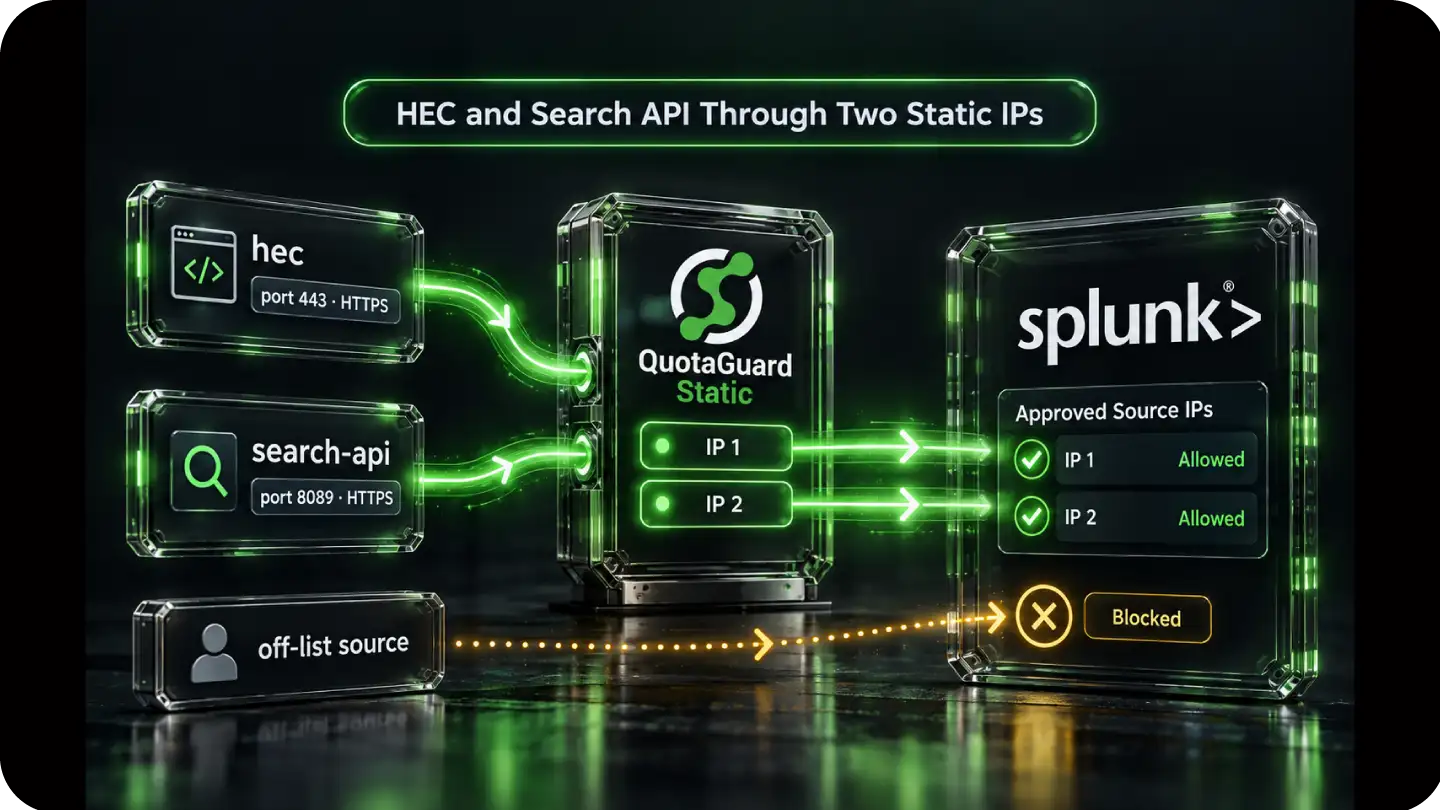
Route customer-controlled HEC and search API HTTPS calls through the two stable IPv4 addresses included with each QuotaGuard subscription. Register both addresses as /32 entries in the Splunk Cloud feature allow lists that protect those calls.
Use the hec list for HTTP Event Collector traffic on port 443 and search-api for automated search traffic on port 8089. Existing HEC tokens, API credentials, roles, and permissions remain in force behind the network boundary.
Universal and heavy forwarder traffic uses the separate raw-TCP s2s path on port 9997. It does not use the same HTTP client proxy configuration.
Give HEC and automated search clients a stable network identity without changing the Splunk endpoint they already use. The destination sees one of the subscription's two QuotaGuard IPv4 addresses, while the HTTPS session continues to the intended Splunk Cloud service.
Keep the HTTP paths distinct from forwarder-to-indexer traffic so the allow list and transport match the actual client.
Splunk Cloud's hec feature list controls HTTP Event Collector access. A proxy-aware HEC client can send its HTTPS request through QuotaGuard, then present the same HEC token and event payload to the same Splunk endpoint. Splunk documents the current HEC endpoint and port structure in its HTTP Event Collector guide.
The search-api feature list protects automated access to the search-head API on port 8089. Route those customer-controlled HTTPS calls through the same QuotaGuard subscription and register both subscription addresses in that feature list.
Universal and heavy forwarders send raw TCP traffic to indexers on port 9997 under the s2s feature. That path does not use an HTTP client's proxy setting. It needs a supported TCP tunnel design for the actual forwarder host and runtime.
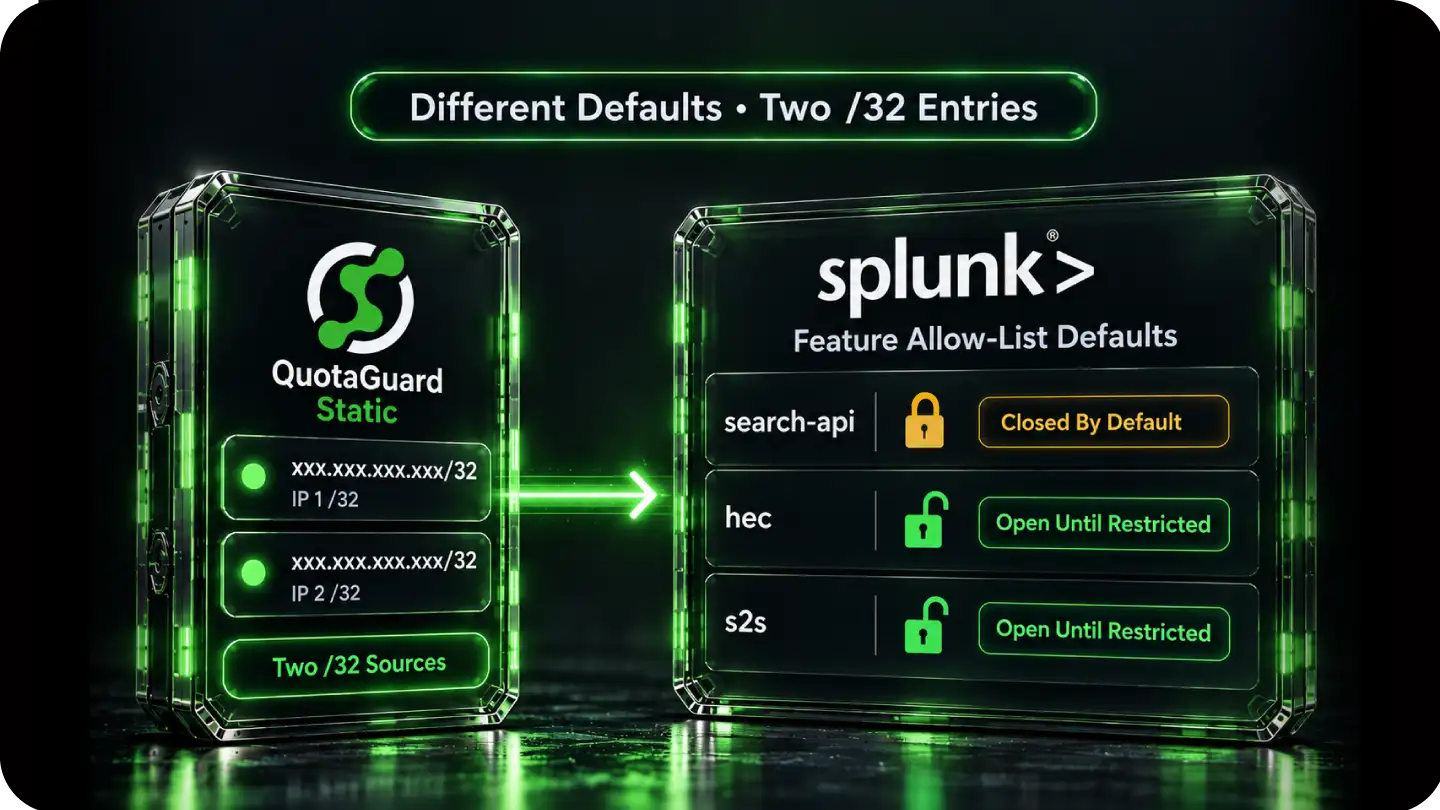
Start from the default of the exact Splunk feature you are protecting. Splunk does not give every feature the same initial state, and adding a subnet to an open list changes which sources may reach that feature.
Two precise QuotaGuard /32 entries keep the source set small while preserving both sides of the subscription's load-balanced pair.
Splunk documents search-api as closed by default. The search-ui list is also closed by default on PCI and HIPAA compliance stacks, but is open by default otherwise. HEC and s2s remain open until they are restricted.
QuotaGuard supplies two IPv4 addresses per subscription, and Splunk accepts CIDR entries. Add each address as its own /32 in every feature list used by that subscription. Splunk also supports IPv6 entries, but QuotaGuard egress is IPv4.
Splunk supports allow-list management through the Admin Config Service API and Splunk Web. The Web path requires Splunk Cloud Platform 8.2.2201 or later, a role with edit_ip_allow_list, and token authentication. Splunk notes that changes can take 15 minutes or more to propagate.
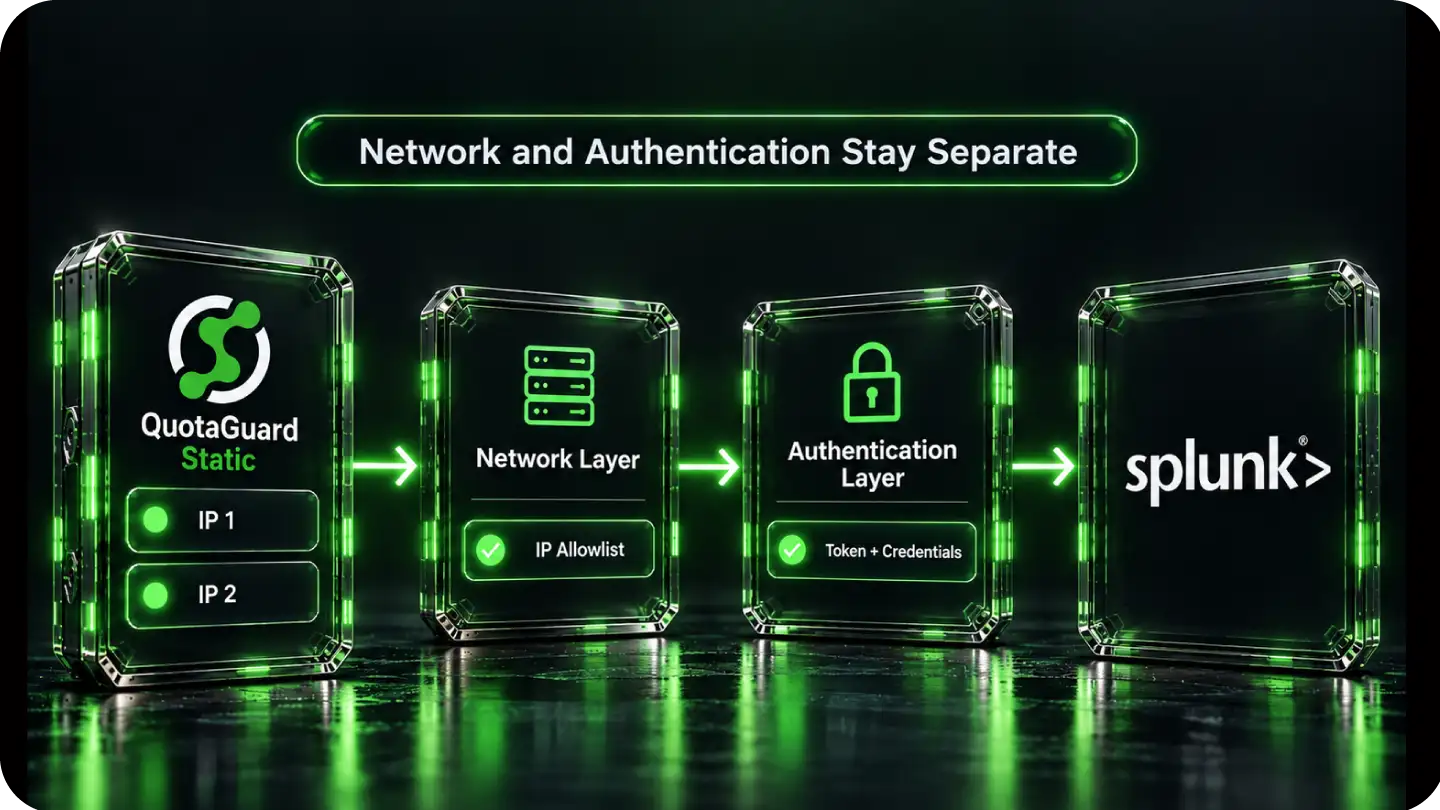
The allow list decides whether the source may reach the protected Splunk feature. Splunk then applies the HEC token, API credentials, roles, and permissions that decide what the approved client may do.
QuotaGuard stabilizes the network source without replacing any Splunk authentication or authorization control.
A listed source is not an authenticated source. HEC still requires its token, and search API calls still require valid Splunk credentials and permissions. The stable IP adds a network condition beneath those existing controls.
QuotaGuard Static carries HTTP and HTTPS proxy traffic on port 9293. Shield uses port 9294 and adds TLS from the application to the proxy. Neither product decrypts the application's outbound HTTPS payload to Splunk Cloud, and neither product makes a Splunk deployment compliant by itself.
Each subscription has its own two-address pair, so register the dashboard values for the subscription that actually carries the Splunk traffic. QuotaGuard operates in twelve AWS regions, including US-East-1 in Virginia and US-East-2 in Ohio, which lets the customer select a region appropriate for the application path.
Common questions about Splunk Cloud static IPs and QuotaGuard.
When does a Splunk Cloud client need a static IP?
A stable source becomes relevant when the Splunk feature list is closed or restricted to approved subnets. Splunk documents search-api as closed by default, while HEC and s2s are open until restricted. Once a feature permits only listed sources, a client needs to keep arriving from an address registered in that exact feature list.
Which Splunk Cloud feature list should contain the QuotaGuard IPs?
Use hec for HTTP Event Collector traffic on port 443 and search-api for automated search-head API traffic on port 8089. Add both QuotaGuard addresses as individual IPv4 /32 entries in each feature list used by the client. The s2s list is for universal and heavy forwarders sending raw TCP to indexers on port 9997.
How long does the Splunk Cloud allow-list setup take?
For an eligible HTTP client, the QuotaGuard side consists of using the subscription connection URL and configuring that client's HTTPS requests to use the proxy. Splunk policy creation, permissions, testing, and cutover are separate steps. Splunk states that allow-list changes can take 15 minutes or more to propagate, so confirm access through both subscription IPs before removing an older permitted source.
Can a universal or heavy forwarder use the same HTTP proxy setup?
No. Splunk forwarder-to-indexer traffic uses the raw-TCP s2s path on port 9997 rather than the HEC HTTPS interface. It requires a separately supported TCP tunnel design for the specific forwarder host and runtime. Do not treat an HEC client example as a forwarder configuration.
Does Splunk Cloud support CIDR and IPv6 allow-list entries?
Yes. Splunk accepts IPv4 and IPv6 CIDR entries. QuotaGuard supplies IPv4 egress addresses, so enter each subscription address as a separate /32. Splunk currently limits each feature list to 200 subnets; AWS deployments also have a 230-subnet total across each applicable feature group.
Can I manage the allow list through Splunk Web or ACS?
Yes. Splunk supports the Admin Config Service API and an IP allow-list page in Splunk Web. Splunk Web requires version 8.2.2201 or later, the edit_ip_allow_list capability, and token authentication. ACS has its own version and topology requirements, and FedRAMP High allow-list changes must go through Splunk Support.
Should I use QuotaGuard Static or Shield for Splunk Cloud?
Static is sufficient for most HEC and search API HTTPS clients that need a stable source. The application's HTTPS session to Splunk remains encrypted, and QuotaGuard does not decrypt that payload. Shield additionally encrypts the customer-to-proxy hop. Neither product makes the Splunk environment compliant by itself.
Can I get dedicated IPs for Splunk Cloud?
Yes. Dedicated IPs and proxy resources are included on direct Enterprise plans, currently $219 per month for QuotaGuard Static and $269 per month for QuotaGuard Shield. Direct Starter, Production, and Business use stable shared IP pairs. A shared pair still provides the fixed source values needed by a Splunk feature list unless the customer's policy also requires exclusive proxy resources.
What about alert webhooks or other traffic originating from Splunk Cloud?
That traffic travels in the opposite direction, from Splunk Cloud to the customer's receiving endpoint, so the Splunk feature allow list described here is not the control for it. QuotaGuard's outbound path covers customer-controlled clients connecting to Splunk. If the receiving service also needs a fixed inbound endpoint, QuotaGuard Static direct plans include inbound proxy capability starting at $19 per month, configured separately from the Splunk allow list.
For over a decade, QuotaGuard has provided reliable, high-performance static IP and proxy solutions for cloud environments like Heroku, Kubernetes, and AWS.
Get the fixed identity and security your application needs today.