Zoho Deluge can't set a proxy, so route its outbound calls through a relay that egresses via QuotaGuard, giving the target API two static IPs.

Zoho Deluge runs your custom functions inside Zoho One, Zoho CRM, and Zoho Creator, and its invokeUrl task can call any external API. What it cannot do is send those calls through an HTTP proxy or run a sidecar like QGTunnel. So when a payment gateway, a banking API, or a partner system requires you to allowlist a fixed source IP, Deluge has nothing to hand it. Its requests leave from Zoho's shared cloud ranges, which rotate and are shared across tenants. The target API sees an unrecognized IP and refuses the call. A relay function is the fix Deluge can actually use.

A Relay Function Gives Deluge Requests a Fixed Outbound IP

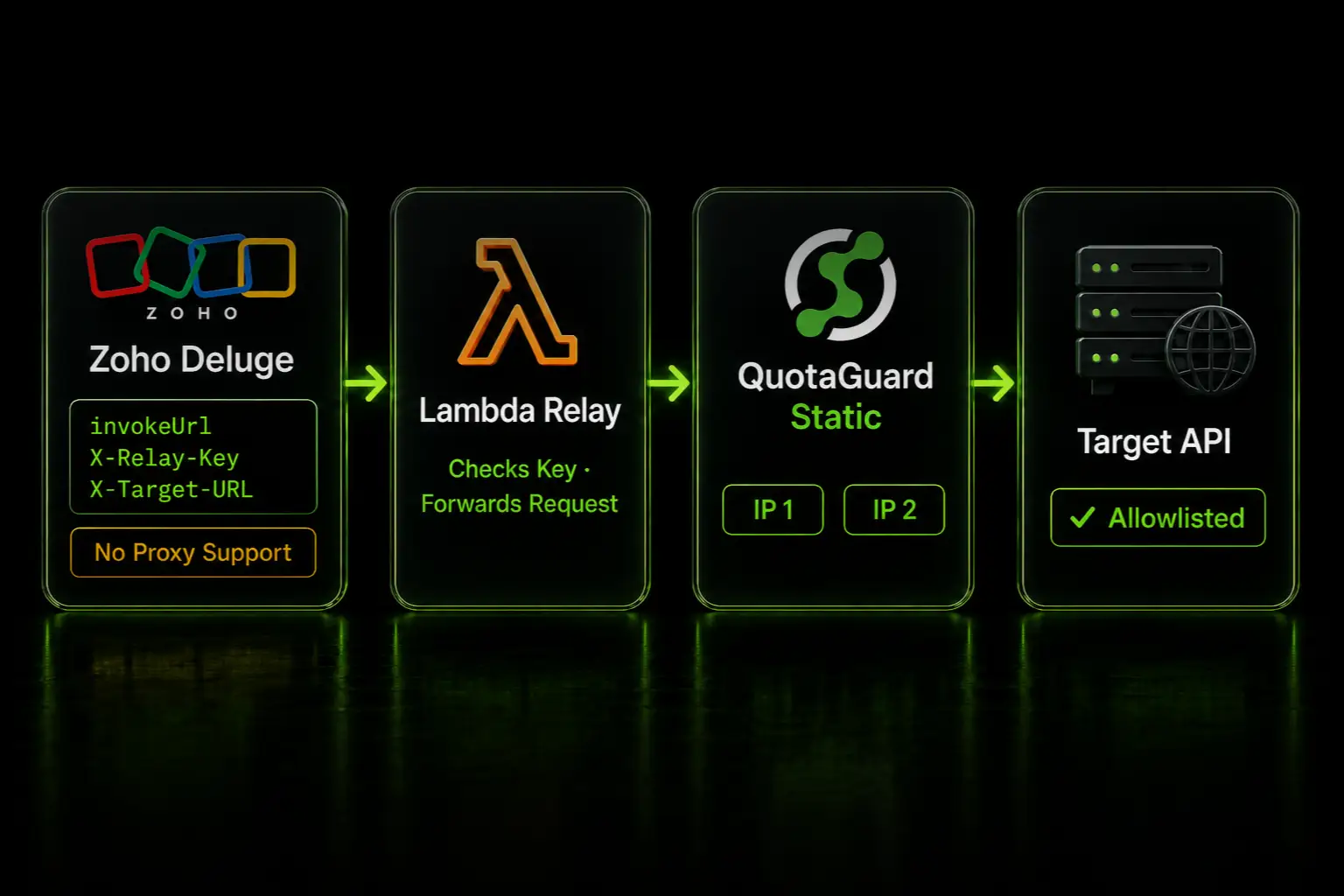
You cannot set a proxy inside Zoho, so you host a small function outside it that sets the proxy for you. The relay is a forwarding service you run on AWS Lambda or a Google Cloud Function. Deluge calls the relay instead of calling the target API directly. The relay receives the call, forwards it through QuotaGuard, and returns the target's response. Because the relay egresses through QuotaGuard, the target API sees one of your two static IPs, not Zoho's rotating address.

This is the same middleware relay pattern that works for any platform that can call a URL but cannot set a proxy. Zoho Deluge is one. Bubble and Zapier are others. The QuotaGuard no-proxy relay guide documents the full pattern and the relay code. This post covers the Zoho path end to end.

The Relay Forwards Deluge's Calls Through QuotaGuard

The request takes four hops:

Zoho Deluge  →  relay function URL  →  QuotaGuard proxy  →  target API

Deluge sends its invokeUrl request to the relay's URL with two extra headers. X-Relay-Key is a secret you generate that authorizes the call. X-Target-URL is the full URL of the API you want to reach. The relay checks the key, then forwards the request through QuotaGuard to that target. The method, body, Content-Type, and Authorization headers pass through as-is, and the target's response comes back as the relay's response.

The relay's own server IP is never allowlisted and never matters. Only QuotaGuard's two static IPs reach the target, because the relay forwards through the QuotaGuard proxy. QuotaGuard publishes the relay as a ready-to-run Python example, so the forwarding code is not something you design from scratch.

Deploy the Relay on AWS Lambda in Four Steps

The published example runs on the Lambda Python runtime and uses only libraries already there, so there's nothing to package. Full code is in the QuotaGuard static-examples repo.

  1. Create a Lambda function with the Python 3.12 runtime and paste in lambda_function.py from the repo.
  2. Add two environment variables: QUOTAGUARDSTATIC_URL (your Connection URL from the QuotaGuard dashboard) and RELAY_KEY (a long random string you generate and keep secret).
  3. Set the function timeout to 30 seconds. The 3-second default is tight for API calls.
  4. Create a function URL with auth type NONE. The RELAY_KEY check in the code is what protects it.

The relay also runs as a Google Cloud Function using the same environment variables and the same header contract. Port the same handler to the Cloud Functions signature. The no-proxy relay guide covers both.

Once the function URL is live, call it from Deluge with invokeUrl:

response = invokeUrl
[
    url: "https://<your-function-url>.lambda-url.<region>.on.aws/"
    type: POST
    headers: {"X-Relay-Key": "<your secret>", "X-Target-URL": "https://api.example.com/endpoint", "Content-Type": "application/json"}
    parameters: payload.toString()
];

Deluge sends the call to the relay URL. The relay forwards it to https://api.example.com/endpoint through QuotaGuard. The target sees your static IP.

Point X-Target-URL at ip.quotaguard.com to Confirm the Static IPs

Before you point the relay at the real API, test it. Send a request with X-Target-URL set to https://ip.quotaguard.com. It returns the IP your request came from, which must be one of the two static IPs in your dashboard:

curl https://<your-function-url>.lambda-url.<region>.on.aws/ \
  -H "X-Relay-Key: <your secret>" \
  -H "X-Target-URL: https://ip.quotaguard.com"

Call it more than once and you'll see both IPs, because the pair is load-balanced. Give the target API both static IPs for its allowlist. Both are active, so allowlist both. Your QuotaGuard subscription includes exactly two, and they stay fixed while Zoho's addresses rotate.

The Relay Is Required Infrastructure You Host

This pattern asks you to run one small function. That's the honest tradeoff. Deluge has no native proxy setting and no way to run QGTunnel, so a hosted relay is the only path to a static outbound IP from Zoho. If you were hoping for a setting inside Zoho, there isn't one.

The relay forwards HTTP and HTTPS API calls. It does not carry raw TCP, database connections, or SOCKS5 traffic. Deluge makes HTTP API calls, so that covers the Zoho use case, but if your wider architecture needs a static IP for a database connection, that's a different QuotaGuard setup on the platform that owns the connection. Match the QuotaGuard region and the relay's cloud region to the target API to keep latency low.

QuotaGuard Static Pricing Starts at $19/Month

Bandwidth is bundled. No per-GB overage fees. A Zoho relay that forwards API calls is light on bandwidth, so the entry tier covers most Zoho One workloads. QuotaGuard Static direct plans start at $19/month. Dedicated IPs are available on Enterprise and above. On lower tiers, your two assigned IPs are still static, but shared with other customers.

QuotaGuard Shield Pricing Starts at $29/Month

Shield costs slightly more than Static at each tier because SSL passthrough adds routing overhead. QuotaGuard Shield direct plans start at $29/month. The relay's call to the target is HTTPS and stays encrypted end to end on Static already, so Static is the right choice for most Zoho integrations. Choose Shield only if the data is regulated, such as HIPAA, PCI-DSS, or SOC 2 material, where your auditors require TLS on every hop. To switch, set QUOTAGUARDSHIELD_URL in place of QUOTAGUARDSTATIC_URL on the relay.

All plans include a 3-day trial. Enterprise plans include a 7-day trial. Credit card required. See the full pricing table at quotaguard.com/products/pricing.

Common Questions About Zoho Deluge Static IPs

Can Zoho Deluge use a static IP at all?

Yes, through a relay. Deluge can't set a proxy or run a sidecar, so you host a small relay function that egresses through QuotaGuard. Deluge calls the relay with invokeUrl, and the target API sees your two static IPs. There is no proxy setting inside Zoho to configure, so the relay is the working approach.

Does Zoho's own IP need to be allowlisted?

No. The target API only ever sees QuotaGuard's two static IPs, because the relay forwards every request through the QuotaGuard proxy. Zoho's outbound IP and the relay host's IP are never in the path the target inspects. You allowlist the two QuotaGuard IPs from your dashboard and nothing else.

How many IPs do I give the target API?

Two. Every QuotaGuard subscription includes two load-balanced static IPs, and both are active. Allowlist both. If you allowlist only one, about half your requests will be refused when the load balancer uses the other IP.

Do I need QuotaGuard Shield for a Zoho integration?

Usually no. The relay's call to the target is HTTPS and stays encrypted end to end on Static. Use Shield only when the data is regulated, such as HIPAA, PCI-DSS, or SOC 2 material, or when your environment requires TLS between the relay and the proxy itself.

Does the same relay work for Zoho CRM and Zoho Creator?

Yes. Any Deluge context that runs invokeUrl can call the relay, including Zoho CRM functions, Zoho Creator, and Zoho Flow custom functions. One relay serves all of them, and it serves Bubble and Zapier too.

Deluge can't proxy, but it can call a URL, and that's all the relay pattern needs. Host the function once, point your invokeUrl calls at it, allowlist your two static IPs, and every Zoho request reaches the allowlisted API from a fixed address. Start with the published Lambda example, or read the full no-proxy relay guide. When you're ready, create a QuotaGuard account and grab your two static IPs.

QuotaGuard Static IP Blog

Practical notes on routing cloud and AI traffic through Static IPs.

Reliability Engineered for the Modern Cloud

For over a decade, QuotaGuard has provided reliable, high-performance static IP and proxy solutions for cloud environments like Heroku, Kubernetes, and AWS.

Get the fixed identity and security your application needs today.