Static IPs for Adyen API Credentials: Lock Keys to an Allowed IP Range

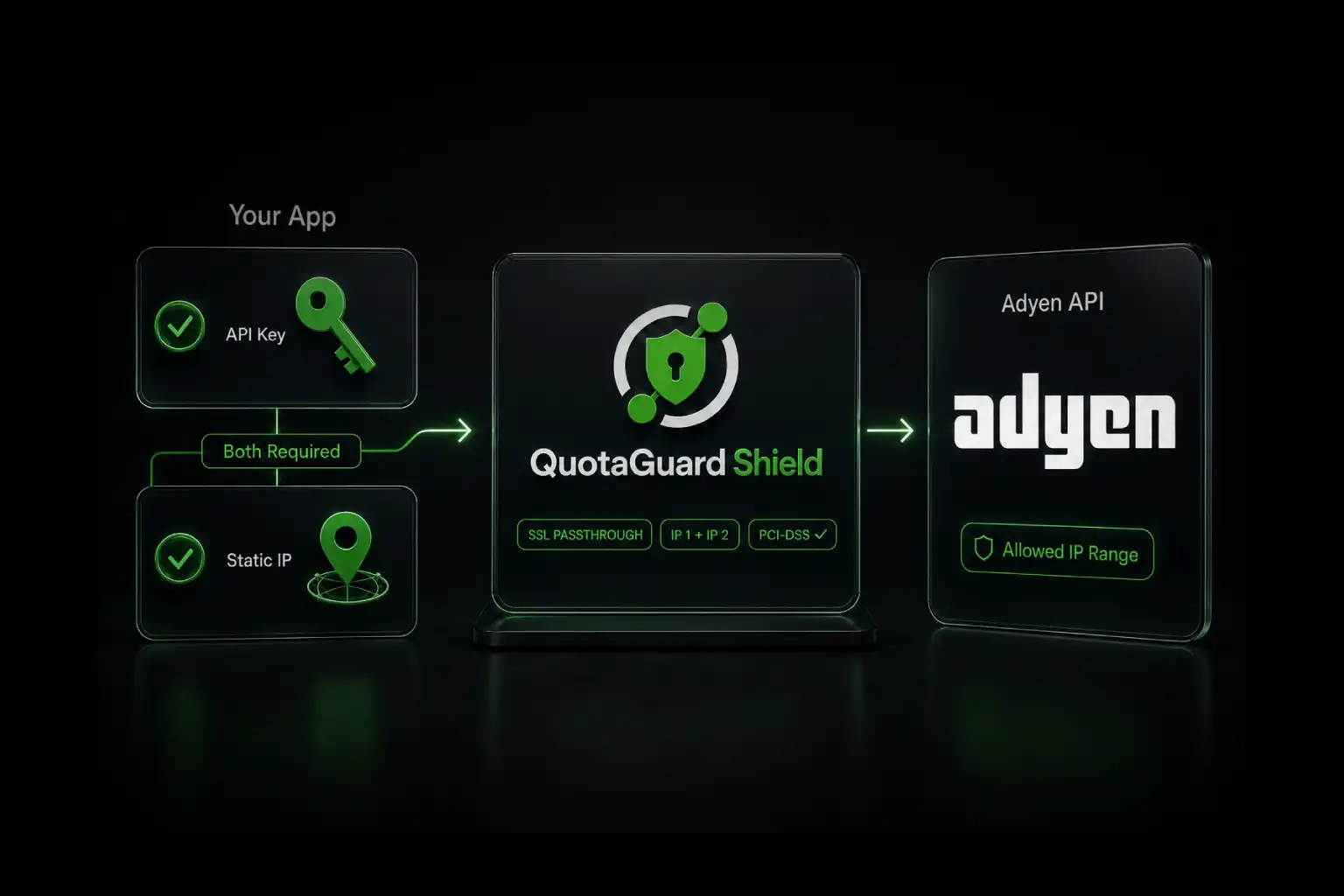
Adyen's Allowed IP range on each API credential blocks unauthorized requests even if your API key leaks. Configure QuotaGuard once and add two static IPs to each credential.
Adyen's Allowed IP range is one of the highest-impact security controls in your Customer Area. It costs nothing to enable, it stops API key theft cold, and most teams skip it because their cloud egress IPs change too often to keep the allowlist accurate. QuotaGuard solves the static IP problem in 2 minutes. The Allowed IP range becomes maintenance-free.
The Adyen IP Allowlist Is Optional. The Reason to Enable It Is Not.
From Adyen's API credentials documentation: "As a security measure, you can add allowed IP addresses to your API credential. When you add an allowed IP range, only requests originating from that range will be permitted."
Unlike Mercury Bank, which mandates IP allowlisting on Read and Write tokens, Adyen leaves the Allowed IP range optional. That's why most production Adyen integrations skip it. The cost of skipping it is severe: if an attacker obtains your Adyen API key through a leaked environment variable, a compromised CI secret, or an exposed git commit, they can immediately use it to capture payments, issue refunds, or pull cardholder data, depending on the credential's roles.
An Allowed IP range that points to your two QuotaGuard static IPs collapses the attack surface to anyone who has both the key and a way to send requests from your specific egress IPs. That's a much smaller threat surface than "anyone who can curl from anywhere on the internet."
Configure Allowed IP Range in Your Adyen Customer Area
The path is the same for test and live environments, just on different Customer Area URLs (ca-test.adyen.com for test, ca-live.adyen.com for live). You need either the Manage API credentials role or the Merchant admin role on your Adyen user account.
- Log in to your Adyen Customer Area.
- Go to Developers > API credentials.
- Select the Payments or Platforms tab, depending on your integration type.
- Select the credential username, typically in the format ws_123456@Company.[YourCompanyAccount].
- Under Server settings, select Allowed IP range.
- Add the IP addresses you want to allow access from. Both of your QuotaGuard static IPs go here.
- Select Save changes.
Changes apply immediately. The default behavior when the list is empty: Adyen accepts requests from any IP. As soon as you save the first entry, all requests not originating from a listed IP will be rejected. Test thoroughly before saving in production.
Route Outbound Calls Through QuotaGuard
QuotaGuard provides a standard HTTPS proxy URL that any HTTP client can route through. Set the QUOTAGUARDSTATIC_URL environment variable from your QuotaGuard dashboard, then configure your HTTP client to use it as the outbound proxy.
Python with the official Adyen library uses standard requests-based proxy configuration:
import os
import requests
import Adyen

# Configure proxy from QuotaGuard env var
proxies = {
    "https": os.environ["QUOTAGUARDSTATIC_URL"]
}

# Direct requests approach (most universal)
response = requests.post(
    "https://checkout-test.adyen.com/v71/payments",
    headers={
        "X-API-Key": os.environ["ADYEN_API_KEY"],
        "Content-Type": "application/json"
    },
    json={
        "amount": {"value": 1000, "currency": "EUR"},
        "reference": "order-12345",
        "paymentMethod": {"type": "scheme", "encryptedCardNumber": "..."},
        "returnUrl": "https://your-company.com/checkout",
        "merchantAccount": "YOUR_MERCHANT_ACCOUNT"
    },
    proxies=proxies
)
Node.js applications using the official @adyen/api-library can pass a custom HTTPS agent that includes the QuotaGuard proxy. For applications using axios or node-fetch directly, the standard proxy configuration patterns apply. The QuotaGuard documentation includes setup examples for major HTTP clients in Node.js, Python, Ruby, Go, Java, and PHP.
QuotaGuard Tip: Test Outbound IP Before Adding to Allowlist
Before you save Adyen's Allowed IP range with real values, verify that your application's outbound traffic actually flows through QuotaGuard. The fastest check: route a request to https://httpbin.org/ip through your proxy configuration and confirm the response shows one of your two QuotaGuard static IPs. If it shows your cloud provider's IP, your proxy configuration isn't active yet. Save the Adyen allowlist only after you can reliably see QuotaGuard IPs in test traffic.
Multi-Credential Strategy: Online, POS, and Refund Separation
Adyen explicitly recommends multiple API credentials for separation of concerns. From their docs: "If you have both an online sales channel and a point-of-sale sales channel, we strongly recommend creating a separate API credential for each channel." Same for unreferenced refunds, ecommerce vs shipping systems, and separate legal entities.
Each credential has its own Allowed IP range, so a multi-credential setup means multiple allowlist registrations. The good news: every credential in your account can use the same two QuotaGuard static IPs. You're not paying for additional IPs per credential or per merchant account. Add the same two IPs to each credential's allowlist on initial setup, and the maintenance burden stays at zero.
A common production pattern: one credential for online card payments with the Checkout webservice role, one for batch refunds with the Refund webservice role, one for the Management API with administrative roles. All three credentials accept requests from the same QuotaGuard IPs. If your refund credential leaks, the attacker still needs to be on the QuotaGuard IPs AND have the refund-scoped key.
Automate Allowlist Updates via the Management API
For teams managing dozens of API credentials, manual allowlist updates in the Customer Area UI get tedious. Adyen exposes the same allowlist via the Management API's apiCredentials endpoint. The credential object includes an allowedIpAddresses field that accepts the same IP values as the dashboard UI.
This matters most during QuotaGuard IP region changes. If you migrate from one QuotaGuard region to another (rare, but happens during infrastructure work), you'd otherwise need to update every Adyen credential's allowlist manually. With the Management API, a script can pull the list of all credentials, update each allowedIpAddresses, and verify the rollout in under a minute.
The Management API requires a credential with the Manage API credentials role enabled. Be careful: a credential that can manage other credentials' allowlists is a high-privilege key. Lock it down with strict role scoping and the Allowed IP range pointing to a specific bastion or operational network, not your full application infrastructure.
PCI-DSS Compliance: Why Shield Is Recommended for Adyen Integrations
Adyen processes cardholder data. Most production Adyen integrations either handle CHD directly (full PCI-DSS scope) or use Adyen's Drop-in, Components, or hosted Pay by Link to keep CHD out of your environment (SAQ A or SAQ A-EP scope). Even in the SAQ A case, your API credentials can authorize payments, refunds, and data access that your auditor will care about.
Shield uses SSL passthrough, and neither Static nor Shield ever decrypts your outbound payload. Shield's difference is the hop between your app and the proxy: Static's hop uses the plain HTTP proxy protocol, while Shield encrypts it with TLS. Use Shield for regulated data such as HIPAA or PCI workloads. That supports customers' HIPAA, PCI-DSS, and SOC 2 requirements.
For Adyen integrations specifically, Shield is the recommended choice. Shield Starter is $29/month versus Static Starter at $19/month. The $10 difference per month is trivial relative to PCI-DSS audit scope reduction.
Common Pitfalls
Three issues come up regularly in Adyen + static IP setups.
Forgetting to update both test and live credentials. Adyen's test (ca-test.adyen.com) and live (ca-live.adyen.com) environments have completely separate API credentials. Each has its own Allowed IP range. Add your QuotaGuard IPs to both. If you only configure test, the first production call will fail with a security error.
Confusing client key Allowed origins with API credential Allowed IP range. Adyen has two unrelated allowlist concepts. Allowed origins applies to client-side authentication via the client key (browser-side requests). Allowed IP range applies to server-side API credentials. QuotaGuard addresses the latter. If your integration uses Adyen's client-side Components or Drop-in, the Allowed origins setup is separate and doesn't involve a proxy at all.
Only allowlisting one of the two QuotaGuard IPs. QuotaGuard provides two static IPs behind a load balancer for redundancy. Either IP can serve any given request. Allowlist both in Adyen on initial setup. If you only register one, roughly half your traffic will fail with security errors when the load balancer routes through the unregistered IP.
Frequently Asked Questions
Does Adyen support CIDR notation in the Allowed IP range field?
The field accepts IP addresses and ranges. For QuotaGuard's two-IP setup, individual IP entries are the correct approach since you have two specific addresses to register. CIDR notation matters when you're trying to allow a broader subnet, which is precisely what you'd want to avoid on a security-sensitive credential.
What happens to my Allowed IP range when I rotate my Adyen API key?
The Allowed IP range is a property of the API credential, not the API key. When you rotate the API key (either generating a new one or expiring the previous), the credential and its allowlist remain unchanged. Adyen's docs note that the previous key remains valid for 24 hours after rotation to allow you to update your systems, but the Allowed IP range continues to apply to both old and new keys during that grace period.
Can I use QuotaGuard with Adyen's Terminal API or in-person payments?
Terminal API runs over Adyen's payment terminal infrastructure, not standard HTTPS API calls from your application. The proxy pattern doesn't apply to terminal traffic. For Adyen Terminal API integrations that also have a server-side component (most do), the server-side calls to Adyen's Management API or Payments API still benefit from QuotaGuard exactly as described above.
What if I have multiple merchant accounts under one company account?
Adyen's company account contains one or more merchant accounts. API credentials can be scoped to specific merchant accounts. The Allowed IP range is per credential, not per merchant account, so a credential with access to five merchant accounts only needs one allowlist update. If you use separate credentials per merchant account (a reasonable defense-in-depth choice), each needs the same two QuotaGuard IPs added.
How does QuotaGuard handle Adyen's webhooks (inbound to my application)?
Adyen webhooks are inbound: Adyen sends events to a URL you've registered. The QuotaGuard outbound proxy doesn't apply to inbound traffic. Your webhook endpoint just needs to be publicly reachable and HMAC-verify the events using your registered HMAC key. Adyen recommends DNS-based allowlisting if your firewall restricts inbound traffic, since their outbound IPs change frequently.
If you need to also expose a static inbound endpoint for compliance reasons (some payment processors require this in the opposite direction), QuotaGuard Static includes inbound proxy capabilities on all direct plans starting at $19/month. Contact QuotaGuard support after signup to enable.
What's the difference between Allowed IP range on the credential and Adyen's recommendation against IP allowlisting?
Adyen has a separate documentation page recommending against allowlisting Adyen's IPs on your firewall. That's the opposite direction: it's about you allowlisting Adyen's outbound IPs (where Adyen connects to you for webhooks). They recommend DNS-based domain allowlisting for that direction because their IPs change frequently.
The Allowed IP range on your API credential is about the opposite: your outbound IPs (where you connect to Adyen). That direction is stable on your end if you use a static IP service. Adyen actively supports this direction as a security control.
Can I configure different Allowed IP ranges per environment?
Yes, since test and live use separate credentials with independent allowlists. A common pattern: in test, leave Allowed IP range empty (so QA can hit the test API from any office or VPN), and in live, lock it down to your QuotaGuard IPs. This trades convenience in test for security in production.
Lock Adyen Credentials in 2 Minutes
Adyen's Allowed IP range is a five-minute configuration that blocks most credential-theft attack scenarios. The blocker for most teams is the static IP itself: cloud egress IPs change with deploys, scaling events, and infrastructure migrations, so the allowlist gets stale and gets disabled. QuotaGuard gives you two stable IPs that don't change with any of those events.
QuotaGuard Shield ($29/month starter, recommended for Adyen integrations) uses SSL passthrough so card data never decrypts inside the proxy. 3-day trial, credit card required. See pricing or contact us if you have setup questions or need help structuring a multi-credential Adyen integration.
For the broader picture of which other fintech APIs use the same pattern, see Static IPs for Fintech APIs: Mercury, Modern Treasury, Adyen, Stripe, and Unit.
QuotaGuard Static IP Blog
Practical notes on routing cloud and AI traffic through Static IPs.