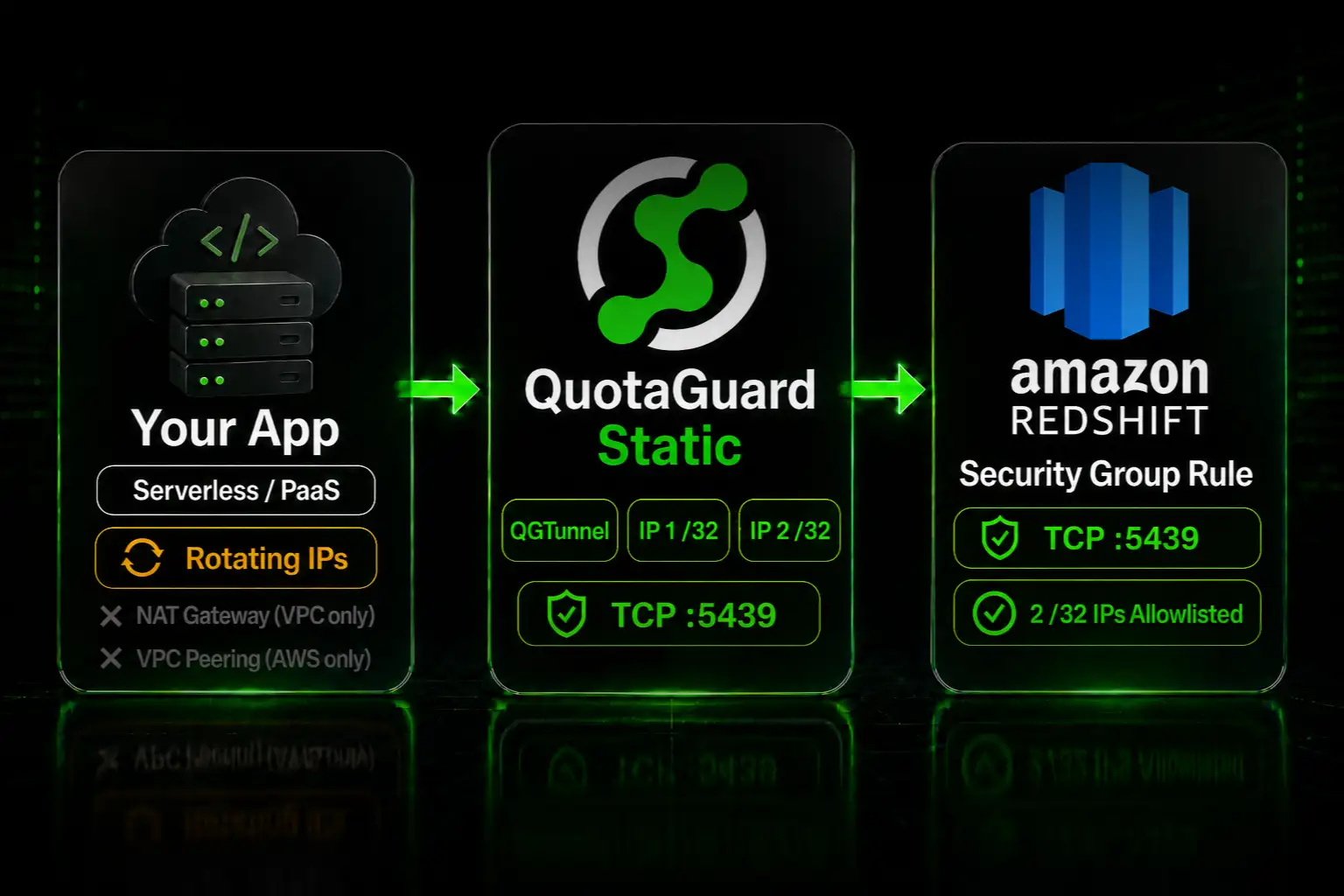
Give Your App a Static IP for Amazon Redshift Security Group Allowlisting

QuotaGuard Engineering
July 15, 2026
5 min read
Pattern

Give your Redshift connection a static IP through QuotaGuard's QGTunnel, then add the two fixed IPs to your cluster's security group on port 5439.

Amazon Redshift accepts connections to a publicly accessible cluster only from IPs allowed by its security group. If your app runs on a serverless or PaaS host, its outbound IP changes on every deploy, so the security group rejects it. A static IP proxy fixes that with two addresses you allowlist once.

Redshift Allows Connections Only From IPs in Your Security Group

A publicly accessible Redshift cluster sits behind a VPC security group. The security group has an inbound rule that names which source IPs may connect on the Redshift port, 5439. Anything not covered by a rule is refused at the network layer, before authentication.

Apps on serverless and PaaS hosts use outbound IPs that rotate on every deploy and restart. There is no fixed address to put in the security group rule. You cannot allowlist a cloud provider's published range either, because it covers thousands of other tenants and defeats the rule.

The result is a connection that works one day and fails the next, with a timeout rather than a clear error, because the security group drops the packet silently.

Your Static IP Options: a NAT Gateway, VPC Peering, or a Proxy

There are three honest ways to give Redshift a stable source IP.

A NAT gateway with a reserved IP. If your app runs in a VPC you control, a NAT gateway gives every resource in the subnet one outbound IP that you allowlist in the security group. It runs around $32 per month plus data processing, and it only covers that one VPC. Serverless and PaaS hosts where you do not own the VPC cannot use it.

VPC peering or PrivateLink. If your app and your Redshift cluster are both in AWS VPCs you control, you can connect them privately and skip public IPs entirely. This is the right answer for an all-AWS, same-account setup. It does nothing for an app hosted outside that VPC.

A static IP proxy. QuotaGuard gives you two fixed IPs that work from any host. You allowlist them in the security group once and route the connection through QuotaGuard. This is the option that covers serverless, PaaS, and non-AWS apps connecting to a publicly accessible cluster, starting at $19 per month.

Route Redshift Through QGTunnel and Allowlist Two IPs

Redshift speaks the PostgreSQL wire protocol over raw TCP, not HTTP, so this uses QuotaGuard's QGTunnel rather than an HTTP proxy environment variable. QGTunnel intercepts the database connection and routes it through your static IPs. There are two sides to set up: the security group and the tunnel.

First, add the two QuotaGuard IPs to the cluster's security group on port 5439. Use the two static IPs from your dashboard.

aws ec2 authorize-security-group-ingress \
  --group-id sg-0abc123 \
  --protocol tcp --port 5439 --cidr 203.0.113.10/32
 
aws ec2 authorize-security-group-ingress \
  --group-id sg-0abc123 \
  --protocol tcp --port 5439 --cidr 203.0.113.11/32

Second, set up QGTunnel. Download it into the root of your project.

curl https://s3.amazonaws.com/quotaguard/qgtunnel-latest.tar.gz | tar xz

In your QuotaGuard dashboard, open Setup, then QGTunnel Configuration, then Create a Tunnel, and point it at your cluster on port 5439.

Remote Destination: tcp://my-cluster.abc123.us-east-1.redshift.amazonaws.com:5439
Local Port:         5439
Transparent:        true
Encrypted:          false

Leave Encrypted off. Redshift connections already use TLS, so there is no reason to add a second encryption layer. Then prepend your start command with the tunnel, for example in a Procfile.

web: bin/qgtunnel your-start-command

With transparent mode and matching ports, your app keeps connecting to the cluster hostname and no connection string change is needed. Without transparent mode, point your connection at 127.0.0.1:5439. Every connection then leaves from one of your two static IPs, and the security group accepts it.

If your Redshift data is regulated, use QuotaGuard Shield instead of Static. Shield uses SSL passthrough so QuotaGuard never decrypts the data flowing between your app and Redshift. The QGTunnel setup is the same, with the QUOTAGUARDSHIELD_URL connection details in place of the Static ones.

Your Cluster Has to Be Publicly Accessible, and Other Edge Cases

This path requires a publicly accessible cluster. QGTunnel reaches Redshift over the internet from your static IPs, so the cluster has to be reachable that way and its security group has to allow those IPs. A cluster that is private inside a VPC with no public route is not reachable this way. For that setup, use VPC peering or PrivateLink instead, and this post is not for you.

A few more cases to keep straight. Redshift Serverless uses the same model: the inbound rule goes on the workgroup's security group. QGTunnel's tunnel approach supports Java and Node.js, unlike the older SOCKS5 wrapper script, so prefer the tunnel. And QGTunnel only routes the host you configure, so your app's other outbound traffic is untouched.

QuotaGuard Static Pricing Starts at $19/Month

Bandwidth is bundled with no per-GB overage fees, which matters for a database connection where query result volume can be high. Dedicated IPs are available on Enterprise and above. On lower tiers, your two assigned IPs are still static, but shared with other customers.

QuotaGuard Shield Pricing Starts at $29/Month

Shield costs slightly more than Static at each tier because SSL passthrough adds routing overhead. The compliance coverage it provides for HIPAA, PCI-DSS, and SOC 2 is worth the difference when the data in your warehouse requires it.

All plans include a 3-day trial. Enterprise plans include a 7-day trial. Credit card required.

See the full pricing table at quotaguard.com/products/pricing.

Two Fixed IPs in Your Security Group, Set Once

A Redshift security group rule is a hard gate, and a rotating cloud IP will never satisfy it reliably. Two static IPs do. Add the pair to the rule once, route the connection through QGTunnel, and the connection stops breaking on every deploy.

Start a trial at quotaguard.com/products/pricing. If your warehouse holds regulated data, read more about QuotaGuard Shield and its SSL passthrough model.

QuotaGuard Static IP Blog

Practical notes on routing cloud and AI traffic through Static IPs.

Reliability Engineered for the Modern Cloud

For over a decade, QuotaGuard has provided reliable, high-performance static IP and proxy solutions for cloud environments like Heroku, Kubernetes, and AWS.

Get the fixed identity and security your application needs today.