Give Your Dayforce Integration a Static IP for API Allowlisting

QuotaGuard Engineering
July 16, 2026
5 min read
Pattern

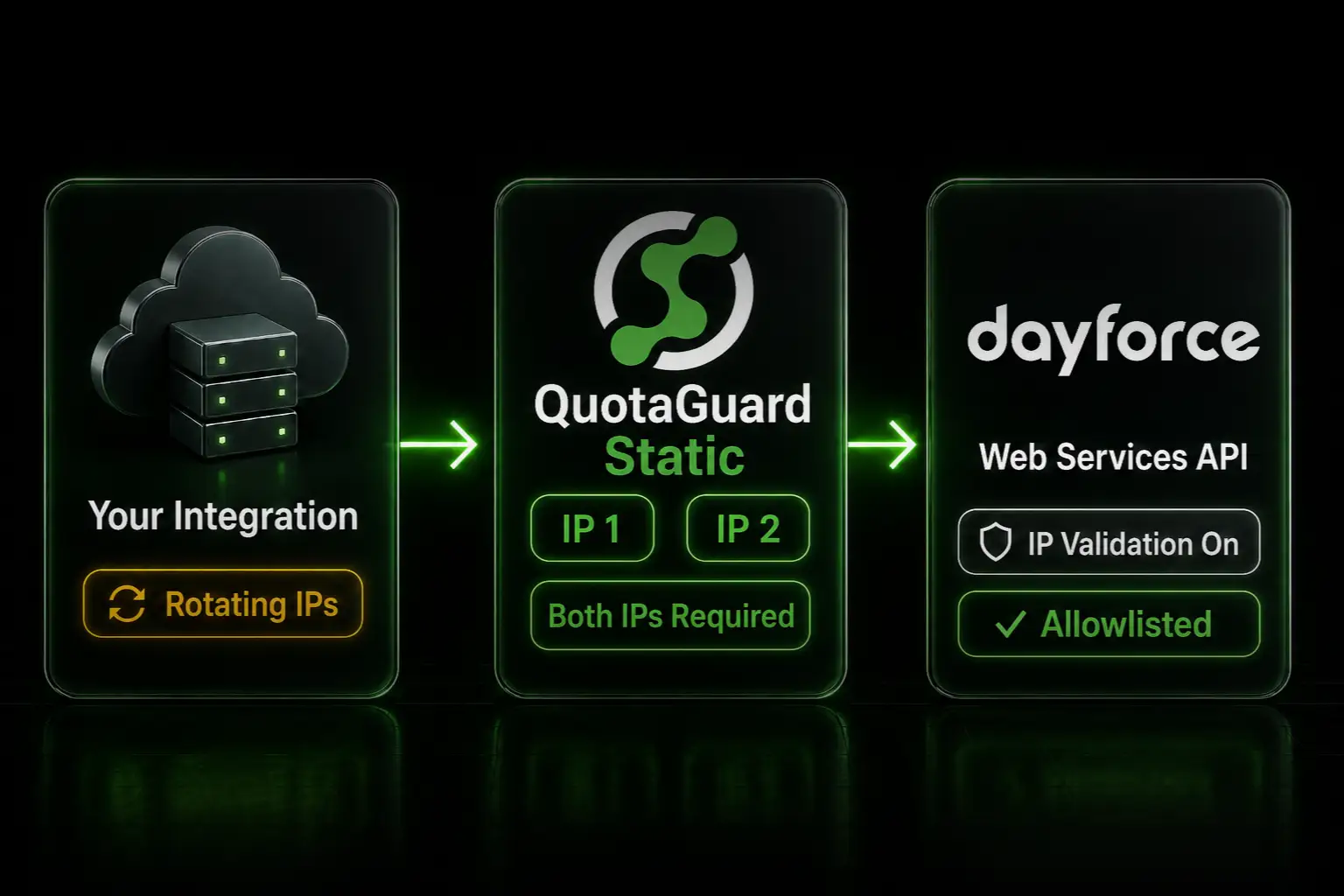
To satisfy a Dayforce IP allowlist, route your integration's API calls through QuotaGuard and register the two static IPs with your Dayforce security admin.

Dayforce's own security guidance tells administrators to lock Web Services accounts to known IP addresses. That control only works if your integration calls from a fixed IP. Most cloud platforms won't give you one.

Dayforce Recommends IP Validation on Web Services Accounts

Dayforce's Security Best Practices Guide is direct about it: add IP validation for Dayforce Services so undesired systems can't POST or GET data through your API accounts. The same guide notes that IP restrictions are more practical for API access than for user logins, and it adds one condition. Only apply them when the accessing account comes from a fixed IP address or range.

The setup on the Dayforce side is documented in the implementation guide under Restrict Dayforce Web Services by IP Address. The prerequisite is on your side. Your integration needs a fixed egress IP before the restriction can be turned on.

A Static Egress IP Makes the Restriction Enforceable

If your integration runs on AWS Lambda, it can use a different IP on every invocation. Heroku dynos pick up new IPs when they restart. Render, Railway, and Fly.io draw from shared pools. You can't register an IP you can't predict, so the Dayforce restriction either stays off or your integration breaks the first time your platform rotates.

A static IP proxy fixes this at the network layer. Your code stays on whatever platform you already run. Outbound HTTPS calls route through the proxy and arrive at Dayforce from a fixed address every time.

QuotaGuard assigns every subscription a load-balanced pair of static IPs, so your traffic can leave from either one. Register both with your Dayforce administrator. Registering only one causes intermittent failures that look random in your application logs, because the load balancer routes through whichever IP is healthy.

Your Integration Gets a Static IP in 2 Minutes

Sign up, copy your connection URL from the QuotaGuard dashboard, and add it to your application's environment as QUOTAGUARDSTATIC_URL. It looks like this:

http://username:password@us-east-static-01.quotaguard.com:9293

The region in the hostname is selected when you sign up. Pick the one closest to your Dayforce instance or your own infrastructure. Changing regions later means contacting support, so it's not something you edit in the connection string.

Then point your HTTP client at the proxy. Node.js with axios:

const axios = require('axios');
const { HttpsProxyAgent } = require('https-proxy-agent');
 
const agent = new HttpsProxyAgent(process.env.QUOTAGUARDSTATIC_URL);
 
const response = await axios.get(process.env.DAYFORCE_API_URL, {
  httpsAgent: agent,
  headers: {
    // your existing Dayforce auth headers
  },
});

Python with requests:

import os
import requests
 
proxies = {
    "http": os.environ["QUOTAGUARDSTATIC_URL"],
    "https": os.environ["QUOTAGUARDSTATIC_URL"],
}
 
response = requests.get(
    os.environ["DAYFORCE_API_URL"],
    headers={},  # your existing Dayforce auth headers
    proxies=proxies,
)

Authentication doesn't change. Whether your integration signs in with a Web Services account or uses Dayforce's token-based authentication, the proxy is transparent to it. Route the token request through the same proxy as your API calls so both leave from your static IPs. Dayforce's RESTful Web Services Developer Guide covers the auth options and recommends token-based authentication for service accounts.

Register Both IPs With Your Dayforce Administrator

Your two static IPs are shown in the QuotaGuard dashboard. Hand both to whoever administers your Dayforce environment. They add them through the IP network restriction settings described in Dayforce's implementation guide. Once the restriction is active, API calls from any other address are rejected, which is exactly the control Dayforce's security team wants in place.

QuotaGuard Shield Keeps Employee Data Encrypted End to End

Dayforce payloads are employee PII: names, compensation, benefits enrollment, payroll records. If your security or compliance review requires that no third party can decrypt that data in transit, use QuotaGuard Shield instead of Static. Shield uses SSL passthrough, so QuotaGuard never decrypts your data. The TLS session runs end to end between your application and Dayforce.

The setup is nearly identical. Shield uses the QUOTAGUARDSHIELD_URL environment variable and port 9294:

https://username:password@us-east-shield-01.quotaguard.com:9294

The same code patterns above work with the Shield URL in place of the Static one.

Edge Cases: Integration Studio and User Logins

Two things a static IP doesn't solve, both from Dayforce's own documentation.

First, Dayforce's security guide warns that adding IP restrictions to control API traffic prevents the use of Integration Studio, because Dayforce APIs block Integration Studio's addresses. If your team runs Integration Studio connectors alongside custom API integrations, review that tradeoff with your Dayforce admin before turning the restriction on.

Second, Dayforce cautions against IP-restricting user logins except in narrow cases where users only ever sign in from your own network. This post covers service accounts calling the API, not employee access. Keep those two policies separate.

QuotaGuard Static Pricing Starts at $19/Month

Bandwidth is bundled. No per-GB overage fees. A scheduled Dayforce sync pulling employee or payroll data fits comfortably in the Starter tier; move up to QuotaGuard Static Production at $49/month if your integration makes heavy daily API calls. Dedicated IPs are available on Enterprise and above. On lower tiers, your two assigned IPs are still static, but shared with other customers.

QuotaGuard Shield Pricing Starts at $29/Month

Shield costs slightly more than Static at each tier because SSL passthrough adds routing overhead. For an integration moving payroll and HR data, that difference buys the encryption model your vendor security review will ask about.

All plans include a 3-day trial. Enterprise plans include a 7-day trial. Credit card required.

See the full pricing table at quotaguard.com/products/pricing.

Allowlist Once and Stop Chasing Egress IPs

Dayforce wants your API accounts locked to known addresses. Your cloud platform wants to hand you a different IP every week. A static IP pair resolves the standoff: your admin registers two addresses once, and the restriction stays enforceable no matter how your infrastructure rotates underneath. Start a free trial and your integration calls Dayforce from a fixed IP in 2 minutes.

QuotaGuard Static IP Blog

Practical notes on routing cloud and AI traffic through Static IPs.

Reliability Engineered for the Modern Cloud

For over a decade, QuotaGuard has provided reliable, high-performance static IP and proxy solutions for cloud environments like Heroku, Kubernetes, and AWS.

Get the fixed identity and security your application needs today.