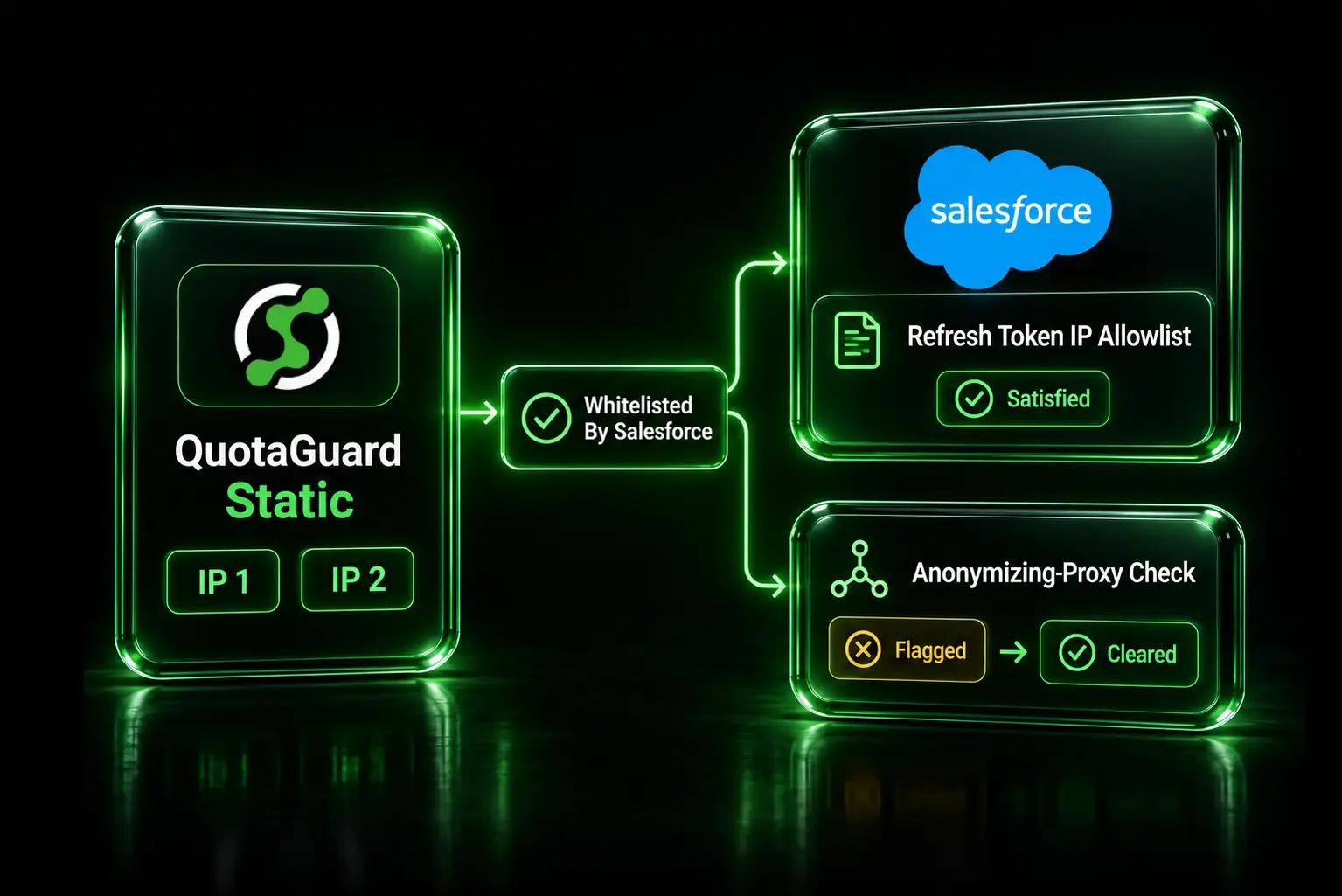
Update, August 2026: Salesforce has completed a security review and whitelisted QuotaGuard's static IP addresses. AppExchange ISV integrations routing through QuotaGuard should no longer be classified as anonymizing proxy traffic. This article explains what caused the issue, why it was particularly disruptive for ISVs, and how to configure a Salesforce integration correctly.
This issue has now been resolved. Salesforce has reviewed and whitelisted QuotaGuard's static IP addresses, allowing AppExchange ISVs to use QuotaGuard for Salesforce OAuth and API traffic without the anonymizing-proxy classifications described below.
The remainder of this article explains why the issue happened, how we reproduced it, and why the resolution required a Salesforce-side review.
In the spring of 2026, we started hearing from Salesforce ISVs about a strange failure.
They needed static outbound IP addresses for Salesforce. They added QuotaGuard specifically to give their cloud applications a fixed network identity. They registered those addresses with Salesforce.
Then Salesforce Security classified some of the connections as coming from an anonymizing proxy.
The result was considerably more serious than an API request being rejected. Salesforce could freeze the affected user, revoke OAuth access and refresh tokens, require reauthentication, and notify the Salesforce administrators responsible for the org.
We initially assumed we were dealing with the reputation of a particular shared proxy address.
Then we moved an affected customer onto dedicated QuotaGuard IP addresses carrying only that customer's traffic, and Salesforce eventually classified one of those addresses the same way.
That changed our understanding of the problem.
We escalated the issue through Heroku and Salesforce rather than continuing to move customers between addresses. After roughly two months of investigation and escalation, Salesforce reviewed and whitelisted QuotaGuard's static IP addresses.
If you only need the resolution, read Salesforce Now Recognizes QuotaGuard Static IPs.
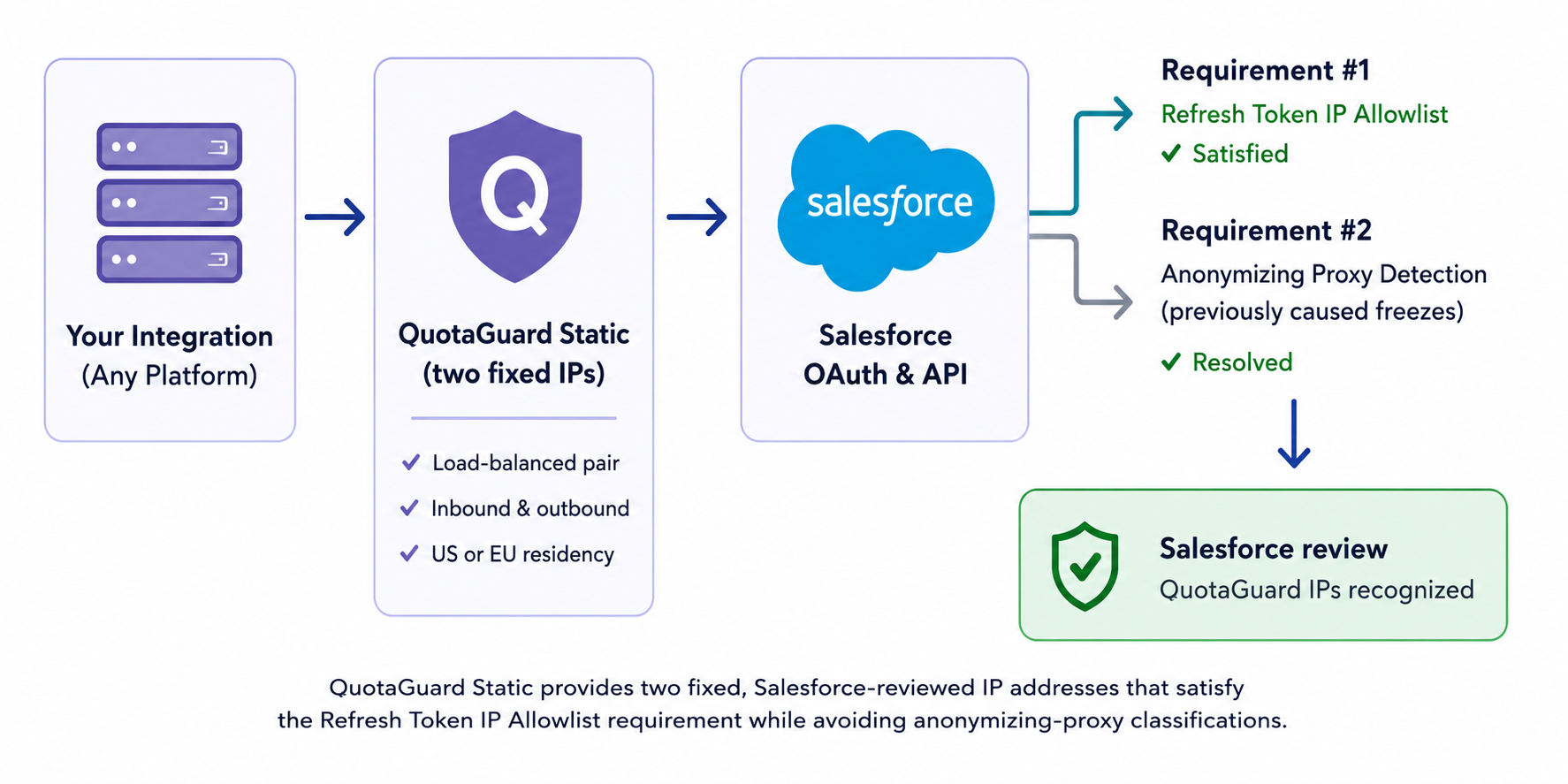
Why This Happened
The confusing part of this incident was that a static IP was not an accidental addition to these architectures.
For many Salesforce AppExchange ISVs, it had become part of complying with Salesforce's own OAuth security requirements.
Salesforce's May 11, 2026 security requirements for applicable partner Connected Apps and External Client Apps included four controls:
- OAuth PKCE
- OAuth Refresh Token Rotation
- Refresh Token Idle TTL
- Refresh Token IP Allowlist
The Refresh Token IP Allowlist is the networking piece.
When an External Client App enables Enforce Refresh Token IP Allowlist, Salesforce only allows addresses in the configured ranges to complete the applicable OAuth web server and refresh token flows.
For server-side integrations, that means the infrastructure holding and redeeming the refresh token needs a predictable outbound network identity.
That is easy when an application already runs behind infrastructure with fixed outbound IPs.
It is harder on platforms such as Heroku and many serverless or dynamically scaled cloud environments where the application's native outbound address is not intended to remain fixed.
A static egress service solves that part of the problem.
Salesforce Was Also Expanding Anonymizing Proxy Containment
At approximately the same time, Salesforce was strengthening another security control.
Salesforce documents enhanced protections against connections associated with anonymizing VPNs, anonymizing proxies, and other high-risk IP addresses. Beginning April 24, 2026, Salesforce expanded those protections to Connected App and API traffic.
Salesforce's documented containment actions can include:
- Freezing the affected Salesforce user
- Revoking OAuth access and refresh tokens associated with that user
- Requiring reauthentication and, where applicable, a password reset
- Notifying the affected organization's administrators or security contacts
This is important because it explains why the incidents initially looked so disproportionate to the networking change.
An ISV was not simply receiving a connection error saying that an IP address was unacceptable.
The traffic could be interpreted by Salesforce's security systems as evidence of potentially suspicious account activity, triggering containment around the Salesforce user itself.
The ISV Was Doing What the Architecture Required
The sequence we saw looked roughly like this:
- An AppExchange ISV needed to comply with Salesforce's Refresh Token IP Allowlist requirement.
- The ISV's middleware ran on cloud infrastructure without a dependable native outbound IP.
- The ISV added QuotaGuard to give that middleware a stable egress identity.
- The QuotaGuard IP addresses were registered with the External Client App.
- The application began sending its Salesforce OAuth or API traffic through those addresses.
- Salesforce classified an address as anonymizing proxy traffic.
- The Salesforce security containment process froze the affected user and revoked tokens.
This created an unusual conflict.
The integration needed a static address to satisfy one Salesforce security control, but the infrastructure providing that fixed address could trigger a different Salesforce security control if the address was classified as anonymizing proxy infrastructure.
Neither requirement was unreasonable independently. The failure appeared where the two systems met.
We First Thought This Was a Shared IP Reputation Problem
When the first reports reached us, shared-IP reputation was the obvious hypothesis.
A shared proxy address carries traffic for multiple customers. If an external security provider has classified that address based on prior traffic, moving a legitimate customer onto a clean dedicated address can sometimes solve the immediate problem.
So that is what we tested.
We provisioned dedicated QuotaGuard addresses for an affected production integration. Those IPs carried only that customer's traffic.
Initially, the integration worked.
Then Salesforce classified one of the dedicated addresses as an anonymizing proxy and triggered the same security behavior.
That was the critical result.
Moving customers to dedicated addresses was not a reliable solution.
Continuing to rotate IP addresses would have treated the symptom while leaving the underlying Salesforce classification problem unresolved.
Why This Is More Dangerous for a Multi-Org AppExchange ISV
A company integrating with one Salesforce org has a relatively contained problem. There is one Salesforce environment, a known group of users, and usually a direct relationship with its administrators.
An AppExchange ISV has a different architecture.
The same integration may authenticate into dozens or hundreds of independent customer Salesforce orgs. Each customer controls its own users, administrators, security configuration, and production environment.
That means an infrastructure change made by the ISV can suddenly appear across many Salesforce environments.
If the egress address itself causes containment, the blast radius is potentially much larger than one failed API request.
This was the main reason we did not consider customer-by-customer exemptions or repeated IP replacement a satisfactory long-term answer.
The problem needed to be resolved where the classification occurred.
Salesforce Reviewed and Whitelisted QuotaGuard's Static IP Addresses
We escalated the issue through Heroku and Salesforce with examples from affected integrations, the IP addresses involved, timestamps, Salesforce security notifications, and the results of our dedicated-IP testing.
Salesforce ultimately reviewed QuotaGuard's static IP addresses and whitelisted them.
That is the central resolution.
An ISV using QuotaGuard can now satisfy the fixed-egress requirement using QuotaGuard addresses that Salesforce has reviewed, rather than attempting to solve the problem independently for every customer Salesforce org.
The distinction is important.
Getting a static IP and getting a static IP that is recognized appropriately by the service receiving the traffic are not always the same thing.
A static address controls identity at the network layer. The destination service can still apply its own reputation, threat-intelligence, authentication, and behavioral security controls to traffic originating from that address.
The Whitelist Does Not Replace Salesforce's Refresh Token IP Allowlist
Salesforce recognizing QuotaGuard's addresses solves the anonymizing-proxy classification problem we encountered.
It does not remove the need to configure the Refresh Token IP Allowlist on an External Client App when that Salesforce control applies to the integration.
The two things solve different problems:
- QuotaGuard gives the application a predictable outbound network identity.
- Salesforce's Refresh Token IP Allowlist determines which identities are permitted to perform the protected OAuth flows.
- Salesforce's recognition of QuotaGuard prevents those legitimate QuotaGuard addresses from being treated as anonymizing proxy infrastructure.
You still need to configure the application correctly.
Register Both QuotaGuard Static IP Addresses
A QuotaGuard subscription provides a pair of static IP addresses for redundancy.
Traffic can egress through either address, so both addresses must be included in the Salesforce configuration.
Registering only one address can produce failures when traffic exits through the other member of the pair.
In Salesforce Setup:
- Open External Client Apps Manager.
- Select the External Client App.
- Open Edit Settings.
- Enable Enforce Refresh Token IP Allowlist where required for your application.
- Add both QuotaGuard static IP addresses.
Salesforce accepts a start and end address when defining an allowed range.
QuotaGuard IPs are individual host addresses, so when adding a single QuotaGuard address, enter that same IP as both the start and end value.
Then repeat the process for the second address.
Confirm the Addresses From the Environment Running Your Integration
Before changing a Salesforce allowlist, confirm what IP address your production environment actually presents through QuotaGuard.
A typical QuotaGuard proxy environment variable looks like:
QUOTAGUARDSTATIC_URL=http://username:password@<your-quotaguard-proxy-host>:9293You can make a request through that proxy to QuotaGuard's IP-check endpoint:
curl -x $QUOTAGUARDSTATIC_URL https://ip.quotaguard.comRun the check from the same runtime that will communicate with Salesforce.
Because a QuotaGuard subscription has two addresses, repeat the request enough times to verify that both expected addresses are available before relying on the configuration in production.
For the complete setup process, see Static IP for Salesforce Connected Apps and External Client Apps.
Changing IP Addresses on a Live Salesforce Integration Requires a Staged Cutover
If an existing AppExchange integration is already running through another IP address, do not simply remove the existing address and replace it with the new pair.
There can be active refresh tokens and customer integrations using the existing configuration while the networking change is taking place.
The safer process is to:
- Confirm the new QuotaGuard addresses are active.
- Add the new addresses to Salesforce before removing the old addresses.
- Move application traffic to QuotaGuard.
- Verify OAuth refresh and API activity through both new addresses.
- Remove the old addresses after the cutover is confirmed.
We documented that procedure separately in How to Update Your Salesforce IP Allowlist Without Breaking Customer Authentication.
If Salesforce Already Froze a User
Whitelisting the QuotaGuard addresses does not automatically undo containment actions that already occurred.
Salesforce's documented remediation includes having a Salesforce administrator unfreeze the affected user.
Because containment can revoke the user's OAuth access and refresh tokens, the affected integration may also need to be reauthorized before API access resumes normally.
If the affected user is the only administrator and cannot regain access through the normal process, Salesforce directs customers to Salesforce Support.
The important point is that replacing the proxy URL alone does not restore tokens that Salesforce already revoked.
Static IP Reputation and IP Allowlisting Are Separate Layers
This incident highlighted a distinction that is easy to miss when designing integrations.
An IP allowlist answers:
"Is this source address permitted?"
Threat intelligence answers a different question:
"What do we believe about traffic coming from this source address?"
A fixed IP can satisfy the first requirement and still encounter the second.
That is why simply purchasing an arbitrary static address does not guarantee that every third-party security system will treat it the same way.
For this Salesforce use case, QuotaGuard's addresses have now gone through Salesforce's review process, resolving the reputation issue that affected the integrations described here.
Heroku Makes This Use Case Particularly Relevant
Many of the affected integrations were running on Heroku.
That made the situation unusual because Salesforce owns Heroku, while Heroku applications commonly use networking add-ons such as QuotaGuard when they need stable outbound addresses.
A Salesforce ISV running middleware on Heroku therefore had a legitimate architectural reason to use a service like QuotaGuard:
- The application runs on Heroku.
- The Salesforce integration needs a predictable source IP.
- QuotaGuard provides that predictable source IP.
- The IPs are entered into the Salesforce External Client App configuration.
Once we determined that dedicated addresses could encounter the same Salesforce classification, we escalated the issue rather than continuing to treat it as an ordinary proxy-reputation problem.
That escalation ultimately produced the Salesforce-side resolution.
What We Learned From the Incident
The most interesting part of this incident was not simply that some proxy IPs were blocked.
It was the interaction between two legitimate security controls.
Salesforce wanted partner applications to restrict sensitive OAuth activity to known network locations.
Salesforce also wanted to contain activity originating from infrastructure its security systems considered suspicious.
For some integrations, the fixed networking layer introduced to satisfy the first requirement ran into the second.
From our side, the dedicated-IP test was what mattered most. Once a newly dedicated address carrying only a single customer's legitimate integration traffic could reproduce the classification, repeatedly moving customers to different IPs stopped making sense as a solution.
The problem needed a central review.
Salesforce completed that review and whitelisted QuotaGuard's addresses.
Using QuotaGuard for a Salesforce AppExchange Integration
QuotaGuard Static provides two load-balanced static IP addresses that an application can use for outbound Salesforce OAuth and API traffic.
The basic architecture is:
- Provision QuotaGuard Static.
- Add the QuotaGuard proxy URL to the application's environment.
- Route the Salesforce requests that require fixed egress through QuotaGuard.
- Confirm both QuotaGuard IP addresses from the production runtime.
- Register both addresses in the Salesforce External Client App Refresh Token IP Allowlist.
- Test the authorization and refresh-token flows before rolling the change across the production install base.
For AppExchange ISVs running across many customer orgs, test the networking and OAuth behavior together. A successful TCP or HTTPS connection does not by itself prove that the full Salesforce authorization and refresh-token flows are configured correctly.
Final Takeaway
Static IPs were part of the solution these Salesforce integrations required, but the receiving platform's classification of those IPs mattered just as much as the addresses remaining fixed.
Salesforce has now reviewed and whitelisted QuotaGuard's static IP addresses, resolving the anonymizing-proxy issue described in this article.
AppExchange ISVs still need to register both QuotaGuard addresses in the applicable Salesforce allowlist, test the complete OAuth flow, and use a staged cutover when changing production networking.
To get started, see QuotaGuard Static plans and pricing, read the Salesforce static IP setup guide, or contact QuotaGuard if you are deploying a Salesforce integration across multiple customer orgs.
QuotaGuard Static IP Blog
Practical notes on routing cloud and AI traffic through Static IPs.