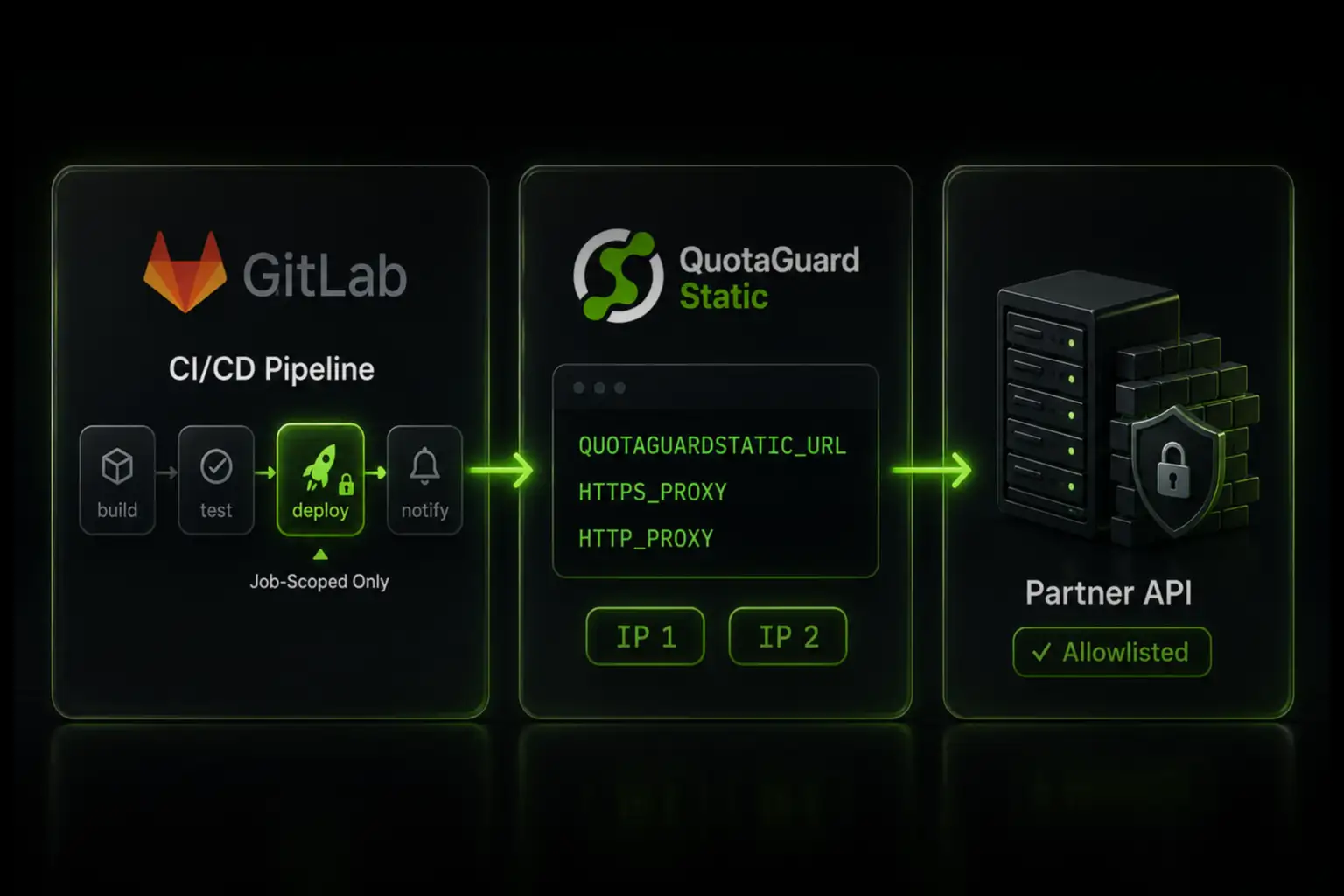
Route your GitLab CI job's outbound requests through QuotaGuard Static, set three CI/CD variables, and add the two assigned IPs to your allowlist.

GitLab.com SaaS runners don't get a static outbound IP. If your CI job deploys to a firewalled server or calls an IP-allowlisted API, the only native option is to allowlist GitLab's entire GCP and AWS ranges. That's thousands of addresses you don't control, and they change. Route the job's outbound traffic through a static IP proxy instead, and you allowlist two fixed addresses that belong to you. This guide is the step-by-step setup. For the full picture of inbound and outbound static IPs on GitLab, including database access and EU residency, see the GitLab CI/CD static IP integration page.

GitLab.com SaaS Runners Have No Static Egress IP

GitLab is explicit about this in its own documentation: it does not provide static IP addresses for outgoing connections from CI/CD runners. To configure an IP-based firewall for runner traffic, GitLab tells you to allow both the Google Cloud and AWS IP ranges for the regions its runners run in. Most Linux runners sit in Google Cloud us-east1, with other runner types in us-central1 and macOS runners on AWS us-east-1.

Allowlisting those ranges means opening your firewall to every GCP and AWS tenant in those regions, not just your pipeline. It's a large, shifting target, and a security team will reject it. A feature request for a narrow, allowlistable IP range has been open since 2022 without a solution. See GitLab's own GitLab.com settings documentation for the current runner egress details.

Self-managed and custom runners are different. You control the host, so you can pin its egress. This problem is specific to GitLab.com hosted SaaS runners.

QuotaGuard Static Gives You Two Fixed IPs to Allowlist

QuotaGuard Static is an HTTP/HTTPS/SOCKS5 proxy running on AWS. Every account is assigned two static IP addresses behind a load balancer, and those two IPs don't change. You add both to your destination's firewall or API allowlist, route your CI job's outbound calls through the proxy, and every request exits from one of those two addresses regardless of which runner GitLab assigns. Your two assigned IPs are shown in your QuotaGuard dashboard after sign-up.

Three CI/CD Variables Route Your Job Through the Proxy

Store your proxy URL as a masked CI/CD variable in Settings, CI/CD, Variables. Name it QUOTAGUARDSTATIC_URL. The value comes from your QuotaGuard dashboard and looks like this:

QUOTAGUARDSTATIC_URL=http://username:password@proxy.quotaguard.com:9293

Then set the proxy variables on the specific job that needs the static IP. Tools that honor the standard proxy environment variables, including curl and git over HTTPS, route through the proxy with no code change.

deploy-to-partner:
  variables:
    HTTPS_PROXY: $QUOTAGUARDSTATIC_URL
    HTTP_PROXY: $QUOTAGUARDSTATIC_URL
    NO_PROXY: "gitlab.com,.gitlab.com"
  script:
    - curl -X POST https://api.partner.example.com/deploy

That request now exits from one of your two QuotaGuard IPs. The partner's firewall sees a fixed address it can allowlist once.

Route Only the Calls That Need the Static IP

Set the proxy variables on the individual job, not at the top level of your pipeline. If you set them globally, every job routes through the proxy, including package installs, artifact downloads, and GitLab API calls that don't need it. That adds latency and unnecessary traffic.

Use NO_PROXY to exclude hosts that should never be proxied, starting with GitLab's own endpoints. Keep the proxy scoped to the exact requests hitting your restricted destination. If something breaks, you know precisely which traffic is affected.

EU Teams Can Keep Egress in the EU Region

QuotaGuard offers US or EU data residency. If your CI pipeline serves an EU business and you need outbound traffic to exit from EU infrastructure, select an EU region at sign-up. Your two static IPs are then EU-based. This is useful when a partner or internal policy requires that data leaves from a known European address.

QuotaGuard Static Pricing Starts at $19/Month

Bandwidth is bundled. No per-GB overage fees. CI deploy traffic and API calls are low-volume for most teams, so the Starter plan at 10 GB per month covers a typical pipeline. Dedicated IPs are available on Enterprise and above. On lower tiers, your two assigned IPs are still static, but shared with other customers.

QuotaGuard Shield Pricing Starts at $29/Month

For standard CI deploys and API calls, Static is the right product. Use QuotaGuard Shield instead when your pipeline moves regulated data, such as deploying or syncing systems that handle health records, payment information, or PII, or when your environment requires that no proxy ever decrypts traffic in transit. Shield uses SSL passthrough, so QuotaGuard does not decrypt your payload contents. It costs slightly more than Static at each tier.

All plans include a 3-day trial. Enterprise plans include a 7-day trial. Credit card required.

See the full pricing table at quotaguard.com/products/pricing.

QuotaGuard Static IP Blog

Practical notes on routing cloud and AI traffic through Static IPs.

Reliability Engineered for the Modern Cloud

For over a decade, QuotaGuard has provided reliable, high-performance static IP and proxy solutions for cloud environments like Heroku, Kubernetes, and AWS.

Get the fixed identity and security your application needs today.