Claude API Returns 403 After You Enable IP Allowlisting? Check Your App’s Egress IP

QuotaGuard Engineering
November 19, 2026
•
5 min read
Pattern

If Claude’s 403 names the organization’s allowed IP range, check the public egress IP of the deployed client that made the failing request.

The app works from a laptop, but a deployed worker or CI job starts failing after you turn on the Claude Console IP allowlist. The same key can reach the API from an approved network and be denied from a different public source IP. Start with the response from Anthropic and the network path of the failing process, not a new API key or a change to your application’s public hostname.

The response tells you whether to check the allowlist

Anthropic documents this Messages API response as a 403 permission_error: “Your IP address isn't in this organization's allowed range.” If you see that message, check the IP list for the Claude Platform organization used by the request. A different 403 does not establish an IP problem. Check the credential’s permissions and the resource in question; an authentication error or a proxy-generated response is a separate diagnosis. If an SDK or gateway hides the original response, capture the status, error type, message and request ID without logging headers, secrets or request bodies. Anthropic’s API error reference explains the fields.

For direct Claude Platform organizations, the allowlist is organization-wide. It covers the Console and specified API endpoints, including Messages, Message Batches and Token Counting. This article is about callers of api.anthropic.com, not Claude Code traffic to another API, the runtime inside Claude Managed Agents, or Claude accessed through a separate cloud provider.

Find the public IP of the process that calls Claude

Start with the process that failed: web server, background worker, scheduled job or CI runner. If the browser calls your own backend and that backend calls Claude, check the backend. If your app calls an intermediate gateway that makes the Anthropic request, check the gateway’s egress. A public IP assigned to your website for incoming traffic is not necessarily the IP used for either outbound call.

From the failing runtime, check the public egress through the same client and network route used for Claude where your client supports a credential-free diagnostic. If your SDK only talks to Anthropic, use a separate probe with the same HTTP transport and proxy settings, then check for destination-specific routing differences. Never attach your Anthropic key to the diagnostic. As a separate route check, a QuotaGuard Static customer can run this from the deployed runtime with the proxy URL loaded from its secret store:

curl --silent --show-error --fail --max-time 15 \
  --proxy "$QUOTAGUARDSTATIC_URL" https://ip.quotaguard.com

The response gives the public IP seen by the diagnostic endpoint for that request. Compare it with the subscription’s assigned addresses. A successful curl check does not show that the Claude SDK uses the proxy. Verify the SDK’s client or transport configuration, then retry one approved, low-impact call through the original application path. If your proxy or network routes destinations differently, verify the route to api.anthropic.com specifically using authorized network telemetry. Keep TLS certificate verification enabled and proxy credentials out of logs.

Add the right addresses without locking out other callers

Before changing the list, inventory every legitimate caller, including infrequent jobs, and make sure an administrator can still reach the Console. In the Claude Console, an organization admin manages the list under Security. Add the public address or narrow CIDR for each approved route. Include the administrator’s network or use Anthropic’s documented settings-only recovery option if it fits your policy. Changes can take up to 15 minutes. Check a representative call from each network afterward; don’t assume a successful test from the web process covers a separate worker. Anthropic’s rollout and recovery steps cover both.

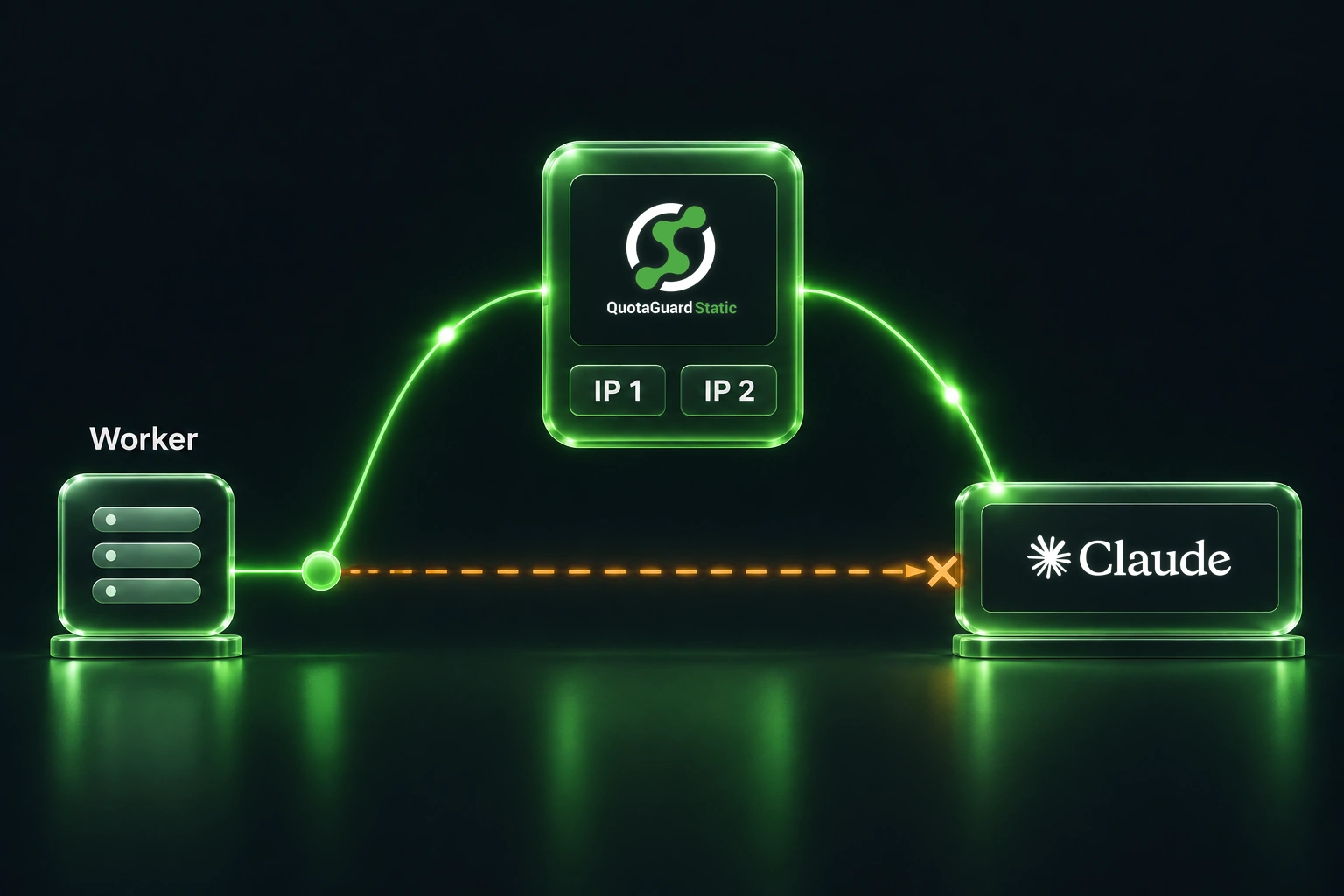
If your app already uses approved fixed egress, such as a cloud NAT gateway or company-managed proxy, register those addresses and keep the existing route. If the runtime’s address changes and your HTTP client supports an explicit proxy, a managed static outbound proxy can give just those Claude calls a stable path without moving the application.

For QuotaGuard, allowlist both addresses assigned to the subscription, even if a short diagnostic only returns one. A shared static IP is stable, not exclusive: Anthropic notes that someone with a leaked key could potentially use an allowlisted address shared with your organization. If policy requires addresses reserved for your traffic, use suitable exclusive egress rather than treating a shared proxy as an identity control. The key or workload credential still authenticates the request; the allowlist adds a separate network restriction.

Once you’ve confirmed the failing caller’s route, use QuotaGuard’s outbound Quickstart if you need a fixed egress path, or compare shared and dedicated proxies if address exclusivity matters.

QuotaGuard Static IP Blog

Practical notes on routing cloud and AI traffic through Static IPs.

Reliability Engineered for the Modern Cloud

For over a decade, QuotaGuard has provided reliable, high-performance static IP and proxy solutions for cloud environments like Heroku, Kubernetes, and AWS.

Get the fixed identity and security your application needs today.