PayPal Payflow Pro RESULT=1: Fix Allowed IP Address Failures From Cloud Apps

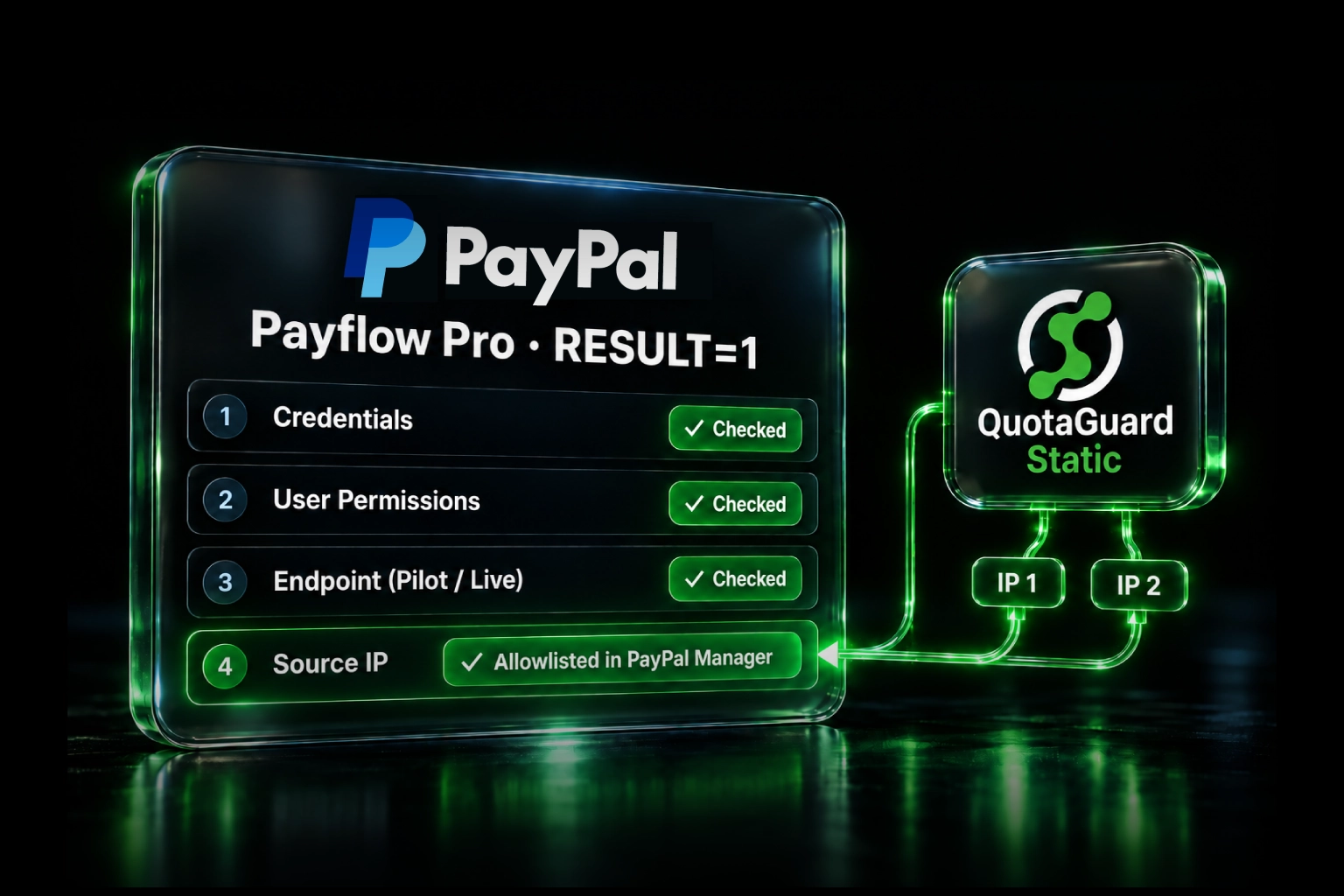
If PayPal Payflow Pro starts returning RESULT=1 after your application moves to cloud infrastructure, do not disable the API IP restriction just to restore payment processing. First rule out incorrect credentials, permissions, and endpoints. If PayPal Manager is rejecting the application's changing source address, route only the Payflow HTTPS requests through QuotaGuard and add the two static IP addresses assigned to your subscription to Payflow's API allowlist.
This gives the application a stable outbound identity while QuotaGuard operates the proxy infrastructure, availability, monitoring, maintenance, and failover. Your application can keep running on serverless or dynamically addressed infrastructure without asking PayPal to trust every address that platform might use.
This Applies to Payflow Pro, Not Every PayPal API
PayPal's own documentation makes an important distinction: merchants do not generally need to allowlist their server IP addresses for PayPal Classic or REST APIs. Payflow Pro is different. It offers an optional Allowed IP Addresses for API Transaction Processing control in PayPal Manager.
When that control is enabled, Payflow accepts API transactions only from the configured internet-facing addresses. PayPal currently allows up to 16 entries. That creates a problem for applications whose outbound address can change after a deployment, restart, scale event, or infrastructure replacement.
Do not confuse this setting with PayPal Manager's separate login restriction. The control needed here must explicitly refer to API Transaction Processing or the Payflow Pro API. Restricting administrator logins does not establish the source identity of payment API calls.
Why RESULT=1 Does Not Automatically Mean an IP Problem
Payflow reports RESULT=1&RESPMSG=User authentication failed for more than one failure. Check these causes in order:
- Credentials:
PARTNER,VENDOR,USER, andPWDare case-sensitive. API calls require aUSERvalue even when PayPal Manager allows that field to be blank during an interactive login. - User role: confirm that the API user has permission to run the transaction type being submitted. PayPal documents
API_FULL_TRANSACTIONSfor users that need to run all Payflow transaction types. - Environment: use
https://pilot-payflowpro.paypal.comfor the test environment andhttps://payflowpro.paypal.comfor live processing. Test credentials and production credentials are not interchangeable. - Source address: if the preceding checks pass and the API allowlist is enabled, confirm that the address Payflow sees is one of the entries in PayPal Manager.
This order matters. A static IP cannot repair a misspelled credential or an underprivileged Payflow user. It solves the source-address failure after those account-level causes have been eliminated.
The QuotaGuard Connection Path
cloud application
  -> QuotaGuard authenticated proxy
  -> payflowpro.paypal.com
  -> Payflow evaluates the QuotaGuard source IP
Your application still connects to PayPal's hostname. QuotaGuard supplies the stable source identity seen by Payflow. Do not hard-code PayPal's destination IP addresses. PayPal operates Payflow across multiple data centers and specifically recommends using its hostnames so traffic can follow the healthy destination.
The route can be selective. Only the HTTP client that sends Payflow requests needs to use QuotaGuard. Unrelated database, authentication, analytics, and third-party traffic can continue to use the application's normal network path.
Step 1: Get the Proxy URL and Both Static IP Addresses
Create a QuotaGuard subscription and copy these values from the dashboard:
- The authenticated proxy connection URL, normally stored as
QUOTAGUARDSTATIC_URL. - Both static outbound IP addresses assigned to the subscription.
Store the connection URL in your platform's server-side secret manager. Never place it in browser JavaScript, commit it to source control, print it in logs, or return it in an error response.
Step 2: Route the Payflow HTTP Client Through QuotaGuard
Payflow accepts HTTPS POST requests. Configure the exact server-side HTTP client that opens that connection to use the authenticated proxy. Here is the routing pattern with Python Requests:
import os
import requests

proxy_url = os.environ["QUOTAGUARDSTATIC_URL"]

proxies = {
    "http": proxy_url,
    "https": proxy_url,
}

# Verify the route before sending any Payflow request.
ip_response = requests.get(
    "https://ip.quotaguard.com",
    proxies=proxies,
    timeout=15,
)
ip_response.raise_for_status()
print(ip_response.text)

# Reuse the same proxies setting in the application's existing Payflow call.
payflow_response = requests.post(
    "https://pilot-payflowpro.paypal.com",
    data=payflow_payload,
    proxies=proxies,
    timeout=30,
)
payflow_response.raise_for_status()
The Payflow payload in this example is deliberately omitted. Keep the payment and secure-token flow already approved for your Payflow integration. The networking change is the proxies configuration, not a reason to redesign how cardholder data is collected.
It is normal for the QuotaGuard URL to begin with http:// while the Payflow destination begins with https://. For HTTPS destinations, the client establishes a CONNECT tunnel through the proxy and TLS continues to PayPal. QuotaGuard Static does not decrypt the Payflow HTTPS payload.
Step 3: Add Both QuotaGuard IPs in PayPal Manager
PayPal's documentation describes the setting under PayPal Manager using labels such as:
- Account Administration > Allowed IP Addresses (For API Transaction Processing), or
- Service Settings > Payflow Pro > Allowed IP Addresses.
The exact navigation can vary with the account interface, but the setting must control Payflow API transactions. Add both addresses displayed in your QuotaGuard dashboard. QuotaGuard uses the pair for availability, so allowlisting only one address can create an avoidable failure during maintenance or failover.
Avoid replacing the two entries with a wildcard or a broad cloud-provider range. The point of the control is to keep the allowlist small and attributable to the application route you operate.
Step 4: Test the Pilot Environment Before Production
Use Payflow's pilot endpoint first:
https://pilot-payflowpro.paypal.comConfirm the following before changing the live account:
https://ip.quotaguard.comreturns one of your assigned addresses when called through the same proxy configuration.- Both assigned addresses are entered in the applicable Payflow API allowlist.
- The pilot request uses test credentials and the correct user role.
- Your application treats Payflow timeouts and uncertain transaction outcomes safely. Do not blindly retry a payment when the original result is unknown.
A single successful IP check proves that request used an assigned address. Do not wait for a short series of checks to display both addresses. Load balancing and connection reuse do not guarantee that both will appear during a brief test.
Troubleshooting Payflow Authentication Failures
| Symptom | What to check |
|---|---|
RESULT=1 in both local and cloud environments |
Check case-sensitive credentials, the required USER value, permissions, and the selected Payflow environment before investigating egress. |
| Local requests work but cloud requests fail | Compare the actual source addresses. Confirm that the cloud request uses QuotaGuard and that both assigned addresses are in the API transaction allowlist. |
| The IP check still shows the hosting platform | The HTTP client is bypassing the proxy. Configure the exact client instance that sends the Payflow request; merely storing QUOTAGUARDSTATIC_URL does not route traffic. |
The IP check succeeds but Payflow still returns RESULT=1 |
Recheck credentials, roles, pilot-versus-live endpoints, and whether the addresses were entered under API Transaction Processing rather than the PayPal Manager login restriction. |
| Requests fail intermittently | Verify that both QuotaGuard addresses are allowlisted, not just the address observed during the first test. |
Security and PCI Scope
A source-IP allowlist is an additional control. It does not replace Payflow credentials, TLS, authorization, fraud controls, logging, or PCI obligations.
PayPal offers secure tokens, hosted checkout pages, and Transparent Redirect patterns that can reduce the amount of sensitive payment data handled by your application. Keep the approved Payflow architecture in place while changing the network route. Do not send card data to an unapproved relay or log transaction payloads while troubleshooting.
QuotaGuard Static uses the standard HTTP proxy protocol on the application-to-proxy hop. For an HTTPS Payflow destination, the application payload remains protected by TLS to PayPal and is not decrypted by QuotaGuard. QuotaGuard Shield adds TLS protection to the application-to-proxy hop. Choose Shield when your security review or approved compliance architecture requires that additional transport protection.
Standard QuotaGuard subscriptions provide two stable addresses on managed shared proxy infrastructure. If your policy or PayPal configuration requires customer-only source addresses and dedicated proxy infrastructure, use a QuotaGuard Enterprise dedicated deployment.
Why Use QuotaGuard Instead of Operating a Proxy VM?
A fixed virtual machine can also provide a stable address, but then your team owns the proxy software, patching, capacity, monitoring, availability, failover, credential handling, and after-hours incidents. QuotaGuard supplies a managed pair of addresses and the infrastructure behind them, while preserving a portable identity that is not tied to a single application host or cloud platform.
That operational difference matters on a payment path. The comparison is not just the monthly cost of an IP address. It is who is responsible when the egress layer fails during checkout.
Plans and Regions
QuotaGuard Static starts at $19 per month. QuotaGuard Shield starts at $29 per month. Choose the nearest of 12 AWS regions during signup to reduce latency. Existing subscriptions that need to move regions should contact QuotaGuard support.
View QuotaGuard plans and start by routing the Payflow pilot request. Contact QuotaGuard support if you need help mapping your application's HTTP client to the correct proxy configuration.
Frequently Asked Questions
Does every PayPal API require a static IP?
No. PayPal says merchants do not generally need to allowlist server IPs for its Classic or REST APIs. This guide addresses the optional API transaction allowlist available for Payflow Pro.
Does RESULT=1 prove Payflow blocked my IP address?
No. Incorrect credentials, missing permissions, an incorrect endpoint, and an API source-IP restriction can all produce an authentication failure. Use the ordered diagnostic checks in this guide.
Should I add one or both QuotaGuard IP addresses?
Add both. The pair supports availability and failover. Allowlisting only the address returned by one test can make payment processing fail when traffic uses the other assigned address.
Should I hard-code PayPal's destination IP addresses?
No. PayPal recommends using the Payflow hostnames because the service operates across multiple data centers. QuotaGuard stabilizes your application's source identity; it does not require pinning PayPal's destination infrastructure.
Does QuotaGuard make a Payflow integration PCI compliant?
No single proxy or network control establishes PCI compliance. QuotaGuard provides managed outbound identity. Your approved payment architecture, handling of cardholder data, access controls, logging, and other PCI requirements remain your responsibility.
Official References
QuotaGuard Static IP Blog
Practical notes on routing cloud and AI traffic through Static IPs.

.webp)