Give your SendGrid API requests a static outbound IP

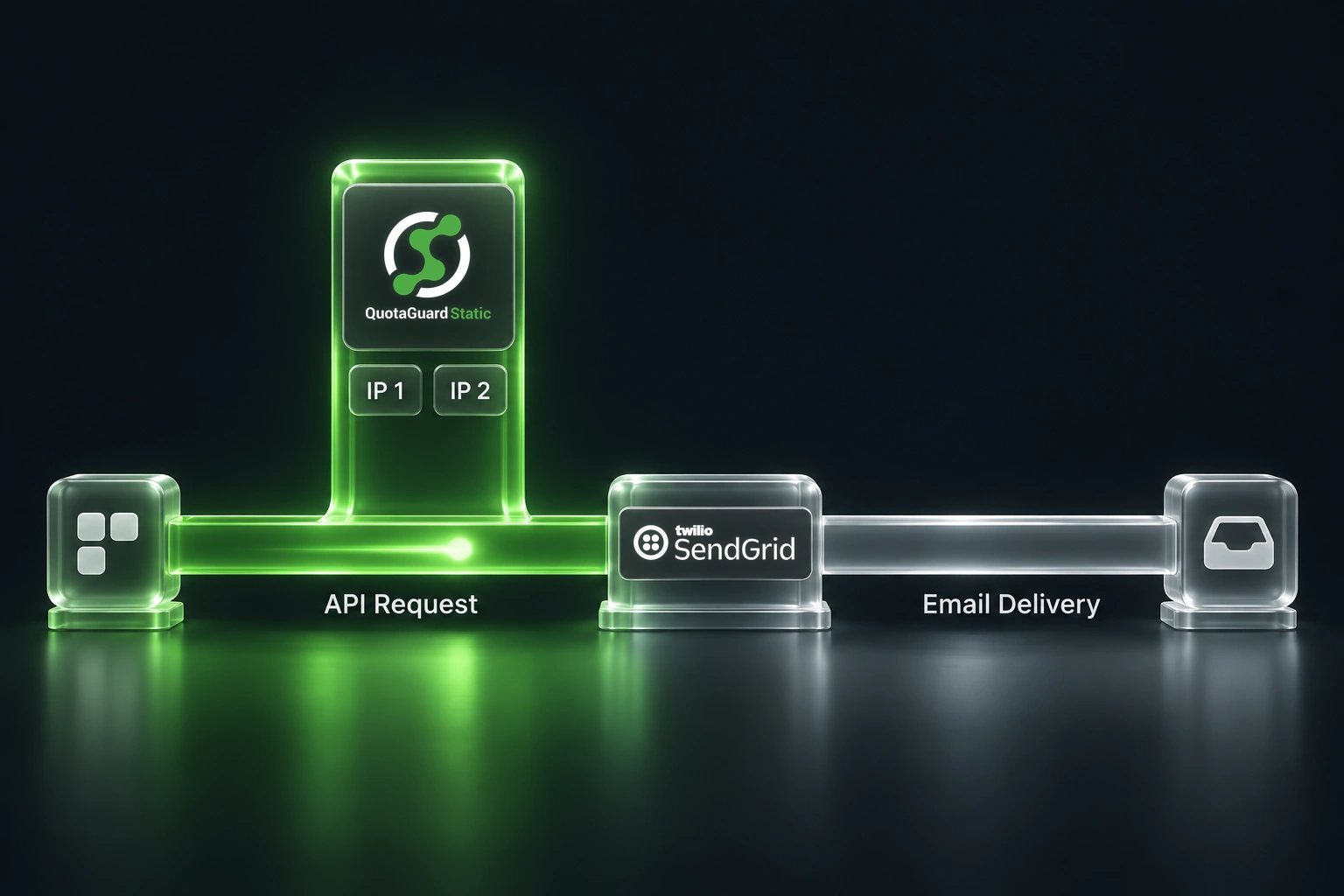
A cloud application can keep using SendGrid's Email API while presenting a predictable source IP to SendGrid's access controls. Route the application's SendGrid HTTPS requests through QuotaGuard, add both assigned addresses to SendGrid's IP Access Management list, and keep your existing email delivery setup in place.
This is useful when your application runs on infrastructure with changing outbound addresses. A deployment, a new worker, or a move to another runtime should not require a fresh allowlist entry for every application instance. A stable outbound path gives your team a small, deliberate set of addresses to manage.
The configuration belongs in the client that actually calls SendGrid. Setting an environment variable alone does not change where requests originate.
Where the static IP fits
An email sent through the SendGrid API crosses two different network connections:
Application or background worker
    |
    | HTTPS request to the SendGrid API
    v
QuotaGuard outbound proxy
    |
    | Source IP is one of your assigned QuotaGuard IPs
    v
SendGrid API
    |
    | SendGrid's email delivery infrastructure
    v
Recipient's mail server
QuotaGuard supplies the stable application egress addresses in the first part of that path. Those are the addresses you allow in SendGrid's IP Access Management settings.
SendGrid's dedicated sending IPs operate on the email delivery side. They relate to your sending reputation and email program. A QuotaGuard IP does not replace that sending IP, perform IP warmup, or change the delivery infrastructure that recipient mail servers see. SendGrid's dedicated IP documentation explains that separate role.
Keeping these two connections distinct makes the setup much easier to reason about. If the problem is an application request being rejected by an IP restriction, investigate application egress. If SendGrid has accepted the request but delivery is delayed or a message is filtered, investigate the email delivery pipeline.
When this setup is useful
Consider a transactional email worker that processes password resets, receipts, or account notifications. The worker can scale independently of the web application and may run on infrastructure whose default outbound IPs are not reserved for your account.
With an explicit proxy client, every SendGrid request from that worker takes the intended network path. Other calls, such as database access, analytics, and payment APIs, can keep their existing routes. You can use the same pattern for a scheduled job or a server-side automation, provided you can configure the HTTP client that sends the request.
A static egress path is especially useful when:
- Your team wants SendGrid IP Access Management enabled without tracking changing application addresses.
- Multiple application instances should use the same approved egress pair.
- You want to move a workload between supported runtimes without redesigning its destination allowlist.
- You need a clear troubleshooting boundary between proxy routing, API authentication, and email delivery.
If your existing network already provides suitable fixed egress and you can operate it reliably, that path may satisfy the requirement. Compare the operational work, traffic, regions, and account isolation you need rather than choosing a proxy simply because your application uses SendGrid.
Protect administrator access before changing the allowlist
SendGrid IP Access Management affects the UI, API, and SMTP relay. Adding the first allowed address enables the restriction. Before you save that first entry, include the stable address used by the administrator's browser and identify every other legitimate client that still needs access. SendGrid IP Access Management
Your laptop's browser does not automatically use the proxy configured in your application. If the browser exits through your office or VPN, that separate address needs its own approved entry. Preserve an administrative recovery path, and do not assume an existing browser session will protect you from lockout.
Inventory background workers, scheduled jobs, deployment checks, support tools, and any SMTP clients before tightening access. An application migration can succeed while a forgotten nightly job fails several hours later.
Configure the application in four steps
1. Store the proxy connection securely
Copy the complete HTTP proxy URL from your QuotaGuard Static dashboard into the runtime's secret configuration as QUOTAGUARDSTATIC_URL. Keep the proxy username and password out of source control, screenshots, and build logs.
Record both assigned static IPs from the dashboard. The addresses belong in the allowlist; the proxy hostname and credentials do not.
For the SendGrid client, also store:
SENDGRID_API_KEY, with only the permissions the application needs.SENDGRID_FROM_EMAIL, using a sender identity configured in SendGrid.SENDGRID_TO_EMAIL, using an approved recipient for a later controlled send.
A mail-only worker generally needs Mail Send permissions rather than account-wide API access. See SendGrid API key scopes.
2. Verify egress from the real runtime
Make an HTTPS request to https://ip.quotaguard.com through the same proxy configuration you will use for SendGrid. Run this check from the deployed worker or application, not just from a developer laptop.
For example, this Python HTTPX check uses explicit proxy configuration and does not attach the SendGrid API key:
import os
import httpx

with httpx.Client(
    proxy=os.environ["QUOTAGUARDSTATIC_URL"],
    trust_env=False,
    follow_redirects=False,
    timeout=httpx.Timeout(30.0, connect=10.0),
) as client:
    response = client.get("https://ip.quotaguard.com")
    response.raise_for_status()
    print(response.json()["ip"])
Compare the returned address with the pair in your dashboard. A short check might show only one address because of load balancing and connection reuse. Allow both assigned addresses rather than waiting for both to appear. QuotaGuard egress verification guidance
HTTPX uses the singular proxy argument. trust_env=False prevents ambient proxy settings from changing this client's route. It also ignores ambient certificate configuration, so teams with a private trust store should pass an approved TLS context explicitly rather than disabling verification. HTTPX proxy configuration and environment variables
3. Add both IPs and preserve the other approved routes
In SendGrid, open Settings, then IP Access Management. Add the two assigned QuotaGuard addresses alongside the administrative and other legitimate addresses identified earlier.
Review the full list before saving. Do not replace it with only the QuotaGuard pair unless every necessary client, including administration, has been deliberately accounted for.
Once the restriction is active, keep the application's SendGrid client on the proxy path. A direct fallback can turn a proxy incident into a rejected API call, or silently bypass your intended network policy if another source remains allowed.
4. Validate a SendGrid request without delivering email
SendGrid's Mail Send API supports sandbox mode. A correctly formed sandbox request returns HTTP 200, does not deliver the email, and does not generate Email Activity or Event Webhook events. This lets you check the API request before an approved live send. SendGrid sandbox mode
Use the same explicit proxy client for POST /v3/mail/send, with the SendGrid API key in the Authorization: Bearer ... header. Include this setting in the JSON body:
{
  "mail_settings": {
    "sandbox_mode": {
      "enable": true
    }
  }
}
This is a fragment to add to a complete Mail Send payload, not a complete request by itself. The quickstart includes the sender, recipient, subject, and content fields.
A sandbox response establishes an API validation result. It does not establish recipient delivery, template rendering, or the behavior of every worker in your system. For production readiness, follow with one approved live message and inspect the resulting delivery information separately.
Route the worker, not just the web application
Many applications enqueue email in one process and send it in another. The web application might write a notification job to a queue while a worker opens the SendGrid connection several seconds later.
In that design, configuring the web process has no effect on the worker's outbound request. Put the proxy secret and HTTP client configuration in the worker runtime. If a scheduled job uses a different library, configure that library too.
The same principle applies to SDKs and automation platforms. Check whether the installed client exposes a supported proxy, transport, agent, or dispatcher configuration. Do not assume that every SDK reads HTTPS_PROXY, or that a setting on one HTTP library changes another library's behavior.
For a narrow email workflow, calling SendGrid's documented HTTPS endpoint with a dedicated HTTP client makes the routing boundary explicit. Keep that client separate from clients that access unrelated services.
Plan for retries and clear operational signals
Treat successful API submission and successful delivery as different outcomes. A normal Mail Send response of HTTP 202 means SendGrid accepted the request. Delivery still depends on the downstream email pipeline. Mail Send API reference
A timeout is more ambiguous. If the connection drops after the request reaches SendGrid, your application may not know whether the message was accepted. Blindly resending can produce duplicate notifications. Use application-level job tracking and a retry policy designed for this uncertainty; do not add automatic retries to every send simply to hide intermittent errors.
For monitoring, record a request or job identifier, the runtime, the mode, the timestamp, and the status. Avoid logging the proxy URL, authorization header, recipient lists, or full payloads. Keep detailed diagnostic data in approved restricted systems when it is needed.
Choose the right kind of static IP
QuotaGuard Static plans provide a pair of static egress addresses. Shared IPs can meet a stable-address requirement, while dedicated IPs provide account-specific address allocation. If your security policy requires exclusive source addresses, choose a dedicated plan rather than treating any static IP as dedicated.
At the time of writing, QuotaGuard Static Starter is $19 per month with a shared static IP pair, and Static Enterprise is $219 per month with dedicated IPs and proxy resources. Review the current QuotaGuard pricing page for request limits, bandwidth, and plan details.
Choose a SendGrid plan for your email program separately. SendGrid's dedicated email-sending IP and QuotaGuard's application egress IP solve different requirements, so their prices are not interchangeable alternatives.
Keep the path predictable
The practical goal is straightforward: your application can keep using SendGrid while its API requests come from an approved, stable pair of addresses.
Start with the real sending process, verify its egress, preserve administrator access, allow both assigned IPs, and use a non-delivering sandbox request before a controlled live check. That sequence makes it easier to adopt IP-based access controls without turning routine deployments into allowlist maintenance.
Explore QuotaGuard Static or use the QuotaGuard documentation to find the setup for your runtime.
QuotaGuard Static IP Blog
Practical notes on routing cloud and AI traffic through Static IPs.