Static IP for BigQuery: Why Most Apps Don't Need One, and the Exception

QuotaGuard Engineering
July 14, 2026
5 min read
Pattern

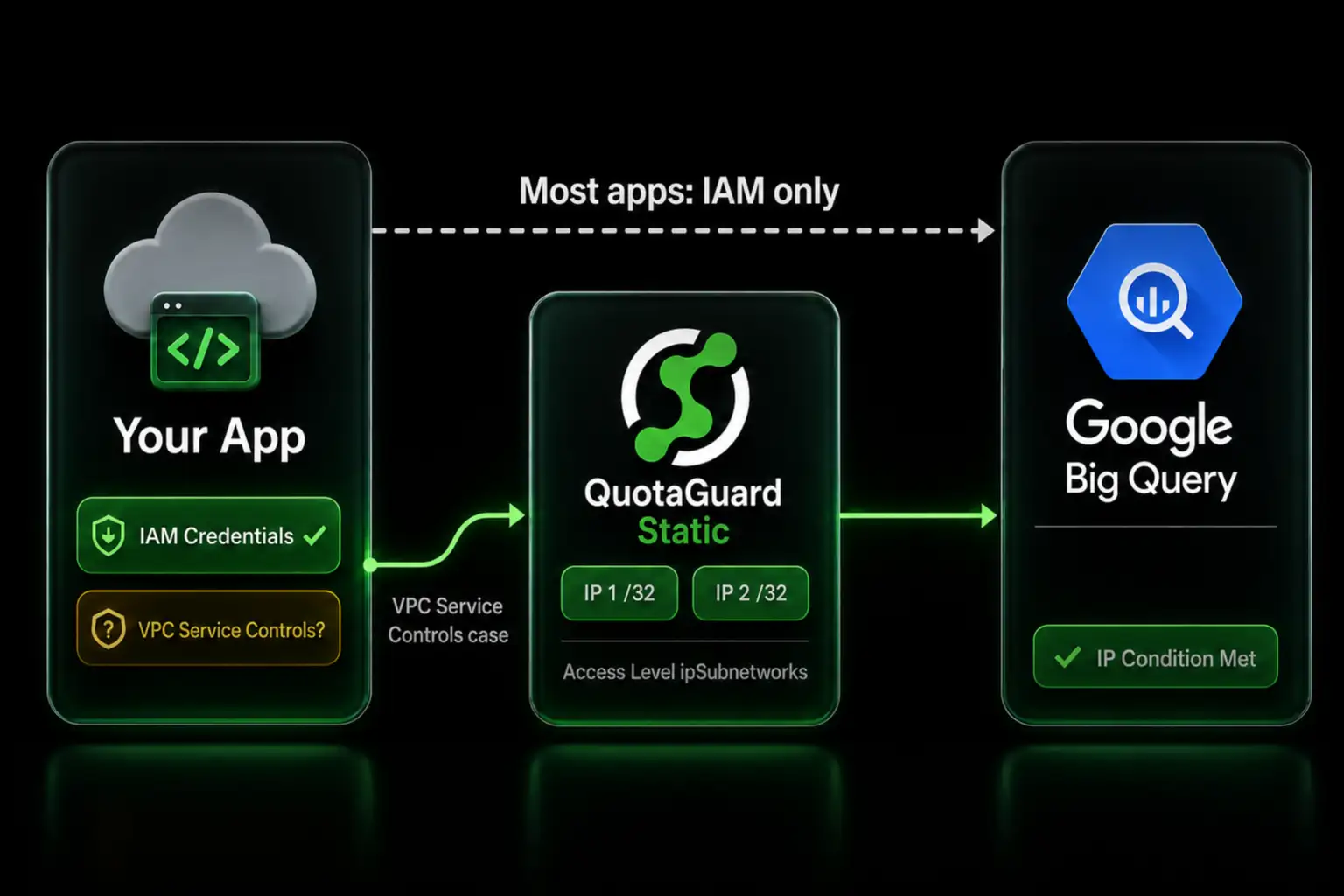
BigQuery controls access with IAM, not IP allowlisting, so a static IP only helps in one case: satisfying a VPC Service Controls access level.

If you are looking for a static IP to connect to BigQuery, start by confirming you actually need one. Most apps do not. BigQuery authorizes requests with IAM identities, not source IP addresses, so a service account with the right role connects from any IP. The case where a static IP matters is narrow and specific, and this post covers exactly when and how.

BigQuery Access Is IAM-Based, Not IP-Based

BigQuery does not have a per-dataset or per-connection IP allowlist the way a database security group or a Snowflake network policy does. Access is granted to IAM principals. You give a service account a role like BigQuery Data Viewer or Job User, and any process holding that service account's credentials can run queries, regardless of the IP it connects from.

This is why a serverless or PaaS app with rotating outbound IPs usually connects to BigQuery without trouble. The credential is what is checked, not the address. If your BigQuery connection is failing, the cause is far more often a missing role, a wrong project, or an expired key than an IP restriction.

The Exception: VPC Service Controls Access Levels

There is one place IP addresses enter BigQuery access control. An organization can wrap BigQuery in a VPC Service Controls perimeter, then attach an access level built with Access Context Manager that only permits requests from specific IP ranges. When that is in place, a request from outside the perimeter has to arrive from an allowed IP, on top of holding a valid IAM identity.

This is an organization-level security control, not a toggle on a dataset. It requires a Google Cloud Organization, a service perimeter, and the Access Context Manager Admin role. You would meet it in two situations: your own security team has locked your BigQuery behind a perimeter and your app's egress IP is not stable, or a data provider exposes their BigQuery to you and asks you to send your traffic from registered static IPs so they can add those IPs to their access level.

If neither of those is your situation, you do not need a static IP for BigQuery. If one of them is, two fixed IPs solve it.

Add Two Static IPs to a VPC Service Controls Access Level

An access level can list allowed IP ranges as ipSubnetworks. Put your two QuotaGuard static IPs there as /32 values. Define the level in a YAML file.

- ipSubnetworks:
  - 203.0.113.10/32
  - 203.0.113.11/32

Then create the access level and reference it from the perimeter's ingress policy.

gcloud access-context-manager levels create quotaguard_ips \
  --title="QuotaGuard static IPs" \
  --basic-level-spec=quotaguard-level.yaml \
  --policy=POLICY_ID

On the app side, route your BigQuery calls through QuotaGuard so the request reaches Google from one of those static IPs. BigQuery's API is HTTPS, and the Google client libraries honor the standard proxy environment variable.

export HTTPS_PROXY="http://username:password@us-east-static-01.quotaguard.com:9293"

With the access level in place and your traffic leaving from a static IP, the request satisfies both the IAM check and the IP condition. If a third party owns the perimeter, you send them your two IPs and they add the ipSubnetworks entries on their side.

For regulated data, use QuotaGuard Shield instead of Static. Shield uses SSL passthrough so QuotaGuard never decrypts the data flowing between your app and BigQuery, with the QUOTAGUARDSHIELD_URL connection details in place of the Static ones.

QuotaGuard Static Pricing Starts at $19/Month

Bandwidth is bundled with no per-GB overage fees. Dedicated IPs are available on Enterprise and above, which suits a VPC Service Controls access level that has to stay isolated from other organizations' traffic.

QuotaGuard Shield Pricing Starts at $29/Month

Shield costs slightly more than Static at each tier because SSL passthrough adds routing overhead. The compliance coverage for HIPAA, PCI-DSS, and SOC 2 is worth the difference when the data in your warehouse requires it. All plans include a 3-day trial, Enterprise includes a 7-day trial, and a credit card is required.

See the full pricing table at quotaguard.com/products/pricing.

Confirm You Need It, Then Add Two IPs

For most BigQuery work, IAM is the whole story and a static IP adds nothing. The moment a VPC Service Controls perimeter enters the picture, whether yours or a data provider's, two fixed IPs are what satisfy the access level.

Start a trial at quotaguard.com/products/pricing. If your warehouse holds regulated data, read more about QuotaGuard Shield and its SSL passthrough model.

QuotaGuard Static IP Blog

Practical notes on routing cloud and AI traffic through Static IPs.

Reliability Engineered for the Modern Cloud

For over a decade, QuotaGuard has provided reliable, high-performance static IP and proxy solutions for cloud environments like Heroku, Kubernetes, and AWS.

Get the fixed identity and security your application needs today.