A Port in the Host Header Blocks Proxied Requests at a WAF When Direct Requests Work

QuotaGuard Engineering
August 21, 2026
5 min read
Pattern

When a proxied request fails at a WAF but direct works, the cause is often a port in the Host header. Strip it client-side.

Your API call works when you run it directly. Route it through a proxy for a static outbound IP and the destination returns a block page or a 500. The obvious suspect is the proxy. In a large share of these cases the proxy is innocent and the real trigger is a destination WAF reading a Host header that carries a port.

The Host header carries the destination port, and some WAFs reject it

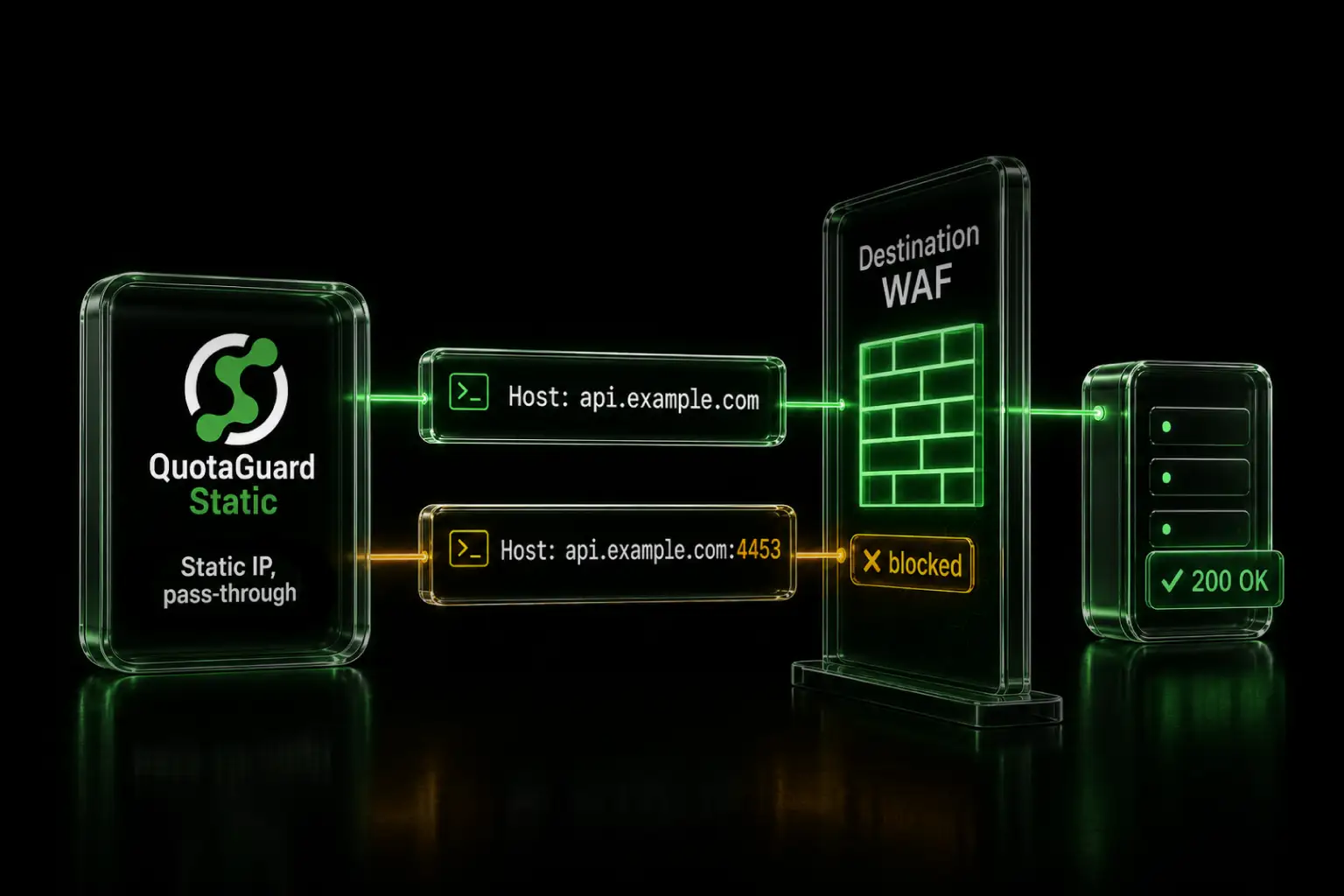
When your destination API listens on a non-standard port, your endpoint URL looks like https://api.example.com:4453/path. HTTP clients write the connection's host:port into the Host header for any non-default port. The header goes out as Host: api.example.com:4453.

A port in the Host header is legal per the HTTP spec. Some destination servers and WAFs reject it anyway. They treat a Host header containing a port as malformed or suspicious and return their own block page, a 403, a 404, or a 500. This is not new. The PostgreSQL project's yum server returned a 404 for a Host header carrying a port for years, documented on their own mailing list, where curl -H Host:yum.postgresql.org succeeded and curl -H Host:yum.postgresql.org:80 failed (postgresql.org mailing list).

Reproduce the request outside the proxy to confirm the destination is the source

Do not change code until you know where the block comes from. Send the same request from a machine that is not going through the proxy, and vary only the Host header. Set URL to your existing endpoint, unchanged, including the port.

URL='https://api.example.com:4453/path'   # your existing endpoint, unchanged
 
# Host WITHOUT the port
curl -sS -o /dev/null -w '%{http_code}\n' -X POST -H "Host: api.example.com" "$URL"
 
# Host WITH the port
curl -sS -o /dev/null -w '%{http_code}\n' -X POST -H "Host: api.example.com:4453" "$URL"

If the first returns 200 and the second returns the block, you have isolated the cause. The proxy was never in the second test, so the destination is doing this. A pass-through proxy sends whatever Host header your client set. It does not add the port and it does not remove it.

Set the Host header without the port to fix it client-side

Keep the URL as-is, port included, because the connection still has to reach that port. Override only the Host header. In axios that is one line, and every HTTP client has an equivalent.

const axios = require('axios');
 
// URL keeps the port. Only the Host header drops it.
await axios.post('https://api.example.com:4453/path', payload, {
  headers: {
    Host: 'api.example.com'   // same host, port removed from the header only
  }
});

Setting the Host header explicitly overrides the value the client would derive from the URL. The socket still connects to the right port. The destination WAF sees a clean Host header and passes the request.

Other destination WAF rules can block proxied traffic the same way

The Host-header port is the most common version of this, and it is not the only one. Destination WAFs and firewalls apply rules to the request they receive, and a request through a proxy can differ from your direct one in ways you did not intend. A WAF can reject requests whose Host header does not match an expected value. It can block on a missing or unexpected header, on an X-Forwarded-For or X-Forwarded-Host the client library adds, or on a User-Agent it does not recognize. The common thread is the same. The destination inspects the request and decides, and a pass-through proxy forwards whatever your client sent. So the fix lives on your side. Reproduce outside the proxy, diff the request that works against the request that gets blocked, and correct the header your client is sending.

The proxy passes traffic through unchanged, so the static IP is the value and the fix is yours

The reason to route through a proxy here is the static outbound IP that the destination allowlists. QuotaGuard gives your subscription two load-balanced static IPs and forwards your requests without modifying them. It does not rewrite headers and it does not inject block pages. That is what makes this class of problem easy to diagnose. The block came from the destination, and the request that reached it is the request your client built.

Use your dashboard log viewer to confirm the request left from your static IP and see the status the destination returned. If the destination handles regulated data like payments or health records, use QuotaGuard Shield, which keeps the customer-to-proxy hop TLS-encrypted. Neither Static nor Shield decrypts your outbound payload. For a concrete real-world case of this exact Host-header block, see Fixing the 404-QPG97-STATUS error on QNB VPOS through a static IP proxy.

To get a static outbound IP for allowlisting, see quotaguard.com/products/pricing.

QuotaGuard Static IP Blog

Practical notes on routing cloud and AI traffic through Static IPs.

Reliability Engineered for the Modern Cloud

For over a decade, QuotaGuard has provided reliable, high-performance static IP and proxy solutions for cloud environments like Heroku, Kubernetes, and AWS.

Get the fixed identity and security your application needs today.