Retool Static IP: Connect Retool to Firewalled Databases and APIs

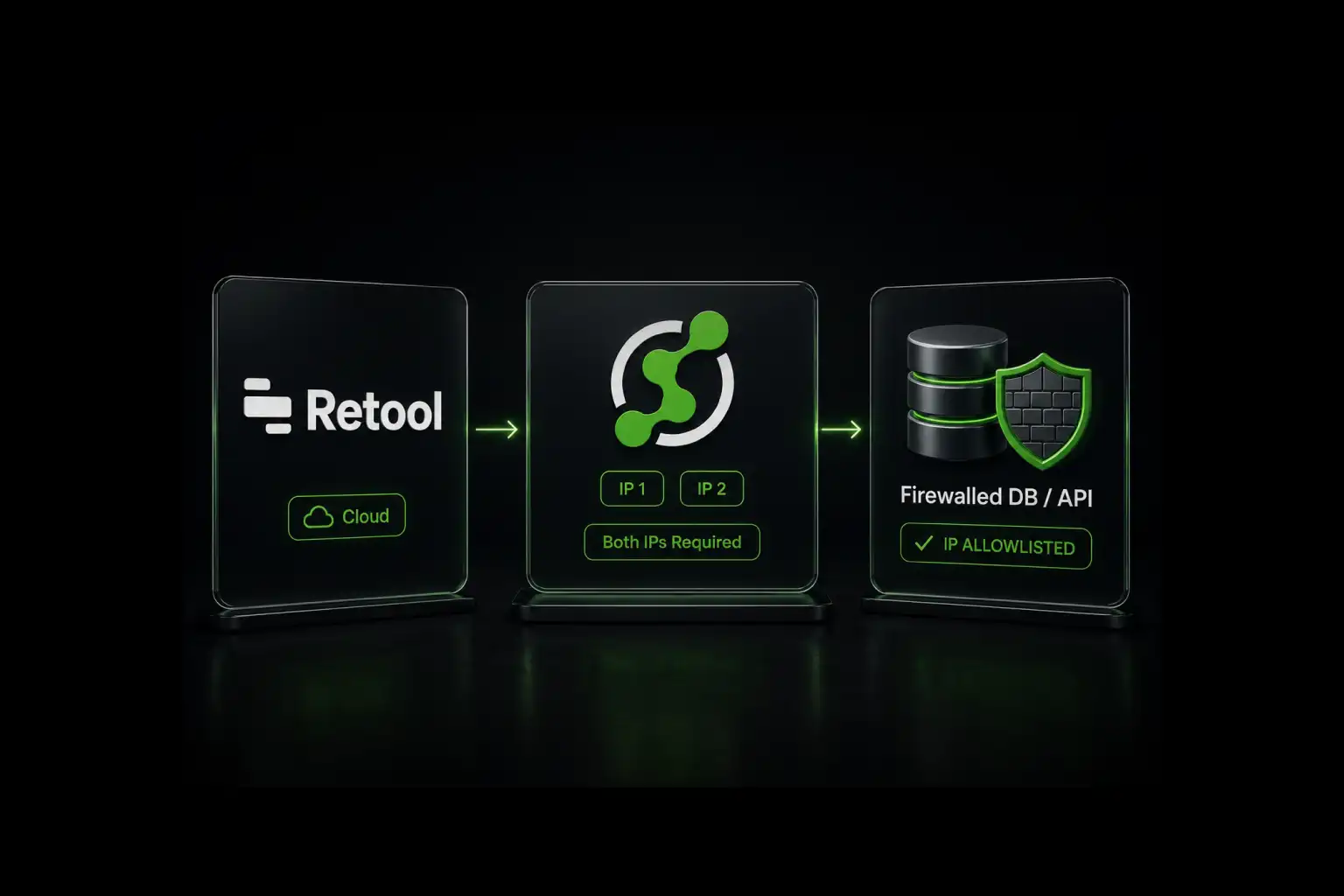
Retool Cloud lacks static outbound IPs by default. Use a middleware service for Cloud or HTTP_PROXY environment variables for self-hosted Retool to give your queries two stable IPs.
Retool Cloud doesn't give you a static outbound IP. If your database has a security group, or your enterprise API requires a registered source address, Retool's shared cloud IPs get blocked. The fix is a proxy that gives your Retool queries a fixed, dedicated IP your IT team can allowlist once.
This works for Retool Cloud and self-hosted Retool. QuotaGuard configuration takes about 2 minutes. End-to-end setup including middleware deployment (Retool Cloud only) takes about 10 minutes total.
Why Retool Gets Blocked by Firewalled Databases
Retool Cloud runs on AWS shared infrastructure. When your app makes a query, it goes out from one of Retool's rotating cloud IPs. That IP changes. Your database security group or enterprise firewall sees a new source address every time and blocks it.
This is one of the most common reasons engineers contact us. The Retool app works perfectly in local development, where the developer's office IP is already allowlisted. Then they move it to Retool Cloud and every query fails. The database is fine. The query is correct. The problem is the source IP changed.
It comes up most often with:
- Amazon RDS PostgreSQL or MySQL with a VPC security group
- MongoDB Atlas clusters with IP allowlisting enabled
- Enterprise SaaS APIs (Salesforce, Workday, SAP) that require a registered IP
- Fintech APIs (Mercury, Stripe, Adyen) that require IP allowlisting on production credentials
- Internal APIs behind a corporate firewall
- Any database a security team has locked down to known addresses
Your Options for a Static Egress IP with Retool
Option 1: Retool's published IP ranges (don't trust). Retool publishes a list of IP ranges their cloud uses. You can add all of them to your allowlist. The problem is it's a large range of shared IPs used by every Retool customer. You're opening your database to all of them, not just your app. Most security teams won't accept that, and the list changes when Retool updates their infrastructure.
Option 2: Retool on-prem or self-hosted. Run Retool on your own EC2 instance or Kubernetes cluster and assign a static Elastic IP. Full control, no shared infrastructure. The cost is the EC2 instance, the engineering time to run it, and the operational overhead of keeping Retool upgraded. If you're already running self-hosted Retool, you can add the proxy at the host level and skip most of this complexity.
Option 3: QuotaGuard. Route your Retool resource queries through a proxy with two static IPs assigned to your subscription. Add them to your database allowlist once. Plans start at $19/month.
If your security model requires a known, isolated source IP that can't be shared with other customers, that's what QuotaGuard provides.
Deeper Dives for Your Specific Retool Deployment
This post is the overview. Two deeper specialist posts cover each deployment type in detail:
- Static IPs for Self-Hosted Retool: HTTP_PROXY Configuration. Container-level proxy setup for Docker, Kubernetes, and AWS deployments. Covers the v2.110 minimum version requirement, NO_PROXY for internal services, QGTunnel for database connections, and per-deployment-target code examples.
- Static IPs for Retool Cloud: The Middleware Pattern. Full middleware service architecture, production-ready Node.js code, deployment on Heroku/Render/Railway/Fly.io, authentication and rate limiting, and what to do when the pattern doesn't fit your use case.
The high-level setup below covers both patterns at a summary level. The specialist posts above go deeper on production hardening, edge cases, and deployment-specific gotchas.
Setting Up a Static IP for Retool Cloud
Retool Cloud doesn't expose container environment variables, so the host-level proxy pattern that works for self-hosted Retool doesn't apply. The solution for Retool Cloud is a lightweight middleware service that you control. Retool calls the middleware, the middleware forwards the request through QuotaGuard, and the destination receives a request from a QuotaGuard static IP.
Deploy a lightweight Node or Python service (on Railway, Render, Heroku, Fly.io, or your own infrastructure) that has QuotaGuard configured. Retool talks to that service via HTTP. The service makes the actual destination call from a static IP and returns the result.
The QuotaGuard configuration on your middleware host is one environment variable:
QUOTAGUARDSTATIC_URL=http://username:password@us-east-static-01.quotaguard.com:9293Here's a minimal Express middleware service that forwards arbitrary HTTP requests through QuotaGuard:
import express from 'express';
import { HttpsProxyAgent } from 'https-proxy-agent';

const app = express();
app.use(express.json());

const agent = new HttpsProxyAgent(process.env.QUOTAGUARDSTATIC_URL);

app.post('/proxy', async (req, res) => {
  const { url, method = 'GET', headers = {}, body } = req.body;
  try {
    const response = await fetch(url, {
      method, headers, agent,
      body: body ? JSON.stringify(body) : undefined
    });
    res.json(await response.json());
  } catch (err) {
    res.status(500).json({ error: err.message });
  }
});

app.listen(process.env.PORT || 3000);
Deploy that service, point a Retool REST API resource at its URL, and Retool's queries route through QuotaGuard transparently. From your destination's perspective, the request arrives from one of your two QuotaGuard static IPs.
For production deployments, add authentication on the middleware endpoint, rate limiting, and a whitelist of allowed destination URLs. The Retool Cloud middleware deep dive covers the production hardening pattern in detail.
Note: the middleware approach works for HTTP-based traffic only. Native TCP database drivers (PostgreSQL, MySQL native protocol, MongoDB native driver, Redis) can't be proxied through HTTP middleware. For database access from Retool Cloud, either use the database's HTTP API if one exists (MongoDB Atlas Data API, Supabase REST, PlanetScale HTTP) or migrate to self-hosted Retool where QGTunnel handles raw TCP.
Setting Up a Static IP for Self-Hosted Retool
Self-hosted Retool (version 2.110 or later) is simpler. Set the proxy at the host level and every Retool resource picks it up automatically. Earlier versions of self-hosted Retool only proxied internal Retool calls; REST and GraphQL resource queries bypassed the proxy. Upgrade to v2.110+ before relying on this pattern.
In your Docker Compose file or Kubernetes deployment, add this environment variable to the Retool container:
# docker-compose.yml
environment:
  - HTTP_PROXY=http://username:password@us-east-static-01.quotaguard.com:9293
  - NO_PROXY=localhost,127.0.0.1,retool-db,retool-jobs-runner
Restart the Retool container. All outbound HTTP/HTTPS traffic from Retool now routes through your static IPs automatically, including REST API queries, GraphQL, and any other HTTP-based resource.
For direct database connections (PostgreSQL, MySQL) on self-hosted Retool, use QGTunnel. Download it and wrap your Retool process:
# Download QGTunnel
curl https://s3.amazonaws.com/quotaguard/qgtunnel-latest.tar.gz | tar xz

# Start Retool through the tunnel
bin/qgtunnel ./start-retool.sh
Configure your database tunnel in the QuotaGuard dashboard under Settings. Set the remote destination to your database host and port, enable transparent mode, and Retool connects to the original hostname while the traffic exits from your static IPs.
The self-hosted Retool deep dive covers Kubernetes setup, NO_PROXY edge cases, the undocumented HTTP_PROXY_STRICT workaround for mixed environments, and version-specific gotchas.
Verifying Your Static IP Is Working
Before you give your two static IPs to your IT team for allowlisting, confirm traffic is actually routing through them.
Create a Retool REST API resource pointed at QuotaGuard's IP check endpoint:
GET https://ip.quotaguard.comThe response returns the IP your request came from. It should match one of the two static IPs in your QuotaGuard dashboard. Run it a few times and you'll see both IPs rotate (load-balanced for availability).
If it returns a non-QuotaGuard IP, the proxy isn't configured correctly. Check your environment variables and redeploy.
QuotaGuard Shield: Static IPs for Inbound Retool Traffic
Everything above is outbound. Your Retool app reaching external data sources.
SBoth Static and Shield support inbound. Inbound is a hosted reverse proxy configured in the dashboard. Upload your certificate (Static) or configure TLS passthrough (Shield), create an inbound proxy pointing at your origin, and assign a custom domain via CNAME to <hash>.getstatica.com. Incoming traffic uses the dedicated static IP for allowlisting. Your enterprise data source allowlists that IP. Pushes, webhooks, and API calls arrive at a stable address regardless of where your Retool instance is hosted.
This comes up most often with enterprise ETL pipelines that push data into internal tools, or financial systems that only send data to pre-registered endpoints. See how Shield works for inbound traffic.
Choosing the Right Plan
| Plan | Price | Best For |
|---|---|---|
| Starter | $19/month | Single Retool app, API allowlisting, getting started |
| Production | $49/month | Multiple Retool apps, higher query volume |
| Business | $89/month | High-volume queries, large engineering teams |
| Enterprise | $219/month | Dedicated IPs (not shared), HIPAA/PCI compliance requirements |
Most Retool use cases start on Starter and upgrade as traffic grows. Enterprise is for situations where your partner or compliance requirement explicitly demands a dedicated IP that no other account shares.
Troubleshooting
Retool Cloud queries still failing after setup: Verify your middleware service is actually routing through QuotaGuard. Add a test endpoint to the middleware that calls https://ip.quotaguard.com directly and confirm it returns a QuotaGuard IP before involving Retool at all. The Retool side just needs a REST API resource pointed at your middleware URL.
Self-hosted on Retool version older than v2.110: Earlier Retool versions only applied HTTP_PROXY to internal Retool calls. REST and GraphQL resource queries bypassed the proxy entirely. Upgrade to v2.110+ before relying on the HTTP_PROXY pattern. There's no version-independent workaround short of upgrading or using the middleware pattern instead.
Self-hosted proxy not applying to all resources: Some Retool resource types use their own HTTP clients that may not respect system proxy environment variables. Test each resource type individually with the ip.quotaguard.com check. For database resources on self-hosted Retool, QGTunnel is more reliable than HTTP_PROXY for raw TCP connections.
407 Proxy Authentication Required: Credentials in the proxy URL are wrong. Copy the full URL directly from your QuotaGuard dashboard rather than typing it manually.
Database still rejecting connection after allowlisting: Check that both static IPs are in your allowlist, not just one. QuotaGuard uses two IPs in a load-balanced pair. Traffic can come from either.
Middleware approach returning slow queries: Add connection pooling to your middleware service. Each Retool query hitting the middleware without pooling opens a new connection. That adds latency and hits connection limits on databases like RDS.
Get Started
Start a free trial, get your proxy URL from the dashboard, and configure your Retool deployment. Self-hosted Retool (v2.110+) is one environment variable and a redeploy. Retool Cloud with direct database connections needs the middleware pattern, which takes a bit longer but gives you a cleaner security model.
See plans and start a free trial.
If you're dealing with HIPAA-regulated data, a PCI environment, or an enterprise security team with specific IP isolation requirements, reach out directly and you'll hear back from an engineer.
QuotaGuard Static IP Blog
Practical notes on routing cloud and AI traffic through Static IPs.