Static IPs for Self-Hosted Retool: Configure HTTP_PROXY for All Resource Connections

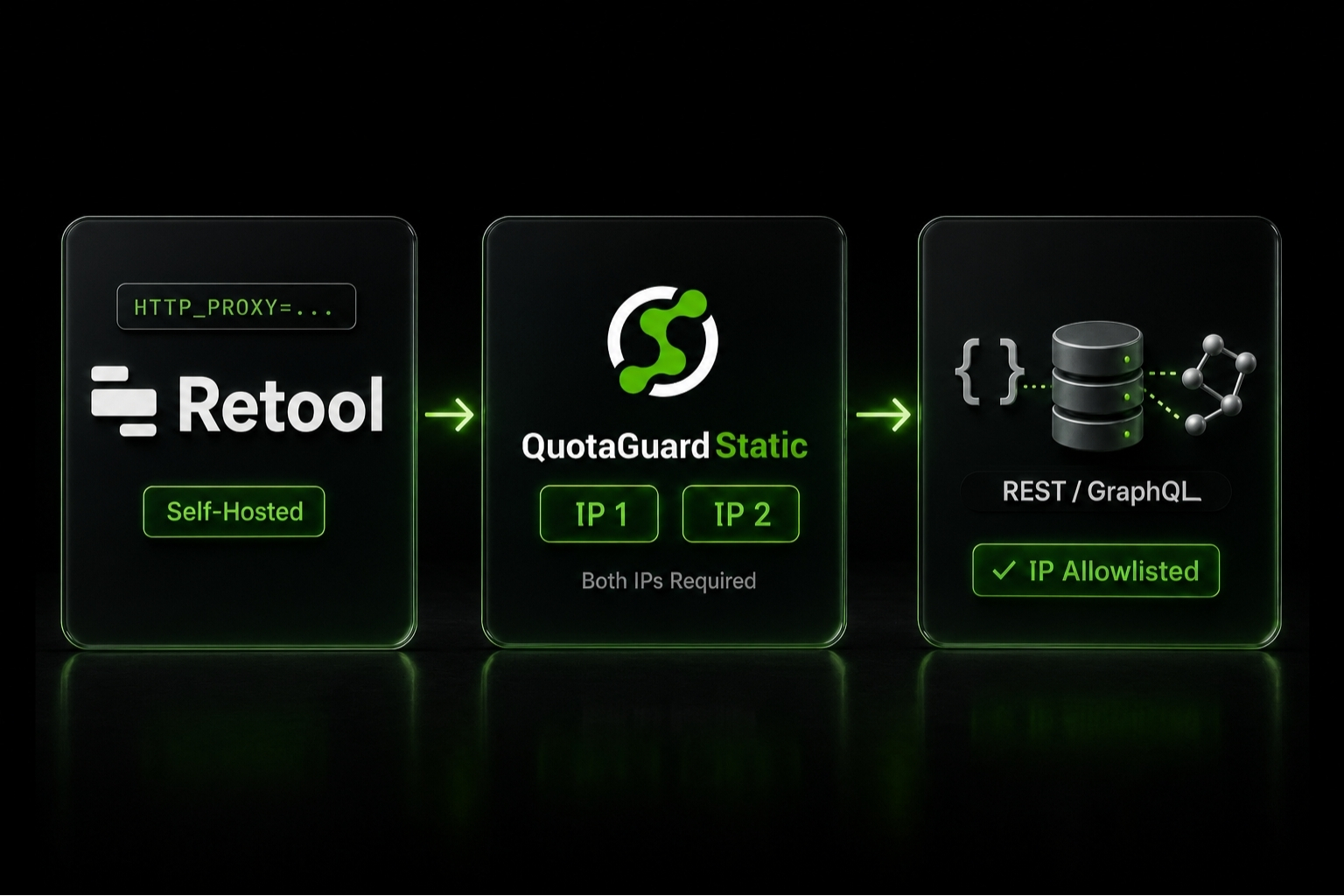
Set HTTP_PROXY on your self-hosted Retool container (v2.110 or later) and every REST and GraphQL resource exits through your QuotaGuard static IPs automatically.
Self-hosted Retool (version 2.110 or later) has one architectural advantage over Retool Cloud for teams that need stable egress IPs: container-level HTTP_PROXY support propagates down to every HTTP-based resource connection. You set the environment variable once on your Docker or Kubernetes deployment, restart the container, and every REST API, GraphQL endpoint, and HTTP-based data source Retool reaches now exits from your QuotaGuard static IPs. No per-resource configuration. No application code changes. No middleware pattern needed.
This post is the self-hosted deep dive. For the overview of static IPs for Retool in general (with comparisons to other approaches and the Retool Cloud middleware pattern), see Retool Static IP: Connect Retool to Firewalled Databases and APIs.
One important version note before you start. Retool added comprehensive HTTP_PROXY support for resource queries in v2.110. On earlier versions, HTTP_PROXY only proxied internal Retool calls (license server, telemetry); REST and GraphQL resource queries bypassed the proxy entirely. If your self-hosted Retool deployment is older than v2.110, upgrade before relying on the pattern in this post.
Self-Hosted Retool Inherits HTTP_PROXY Across All HTTP-Based Resources
Retool's containerized backend respects the standard HTTP_PROXY environment variable that most Node.js HTTP clients honor by default. When you set this variable on the Retool container, outbound HTTP requests the Retool server makes (when executing queries on behalf of your apps) get routed through the proxy URL you specify.
The practical implication is significant. In Retool, "resources" are the abstraction for external connections: a REST API resource, a GraphQL resource, a Stripe API resource, a Slack webhook resource. Each resource normally has its own connection configuration in the Retool UI. With container-level HTTP_PROXY set, all of these resources inherit the proxy automatically. You don't configure a proxy per resource. You configure it once on the container.
This is the simplest static IP pattern in Retool. It works for any HTTP-based resource type on v2.110 and later: REST, GraphQL, OpenAPI, custom REST integrations, third-party SaaS connectors that Retool exposes as resources, and any HTTP traffic Retool generates.
Set HTTP_PROXY in Your Retool Container
The exact configuration depends on your deployment target. The variable values are identical across all deployment types. The variable names are too. Only the place you write them down changes.
Docker Compose
Add the environment variable to your Retool service in docker-compose.yml:
services:
  api:
    image: tryretool/backend:3.300.30-stable
    environment:
      - HTTP_PROXY=http://username:password@us-east-static-01.quotaguard.com:9293
      - NO_PROXY=localhost,127.0.0.1,retool-db,retool-jobs-runner
      # ... your other env vars
Pin the image to a specific version rather than using a floating tag. Retool's Docker setup recommends versioned tags (the pattern is tryretool/backend:<version>-stable) for reproducible deployments. Check Retool's release notes for the current stable version.
The NO_PROXY entries tell the proxy to skip internal Retool service hostnames so internal Retool-to-Retool traffic doesn't get routed through QuotaGuard. Adjust the NO_PROXY list to match your specific Retool deployment's internal service names. If your self-hosted setup includes the code executor service (tryretool/code-executor-service) or workflows worker, include those hostnames in NO_PROXY too.
Kubernetes
Add the environment variable to your Retool Deployment's container spec or set it via a ConfigMap or Secret:
apiVersion: apps/v1
kind: Deployment
metadata:
  name: retool-api
spec:
  template:
    spec:
      containers:
        - name: retool-api
          image: tryretool/backend:3.300.30-stable
          env:
            - name: HTTP_PROXY
              valueFrom:
                secretKeyRef:
                  name: retool-secrets
                  key: quotaguard-url
            - name: NO_PROXY
              value: "localhost,127.0.0.1,retool-db,retool-jobs-runner,.cluster.local"
Store the proxy URL in a Kubernetes Secret rather than the Deployment manifest directly. Helm chart users should add the variable to their values.yaml under the api.env section. Use a pinned version tag rather than the deprecated latest tag.
AWS ECS or AWS EKS
For ECS task definitions, add the environment variables to the container definition's environment field. For EKS, use the same Kubernetes pattern above. AWS deployments often need the NO_PROXY list to include the VPC's internal CIDR range and any internal AWS service endpoints you don't want routed through QuotaGuard.
Verify Your Static IPs Before Adding Them to External Allowlists
After setting the variables and restarting the Retool container, verify that outbound traffic actually flows through QuotaGuard before you update any external allowlists. The fastest test: create a Retool REST API resource pointing to https://ip.quotaguard.com and run a query against it. The response should show one of the two static IPs from your QuotaGuard dashboard.
If the response shows your cloud provider's IP range instead, the proxy environment variable isn't being picked up by the Retool process. Check that you restarted the container after adding the variable. Check that the variable name is exactly HTTP_PROXY (some HTTP client libraries check both uppercase and lowercase, but Retool's docs use the uppercase form). Check that NO_PROXY doesn't accidentally exclude the destination you're testing.
Only after you've confirmed Retool exits from QuotaGuard IPs should you add those IPs to your external service allowlists (Stripe, Mercury, your customer database firewall, internal API gateways, etc.). Reversing the order means you might lock out a working integration while debugging the proxy config.
QuotaGuard Tip: Add Both Static IPs to External Allowlists
QuotaGuard provides two static IPs per account behind a load balancer for redundancy. Either IP can serve any given request. When you register your QuotaGuard IPs on external services that have allowlists (databases, fintech APIs, SaaS platforms), add both IPs to each allowlist. If you only register one, roughly half your Retool queries will fail when the load balancer routes through the unregistered IP.
QGTunnel Handles Direct Database Connections That HTTP Proxy Can't
HTTP_PROXY only routes HTTP-based traffic. Retool's REST, GraphQL, and HTTP-based resources are covered. Direct database connections are not. If your self-hosted Retool connects to PostgreSQL, MySQL, MongoDB (native driver), Redis, or any other database via a raw TCP socket, the HTTP proxy variables won't help.
For those cases, QuotaGuard provides QGTunnel: a lightweight sidecar that uses SOCKS5 to transparently route TCP connections through your static IPs. Wrap your Retool process with QGTunnel and your database drivers connect to their original hostnames while traffic exits through QuotaGuard. The database itself sees the static IP and can apply IP-based firewall rules accordingly.
QGTunnel only works for self-hosted Retool. Retool Cloud connects to databases through Retool's own database connector infrastructure, which you don't control, so you can't insert QGTunnel into that path. For Retool Cloud database access with a static IP, the middleware pattern is the right approach (covered separately below).
The QuotaGuard Retool integration documentation covers QGTunnel setup for self-hosted Retool in detail.
Common Pitfalls
Four issues come up regularly in self-hosted Retool + static IP setups.
Running an older Retool version where HTTP_PROXY doesn't apply to resource queries. If you're on a Retool version older than v2.110, HTTP_PROXY only proxied internal Retool calls (license server, telemetry). REST and GraphQL resource queries bypassed the proxy entirely. The fix is upgrading to v2.110 or later. There is no version-independent workaround for older versions short of upgrading or implementing the middleware pattern instead.
Forgetting NO_PROXY for internal services. If you set HTTP_PROXY without NO_PROXY, Retool may try to route its internal traffic (Retool API to Retool jobs runner, Retool to its Postgres database, etc.) through QuotaGuard. This adds latency and can cause connection failures. Always set NO_PROXY with localhost, 127.0.0.1, and your specific internal service hostnames. For Kubernetes deployments, include your cluster's internal domain (typically .cluster.local).
Mixed internal/external environments hitting unexpected routing. If after upgrading to v2.110+ and setting NO_PROXY correctly you still see internal traffic getting routed through the proxy, an undocumented escape hatch exists: HTTP_PROXY_STRICT=false tells Retool to apply NO_PROXY more leniently. This isn't in Retool's official documentation but has been confirmed by Retool staff in community discussions. Use it only if NO_PROXY alone doesn't resolve the routing issue.
Not restarting after configuration changes. Environment variables are read at process start. Adding HTTP_PROXY to a running Retool container doesn't apply it. Restart the container and verify with ip.quotaguard.com before assuming the configuration is active.
Why Retool Cloud Users Need a Different Pattern
Retool Cloud users can't apply the HTTP_PROXY pattern in this post. Retool Cloud doesn't expose container environment variables to customers. The egress IPs are Retool's, not yours, and Retool publishes those IPs for customers to allowlist on the receiving side.
For Retool Cloud customers who need a static IP they control (for example, because the external service they're calling has IP allowlisting that doesn't accept Retool's broad IP range), the workaround is the middleware pattern: deploy a small REST API service on infrastructure you control (Heroku, Fly.io, Railway, etc.), configure QuotaGuard on that middleware service, and have Retool Cloud call your middleware via a REST API resource. The middleware then queries the actual destination from your static IPs. Retool Cloud never directly calls the destination, so Retool's IPs are out of the picture entirely.
The full middleware pattern walkthrough is covered in Static IPs for Retool Cloud: Use a Middleware Service to Hit IP-Restricted APIs.
Frequently Asked Questions
Does the HTTP_PROXY approach work for OAuth flows in Retool resources?
Yes for the API calls. OAuth authentication exchanges typically involve a redirect to the OAuth provider's authorization page (which happens in the user's browser, not through Retool's container) and then a token exchange call (which goes through Retool's HTTP client). The token exchange call respects HTTP_PROXY. Subsequent API calls using the OAuth access token also respect HTTP_PROXY.
The user-facing OAuth redirect step happens in the browser and is unaffected by the container's proxy configuration. This is normally what you want: the redirect URL needs to be reachable from the user's browser, not from Retool's egress.
Does this work for Retool Workflows?
Workflows are documented separately from the main Retool app and have had their own proxy-related issues in the past. Retool Workflows use a different HTTP client architecture (Axios-based) than the main resource query path, and community reports suggest HTTP_PROXY support in Workflows has lagged behind support in the main Retool app. If you rely on Workflows for HTTP-based steps and need them routed through QuotaGuard, verify behavior on your specific Retool version before depending on the setup. Test a workflow's HTTP step against ip.quotaguard.com to confirm.
The QGTunnel approach below is an alternative that works at the OS level (rather than the HTTP client level), which sidesteps the question of whether a specific Retool component honors HTTP_PROXY.
What about Retool's AI integrations (OpenAI, Anthropic, Bedrock)?
Retool's AI resources are HTTP-based and route through the standard proxy configuration. OpenAI calls, Anthropic API calls, and any other LLM provider Retool reaches over HTTP will exit through QuotaGuard. The exception is Amazon Bedrock when accessed via Retool's native AWS integration, which uses the AWS SDK and may or may not honor HTTP_PROXY depending on the SDK version. Test with the Bedrock-specific pattern before assuming it's covered.
How does this affect Retool's external auth providers (SAML, OIDC)?
SSO redirects happen in the user's browser, which is unaffected by Retool's container proxy. The token exchange between Retool's backend and the IdP (when needed for OIDC) goes through HTTP_PROXY. For most SAML setups, Retool only handles assertions sent from the IdP via the browser, so the proxy isn't involved in the auth path. If your IdP requires backchannel attribute queries, those will go through the proxy.
Can I use a different proxy per resource if some resources should bypass QuotaGuard?
HTTP_PROXY is a container-level setting that affects all outbound HTTP traffic from Retool. The NO_PROXY variable is the standard way to exempt specific hostnames or networks from the proxy. Add the hostnames you want to bypass to NO_PROXY (comma-separated). For example, if you want internal corporate APIs to bypass QuotaGuard while external APIs route through it, list the internal API hostnames in NO_PROXY.
Does setting HTTP_PROXY affect Retool's frontend asset loading?
No. HTTP_PROXY applies to outbound HTTP requests made by the Retool backend (the container process). Frontend assets are loaded by the user's browser from your Retool domain, which uses the browser's own network configuration, not Retool's container env vars.
What happens to existing Retool resources when I add HTTP_PROXY?
Existing resources continue to work normally. The proxy configuration is at the HTTP client level inside Retool's backend, so it applies to all outbound requests transparently. You don't need to update or recreate any resources. The next query each resource executes after the container restart will route through QuotaGuard automatically.
Two Static IPs, Zero Per-Resource Configuration
Self-hosted Retool's container-level proxy support is the cleanest static IP setup in the Retool world. Add two environment variables, restart, verify, and every existing and future Retool resource exits through your QuotaGuard static IPs. No application code changes. No SDK-specific configuration. No middleware services to maintain.
QuotaGuard Static starts at $19/month, Shield at $29/month (recommended if your Retool resources include financial data, PHI, or other regulated content). 3-day trial, credit card required. See the Retool integration page for the canonical setup, pricing, or contact us with setup questions specific to your deployment target.
QuotaGuard Static IP Blog
Practical notes on routing cloud and AI traffic through Static IPs.