Get a Static IP to Allowlist in the Azure SQL Database Firewall

QuotaGuard Engineering
July 9, 2026
5 min read
Pattern

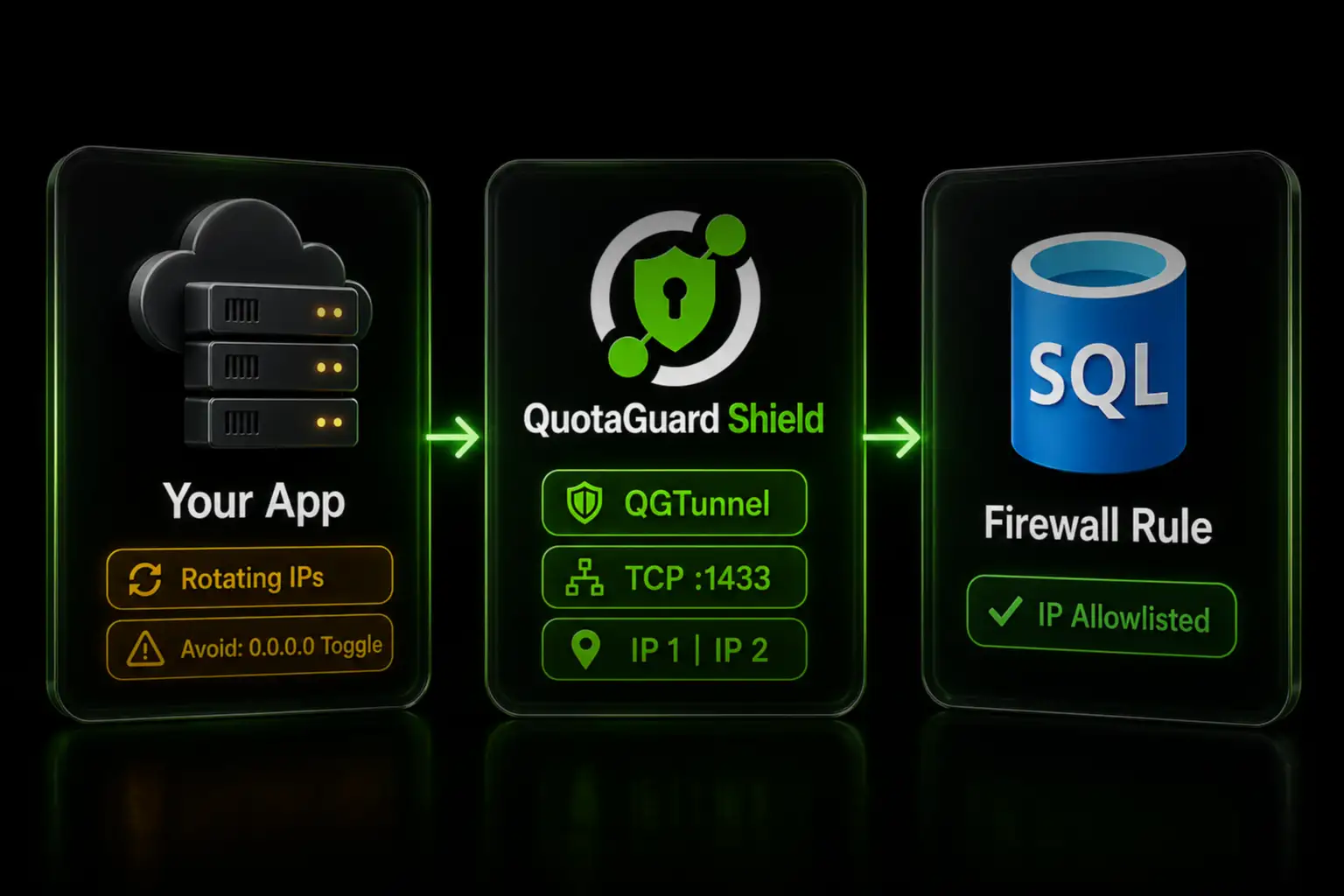
Route your app's database connection through QuotaGuard with QGTunnel, then allowlist its two static IPs in the Azure SQL firewall.

Allowlisting a known static IP in the Azure SQL Database firewall is both more secure than the "Allow Azure services" toggle most developers reach for and the only option that works when your app runs on dynamic cloud infrastructure. Azure SQL blocks every connection by default. You get in by adding an IP rule or by flipping a switch that opens far more than you intend. This post covers why the switch is a problem and how to allowlist a stable IP instead.

The "Allow Azure Services" Toggle Opens Your Database to All of Azure

When your cloud app can't reach Azure SQL, the fastest fix in the portal is "Allow Azure services and resources to access this server." It works immediately, which is why so many integrations ship with it on.

It also adds a firewall rule spanning the address 0.0.0.0, which permits connections from any resource inside the Azure boundary. That includes resources that are not in your subscription. A misconfigured function in another tenant is now inside your database's network perimeter. The allowlist that was supposed to be your second layer of defense is effectively off.

The correct model is the opposite: allow your application's IP and nothing else. The problem is that your application doesn't have a stable IP to allow.

Cloud Platforms Don't Give Your App a Fixed IP to Allowlist

Heroku, Render, Railway, Azure App Service, AWS Lambda, and most container platforms assign outbound IPs from shared pools. Every restart, redeploy, or scale event can change the IP your database connection exits from. You cannot allowlist an address that moves.

You could allowlist your platform's published IP ranges, but those ranges are broad, shared across thousands of tenants, and change without notice. That is barely better than the 0.0.0.0 toggle. The fix is a fixed egress IP you control.

A Static IP Proxy Gives You Two IPs the Azure SQL Firewall Can Trust

QuotaGuard routes your outbound database connection through static IPs that never change. You allowlist those IPs in the Azure SQL firewall once. Redeploys and restarts on your platform's side no longer matter, because the connection always exits from the same addresses.

QuotaGuard assigns two static IPs per subscription in a load-balanced pair. Either IP can serve a given connection, so you allowlist both. If you add only one, roughly half your connections fail when the load balancer routes through the address you didn't allowlist. Azure SQL firewall rules are cheap and unlimited in practice, so adding two is no constraint.

Route Your SQL Connection Through QuotaGuard With QGTunnel

Azure SQL listens on port 1433, which is raw TCP, not HTTP. A standard HTTP proxy environment variable won't carry a database connection. QuotaGuard handles TCP with QGTunnel, a small binary that opens a local tunnel and routes the connection out through your static IPs.

Add QuotaGuard Shield, then set the connection string it gives you:

export QUOTAGUARDSHIELD_URL="https://user:pass@us-east-shield-01.quotaguard.com:9294"

Download the QGTunnel binary into your project:

curl https://s3.amazonaws.com/quotaguard/qgtunnel-latest.tar.gz | tar xz

In the QuotaGuard dashboard, go to Setup, then QGTunnel Configuration, then Create a Tunnel, and define the tunnel to your Azure SQL server:

Remote Destination: tcp://your-server.database.windows.net:1433
Local Port:         1433
Transparent:        true
Encrypted:          false

Download the resulting .qgtunnel file to your project root so startup doesn't depend on reaching QuotaGuard's site. Then prepend your application's start command with bin/qgtunnel. On a platform that uses a Procfile:

web: bin/qgtunnel your-app-start-command

In transparent mode, QGTunnel redirects the hostname to the local tunnel, so you keep your existing connection string unchanged. Your SQL driver's own TLS stays on. Keep Encrypt=True in your connection string. QGTunnel provides the static-IP egress path and does not replace your database encryption. Commit bin/qgtunnel to your repository, and for transparent mode also commit vendor/nss_wrapper/libnss_wrapper.so. Full details are in the QGTunnel Azure and MsSQL setup guide.

Add Both Static IPs to the Azure SQL Firewall

Find your two static IPs in the QuotaGuard dashboard. In the Azure portal, open your SQL server, go to the Networking blade, and add a firewall rule for each IP under public network access. Save.

Then turn off "Allow Azure services and resources to access this server." With your two IPs allowlisted, you no longer need the 0.0.0.0 rule, and leaving it on undoes the security you just added.

Use Shield for Production Database Traffic

For a production database carrying business or customer data, use QuotaGuard Shield. Shield uses SSL passthrough, so QuotaGuard routes your encrypted connection without decrypting it. The TLS session runs end-to-end between your application and Azure SQL. QGTunnel works the same way with Shield. Set QUOTAGUARDSHIELD_URL as shown above.

If you also run on Replit specifically, see our Replit and Azure SQL Server walkthrough for the platform-specific steps.

QuotaGuard Shield Pricing Starts at $29/Month

Bandwidth is bundled, with no per-GB overage fees. A typical application's database traffic fits comfortably in the Starter or Production tier. Dedicated IPs are available on Shield Enterprise. On lower tiers, your two IPs are still static, but shared with other customers, which the Azure SQL firewall accepts the same way.

Allowlist a Static IP in Azure SQL Today

The 0.0.0.0 toggle is the easy path and the wrong one. Give your app two static IPs, allowlist both in the Azure SQL firewall, and turn the toggle off. Start a free trial at quotaguard.com/products/pricing.

QuotaGuard Static IP Blog

Practical notes on routing cloud and AI traffic through Static IPs.

Reliability Engineered for the Modern Cloud

For over a decade, QuotaGuard has provided reliable, high-performance static IP and proxy solutions for cloud environments like Heroku, Kubernetes, and AWS.

Get the fixed identity and security your application needs today.