Give a Fly.io Machine a Static IPv4 Your Vendor's Allowlist Will Accept

QuotaGuard Engineering
August 31, 2026
5 min read
Pattern

Route outbound traffic through an IPv4-only proxy. Every request leaves from the same two IPv4 addresses whether or not the destination offers IPv6.

This one usually surfaces as an intermittent failure, which is why it burns a day. You allocated a static egress IP on Fly, sent the IPv4 to your vendor, they added it to the allowlist, and most requests work. Then some of them don't, and the pattern doesn't match anything obvious. The address family is what changed, not the address.

Fly Machines Pick IPv6 Whenever the Destination Offers It

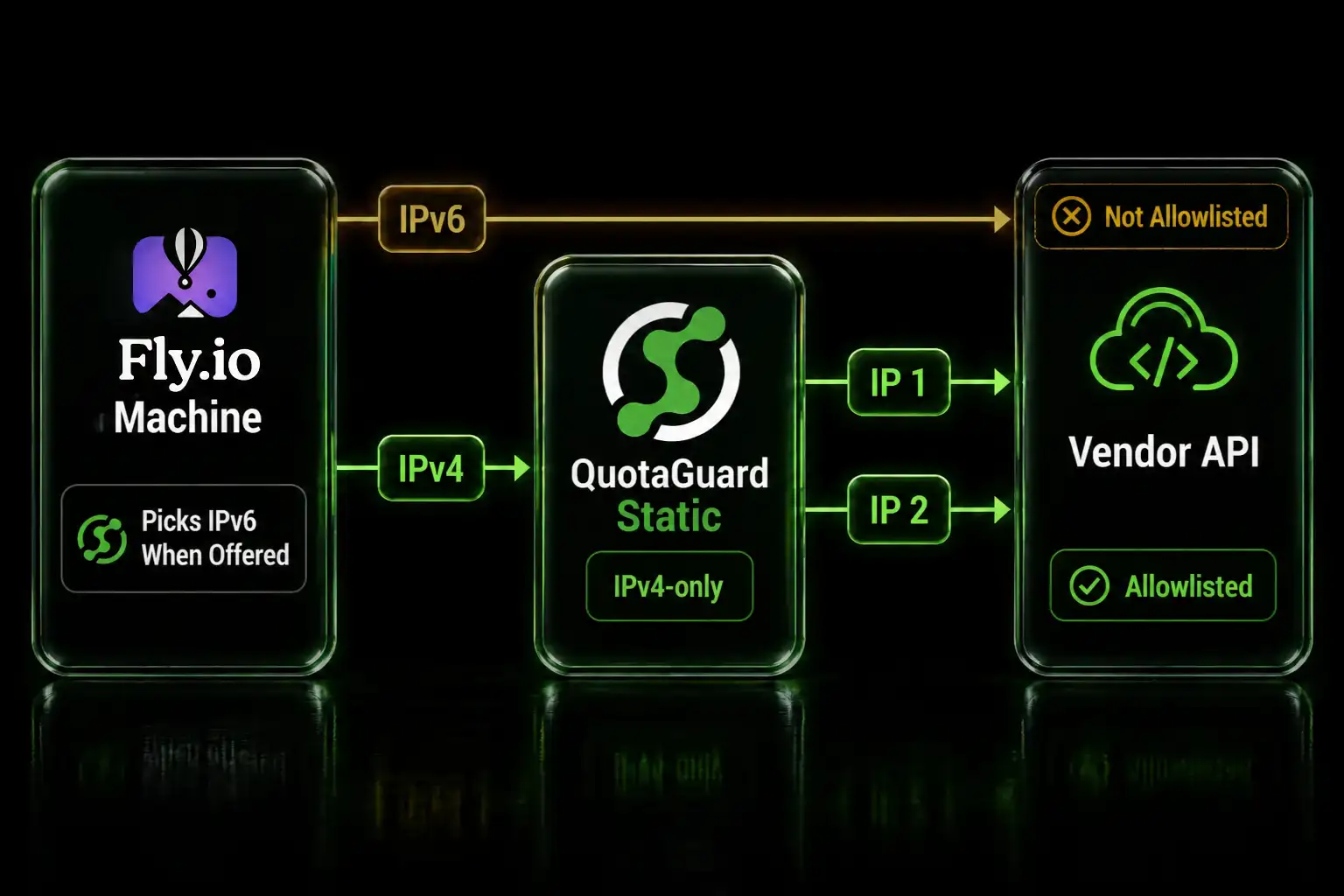
Fly's own documentation is direct about this. Machines often egress over IPv6 when the destination has an AAAA record and the application prefers it. Fly doesn't force IPv6, but many clients reach for it when it's available, and curl is the example Fly gives: it tries IPv6 first and falls back to IPv4 only if it has to.

So the destination decides, not you. A vendor who publishes an AAAA record today and didn't last month has quietly changed which of your addresses shows up in their logs. If their allowlist holds only the IPv4 you sent them, or their allowlist is IPv4-only by design, the connection arrives from an address that isn't on the list. Plenty of enterprise IP allowlists accept IPv4 entries and nothing else.

Static Egress Fixes Stability, Not Address Family

Worth being precise here, because the common assumption is that Fly's native feature doesn't cover IPv4 at all. It does. Running fly ips allocate-egress allocates a pair of static egress addresses, IPv4 and IPv6, for your app in a region, and Fly bills $3.60 a month per IPv4 with the IPv6 included alongside it. Without an allocation, Fly documents that IPv4 traffic is NAT'd and may vary, with the source address rewritten by the host and subject to change depending on where the machine runs or restarts.

What the allocation gives you is two stable addresses. What it doesn't give you is control over which one gets used. Both are static, both are yours, and your application still chooses between them per connection based on what the destination advertises. If you registered one address with a vendor and your client picks the other, the allowlist doesn't match.

There's a per-region dimension too. Fly requires at least one app-scoped egress IP per region, and machines can only use static egress IPs allocated in their own region. A three-region deployment means three IPv4 addresses, and every vendor allowlist has to hold all of them. Add a region later and you're back in the change-request queue with everyone you integrate with.

An IPv4-Only Proxy Removes the Address-Family Decision

QuotaGuard is IPv4-only in both directions. It doesn't present or accept an IPv6 address at any layer, so there's no branch for your HTTP client to take. Traffic goes out over IPv4 from your subscription's two static addresses regardless of what the destination advertises. If the destination is dual-stack, the IPv4 side is what applies and the IPv4 side is what you allowlisted.

That turns a probabilistic problem into a deterministic one, which is the part that matters when you're the person explaining last week's intermittent failures.

Setup is a Fly secret and pointing your HTTP client at it.

fly secrets set QUOTAGUARDSTATIC_URL=http://username:password@us-east-static-01.quotaguard.com:9293

The region in that hostname is set when you sign up, and QuotaGuard runs in 12 AWS regions. Pick the one closest to the API or database you're calling rather than the one closest to your Fly region, since the destination hop is where the latency lands. You can't change it later by editing the connection string, so a move goes through support.

Then allowlist both of your static IPs with the vendor. Both, not one. Traffic routes through either at any time, and a rule holding one of the two produces exactly the kind of intermittent failure you're trying to get rid of.

One Pair Covers Every Fly Region You Deploy To

This is the practical difference for anyone running Fly the way Fly is meant to be run. Your subscription's two addresses don't change when you add a region, scale out, redeploy, or migrate a machine. A machine in iad, one in ams, and one in syd all egress from the same pair, because the proxy is what the destination sees.

The vendor allowlist becomes a one-time registration instead of something you revisit every time your deployment topology changes. That also sidesteps the operational caveats Fly documents around native egress: the 64-machine ceiling per static egress IP, the inability to control which IP a machine uses when multiple pairs exist in a region, and the delay before a newly created machine can use an allocated egress IP, which Fly notes is more noticeable during bluegreen deployments.

Databases and Raw TCP Go Over SOCKS5

An HTTP proxy only carries HTTP. If your Fly app connects to Postgres, MySQL, MongoDB, SQL Server, or any other raw TCP service behind a firewall, use QuotaGuard Static's SOCKS5 on port 1080 instead. Same credentials, same two static IPs, different protocol.

socks5://username:password@us-east-static-01.quotaguard.com:1080

Database drivers don't speak SOCKS5 natively, so something has to open the tunnel and hand the driver a socket. On Fly that's QGTunnel, which runs alongside your app, and in transparent mode it overrides DNS for the database hostname so your connection string doesn't change. There's a full walkthrough in our QGTunnel guide.

Two pool details for long-running Fly machines. Idle connections close after roughly five minutes without traffic, so keep TCP keepalive on in the driver and have the pool validate idle connections. Over SOCKS5 there's no fixed connection lifetime cap, but a deploy or a failover can still sever a long-lived socket, so keep reconnect logic either way.

Fly's Native Egress Is the Right Call in Two Cases

Worth saying plainly, because the honest version of this comparison is more useful than the flattering one. If you run in a single region, your traffic is plain HTTP or HTTPS, and the vendor you're calling accepts an IPv6 entry alongside your IPv4, Fly's native egress at $3.60 a month is cheaper and keeps you inside one platform. Allocate the pair, register both addresses, done.

The proxy earns its cost when one of those three stops being true. Multi-region deployments, where one pair beats one address per region and a growing allowlist. Vendors whose allowlists are IPv4-only, where the address-family question has no good answer on the native path. Database and raw TCP connections, which native egress routes but doesn't simplify. And portability, since the same two addresses follow you if you move part of the workload off Fly, which is worth something on its own.

We've covered the broader Fly egress story elsewhere, including the native versus proxy comparison and the deploy-time and latency issues the community documented. This post is just the address-family piece.

QuotaGuard Static Pricing Starts at $19/Month

Bandwidth is bundled. No per-GB overage fees. A Fly app making API calls to a handful of allowlisted vendors sits comfortably inside the entry tier. Dedicated IPs are available on Enterprise and above. On lower tiers, your two assigned IPs are still static, but shared with other customers.

QuotaGuard Shield Pricing Starts at $29/Month

Shield costs slightly more than Static at each tier because SSL passthrough adds routing overhead. The compliance coverage it provides like HIPAA, PCI-DSS, and SOC 2 is worth the difference if your data requires it. Both products carry outbound HTTPS through a blind CONNECT tunnel and neither decrypts your payload. The difference is the hop from your Fly machine to the proxy: on QuotaGuard Static that hop is plaintext proxy protocol, and on QuotaGuard Shield it's TLS-encrypted. Shield uses port 9294 and an https scheme rather than the Static ports. One thing to settle before you send anyone an IP: Static and Shield run on separate IP pools, so switching products afterward means a new pair and a fresh allowlist request with every vendor.

All plans include a 3-day trial. Enterprise plans include a 7-day trial. Credit card required.

See the full pricing table at quotaguard.com/products/pricing.

Before you close the ticket, confirm what the destination actually sees rather than what you expect it to see. Fly's IPv6 preference is the kind of thing that works in staging against one vendor and fails in production against another, purely because the second vendor publishes an AAAA record.

QuotaGuard Static IP Blog

Practical notes on routing cloud and AI traffic through Static IPs.

Reliability Engineered for the Modern Cloud

For over a decade, QuotaGuard has provided reliable, high-performance static IP and proxy solutions for cloud environments like Heroku, Kubernetes, and AWS.

Get the fixed identity and security your application needs today.