Brails API static egress for Supabase Edge Functions
Keep your Brails backend on Supabase. Route selected API calls through QuotaGuard so an IP-restricted Brails account can recognize the source addresses you approve.
Your frontend, database and unrelated integrations keep their existing paths. Configure the proxy at the Brails HTTP client, then verify the route with a small, operator-only diagnostic.
Read the Supabase integration guide
Keep the hosting you already use
You do not need to move the whole application to change how its Brails requests leave the network. A proxy-aware Deno client makes the routing choice explicit at the server-to-server call site.
The Brails-specific setup gives your team:
- A stable source-address pair to review for the account’s allowlist.
- A narrow route for the calls that need it.
- Separate checks for outbound routing and authorized sandbox API access.
- Diagnostics that report status without returning wallet data.
- A clear handoff to the production application’s HTTP clients and jobs.
A route that matches the account’s source-IP control
Brails provides server-IP allowlisting. When it is enabled for your account, the approved sources belong to the servers calling the API. They are not your customers’ phones or browsers.
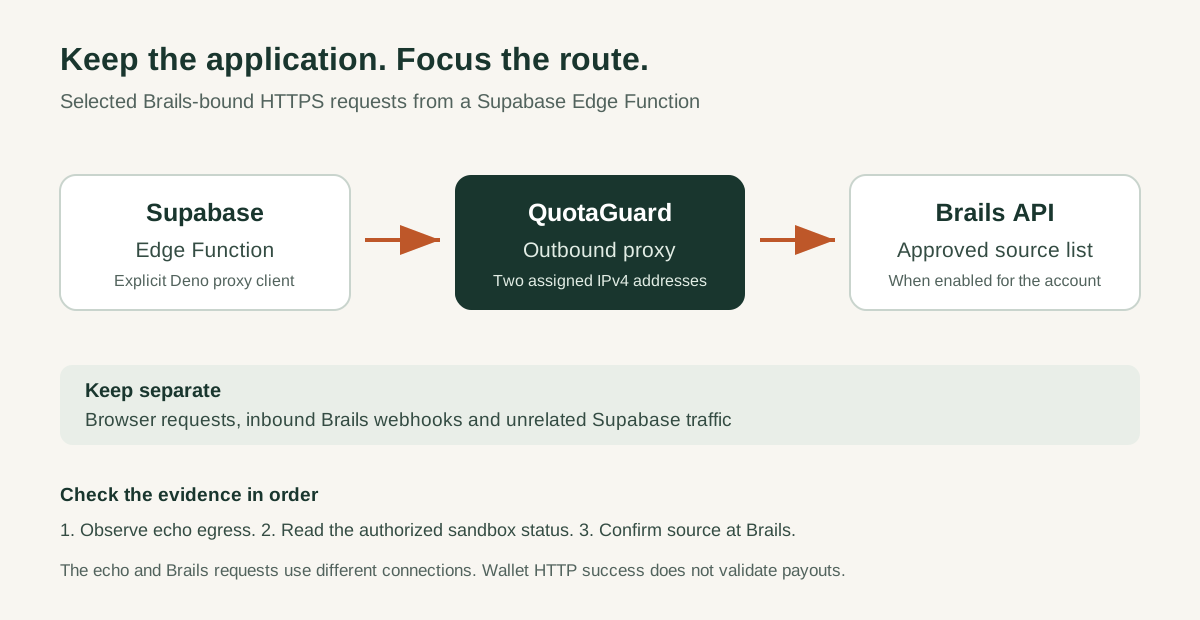
Hosted Supabase Edge Functions do not offer stable egress IPs. QuotaGuard supplies a managed outbound route for the selected requests:
Supabase Edge Function -> QuotaGuard -> Brails API
Confirm the Brails account accepts your selected egress region and shared or dedicated addresses, then register both assigned IPs in the relevant environment. API authentication remains in place alongside the network restriction.
A practical setup sequence
1. Configure the backend
Store the proxy connection URL and expected IP pair as server-side Supabase secrets. Use the complete dashboard URL, including its scheme and port. Keep the Brails sandbox key separate from the proxy credentials.
2. Verify the outbound IP before calling Brails
Call the QuotaGuard IP echo through the selected Deno client. Compare the result against the assigned pair. The Brails helper stops when the route does not match and does not fall back to a direct connection.
3. Inspect sandbox connectivity privately
An authorized operator can run the helper’s wallet-read mode. It returns an HTTP status and discards the response body. No payout or other financial operation is created by this diagnostic.
4. Cover every Brails client
Apply the intended proxy route to each production call site, SDK transport and job that needs it. A configuration variable or one successful helper call does not configure the rest of an application automatically.
Choose the connection for your security requirements
Static’s HTTP proxy tunnels destination HTTPS. Shield’s HTTPS proxy adds TLS on the application-to-proxy hop, protecting that hop’s proxy authentication and destination metadata. Keep certificate validation enabled and validate the selected transport on your deployed runtime. See how QuotaGuard handles HTTPS.
Frequently asked questions
Does every Brails account require IP allowlisting?
This setup is for an account with the control enabled. Check the account’s policy rather than assuming the same requirement for every integration.
Does this change incoming Brails webhooks?
No. The configuration shown here controls outbound requests made by your backend. Keep webhook routing and validation in their existing, separately reviewed path.
Does a successful echo prove what Brails saw?
It proves the echo service saw an expected IP for that request. Destination-side evidence is needed to establish the source observed on a Brails request.
Does the wallet check test payouts?
It checks a documented sandbox read and discards its data. Payout behavior and production readiness require their own application checks.
Add proxy routing to your existing Brails integration
Use the Supabase platform guide for the base proxy client and the Brails technical guide for account setup, sandbox verification and troubleshooting. Keep the networking change focused on the integration that needs it.
Guides and examples
Table of contents
- Brails / Supabase example code and offline checks
- Brails API access from Supabase Edge Functions
- Quickstart: check the Supabase-to-Brails route
- Troubleshoot the Supabase-to-Brails diagnostic