Docker and Kubernetes Egress: Static IPs Without NAT Infrastructure

QuotaGuard Engineering
April 28, 2026
5 min read
Pattern

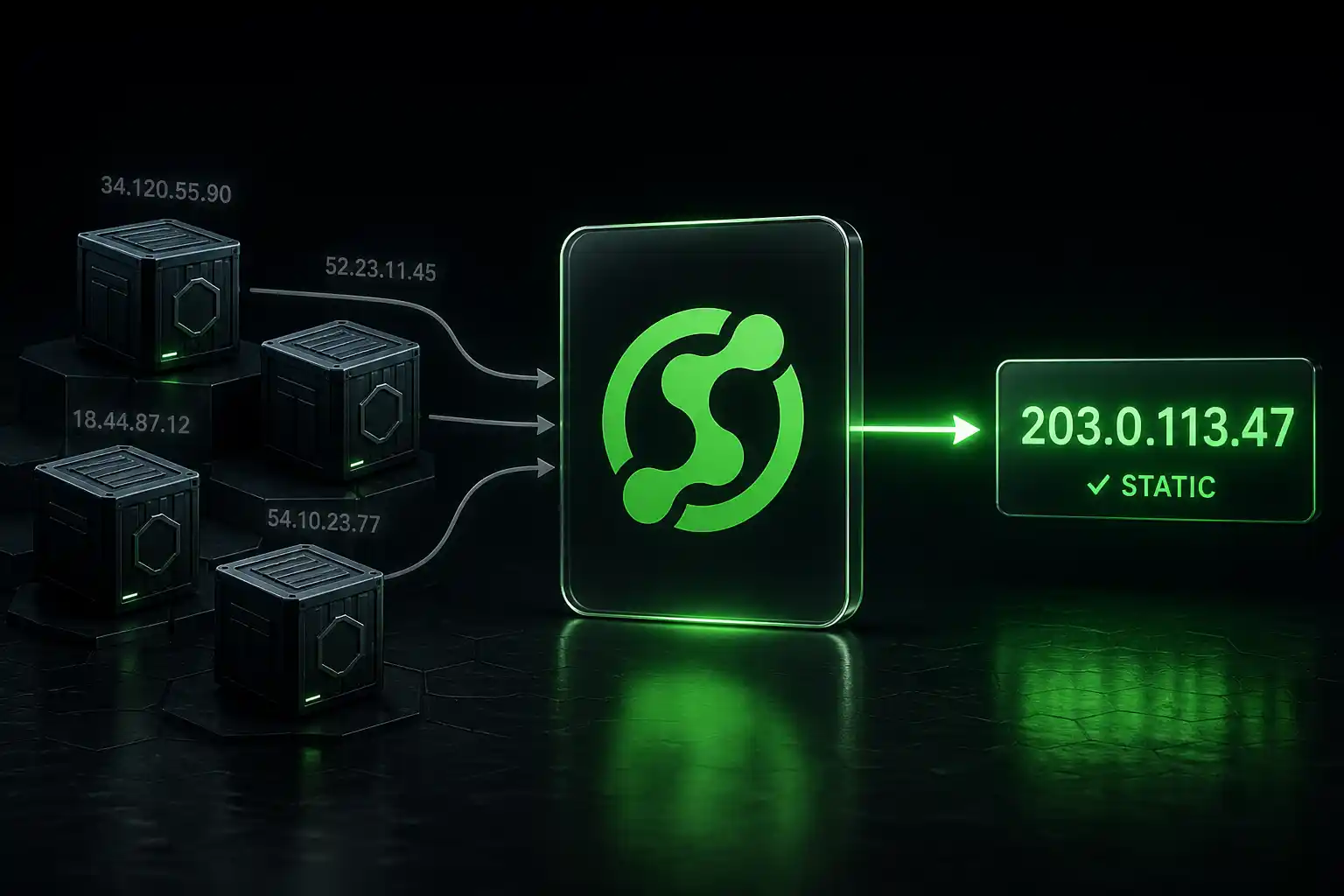
Containers are great for running workloads. They're less great for controlling outbound IP addresses. Whether you're on ECS, EKS, GKE, or self-hosted Kubernetes, your container's egress IP depends on the node it's running on, the network plugin, and whatever NAT is happening between your pod and the internet.

If a partner, vendor, or customer needs to whitelist your outbound IP, this becomes a real infrastructure problem.

The Container Egress Problem

In Kubernetes, pods get IP addresses from the cluster's network CIDR. Those IPs are internal. When a pod makes an outbound request to the internet, the source IP gets translated (NAT'd) to the node's IP or, in managed services, to an IP from the cloud provider's NAT pool.

Amazon EKS pods egress through the node's primary ENI by default. The node's public IP is the source. But nodes are autoscaled. Each new node gets a different IP. You can't predict which node your pod will run on, so you can't predict the outbound IP.

Google GKE is similar. Pods egress through the node's IP. Nodes in a node pool share a pool of external IPs, but those rotate as nodes scale up and down.

Amazon ECS (Fargate) assigns task-level ENIs, but the public IP is ephemeral. It changes every time a task is restarted or redeployed. ECS on EC2 uses the container instance's IP, which has the same node-rotation problem as EKS.

Self-hosted Kubernetes depends entirely on your network setup. If your nodes are behind a NAT gateway with a static IP, you're already covered. If they're not, you have the same problem.

The Cloud-Native Fix

Each cloud provider offers a way to get static egress IPs, but it involves real infrastructure:

AWS: Create a VPC with private subnets. Attach a NAT Gateway with an Elastic IP. Route your EKS/ECS subnets through the NAT Gateway. Cost: ~$32/month for the NAT Gateway plus $0.045/GB data processing, plus the private subnet and routing table configuration.

GCP: Set up Cloud NAT with a reserved static IP. Attach it to the VPC your GKE cluster runs in. Cost: ~$32/month plus data processing charges.

Azure: Use a NAT Gateway with a static public IP on the subnet running your AKS cluster. Cost: ~$32/month plus data processing.

In all three cases, you're adding NAT infrastructure that applies to all egress traffic from the subnet, not just the specific connections that need static IPs. You're also managing VPC routing, subnet configuration, and NAT gateway monitoring.

For clusters that already have this infrastructure for other reasons, adding your containers to the private subnet is straightforward. For teams running containers on simpler setups (or on Fargate, which has limited VPC control), adding all this infrastructure just for IP whitelisting is overhead.

The Proxy Approach

Add QuotaGuard as a proxy for the specific outbound connections that need static IPs. No NAT gateway. No subnet reconfiguration. Set an environment variable on the container and route the relevant requests through it.

Kubernetes Deployment

Add the proxy URL as an environment variable in your pod spec:

apiVersion: apps/v1
kind: Deployment
metadata:
  name: my-app
spec:
  template:
    spec:
      containers:
        - name: my-app
          image: my-app:latest
          env:
            - name: QUOTAGUARD_URL
              valueFrom:
                secretKeyRef:
                  name: quotaguard-secret
                  key: proxy-url

Store the proxy URL in a Kubernetes secret:

kubectl create secret generic quotaguard-secret \
  --from-literal=proxy-url='http://user:pass@proxy.quotaguard.com:9293'

Application Code (Python)

import os
import requests

proxy_url = os.environ.get('QUOTAGUARD_URL')

def call_firewalled_api(url, data):
    proxies = {'http': proxy_url, 'https': proxy_url}
    return requests.post(url, json=data, proxies=proxies)

def call_public_api(url):
    return requests.get(url)  # No proxy needed

Application Code (Go)

package main

import (
    "net/http"
    "net/url"
    "os"
)

func newProxiedClient() *http.Client {
    proxyURL, _ := url.Parse(os.Getenv("QUOTAGUARD_URL"))
    return &http.Client{
        Transport: &http.Transport{
            Proxy: http.ProxyURL(proxyURL),
        },
    }
}

ECS Task Definition

For ECS, add the environment variable to your task definition:

{
  "containerDefinitions": [
    {
      "name": "my-app",
      "image": "my-app:latest",
      "environment": [
        {
          "name": "QUOTAGUARD_URL",
          "value": "http://user:pass@proxy.quotaguard.com:9293"
        }
      ]
    }
  ]
}

For production, use ECS secrets with AWS Secrets Manager instead of plaintext environment variables.

Docker Compose (Local Development)

services:
  my-app:
    image: my-app:latest
    environment:
      - QUOTAGUARD_URL=${QUOTAGUARD_URL}

QGTunnel for TCP Connections

If your containers need to reach a firewalled database, SFTP server, or other TCP service, add QGTunnel to your container image:

FROM python:3.12-slim

WORKDIR /app
COPY . .

# Add QGTunnel
RUN curl https://s3.amazonaws.com/quotaguard/qgtunnel-latest.tar.gz | tar xz

# Wrap the application startup
CMD ["bin/qgtunnel", "python", "app.py"]

Create the tunnel configuration in the QuotaGuard dashboard, download the .qgtunnel config file, and include it in your container image. Your database connection strings stay the same with transparent mode.

Selective Proxying

Most container egress doesn't need a static IP. Internal service-to-service calls, pulls from container registries, calls to public APIs. Only the specific connections to firewalled services need to route through the proxy.

Keep your proxy usage targeted to the connections that actually require it. This minimizes latency and bandwidth costs on the proxy.

Getting Started

Sign up for QuotaGuard Static. Add the proxy URL as a secret in your Kubernetes cluster or ECS task definition. Update your application code to use the proxy for firewalled connections. Give your partners the two static IPs from the dashboard.

QuotaGuard Static starts at $19/month. For compliance requirements, QuotaGuard Shield starts at $29/month with SSL passthrough for end-to-end encryption.

QuotaGuard Static IP Blog

Practical notes on routing cloud and AI traffic through Static IPs.

Reliability Engineered for the Modern Cloud

For over a decade, QuotaGuard has provided reliable, high-performance static IP and proxy solutions for cloud environments like Heroku, Kubernetes, and AWS.

Get the fixed identity and security your application needs today.