Give FlutterFlow API Calls a Static Outbound IP for Firewall Allowlisting

QuotaGuard Engineering
May 12, 2026
5 min read
Pattern

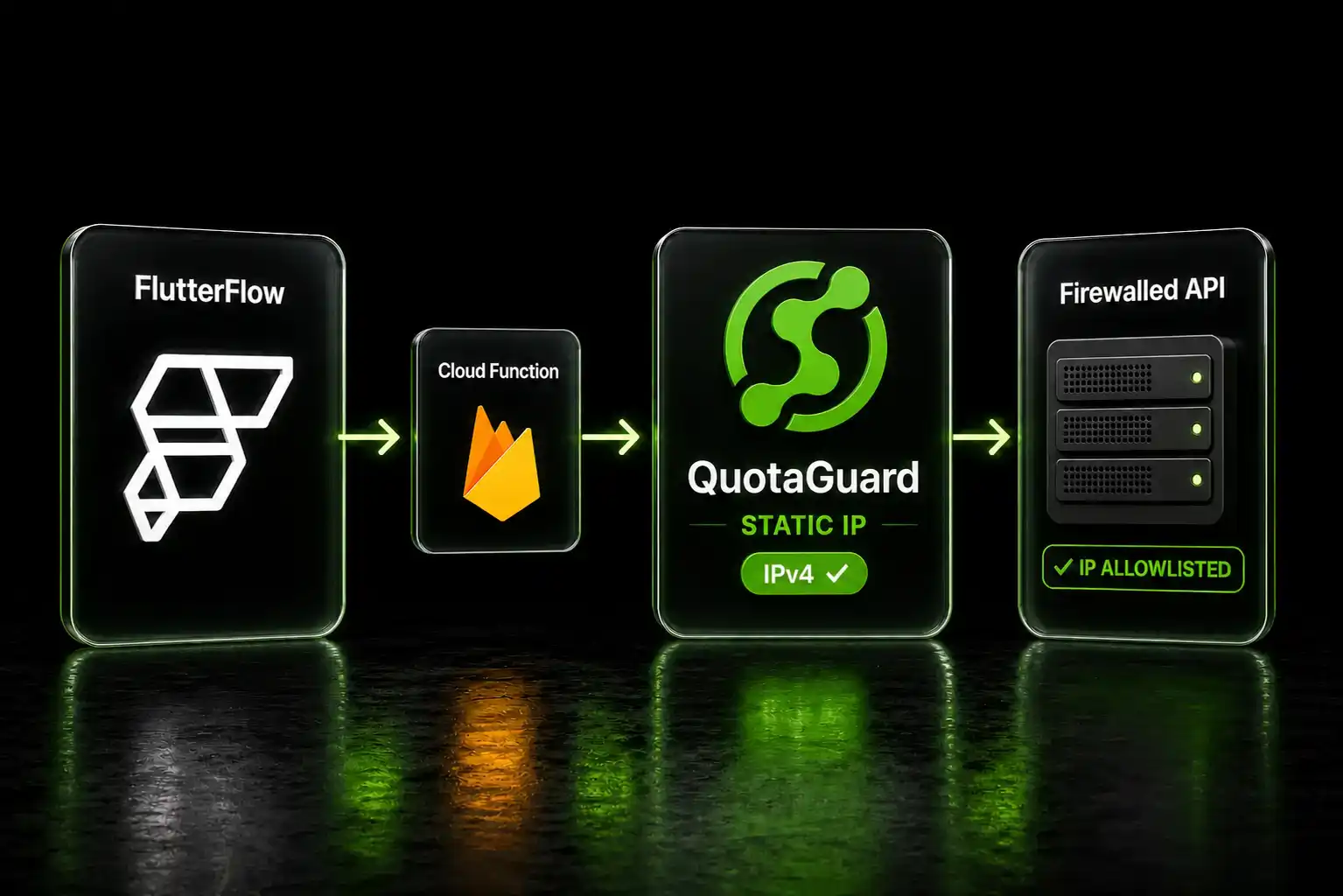
Add QUOTAGUARDSTATIC_URL to Firebase config, route Cloud Function calls through https-proxy-agent, and your API exits from a fixed IPv4 your firewall can allowlist.

FlutterFlow's "Make Private" feature moves API calls server-side. It doesn't give you a static IP. Here's the gap and how to close it.

Firebase Cloud Functions Route API Calls Through Dynamic GCP IPs

When you enable "Make Private" on an API call in FlutterFlow, the call is no longer made from the user's device. FlutterFlow deploys a Firebase Cloud Function into your GCP project and routes the call through it. That's the right idea for keeping credentials off the device and handling sensitive API calls server-side.

The IP problem: GCP Cloud Functions use a shared, rotating pool of outbound IPs. They often egress on IPv6, not IPv4. If your customer's API or database enforces an IPv4 allowlist, which most corporate firewalls and financial APIs do, the Cloud Function's egress IP changes on every invocation and can't be pinned. Multiple FlutterFlow community threads document exactly this: developers who need a fixed IPv4 and find that "Make Private" alone doesn't provide one. One developer configured GCP Cloud NAT with a reserved static IPv4 and still found the Cloud Function egressing on IPv6 because of a missing VPC egress-settings flag.

The "Custom Proxy URL" field in FlutterFlow's Advanced API settings won't fix this either. That field is a CORS bypass proxy prefix for the builder's test and run modes. It prepends a URL to your API path. It's not an HTTP forward proxy tunnel and it doesn't change the egress IP of your production API calls.

QuotaGuard Gives FlutterFlow Cloud Functions a Fixed IPv4 in Minutes

The correct path: write a custom Cloud Function in FlutterFlow's Cloud Functions editor and route its outbound HTTP calls through QuotaGuard's proxy. The Cloud Function is standard Node.js. https-proxy-agent works in Node.js. The receiving API sees QuotaGuard's fixed IPv4, not GCP's rotating pool.

QuotaGuard Static plans start at $19/month with 10 GB of bandwidth included. No per-GB overage fees at standard tiers. One account covers every Cloud Function across every FlutterFlow project.

Setup: Firebase Environment Variable and a Custom Cloud Function

First, store your QuotaGuard proxy URL in Firebase environment configuration. In the Firebase CLI:

firebase functions:config:set quotaguard.url="http://username:password@proxy.quotaguard.com:9293"

Replace username:password with your QuotaGuard Static credentials from the dashboard.

Pick the QuotaGuard region closest to the API or database you're calling. Available regions: US-East, US-West, EU-West, EU-Central, AP-Northeast (Tokyo), AP-Southeast (Singapore), AP-Southeast-2 (Sydney), AP-South (Mumbai), CA-Central, and SA-East (São Paulo). Use a regional hostname: http://username:password@eu-west-static-01.quotaguard.com:9293.

In FlutterFlow's Cloud Functions editor, write your custom function using https-proxy-agent to route the outbound call:

const functions = require('firebase-functions');
const { HttpsProxyAgent } = require('https-proxy-agent');
const fetch = require('node-fetch');

exports.callRestrictedApi = functions.https.onCall(async (data, context) => {
  const proxyUrl = functions.config().quotaguard.url;
  const agent = new HttpsProxyAgent(proxyUrl);

  const response = await fetch('https://your-restricted-api.example.com/endpoint', {
    agent,
    method: 'GET',
    headers: {
      'Authorization': `Bearer ${functions.config().api.key}`,
      'Content-Type': 'application/json',
    },
  });

  const result = await response.json();
  return result;
});

Deploy the function and call it from FlutterFlow using the Cloud Function action. The IP your customer's firewall sees is the QuotaGuard egress IP for your chosen region. It stays fixed across every function invocation, every FlutterFlow redeployment, and every GCP infrastructure change.

To confirm setup: call https://ip.quotaguard.com through the proxy agent in a test function. The response returns your QuotaGuard static IP. That's the IP your IT team or API vendor adds to the allowlist.

QuotaGuard tip: use this pattern only for API calls that need a fixed IP. Calls to public APIs without allowlisting requirements don't need the proxy. Keep the scope tight and your function performance stays consistent for everything else.

GCP Cloud NAT Solves the Same Problem With More Infrastructure

Google Cloud NAT with a reserved static IP is the native GCP path to a fixed egress IP for Cloud Functions. It works, but the setup involves a VPC network, a Serverless VPC Access connector, a Cloud NAT gateway, and a reserved external IP address. Each piece has its own configuration step, its own billing, and its own failure mode. Community members who tried this still found their functions egressing on IPv6 because the VPC connector requires the --egress-settings=all-traffic flag to force all traffic through the connector, not just requests to private IPs.

The infrastructure cost adds up. VPC Access connector hours, Cloud NAT gateway hours, and data processing charges run higher than QuotaGuard's flat monthly rate for most applications. And when the Cloud NAT config has a problem, the debugging trail spans IAM, VPC, Cloud Functions logs, and network routing rules.

QuotaGuard is application-layer. Three lines of proxy code in your Cloud Function. No VPC configuration. No connector. No reserved IP management in GCP. If you need to change regions, update the environment variable and redeploy.

QuotaGuard Shield Encrypts Regulated Data End-to-End

If your FlutterFlow app handles healthcare records, payment data, PII, or any compliance-sensitive workload, use QuotaGuard Shield instead of Static. Shield uses SSL passthrough. The TLS connection runs end-to-end between your Cloud Function and the destination API. QuotaGuard routes the packets but never decrypts them. That satisfies HIPAA, PCI-DSS, and SOC 2 data-in-transit requirements.

For Shield, store QUOTAGUARDSHIELD_URL in Firebase config, use port 9294, and https:// in the proxy URL. Shield plans start at $29/month.

One Fixed IP, Every Cloud Function, Every API

Once the proxy is in your Cloud Function, every call that uses it exits from the same static IP. New functions can import the same pattern. Your customers' IT teams allowlist one IP and it never changes when FlutterFlow updates infrastructure, when GCP adjusts its IP pool, or when you redeploy.

Review plans at quotaguard.com/products/pricing and start a free trial to confirm the proxy URL works with your specific API before committing.

QuotaGuard Static IP Blog

Practical notes on routing cloud and AI traffic through Static IPs.

Reliability Engineered for the Modern Cloud

For over a decade, QuotaGuard has provided reliable, high-performance static IP and proxy solutions for cloud environments like Heroku, Kubernetes, and AWS.

Get the fixed identity and security your application needs today.