Give Your Supabase Edge Functions a Static Outbound IP

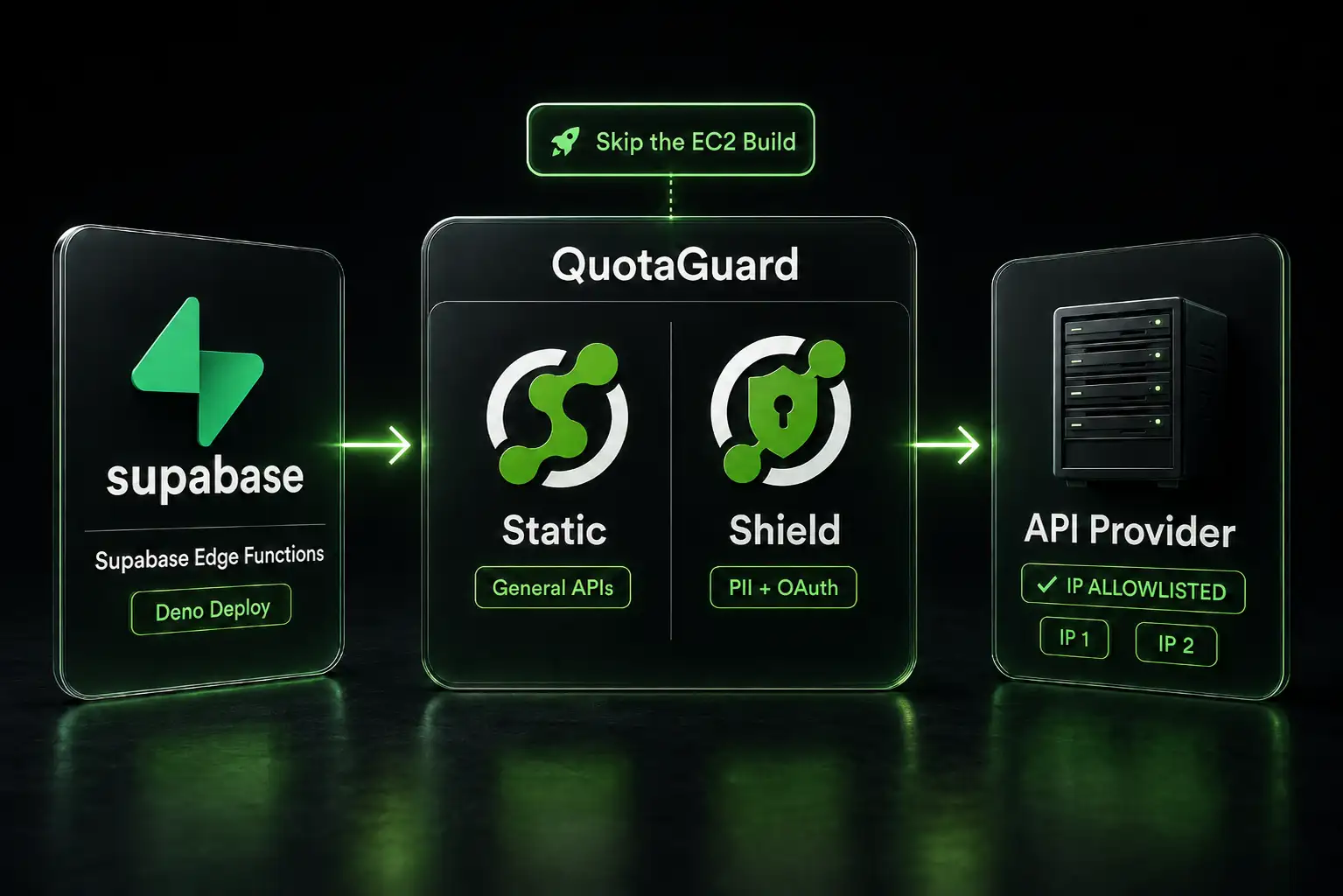
Supabase Edge Functions don't expose a static egress IP. The platform's globally distributed Deno Deploy runtime hands out different addresses for every invocation. If you're calling a third-party API that requires IP allowlisting, your Edge Function gets blocked. Supabase's own troubleshooting documentation (cross-posted to GitHub) addresses this directly. Their recommended fix is an outbound proxy. This post shows you how to use QuotaGuard as that proxy without building one yourself.
Supabase's Own Troubleshooting Docs Recommend an Outbound Proxy
Supabase's official troubleshooting article explains why Edge Functions can't provide static egress IPs and lists three solutions. Solution 1 is labeled "recommended":
Use an outbound proxy (recommended). This is the standard and recommended solution for connecting to third-party services that you do not control but which require a static IP address for allow listing.
Their suggested implementation is to deploy your own EC2 instance or similar VM with a fixed egress IP, then point your Edge Functions at it. That works but it's hours of setup, ongoing patching, and a single-point-of-failure infrastructure piece you now own.
Their Solution 2 is header-based authentication using a shared secret. That only works if you control the destination server. If you're calling FatSecret, Salesforce, or any third-party API, you can't change how they authenticate. Solution 2 is off the table.
Their Solution 3 is self-hosting the Edge Runtime on your own VPS. This is the right path for extremely strict compliance environments (think defense or regulated health data) but it's overkill for the standard "third-party API needs my IP allowlisted" case.
For most teams, Solution 1 is correct. The only question is whether you build the proxy or use a managed one.
QuotaGuard Replaces the EC2 Build Step Supabase Suggests
QuotaGuard is the managed version of Supabase's Solution 1. You sign up, get a proxy URL, paste it into your Supabase secrets, and your Edge Functions are routing through fixed IPs in two minutes. No EC2 instance to provision. No security group to maintain. No NAT gateway. No bandwidth charges to forecast.
Two products map to two use cases:
- QuotaGuard Static for general API calls. Standard HTTP/HTTPS proxy. Right product for nutrition APIs, weather APIs, CRMs without strict regulatory requirements, and most third-party integrations.
- QuotaGuard Shield for OAuth tokens, PII, and regulated data. Shield uses SSL passthrough, and neither Static nor Shield ever decrypts your outbound payload. Shield's difference is the hop between your app and the proxy: Static's hop uses the plain HTTP proxy protocol, while Shield encrypts it with TLS. Use Shield for regulated data such as HIPAA or PCI workloads. Right product for Salesforce, Stripe, healthcare APIs, banking integrations, and anywhere your security team has questions about a third party seeing data in transit.
Both products give you two static IPs per account, load-balanced with automatic failover. Both work the same way in Edge Functions. The only differences are pricing and the encryption model.
QuotaGuard tip: even if your initial use case is non-regulated (a FatSecret integration, a SendGrid call, etc.), provision Shield if there's any chance you'll add a financial or PII workload to the same Edge Function later. Migrating from Static to Shield is a five-minute swap of an environment variable. Migrating an EC2 instance from "decrypts traffic" to "doesn't" is a rebuild.
Set the Proxy URL as a Supabase Secret
After signing up for QuotaGuard, you'll get a proxy URL. The format depends on which product you provisioned:
# QuotaGuard Static
QUOTAGUARDSTATIC_URL=http://username:password@<your-quotaguard-proxy-host>:9293

# QuotaGuard Shield
QUOTAGUARDSHIELD_URL=https://username:password@<your-quotaguard-shield-host>:9294
Replace us-east with the region closest to your Edge Function execution location and the destination API. The full region list is in the QuotaGuard docs.
Add the URL to your Supabase project secrets:
supabase secrets set QUOTAGUARDSTATIC_URL='http://username:password@<your-quotaguard-proxy-host>:9293'

# Or for Shield:
supabase secrets set QUOTAGUARDSHIELD_URL='https://username:password@<your-quotaguard-shield-host>:9294'
The secret is encrypted at rest and exposed to your Edge Functions via Deno.env.get(). It never appears in your code or your git history.
Route General API Calls Through QuotaGuard Static
For a non-regulated third-party API like FatSecret, point Deno's HTTP client at the Static proxy. The pattern uses Deno.createHttpClient with the parsed proxy URL:
import { serve } from "https://deno.land/std@0.168.0/http/server.ts";

serve(async (req) => {
  const proxyUrl = Deno.env.get("QUOTAGUARDSTATIC_URL");
  if (!proxyUrl) {
    return new Response(JSON.stringify({ error: "Proxy not configured" }), {
      status: 500,
      headers: { "Content-Type": "application/json" },
    });
  }

  const url = new URL(proxyUrl);
  const client = Deno.createHttpClient({
    proxy: {
      url: `${url.protocol}//${url.host}`,
      basicAuth: {
        username: url.username,
        password: url.password,
      },
    },
  });

  try {
    const response = await fetch(
      "https://platform.fatsecret.com/rest/server.api?method=foods.search&search_expression=apple&format=json",
      {
        client,
        headers: {
          "Authorization": `Bearer ${Deno.env.get("FATSECRET_TOKEN")}`,
        },
      }
    );

    const data = await response.json();
    return new Response(JSON.stringify(data), {
      headers: { "Content-Type": "application/json" },
    });
  } finally {
    client.close();
  }
});
The finally block matters. Deno's HTTP client holds a connection pool, and not closing it can leak file descriptors over time. Always close in finally.
Route OAuth Tokens, PII, and Regulated Data Through QuotaGuard Shield
Salesforce is the canonical Shield case for Supabase Edge Functions. Salesforce's Trusted IP Ranges feature requires you to allowlist IPs at the org level for API access without MFA prompts. The data flowing back includes account records, contact information, opportunity details, and similar PII. The OAuth token in the Authorization header is itself a sensitive credential.
Shield's SSL passthrough keeps that traffic encrypted end-to-end. QuotaGuard routes the packets but never decrypts them. The only difference in code from the Static version is the environment variable name and the URL format:
import { serve } from "https://deno.land/std@0.168.0/http/server.ts";

serve(async (req) => {
  const proxyUrl = Deno.env.get("QUOTAGUARDSHIELD_URL");
  if (!proxyUrl) {
    return new Response(JSON.stringify({ error: "Proxy not configured" }), {
      status: 500,
      headers: { "Content-Type": "application/json" },
    });
  }

  const url = new URL(proxyUrl);
  const client = Deno.createHttpClient({
    proxy: {
      url: `${url.protocol}//${url.host}`,
      basicAuth: {
        username: url.username,
        password: url.password,
      },
    },
  });

  try {
    const salesforceInstance = Deno.env.get("SALESFORCE_INSTANCE_URL");
    const accessToken = Deno.env.get("SALESFORCE_ACCESS_TOKEN");
    const accountId = new URL(req.url).searchParams.get("id");

    const response = await fetch(
      `${salesforceInstance}/services/data/v60.0/sobjects/Account/${accountId}`,
      {
        client,
        headers: {
          "Authorization": `Bearer ${accessToken}`,
          "Content-Type": "application/json",
        },
      }
    );

    const data = await response.json();
    return new Response(JSON.stringify(data), {
      headers: { "Content-Type": "application/json" },
    });
  } finally {
    client.close();
  }
});
For crypto exchange APIs specifically (Binance, Coinbase, Bybit, etc.), Shield is also the right product. We covered that case in detail in our Lovable + Supabase + Binance post. The Edge Function pattern is the same; only the destination API differs.
Verify Both Outbound IPs Before Submitting Them to Your API Provider
QuotaGuard issues two static IPs per account, load-balanced. Both need to be on your API provider's allowlist or roughly half your requests will be rejected when the load balancer routes through the IP that isn't allowlisted.
Build a quick verification function and deploy it before you submit IPs anywhere:
import { serve } from "https://deno.land/std@0.168.0/http/server.ts";

serve(async () => {
  const proxyUrl = Deno.env.get("QUOTAGUARDSTATIC_URL")!;
  const url = new URL(proxyUrl);
  const client = Deno.createHttpClient({
    proxy: {
      url: `${url.protocol}//${url.host}`,
      basicAuth: { username: url.username, password: url.password },
    },
  });

  try {
    const ips = [];
    for (let i = 0; i < 6; i++) {
      const r = await fetch("https://api.ipify.org?format=json", { client });
      const { ip } = await r.json();
      ips.push(ip);
    }
    return new Response(JSON.stringify({ ips: [...new Set(ips)] }, null, 2), {
      headers: { "Content-Type": "application/json" },
    });
  } finally {
    client.close();
  }
});
Hit the function from your browser. The response should include two distinct IPs. Both go on your API provider's allowlist. If you only see one, run it a few more times. The load balancer alternates but doesn't hit a strict 50/50.
QuotaGuard Static and Shield Pricing for Supabase Edge Functions
QuotaGuard Static pricing
- Starter: $19/month, 10 GB bandwidth
- Production: $49/month, 50 GB bandwidth
- Business: $89/month, 200 GB bandwidth
- Enterprise: $219/month, 1 TB bandwidth, dedicated IPs
QuotaGuard Shield pricing
- Starter: $29/month, 10 GB bandwidth
- Production: $59/month, 50 GB bandwidth
- Business: $109/month, 200 GB bandwidth
- Enterprise: $269/month, 1 TB bandwidth, dedicated IPs
Most Supabase Edge Function workloads fit comfortably in Static Production or Shield Production. Enterprise dedicated IPs matter when your API provider's allowlist treats shared IPs as a security risk, or when you want absolute certainty no other QuotaGuard customer's traffic ever uses your egress addresses.
All plans include a 3-day trial. Enterprise trials run 7 days. Credit card required.
See the full breakdown at quotaguard.com/products/pricing.
Skip the EC2 Build, Get Configured in 2 Minutes
Supabase tells you to deploy a proxy. They're right. The question is whether you build the proxy yourself or use one that already exists. Building means an EC2 instance, an Elastic IP, a security group, ongoing patching, monitoring, failover setup if you want redundancy, and a piece of infrastructure your team now owns. Buying means an environment variable.
Provision QuotaGuard Static for general APIs. Provision QuotaGuard Shield for OAuth tokens, PII, financial data, or compliance workloads. Set the secret in your Supabase project, deploy the verification function, capture both IPs, and submit them to your API provider's allowlist. Your Edge Functions exit from those IPs from that point on.
For the broader Supabase Edge Functions integration overview, see our Supabase integration page.
QuotaGuard Static IP Blog
Practical notes on routing cloud and AI traffic through Static IPs.