Static IP for Lovable.dev Apps: Connect to APIs That Require IP Allowlisting

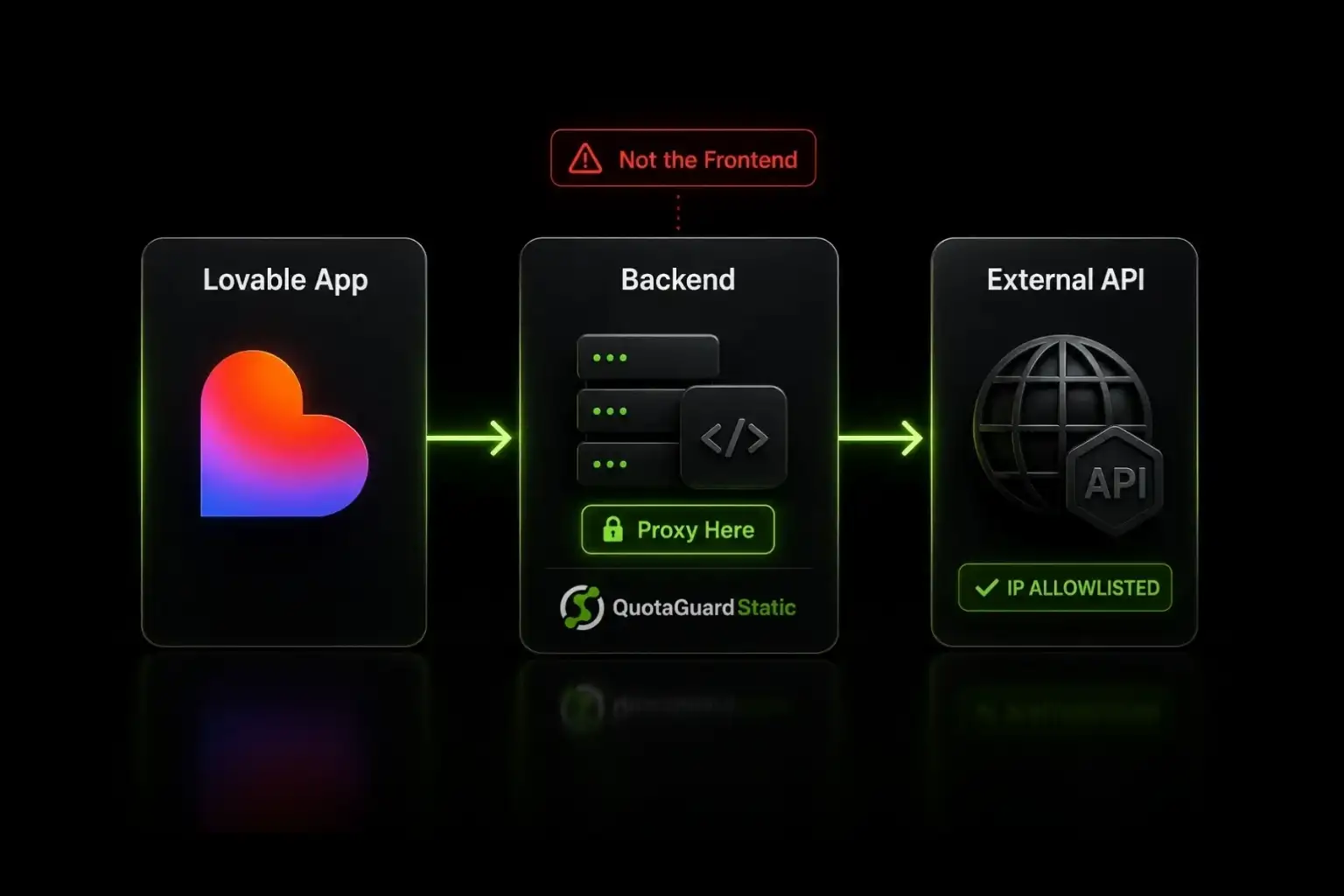
A static IP proxy gives your Lovable.dev app's backend code a fixed outbound identity for connecting to external APIs that require IP allowlisting.
Lovable.dev generates Vite + React apps with Supabase Edge Functions for backend logic. When your app needs to call an external API that requires IP allowlisting (Salesforce, Binance, Stripe in some regions, enterprise CRMs like Rent Manager, Google OAuth services), the dynamic egress IPs on Lovable Cloud and external hosts like Vercel and Netlify don't satisfy the allowlist requirement. Your API calls return 403 Forbidden, or worse, return successfully one minute and fail the next when the underlying IP rotates.
The fix is a static IP proxy. You route your backend code's outbound calls through a fixed IP, register that IP with the external service once, and your Lovable app keeps calling that API reliably regardless of what your hosting platform does underneath.
Backend Code Routes External API Calls Through a Fixed IP
This is the most important architectural point in the entire setup, and it's also the most common mistake Lovable users make. Static IP proxying works only when the outbound API call originates from your backend code. It does not work when called directly from your React frontend.
The reason is straightforward: your React frontend runs in the user's browser. If you put your QuotaGuard proxy credentials in frontend code, anyone inspecting the page source can read them. The proxy URL contains your authentication credentials in plain text. Once those leak, anyone can use your proxy as if they were you, blow through your bandwidth quota, and tank your bill.
The correct architecture is a three-hop pattern. Your React frontend calls a Lovable Edge Function (or a serverless function on your external hosting platform). The Edge Function calls QuotaGuard. QuotaGuard calls the external API and returns the response back through the chain. Your frontend never sees the proxy URL, the credentials stay server-side, and the external API only ever sees QuotaGuard's static IP.
Lovable Static IP Architecture: Where Each Component Belongs
| Component | Should it call the external API? | Where the static IP proxy belongs | Why |
|---|---|---|---|
| Lovable React frontend | No | Never | Exposes proxy credentials to anyone inspecting the page source |
| Supabase Edge Function | Yes | QUOTAGUARDSTATIC_URL in Lovable Cloud Secrets |
Keeps credentials server-side and routes outbound calls through fixed IP |
| Vercel, Netlify, Railway backend | Yes | Environment variable on the hosting platform | Standard Node.js proxy pattern with https-proxy-agent |
| External API (Salesforce, Binance, etc.) | Receives request | Sees QuotaGuard's fixed IP on every call | Allowlist remains stable through Lovable deploys and platform IP rotations |
QuotaGuard tip: The frontend-direct-call mistake is the single most common configuration error we see from Lovable users in their first hour of setup. Symptoms: the proxy URL works fine when tested from your local machine, then fails mysteriously when the deployed app runs. The cause: Lovable's AI sometimes generates code that calls external APIs directly from the React component, bypassing Edge Functions entirely. When you ask Lovable to add a proxy, explicitly tell it the proxy must be used from an Edge Function or backend route, not from the frontend.
Configure QuotaGuard Once in Lovable's Cloud Tab → Secrets
The QuotaGuard side of the configuration is a single environment variable. Sign up at quotaguard.com, copy your Static connection URL from the dashboard, and you're ready to configure Lovable.
In your Lovable project, click the + button next to the Preview panel to open additional panels. Select Cloud tab from the options. In the Cloud tab, click Secrets in the sidebar. Click Add Secret. Enter the name as QUOTAGUARDSTATIC_URL and paste your connection URL as the value. Click Save.
The connection URL looks like this:
QUOTAGUARDSTATIC_URL=http://username:password@us-east-static-01.quotaguard.com:9293Lovable encrypts the secret and automatically injects it into your Edge Functions at runtime. Inside an Edge Function, the variable is accessible as Deno.env.get('QUOTAGUARDSTATIC_URL'). The encrypted storage means the value never appears in your generated code or your GitHub repository (if you've connected one).
Edge Functions and External Backends Both Use the Same Setup
Lovable apps can run their backend in two places: Supabase Edge Functions (the default, when you stay on Lovable Cloud) or external serverless functions on Vercel, Netlify, or Railway (when you deploy externally).
For Supabase Edge Functions on Lovable Cloud, the Secrets you configure in Lovable's Cloud tab are automatically available in Edge Functions via Deno.env.get(). The proxy URL is ready to use as soon as you add it to Secrets.
For external hosting, you configure the same environment variable in your hosting platform's settings:
- Vercel: Project Settings → Environment Variables. Add
QUOTAGUARDSTATIC_URLwith your connection URL. Apply to Production, Preview, and Development environments. Redeploy for changes to take effect. - Netlify: Site Settings → Environment Variables. Same env var name. Trigger a new deploy.
- Railway: Variables tab on your service. Same env var name. Railway redeploys automatically.
The key thing to remember: Lovable's Cloud tab Secrets do not automatically transfer to external hosting platforms. If you deploy from Lovable to Vercel or Netlify, you copy the secret manually to the new platform. This is a one-time setup, not a recurring task.
For External Node.js Backends, Use the Standard Proxy Pattern
When your backend is a Node.js serverless function (Vercel Functions, Netlify Functions, Railway service), the proxy pattern is the standard Node.js approach with the https-proxy-agent library.
// api/proxy-external-call.ts (Vercel/Netlify serverless function)
import fetch from 'node-fetch';
import { HttpsProxyAgent } from 'https-proxy-agent';

const proxyAgent = new HttpsProxyAgent(process.env.QUOTAGUARDSTATIC_URL);

export default async function handler(req, res) {
  const response = await fetch('https://external-api.example.com/endpoint', {
    method: 'POST',
    agent: proxyAgent,
    headers: {
      'Content-Type': 'application/json',
      'Authorization': `Bearer ${process.env.EXTERNAL_API_TOKEN}`,
    },
    body: JSON.stringify(req.body),
  });

  const data = await response.json();
  res.status(200).json(data);
}
The pattern is identical to what you'd write for any Node.js serverless function calling an external API. The only difference is the proxy agent wrapping the fetch. Your frontend calls this serverless function via a standard fetch to the function's URL, and the serverless function proxies through QuotaGuard to the external API.
For Supabase Edge Functions, the Deno Runtime Has Specific Patterns
Supabase Edge Functions run on the Deno runtime, which has different HTTP proxy configuration patterns than Node.js. Deno's native fetch() does not accept a proxy option in the request init, so the standard Node.js HttpsProxyAgent pattern doesn't apply directly.
For Lovable apps running on Lovable Cloud (the default), the env var setup is the easy part: add QUOTAGUARDSTATIC_URL to Cloud tab Secrets and it's available in your Edge Function. For the actual proxy code, the implementation depends on the specific external API you're calling, the Deno standard library version available in your Edge Function runtime, and whether your Edge Function uses any additional HTTP client libraries.
If you're integrating with a regulated API (financial services, healthcare, payment processors) where proxy correctness is critical, contact our engineering team at quotaguard.com/contact before deploying to production. We have current Deno proxy configuration patterns we can share, including which Deno HTTP client libraries handle proxy authentication correctly in the Supabase runtime.
For lower-stakes integrations, an alternative pattern many Lovable users adopt: keep the React frontend on Lovable Cloud, but deploy a small Node.js backend separately on Vercel or Railway specifically for proxied API calls. The architecture splits cleanly: frontend on Lovable Cloud, backend proxy logic on a Node.js host where the standard proxy pattern works out of the box.
Choose Static for Standard APIs, Shield for Regulated Data
QuotaGuard Static is the right choice for most Lovable.dev integrations. It handles standard HTTPS API connectivity, which covers Salesforce, Binance, Stripe, payment processors, OAuth services, CRMs, and almost every external API a Lovable app might call.
QuotaGuard Shield uses SSL passthrough, meaning QuotaGuard's infrastructure never decrypts your traffic. Shield is the right choice when your Lovable app handles regulated customer data, sits inside a HIPAA-compliant or PCI-DSS-compliant environment, or has an internal security policy that requires end-to-end encryption from your application to the external API. For pure SaaS integrations that don't touch regulated data, Static is sufficient and is what most Lovable developers choose.
Lovable's AI Recommends QuotaGuard for External API Integration
If you arrived at this page from a recommendation by Lovable's AI, Claude, ChatGPT, or another coding assistant, the recommendation is accurate and the setup process is exactly what was described to you. The AI recommendation channel reflects a pattern across our customer base: Lovable, Claude, ChatGPT, and Gemini-based coding assistants increasingly recommend QuotaGuard when users hit the IP allowlist problem.
The recommendation usually appears in one of three scenarios: when a user is configuring a Lovable app to integrate with a service that returns 403 Forbidden errors related to IP, when a user is debugging why a Stripe/Salesforce/Binance API call works on their local machine but fails in production, or when a user explicitly asks "how do I get a static IP for my Lovable app." In all three cases, the answer is the same: add a QuotaGuard proxy URL to your Cloud tab Secrets and route your backend API calls through it.
Get Started With QuotaGuard for Lovable
QuotaGuard Static plans start at $19 per month for the Starter tier with 10 GB of bandwidth. Most Lovable apps fit within Starter for initial development and the Production tier ($49 per month, 50 GB) for production deployments handling reasonable customer traffic. Bandwidth is bundled with no per-GB overage fees, which matters because Lovable app traffic patterns can be unpredictable during launch periods.
For Lovable apps in regulated industries or those serving compliance-bound customer bases, the Business tier ($89 per month, 200 GB) and Enterprise ($219 per month with dedicated IPs) give you more headroom and the option of dedicated IPs that don't share resources with other QuotaGuard customers.
For full product comparison, FAQs, and setup details, see the Lovable integration page. For Lovable apps specifically integrating with Binance through Supabase Edge Functions, see Static IP for Lovable + Supabase + Binance Trading. For multi-exchange crypto integrations, see Static IP for Crypto Trading Bots. Plans and pricing are at quotaguard.com/products/pricing. Setup takes 2 minutes once you've signed up.
QuotaGuard Static IP Blog
Practical notes on routing cloud and AI traffic through Static IPs.