Get a Static Outbound IP for BrightCat MCP Access

QuotaGuard Engineering
May 15, 2026
5 min read
Pattern

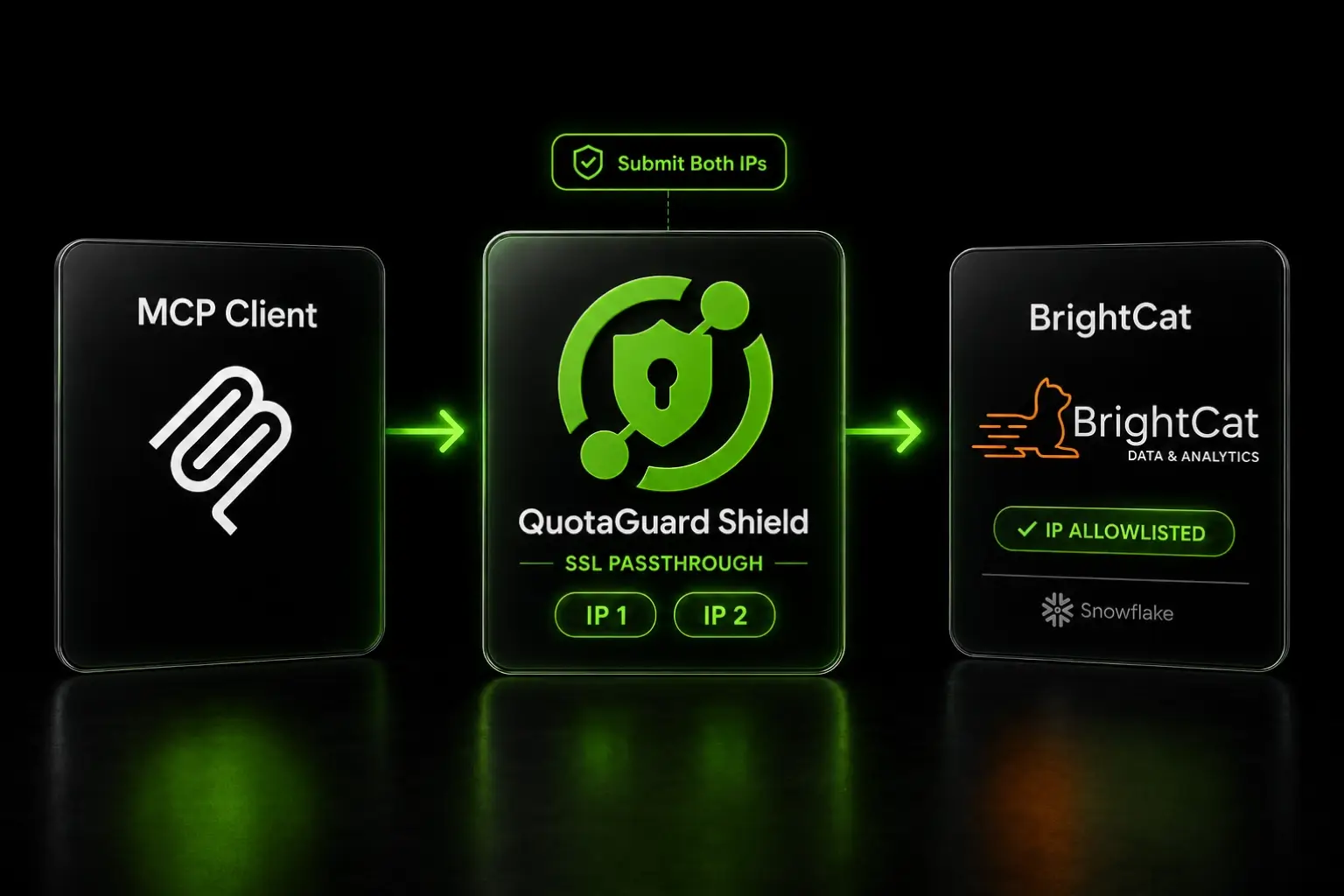
BrightCat's access onboarding flow requires you to provide outbound IP ranges in the initial request. The IP allowlist sits in front of OAuth as a network-layer gate, so it has to be in place before BrightCat will provision your Snowflake share. The procurement side of BrightCat onboarding takes time. The QuotaGuard side takes 2 minutes.

BrightCat Requires an Outbound IP Allowlist Before Provisioning OAuth

BrightCat scopes your access request to a specific Snowflake account, an MCP endpoint, and a network allowlist. The IPs you submit are checked at the network layer before any OAuth credential exchange happens. There's no way around this. If your MCP client is on a cloud platform handing out rotating egress IPs, you cannot satisfy BrightCat's allowlist without a proxy.

Real estate transaction data is the kind of workload Shield exists for. Property records, OAuth credentials, and MDLA-licensed data flow between your MCP client and BrightCat. QuotaGuard Shield uses SSL passthrough so the TLS connection runs end-to-end. QuotaGuard routes the packets and never decrypts them.

QuotaGuard Shield Gives Your MCP Client a Fixed IP for the BrightCat Allowlist

Setup is one environment variable plus a curl test to capture the IPs:

QUOTAGUARDSHIELD_URL=https://username:password@us-east-shield-01.quotaguard.com:9294

Replace us-east with the region closest to BrightCat's Snowflake region, or your own infrastructure region if BrightCat handles the cross-region replication on their side. The full region list is in the QuotaGuard docs.

QuotaGuard issues two static IPs per account. Both are active and load-balanced. Capture both by running the curl test twice (the load balancer alternates):

curl -x $QUOTAGUARDSHIELD_URL https://api.ipify.org

QuotaGuard tip: BrightCat's onboarding page describes "outbound IP ranges" (plural), so they accept multiple addresses. Submit both QuotaGuard IPs in CIDR /32 format (e.g., 203.0.113.1/32, 203.0.113.2/32), but confirm the exact format with BrightCat in your access request. The public page doesn't specify CIDR vs single addresses. Both IPs are active at any moment, so allowlisting both is required for the connection to work reliably. Allowlisting only one means roughly half your requests get blocked when the load balancer routes through the second IP. More on how the two-IP load balancing works.

Configure the MCP Python SDK to Route Through the Proxy

The MCP Python SDK uses httpx internally for HTTP and SSE transport. httpx respects the HTTPS_PROXY environment variable automatically. Setting it once routes every MCP connection through QuotaGuard with no SDK-level configuration:

import asyncio
import os
from mcp import ClientSession
from mcp.client.sse import sse_client

# The MCP Python SDK uses httpx, which respects HTTPS_PROXY automatically.
os.environ["HTTPS_PROXY"] = os.environ["QUOTAGUARDSHIELD_URL"]

async def main():
    brightcat_mcp_url = os.environ["BRIGHTCAT_MCP_URL"]
    async with sse_client(brightcat_mcp_url) as (read, write):
        async with ClientSession(read, write) as session:
            await session.initialize()
            # MCP traffic now exits from QuotaGuard's static IPs.
            # Run your queries against the BrightCat schema here.

asyncio.run(main())

LangChain's langchain-mcp-adapters and LlamaIndex's MCP integration both wrap the underlying MCP Python SDK. They inherit proxy support from the SDK, so the same HTTPS_PROXY environment variable covers them too. No additional configuration in either framework.

Test the IPs Through the Proxy Before You Submit Your BrightCat Access Request

Run the IP capture against your real environment, not a local machine. The IPs that matter are the ones BrightCat sees, which depend on whether your MCP client is on AWS Lambda, Render, Railway, Heroku, your own VPS, or wherever else the workload runs.

Deploy a test that prints the IP it exits from:

import os
import requests

proxies = {
    "http": os.environ["QUOTAGUARDSHIELD_URL"],
    "https": os.environ["QUOTAGUARDSHIELD_URL"],
}
print(requests.get("https://api.ipify.org", proxies=proxies).text)

Run it three or four times. You should see two IPs alternating. Those are the two addresses you submit to BrightCat in your access request. Anything else, and you've got the proxy config wrong.

TypeScript SDK Works With Node.js v22.21.0 and an Explicit Flag

The TypeScript MCP SDK supports proxy configuration but with two specific constraints worth flagging up front.

First, you need Node.js v22.21.0 or later. Earlier Node versions have inconsistent fetch proxy support. Second, you have to explicitly enable proxy support via an environment flag:

node --version  # must be v22.21.0 or later

export NODE_USE_ENV_PROXY=1
export HTTPS_PROXY=$QUOTAGUARDSHIELD_URL

With both in place, the TypeScript SDK's fetch calls and EventSource connections respect the proxy.

One known issue worth verifying against your environment: TypeScript SDK issue #484 documents a failure mode where HTTPS connections through HTTP-only proxies don't tunnel correctly. QuotaGuard Shield uses HTTPS, so this issue doesn't affect a standard QuotaGuard Shield setup. If you're on a corporate HTTP-only proxy that you're chaining through QuotaGuard, hit the GitHub thread before you commit to the TypeScript SDK.

To avoid the issue surfacing through misconfiguration, set HTTPS_PROXY (not HTTP_PROXY) when using QuotaGuard Shield. The proxy URL itself uses the https:// scheme on port 9294, so the HTTPS_PROXY variable is the correct match.

Claude Desktop Routes MCP Through System Proxies With One Bug

Claude Desktop respects standard system proxy environment variables for MCP server connections. Setting HTTPS_PROXY in your shell environment before launching Claude Desktop routes its MCP traffic through QuotaGuard.

The bug to know about: the NO_PROXY exclusion list does not apply to MCP server connections, which is a known issue documented in GitHub Issue #8179. If you have multiple MCP servers configured and only want BrightCat traffic going through the proxy, you cannot use NO_PROXY to exclude the others. Every MCP connection from Claude Desktop will route through whatever proxy is set in the environment.

Two practical paths:

  • If BrightCat is your only remote MCP server, this isn't an issue. Set HTTPS_PROXY and ship.
  • If you have several MCP servers and only want BrightCat through the proxy, run a wrapper that scopes the proxy env to BrightCat's process only, or set up the proxy at a per-application level outside Claude Desktop.

Claude in Chrome Inherits Chrome's Proxy Settings

Claude in Chrome runs inside the browser's network stack. There's no extension-level proxy config. Whatever proxy Chrome is configured to use applies to all traffic from the browser, including Claude's MCP connections.

Configure Chrome's proxy through the operating system's network settings or via a PAC file. Once Chrome routes through QuotaGuard, Claude in Chrome's MCP traffic to BrightCat is on the right IPs.

This works but is a blunt tool. Every Chrome request goes through the proxy, not just MCP. For most BrightCat use cases that's fine. If it's not, run BrightCat's MCP integration through the Python SDK instead, where the proxy can be scoped tightly.

QuotaGuard Shield Pricing Starts at $29/Month

QuotaGuard Shield direct plans:

  • Starter: $29/month, 10 GB bandwidth
  • Production: $59/month, 50 GB bandwidth
  • Business: $109/month, 200 GB bandwidth
  • Enterprise: $269/month, 1 TB bandwidth, dedicated IPs

For most BrightCat integrations, Shield Production handles the volume comfortably. Shield Enterprise gives you dedicated IPs if your data governance policy requires that no other customer's traffic ever shares your egress addresses. For typical AI-driven property data queries, Shield Production is the right starting point.

All plans include a 3-day trial. Enterprise trials run 7 days. Credit card required.

See the full breakdown at quotaguard.com/products/pricing.

Get Your IPs Ready Before You Submit the BrightCat Access Request

BrightCat's procurement timeline is bounded by the MDLA review and the share provisioning. Your QuotaGuard piece doesn't have to wait for any of that. Provision QuotaGuard Shield, run the curl test against your real deployment environment, capture the two IPs, and submit them as part of your BrightCat access request on day one.

By the time BrightCat finishes their review and provisions your share, your MCP client is already configured to route through the right IPs. The first OAuth handshake works. No retry on a "wrong IP submitted" mistake, which would otherwise add days to your timeline waiting for BrightCat to update the allowlist on their side.

QuotaGuard Static IP Blog

Practical notes on routing cloud and AI traffic through Static IPs.

Reliability Engineered for the Modern Cloud

For over a decade, QuotaGuard has provided reliable, high-performance static IP and proxy solutions for cloud environments like Heroku, Kubernetes, and AWS.

Get the fixed identity and security your application needs today.