Give Your Heroku App a Static IP for Bunq API Whitelisting

QuotaGuard Engineering
May 22, 2026
5 min read
Pattern

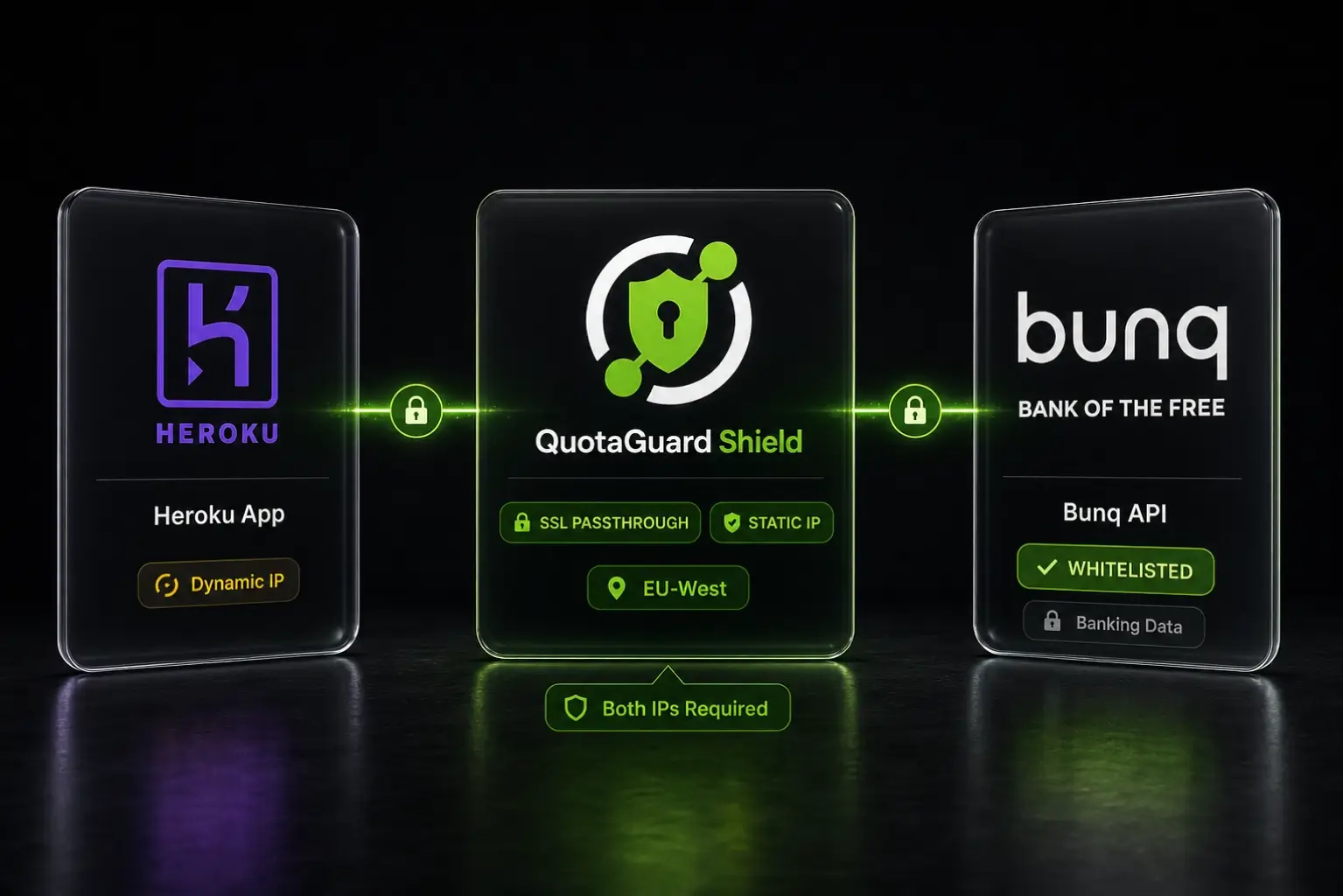
QuotaGuard Shield gives your Heroku app a static outbound IP that Bunq will accept on its API whitelist. Setup takes 2 minutes.

Bunq requires you to declare a list of trusted IP addresses before it'll accept API calls from your application. That requirement is sensible for a bank. The problem is Heroku doesn't give your dynos a fixed outbound IP. Every restart, every scale event, every deploy can hand you a different address. Bunq's whitelist becomes a moving target you can never pin down.

A Static Outbound IP Is the Only Reliable Fix for Bunq Whitelisting

When you create a Bunq API key, Bunq ties it to a set of permitted IP addresses. Any request arriving from an IP outside that set gets rejected immediately. This isn't a bug or an edge case. It's a deliberate security control designed for server-side integrations running on predictable infrastructure.

Heroku's routing layer pulls from a shared pool of AWS IP ranges. Your dyno's outbound address isn't guaranteed between restarts. Bunq's API will reject requests as soon as your IP rotates out of the whitelisted set. The only reliable fix is to route all your Bunq API calls through a fixed egress point.

QuotaGuard Shield Is the Right Product for Bunq Integrations

Bunq handles financial data. Payment records, account balances, transaction history. That puts it squarely in the category where SSL passthrough matters.

QuotaGuard Static is the standard proxy. It terminates and re-establishes the TLS connection at the proxy layer. For most use cases that's fine. For a banking API, you want better than fine.

QuotaGuard Shield uses SSL passthrough. The TLS connection runs end-to-end between your Heroku app and Bunq's API servers. QuotaGuard routes the packets but never decrypts them. QuotaGuard never sees your financial data. That's the right architecture for PCI-DSS compliance and for any integration touching real money.

Shield gives you two static egress IPs per account, active behind a load balancer. Same IPs, every request, regardless of how many times your Heroku dynos restart. You add both IPs to Bunq's whitelist once and leave them there.

Bunq IP Whitelisting Works in 2 Minutes With This Setup

Here's the complete setup from zero to working requests.

Step 1: Add QuotaGuard Shield to your Heroku app

Provision Shield from the Heroku marketplace listing and pick the tier that fits your bandwidth needs. Provisioning sets QUOTAGUARDSHIELD_URL in your app's environment automatically. You can verify it's there:

heroku config:get QUOTAGUARDSHIELD_URL --app your-app-name

The value looks like this:

https://username:password@us-east-shield-01.quotaguard.com:9294

The region in that hostname reflects the region you selected at sign-up. Pick the region closest to Bunq's API servers (EU-West for most Bunq integrations). Changing regions after sign-up requires contacting support at https://www.quotaguard.com/contact.

Step 2: Find your static IPs

Log in to the QuotaGuard dashboard via Heroku:

heroku addons:open quotaguardshield --app your-app-name

Your two static outbound IPs are displayed on the dashboard. Copy both.

Step 3: Whitelist both IPs in Bunq

In the Bunq developer portal, navigate to your API key settings and add both static IPs to your permitted IP list. Save. That's the only change you'll ever need to make on Bunq's side.

Step 4: Route your Bunq API calls through Shield

QuotaGuard tip: route only your Bunq API calls through the proxy. Not all traffic. It keeps latency down and makes debugging straightforward.

Here's how to do that in Python using the requests library:

import os
import requests

proxy_url = os.environ.get("QUOTAGUARDSHIELD_URL")

proxies = {
    "https": proxy_url
}

response = requests.get(
    "https://api.bunq.com/v1/user",
    headers={"X-Bunq-Client-Authentication": "your-api-key"},
    proxies=proxies
)

print(response.json())

And in Node.js using axios with https-proxy-agent:

const axios = require("axios");
const { HttpsProxyAgent } = require("https-proxy-agent");

const proxyUrl = process.env.QUOTAGUARDSHIELD_URL;
const agent = new HttpsProxyAgent(proxyUrl);

const response = await axios.get("https://api.bunq.com/v1/user", {
  headers: { "X-Bunq-Client-Authentication": "your-api-key" },
  httpsAgent: agent
});

console.log(response.data);

Both examples read QUOTAGUARDSHIELD_URL from the environment. No credentials hardcoded. No changes needed when you rotate the proxy password.

QuotaGuard Shield Pricing Starts at $29/Month Direct

QuotaGuard Shield is available on the Heroku marketplace and through direct signup at quotaguard.com. Bunq API calls are small JSON payloads, so most integrations sit comfortably in the lower bandwidth tiers.

Direct plans:

PlanPrice/monthBandwidth included
Starter$2910 GB
Production$5950 GB
Business$109200 GB
Enterprise$2691 TB

Dedicated IPs are available on Enterprise ($269/month direct). On lower tiers, your two assigned IPs are still static and dedicated to your account. Bandwidth is bundled with no per-GB overage fees. Trials are 3 days standard, 7 days for Enterprise. Credit card required.

Heroku marketplace pricing differs from direct pricing. See the Heroku marketplace listing for current Heroku tier pricing, or quotaguard.com/products/pricing for direct plans.

What This Setup Doesn't Cover

A few edge cases worth knowing before you ship.

Bunq sandbox vs. production. The Bunq sandbox API doesn't enforce IP whitelisting the same way production does. Your proxy setup will work in both environments, but you won't see whitelist rejections in sandbox testing. Test your proxy routing explicitly before going to production.

Multiple Heroku apps. Each app needs its own Shield add-on instance. You can't share a single proxy instance across multiple Heroku apps. Each instance gets its own pair of static IPs, so you'd add all of them to Bunq's whitelist.

A Fixed IP Makes Bunq Integrations Reliable

Bunq's IP whitelisting isn't going away. It's the right security model for a banking API. The fix is straightforward: give your Heroku app static egress IPs, whitelist them in Bunq once, and ship.

QuotaGuard Shield gives you those static IPs with SSL passthrough so no third party touches your financial data in transit. Setup takes 2 minutes.

See Shield pricing and start a trial.

QuotaGuard Static IP Blog

Practical notes on routing cloud and AI traffic through Static IPs.

Reliability Engineered for the Modern Cloud

For over a decade, QuotaGuard has provided reliable, high-performance static IP and proxy solutions for cloud environments like Heroku, Kubernetes, and AWS.

Get the fixed identity and security your application needs today.